
Introduction
The AC Infinity Controller 63 is a wireless remote control system designed to provide convenient speed adjustment for compatible AC Infinity EC motor fans. This system allows for remote operation, optimizing airflow and managing fan noise in various applications, including HVAC and growing environments. It replaces existing wired speed controllers to offer wireless functionality.
Product Features
- Wireless Control: Operates via a 433 MHz wireless signal, providing a maximum range of 130 feet for flexible placement.
- 10 Fan Speed Settings: Features 10 distinct speed levels, indicated by backlit white LEDs, allowing precise control over fan operation.
- Memory Function: Equipped with backup memory to retain the last selected speed setting even after power is disconnected and reconnected.
- Multi-Fan Compatibility: Capable of controlling multiple fans simultaneously by pairing additional receivers (sold separately) with a single remote.
- Adaptive Connectivity: Compatible with AC Infinity EC motor fans from the CLOUDLINE, AIRLIFT, CLOUDWAY, and CLOUDLIFT series that are UIS compatible.
- PWM Technology: Utilizes Pulse Width Modulation (PWM) for efficient and quiet fan speed adjustment.
- Magnetic Mounting: The remote features a built-in magnet for convenient storage on metallic surfaces.
Package Contents
- AC Infinity Controller 63 Wireless Remote
- Wireless Receiver (USB-C compatible)
- AAA Batteries (x2)
Setup Instructions
- Install Batteries: Open the battery compartment on the back of the wireless remote and insert two AAA batteries, ensuring correct polarity.
- Connect Receiver: Plug the wireless receiver into the USB-C port of your compatible AC Infinity fan. Ensure it is securely connected.
- Pair Remote and Receiver: Locate the three-pin switches on both the remote and the receiver. Slide the pins on both devices to match their numerical settings. This action pairs the remote with the receiver. For controlling multiple fans with one remote, set all corresponding receivers to the same pin combination.
- Power On: Ensure your AC Infinity fan is powered on. The remote is now ready for use.

Image: The wireless remote and receiver, showing battery installation and pairing pins. The remote has a power button and LED indicators. The receiver connects via USB-C.

Image: Diagram illustrating the adaptive connectivity of the Controller 63 receiver with various AC Infinity fan series: AIRLIFT, CLOUDLINE, and CLOUDWAY.
Operating Instructions
- Power On/Off and Speed Adjustment: Press the central fan icon button on the remote to cycle through the 10 available fan speed levels. Each press increases the speed by one level. The white LED indicators around the button will illuminate progressively to show the current speed setting. To turn the fan off, continue pressing the button until all LEDs are off.
- Memory Function: The controller will automatically remember the last selected speed setting. If power to the fan is interrupted and then restored, the fan will resume operation at the previously set speed.
- Controlling Multiple Fans: If you have multiple fans with their own receivers paired to the same remote, pressing the button will adjust the speed of all paired fans simultaneously.

Image: The wireless remote controlling an AC Infinity inline duct fan and a shutter exhaust fan, demonstrating remote fan access.

Image: A single remote controlling multiple AC Infinity fan receivers, illustrating the multi-unit operation capability.
Maintenance
- Cleaning: Wipe the remote and receiver with a soft, dry cloth. Avoid using abrasive cleaners or solvents.
- Battery Replacement: Replace the AAA batteries in the remote when the LED indicators become dim or the remote's range decreases. Ensure to use fresh, high-quality batteries for optimal performance.
- Storage: Store the remote and receiver in a dry environment away from extreme temperatures.
Troubleshooting
- Fan Not Responding:
- Check if the receiver is securely plugged into the fan's USB-C port.
- Verify that the batteries in the remote are fresh and correctly installed.
- Ensure the pairing pins on both the remote and receiver match exactly.
- Confirm the fan itself is powered on.
- Short Wireless Range:
- Replace the remote's batteries with new ones.
- Ensure there are no significant obstructions (e.g., thick walls, metal objects) between the remote and the receiver.
- Avoid operating near other devices that use similar radio frequencies, which may cause interference.
- Rapid Battery Drain:
- Ensure the remote is not constantly transmitting a signal (e.g., by being held down or in a position where buttons are pressed).
- Use high-quality, reputable brand AAA batteries.
- If the issue persists, contact AC Infinity support.
- Incompatible Fan: The Controller 63 is designed for AC Infinity EC motor fans that are UIS compatible. It may not work with other fan types or brands.
Specifications
| Model | CTR63A |
| Wireless Signal | 433 MHz |
| Wireless Range | Up to 130 ft (40 m) |
| Speed Levels | 10 + Power Switch |
| Channels | 8 Combinations |
| Remote Input Power | 3V (2x AAA Batteries) |
| Remote Power Consumption | 0.3 mW |
| Display Type | LED |
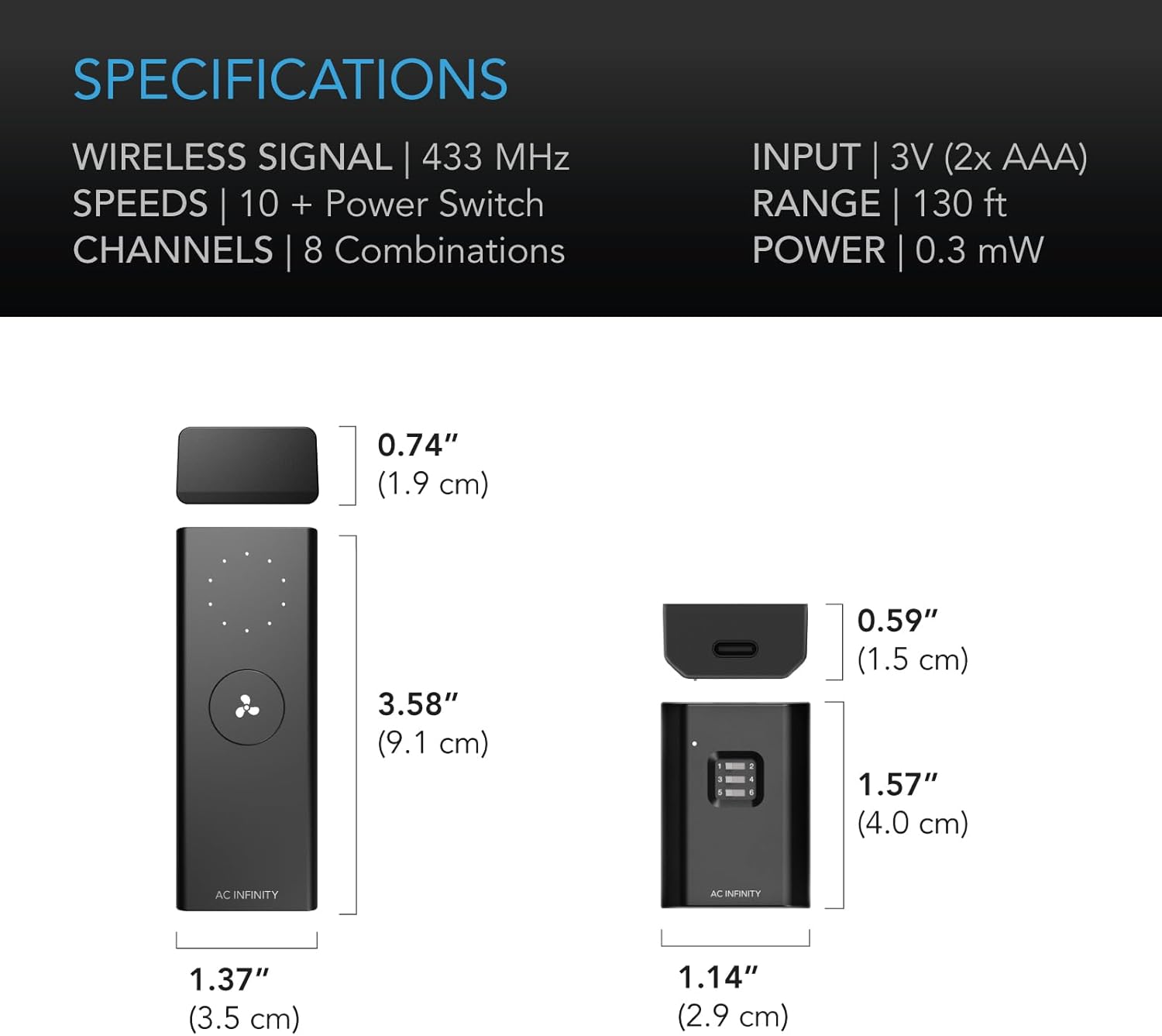
Image: Detailed dimensions of the wireless remote (3.58" L x 1.37" W x 0.74" H) and receiver (1.57" L x 1.14" W x 0.59" H), along with key specifications.
Warranty and Support
AC Infinity products are designed with quality and customer satisfaction in mind. For specific warranty information regarding your Controller 63, please refer to the warranty card included with your product or visit the official AC Infinity website. For technical support, troubleshooting assistance, or any product-related inquiries, please contact AC Infinity customer service through their official channels.
AC Infinity Official Website: www.acinfinity.com