
BAOFENG BF-88A-6 way charger
BAOFENG BF-88A Walkie Talkies & 6-Way Charger User Manual
Model: BF-88A-6 way charger | Brand: BAOFENG
Product Overview
The BAOFENG BF-88A is a license-free FRS radio system designed for reliable short-range communication. This package includes six BF-88A walkie talkies and a convenient 6-way multi-unit charger, allowing simultaneous charging of multiple radios or batteries. These radios feature 16 channels, 0.5W power output, and essential functions like internal VOX and auto squelch, making them suitable for various applications requiring clear and consistent two-way communication.
Key Features
- FCC ID: 2AJGM-BF-88A; Legal and License-free FRS radio.
- New Six-Way Charger Multi Unit Charger Station, allows charging whole radios or only batteries at the same time, with a power button on the side.
- 0.5W power output; 16 Channels; 38 CTCSS 83 DCS for enhanced privacy.
- Internal VOX (Voice Operated Exchange) for hands-free operation.
- LED Indicator Light for status updates.
- Fixed and updated antenna for improved signal.
- Auto Squelch function to suppress weak signals and noise.
- Updated Battery, more durable and steady.
- Auto Battery Saving and Low Battery Checking features.
- Easy to program via PC (software available on BAOFENG official website, model: BF-88A/88E) and supports CHIRP quick programming (model: Baofeng, BF-888).
What's in the Box
- 6 x BF-88A FRS Radios
- 1 x Six-way Multi Unit Charger
- 1 x Removable Adapter
- 1 x Cable
- 6 x Rechargeable 1500mAh Li-ion battery
- 6 x Hand Strap
- 6 x Belt Clip
- 6 x Earpiece
- 1 x English User Manual (this document)
Product Components and Controls
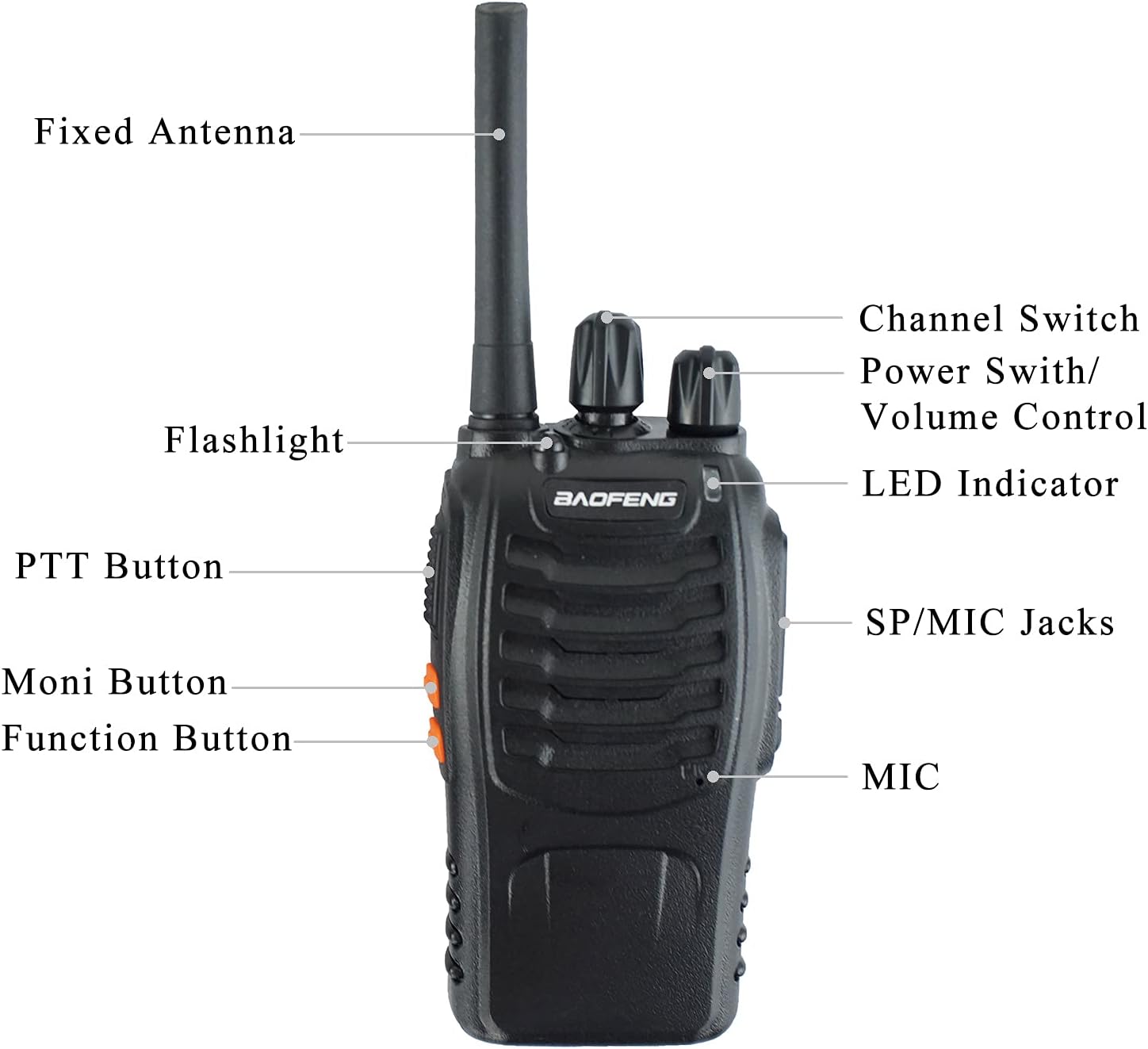


Setup
- Unpack Components: Carefully remove all items from the packaging. Verify that all components listed in the "What's in the Box" section are present.
- Install Battery:
- Align the battery pack with the grooves on the back of the radio.
- Slide the battery pack upwards until it clicks securely into place.
- To remove, press the battery release latch (if present) and slide the battery downwards.
- Connect Charger:
- Connect the removable adapter to the 6-way multi-unit charger.
- Plug the adapter into a standard electrical outlet.
- Ensure the power button on the side of the charger is in the 'ON' position.
- Charge Radios/Batteries:
- Place the radios (with batteries installed) or individual battery packs into the charging slots.
- The LED indicator on each slot will show charging status (typically red for charging, green for fully charged).
- Allow sufficient time for a full charge before first use (approximately 3-4 hours for a depleted battery).
- Attach Accessories:
- Attach the hand strap to the designated loop on the radio.
- Clip the belt clip onto the back of the radio if desired.
- Insert the earpiece into the SP/MIC jacks for private listening and hands-free communication.
Operating Instructions
- Power On/Off and Volume Control:
- Rotate the Power Switch/Volume Control knob clockwise to turn the radio ON. You will hear a "click" and a voice prompt.
- Continue rotating clockwise to increase the volume. Rotate counter-clockwise to decrease volume and turn the radio OFF.
- Channel Selection:
- Rotate the Channel Switch knob to select one of the 16 available channels.
- Ensure all radios intended for communication are set to the same channel.
- Transmitting (PTT):
- To transmit, press and hold the PTT (Push-To-Talk) button on the side of the radio.
- Speak clearly into the microphone (MIC) located on the radio.
- Release the PTT button to stop transmitting and return to receive mode.
- Receiving:
- When not transmitting, the radio is in receive mode.
- The LED indicator will typically glow green when a signal is being received.
- Monitor Function:
- Press and hold the Moni Button to temporarily disable the squelch and listen for weak signals or background noise on the current channel. Release to re-enable squelch.
- Flashlight:
- Press the Function Button (often located below the Moni button) to activate the built-in flashlight. Press again to turn it off.
- VOX (Voice Operated Exchange):
- The BF-88A features internal VOX. This allows for hands-free transmission when a voice is detected.
- VOX sensitivity can typically be adjusted via programming software. Refer to the programming section for details.
- Low Battery Alert:
- The radio will provide an audible alert or visual indication (e.g., flashing LED) when the battery level is low. Recharge the battery promptly.
Programming
The BF-88A radios can be programmed via a computer to customize channel frequencies, CTCSS/DCS tones, VOX sensitivity, and other advanced settings. This requires a programming cable (not included) and specific software.
- Official Software: For official BAOFENG software, please visit the official BAOFENG website. Look for software compatible with model BF-88A/88E.
- CHIRP Programming: The radios also support quick programming using CHIRP software. Select "Baofeng" and "BF-888" as the model within CHIRP for compatibility.
- Note: Ensure you comply with all local and national regulations (e.g., FCC rules in the US) when programming and operating FRS radios.
Maintenance
- Cleaning:
- Wipe the radio and charger surfaces with a soft, damp cloth. Do not use harsh chemicals or abrasive cleaners.
- Ensure the charging contacts on both the radio and charger are clean and free of debris.
- Battery Care:
- To maximize battery life, avoid overcharging or completely discharging the Li-ion batteries.
- Store batteries in a cool, dry place when not in use.
- If storing for extended periods, charge batteries to approximately 50% capacity.
- Storage:
- When not in use for a long period, remove batteries from the radios.
- Store the radios and charger in a dry, dust-free environment.
Troubleshooting
| Problem | Possible Cause | Solution |
|---|---|---|
| Radio does not power on. | Battery is depleted or not properly installed. | Ensure battery is fully charged and securely attached. |
| Cannot transmit or receive. | Incorrect channel selected; radios out of range; battery low. | Verify all radios are on the same channel. Move closer to other radios. Recharge battery. |
| Poor audio quality or static. | Weak signal; interference; volume too low/high. | Adjust volume. Move to an open area. Check for sources of interference. |
| Charger LED not indicating charging. | Charger not powered; radio/battery not seated correctly. | Ensure charger is plugged in and power switch is ON. Re-seat radio/battery firmly in the slot. |
| Radio turns off/on randomly. | Loose battery connection. | Ensure the battery is firmly seated and locked into place. If issue persists, inspect battery contacts for damage. |
Specifications
| Feature | Detail |
|---|---|
| Model Number | BF-88A-6 way charger |
| FCC ID | 2AJGM-BF-88A |
| Power Output | 0.5W |
| Number of Channels | 16 |
| CTCSS/DCS Tones | 38 CTCSS, 83 DCS |
| Frequency Range | 462.55-462.725 MHz, 467.5625-467.7125 MHz |
| Battery Type | 1500mAh Li-ion (included) |
| Voltage | 3.7 Volts |
| Talking Range Maximum | 3 Kilometers (approximate, depends on terrain) |
| Product Dimensions (Radio) | Approx. 4.9" (H) x 2.7" (W) x 1.4" (D) (excluding antenna) |
| Product Dimensions (Charger) | 9.4 x 7.1 x 2.4 inches |
| Item Weight | 4.71 pounds (total package) |
| Water Resistance Level | Waterproof (as per product specifications, typically splash resistant for FRS radios) |
| Country of Origin | China |
Warranty and Support
Warranty: The product specifications indicate "NO" warranty. Please refer to your point of purchase or retailer for any return or exchange policies.
Support: For technical support, software downloads, and additional information, please visit the official BAOFENG website. Ensure you select the correct model (BF-88A/88E) for software and resources.
For general inquiries or assistance, you may also contact the seller, ALPHA RADIO, through the Amazon platform.
Ask a question about this manual
Ask about setup, troubleshooting, compatibility, parts, safety, or missing instructions. Manuals+ will review the question and use this page’s manual context to help answer it.