Introduction
This manual provides essential information for setting up, operating, maintaining, and troubleshooting your ASUS ZenBook 14 UX425EA-EH51 laptop. Please read this guide thoroughly to ensure proper use and to maximize the lifespan of your device.

Setup
Package Contents
Verify that all items are present in your product package:
- ASUS ZenBook 14 UX425EA-EH51 Laptop
- Sleeve
- USB-A to RJ45 Gigabit Ethernet Adapter
- USB-C to Audio Jack Adapter
- Power Adapter & Cord
- User Guide (this document)
- Warranty Card
Initial Power On
- Connect the Power Adapter: Plug the power adapter into the laptop's USB-C port and then into a power outlet. Ensure the power indicator light illuminates.
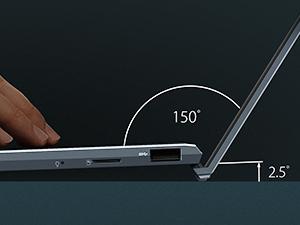
- Open the Laptop: Carefully lift the display lid. The ErgoLift hinge will slightly tilt the keyboard for a more comfortable typing angle and improved cooling.
- Power On: Press the power button, typically located on the keyboard.
- Follow On-Screen Instructions: The laptop will guide you through the initial Windows 10 setup process, including language selection, network connection, and user account creation.
Operating Your Laptop
External Components and Ports
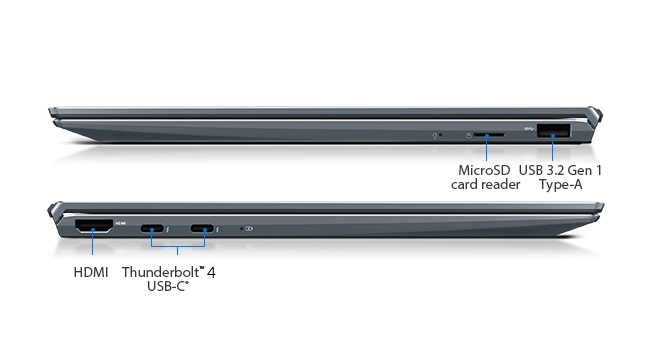
Your ZenBook 14 is equipped with various ports for connectivity:
- Left Side: HDMI, two Thunderbolt 4 USB-C ports.
- Right Side: USB 3.2 Gen 1 Type-A port, MicroSD card reader, audio jack (via adapter).
Keyboard and Touchpad
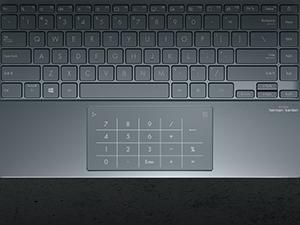
The laptop features a full-size backlit keyboard and a large touchpad. The touchpad integrates the ASUS NumberPad 2.0, which can be activated for numeric input.
- Backlit Keyboard: Adjust brightness using function keys (Fn + F3/F4).
- NumberPad 2.0: To activate the NumberPad, press and hold the NumberPad icon on the top-right corner of the touchpad. This transforms the touchpad into an LED-illuminated numeric keypad.
Display Features
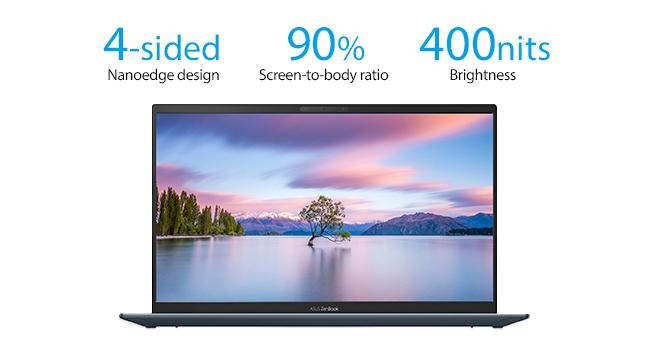
The 14-inch Full HD NanoEdge display offers a wide viewing experience with minimal bezels and anti-glare properties.
- NanoEdge Design: Provides an immersive visual experience with a high screen-to-body ratio.
- Anti-Glare: Reduces reflections for comfortable viewing in various lighting conditions.
Security and Audio
- Windows Hello: Utilize the built-in IR camera for facial recognition login, providing secure and convenient access.
- AI Noise-Cancellation: Enhances audio clarity during video calls and online meetings by filtering out background noise.
Maintenance
Battery Care
To prolong the battery life of your ASUS ZenBook 14:
- Avoid extreme temperatures.
- Do not fully discharge the battery frequently.
- If storing the laptop for an extended period, ensure the battery is charged to approximately 50-60%.
Cleaning Instructions
- Use a soft, lint-free cloth for cleaning the screen and chassis.
- For stubborn marks, dampen the cloth slightly with water or a screen-safe cleaning solution.
- Avoid harsh chemicals, abrasives, or solvents.
Troubleshooting
Common Issues and Solutions
- Laptop does not power on: Ensure the power adapter is securely connected and the power outlet is functional. Try a different outlet.
- Display issues: If the screen is blank, try connecting an external monitor to check if the issue is with the laptop's display. Adjust display brightness using function keys.
- Slow performance: Close unnecessary applications, check for background updates, or restart the laptop. Ensure sufficient free storage space.
- Connectivity problems (Wi-Fi/Bluetooth): Check if Wi-Fi or Bluetooth is enabled in Windows settings. Restart your router or the laptop.
- Keyboard or touchpad unresponsive: Restart the laptop. Ensure no foreign objects are obstructing the touchpad.
Specifications
| Feature | Detail |
|---|---|
| Model Number | UX425EA-EH51 |
| Display | 14-inch Full HD (1920x1080) Anti-Glare IPS NanoEdge Display, 400 nits |
| Processor | Intel Core i5-1135G7 (2.4 GHz, up to 4.2 GHz, 4 cores) |
| RAM | 8GB LPDDR4X |
| Storage | 512GB PCIe NVMe SSD |
| Graphics | Intel Iris Xe Graphics |
| Operating System | Windows 10 Home (Free upgrade to Windows 11 when available) |
| Wireless Connectivity | 802.11ax Wi-Fi, Bluetooth |
| Ports | 2x Thunderbolt 4 USB-C, 1x USB 3.2 Gen 1 Type-A, 1x HDMI, MicroSD card reader |
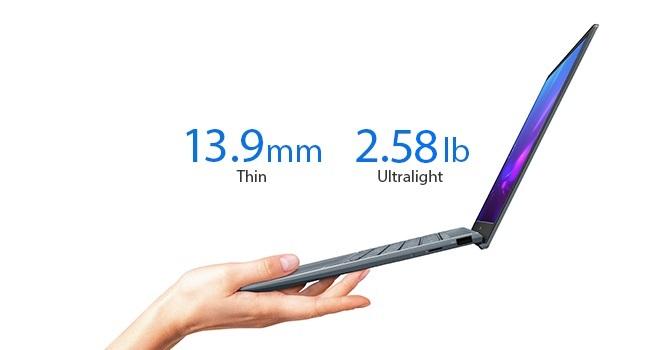
| Weight | 2.58 pounds (approx. 1.17 kg) |
| Dimensions (LxWxH) | 12.56 x 8.19 x 0.55 inches (approx. 31.9 x 20.8 x 1.4 cm) |
| Color | Pine Grey |
| Battery | 1 Lithium Ion battery (included) |
Warranty and Support
Warranty Information
Your ASUS ZenBook 14 UX425EA-EH51 comes with a limited warranty. Please refer to the included Warranty Card in your package for detailed terms, conditions, and coverage period. Keep your proof of purchase for warranty claims.
Customer Support
For technical assistance, driver downloads, or further product information, please visit the official ASUS support website. You can typically find support resources by searching for your specific model number (UX425EA-EH51) on the ASUS website.
Legal Disclaimer: The Windows 11 upgrade will be delivered to qualifying devices late 2021 into 2022. Timing varies by device. Certain features require additional hardware (see aka.ms/windows11-spec).


