
1. Introduction and Overview
The GIANDEL 2000W Modified Sine Wave Power Inverter is a robust device designed to convert 12V DC battery power into 110V/120V AC household electricity. This inverter is ideal for powering various AC appliances and large electrical devices during trips, camping, or at work sites. It provides 2000W of continuous power output and can handle surge capacities up to 4000W, making it suitable for a wide range of applications from lights and TVs to freezers and laptops. The unit features two standard AC outlets, a 2.4 Amps USB port, an LED display for monitoring, and both wired and wireless remote controllers for convenient operation.

Image: The GIANDEL 2000W Power Inverter, showcasing its main unit, wired remote, wireless remote, and battery cables.
2. Safety Information
Warning:
- Please do not reverse connect the battery cables. Reverse connection will burn the internal fuses and void the warranty.
- Do not leave the power inverter in the ON position while your vehicle's engine is off to prevent battery drain.
- Always disconnect the positive battery terminal before performing any wiring to the inverter.
- Do not expose the inverter to direct sunlight. Keep it in a cool and dry environment.
- Do not use the inverter with products that draw higher than 2000W, as this may cause damage to both the inverter and the connected device.
3. Product Features
- High Power Output: Provides 2000W continuous DC to AC power output, with a peak surge capacity of 4000W. Equipped with 2 AC outlets and one USB charging port (5V/2.4A max) to convert 12V DC battery power to standard 110V AC.
- Comprehensive Protection: Features built-in 8*30A fuses and smart digital display. Includes automatic shutdown protection against overvoltage (HI), low voltage (LO), overload (OL), short circuit (OL), and overheat (OH). An audible alarm will sound before shutdown.
- Wide Application: Connects to a 12V battery system to power devices for emergencies, hurricanes, storms, snowstorms, and power outages. Suitable for RVs, trucks, boats, and off-grid solar systems.
- Durable Construction: Features a full aluminum alloy shell, providing robust and fireproof all-round protection. Comes with all-insulated ring terminal cables for safer connections compared to standard alligator clip cables.
- Convenient Remote Control: Includes both a wired remote controller with a 15ft cable and a wireless remote for easy ON/OFF control from a distance. The wireless remote can control the inverter up to 30 meters without obstacles.
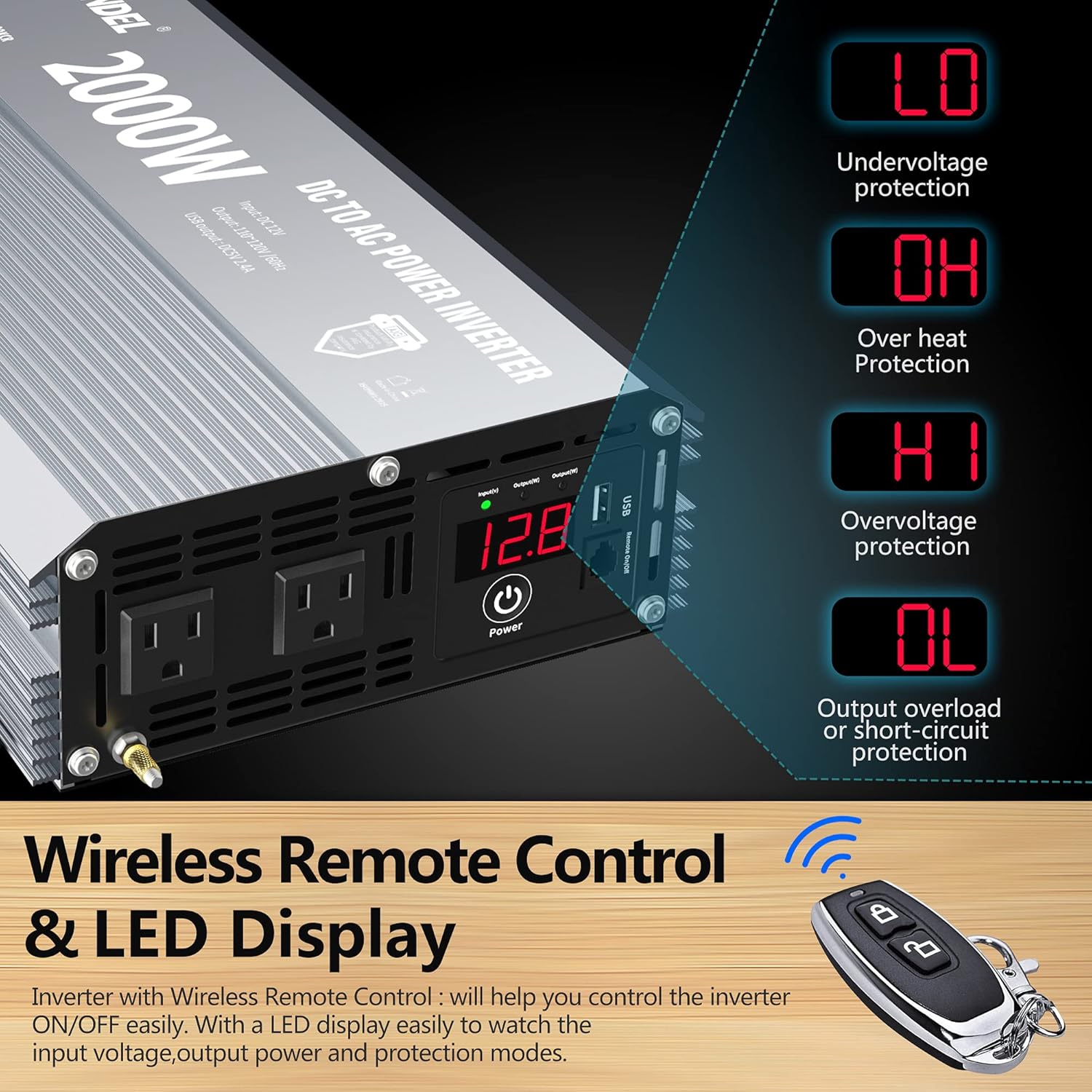
Image: Close-up of the inverter's LED display indicating various protection modes: LO (Undervoltage), OH (Overheat), HI (Overvoltage), and OL (Output Overload or Short-circuit).

Image: Examples of the inverter's use in an RV, on a boat, for powering a laptop outdoors, and for tools.

Image: Close-up of the wired remote control with its 15ft cable, allowing for convenient power management.
4. Setup Instructions
- Prepare the Battery: Ensure your 12V battery is fully charged and in good condition.
- Connect Battery Cables: Using the provided battery cables, connect the positive (+) terminal of the inverter to the positive (+) terminal of your 12V battery. Connect the negative (-) terminal of the inverter to the negative (-) terminal of your battery. Ensure connections are secure and tight.
- Connect Remote Controller: Plug the wired remote controller into the designated port on the inverter if desired. The wireless remote is pre-paired.
- Power On: Press the power button on the inverter or use the remote controller to turn the unit on. The LED display will illuminate.
- Connect AC Devices: Plug your AC devices into the 110V/120V AC outlets on the inverter. Ensure the total wattage of your devices does not exceed 2000W.
- Connect USB Devices: Use the 2.4A USB port to charge compatible USB devices.

Image: Rear view of the inverter showing the 12V DC input terminals and cooling fans, highlighting proper cable connection points.
5. Operating Instructions
- Powering On/Off: Use the main power button on the inverter or the provided wired/wireless remote controllers to turn the unit on or off. The LED display will show input voltage and output status.
- Monitoring: The LED display provides real-time information, including input voltage and any active protection warnings (LO, OH, HI, OL).
- Load Management: Always ensure the total power consumption of connected devices does not exceed the inverter's continuous rating of 2000W. Avoid exceeding the 4000W peak surge capacity for short durations.
- Ventilation: Ensure adequate ventilation around the inverter to prevent overheating. Do not block the cooling fans.
6. Maintenance
- Regular Cleaning: Keep the inverter clean and free from dust and debris. Use a dry cloth to wipe the exterior.
- Check Connections: Periodically inspect all cable connections to ensure they are tight and free from corrosion. Loose connections can lead to power loss or overheating.
- Storage: When not in use for extended periods, store the inverter in a cool, dry place away from direct sunlight and moisture.
7. Troubleshooting
The GIANDEL inverter is equipped with multiple protection features indicated by codes on the LED display. Refer to the table below for common issues and their solutions.
| Display Code | Description | Possible Cause | Solution |
|---|---|---|---|
| LO | Undervoltage Protection | Battery voltage is too low. | Recharge or replace the 12V battery. |
| OH | Overheat Protection | Inverter is too hot due to poor ventilation or excessive load. | Ensure proper ventilation, clear obstructions from fans, reduce load, or allow unit to cool down. |
| HI | Overvoltage Protection | Input voltage from battery is too high. | Check battery voltage; ensure it is within the 9.8-16VDC range. |
| OL | Output Overload or Short-circuit Protection | Connected devices draw too much power or there is a short circuit. | Reduce the total load, disconnect faulty devices, or check for short circuits in wiring. The internal 30A fuses may have blown and require replacement. |
If the issue persists after attempting these solutions, please contact GIANDEL customer service for further assistance.
8. Specifications
| Specification | Value |
|---|---|
| Power (AC Outlets) | 2000W Rated, 4000W Peak |
| Max Efficiency | 90% |
| USB Output | 1x DC 5V/2.4A (max) |
| Output Wave | Modified Sine Wave |
| Nominal Input Voltage | 9.8-16VDC |
| Nominal Output Voltage | 110-120VAC |
| Internal Fuses | 8x 30A |
| Battery Cables | One pair, 2 ft length |
| Remote Controllers | 1x Wired (15ft cable), 1x Wireless |
| Item Weight | 11.03 pounds |
| Product Dimensions | 15.9 x 9.37 x 3.7 inches |
| Model Number | PM-2000KCR |
9. Warranty and Support
GIANDEL provides an 18-Month Hassle-Free Warranty for this power inverter. This warranty covers defects in materials and workmanship under normal use.

Image: The GIANDEL 2000W Power Inverter, highlighting the 18-month warranty and AIG product liability insurance coverage.
For any technical assistance, troubleshooting, or warranty claims, GIANDEL offers 24-hour friendly customer service to ensure 100% customer satisfaction. Please refer to the contact information provided with your product packaging or visit the official GIANDEL website for support details.


