
ExpertPower EPSML2420
ExpertPower 20A MPPT Solar Charge Controller User Manual
Model: EPSML2420
1. Introduction
This manual provides detailed instructions for the installation, operation, and maintenance of your ExpertPower 20A MPPT Solar Charge Controller. This device is designed to efficiently manage power from your solar array to charge 12V or 24V battery systems, supporting various battery types including lead-acid (AGM, Gel, Flooded) and Lithium (LiFePO4).
Please read this manual thoroughly before installation and operation to ensure proper use and to prevent damage to the controller or your solar power system.
2. Safety Information
- Ensure all wiring is correctly connected and securely fastened to prevent loose connections that could cause sparks or overheating.
- Always disconnect the solar panel and battery power before installing or adjusting the controller.
- Install the controller in a well-ventilated area, away from flammable gases and liquids.
- Do not disassemble or attempt to repair the controller yourself. Contact qualified personnel for service.
- Wear appropriate personal protective equipment, including eye protection, when working with batteries and electrical systems.
- Ensure the battery voltage matches the system voltage (12V or 24V) selected by the controller.
3. Product Features
- MPPT Technology: Maximizes solar array power generation by over 20% compared to PWM controllers through advanced tracking.
- System Versatility: Automatic 12V/24V system detection. Compatible with various battery chemistries including Lithium (LiFePO4), AGM, Gel, and Flooded. Offers user-defined settings, RS232 communication, and optional Bluetooth app for system control.
- Battery Management System (BMS) Compatibility: Designed to operate with or without a battery's internal BMS. Includes built-in protection features such as over-voltage, over-charge, low-voltage, deep discharge, and over-temperature compensation.
- Durable Construction: Features an industrial-grade chassis with an IP32 rating for durability in various environmental conditions.

Image: The ExpertPower 20A MPPT Solar Charge Controller highlighting its protection features including short-circuit, overload, reverse current, and over-current protection. It also notes compatibility with AGM, Gel, Flooded, and LiFePO4 batteries, RS232 communication, and auto 12V/24V selection.
4. Product Components and Overview
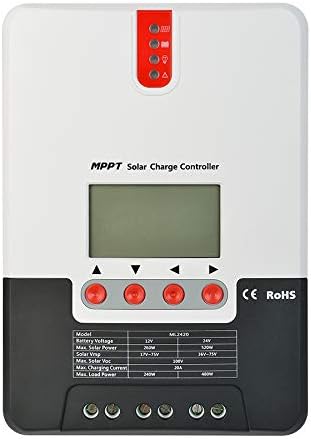
Image: Front view of the ExpertPower 20A MPPT Solar Charge Controller, showing the LCD display, control buttons, and LED indicators.

Image: Diagram illustrating the components of the solar charge controller, including the LCD display & buttons, LED indicators, load ports, Bluetooth port, battery ports, solar panel ports, and temperature port.
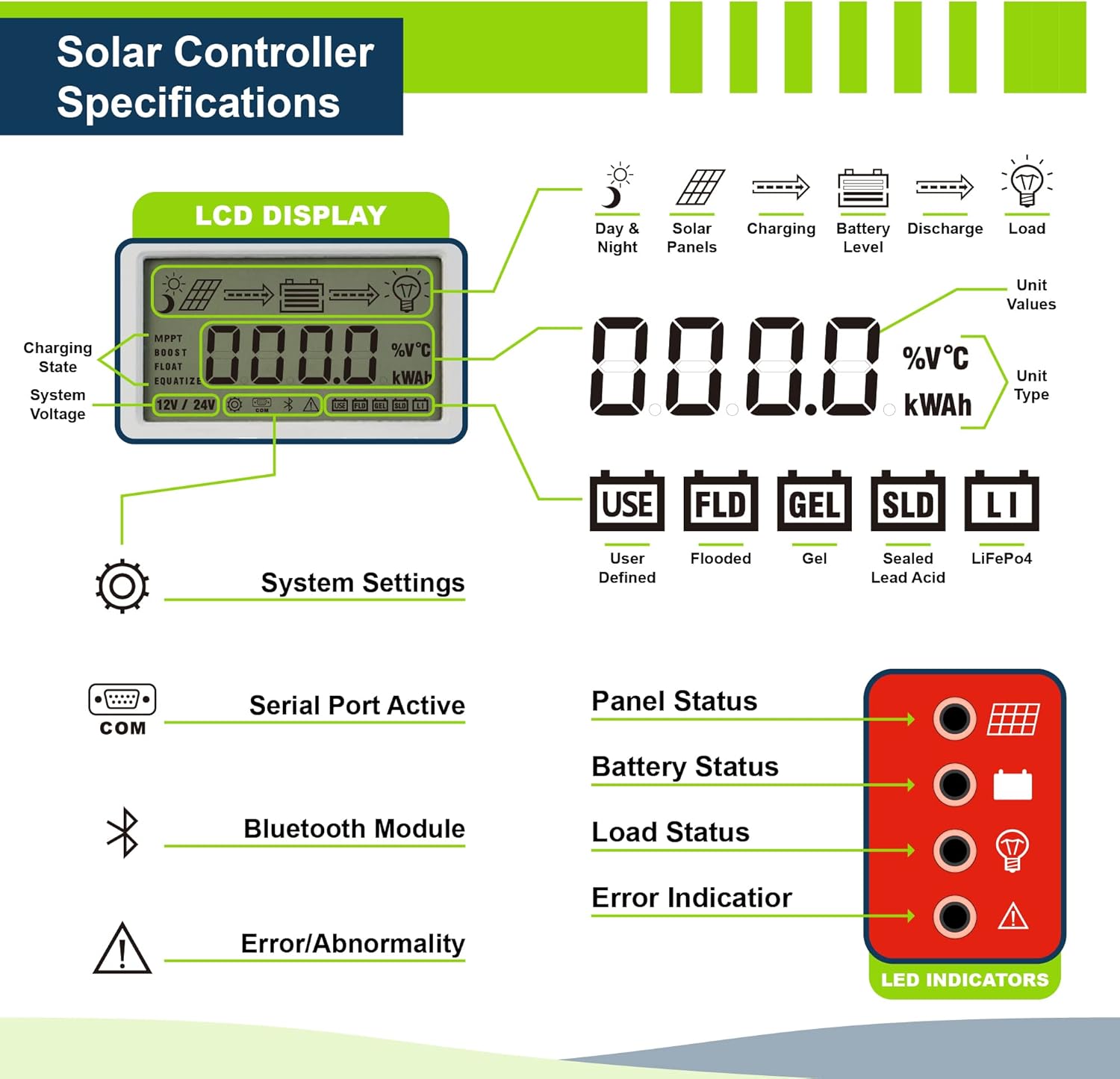
Image: Detailed view of the LCD display and LED indicators. The LCD shows charging state, system voltage, unit values, and unit type. The LED indicators show panel status, battery status, load status, and error indication.
5. Specifications
| Specification | Value |
|---|---|
| Product Dimensions | 8 x 5.6 x 2.5 inches |
| Item Weight | 2.4 pounds |
| Model Number | EPSML2420 |
| Brand | ExpertPower |
| Voltage | 12V / 24V Auto-Select |
| Max PV Input Voltage | 100V |
| Max Charging Current | 20A |
| UPC | 840140942286 |
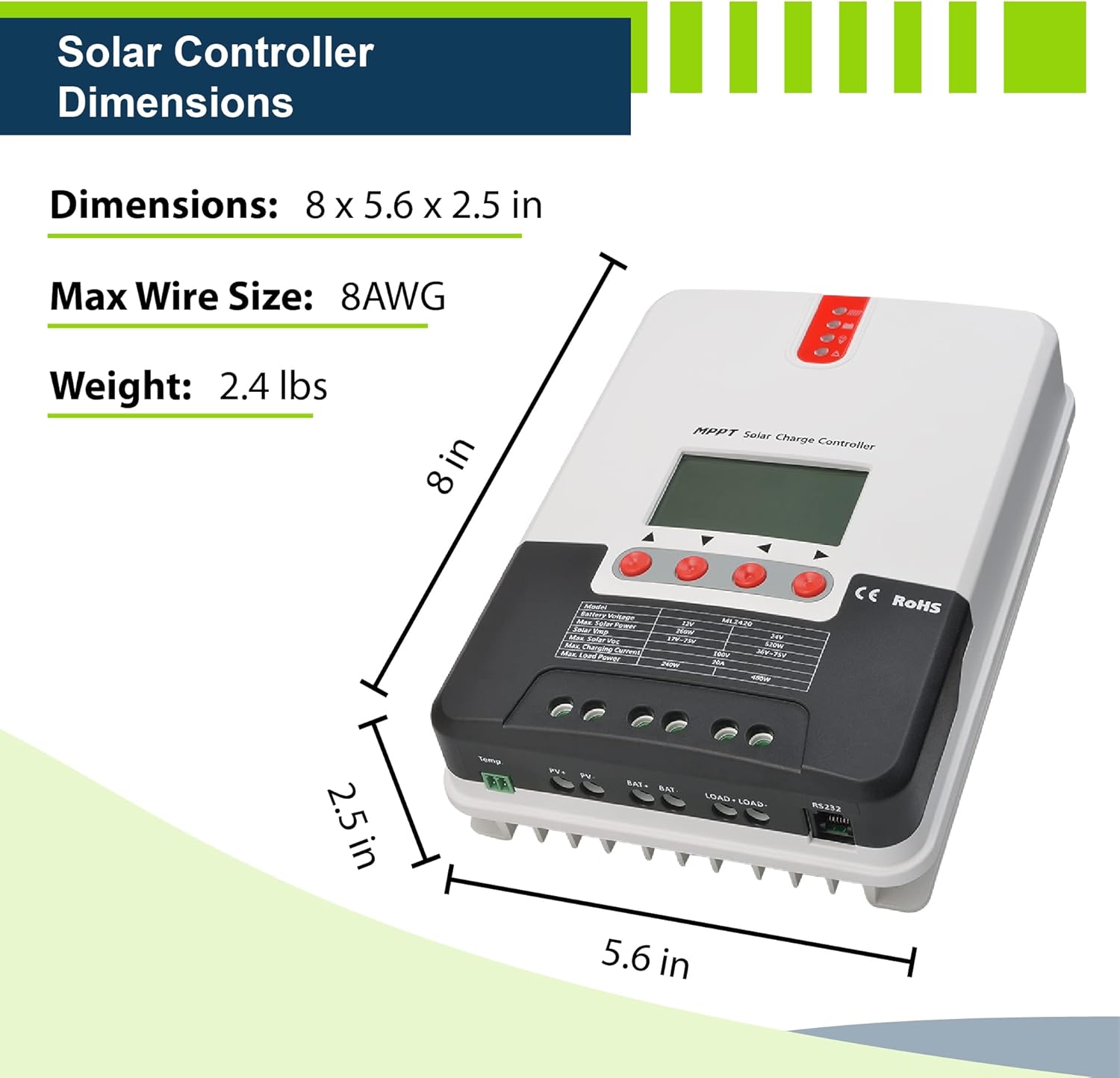
Image: Diagram showing the physical dimensions (8 x 5.6 x 2.5 inches) and weight (2.4 lbs) of the solar charge controller, along with the maximum recommended wire size (8AWG).
6. Setup and Installation
Follow these steps for safe and correct installation of your solar charge controller:
- Mounting: Choose a suitable location for mounting the controller. It should be indoors, protected from direct sunlight, high temperatures, and water. Ensure adequate ventilation around the unit.
- Wire Sizing: Use appropriate wire gauges for your solar panel, battery, and load connections to minimize power loss and ensure safety. Refer to local electrical codes.
- Connection Order:
- Connect the battery to the controller first. Ensure correct polarity (+ to + and - to -).
- Connect the solar panel to the controller. Ensure correct polarity.
- Connect the DC load to the controller (if applicable). Ensure correct polarity.
- Disconnection Order: When disconnecting, always reverse the connection order: disconnect the load first, then the solar panel, and finally the battery.
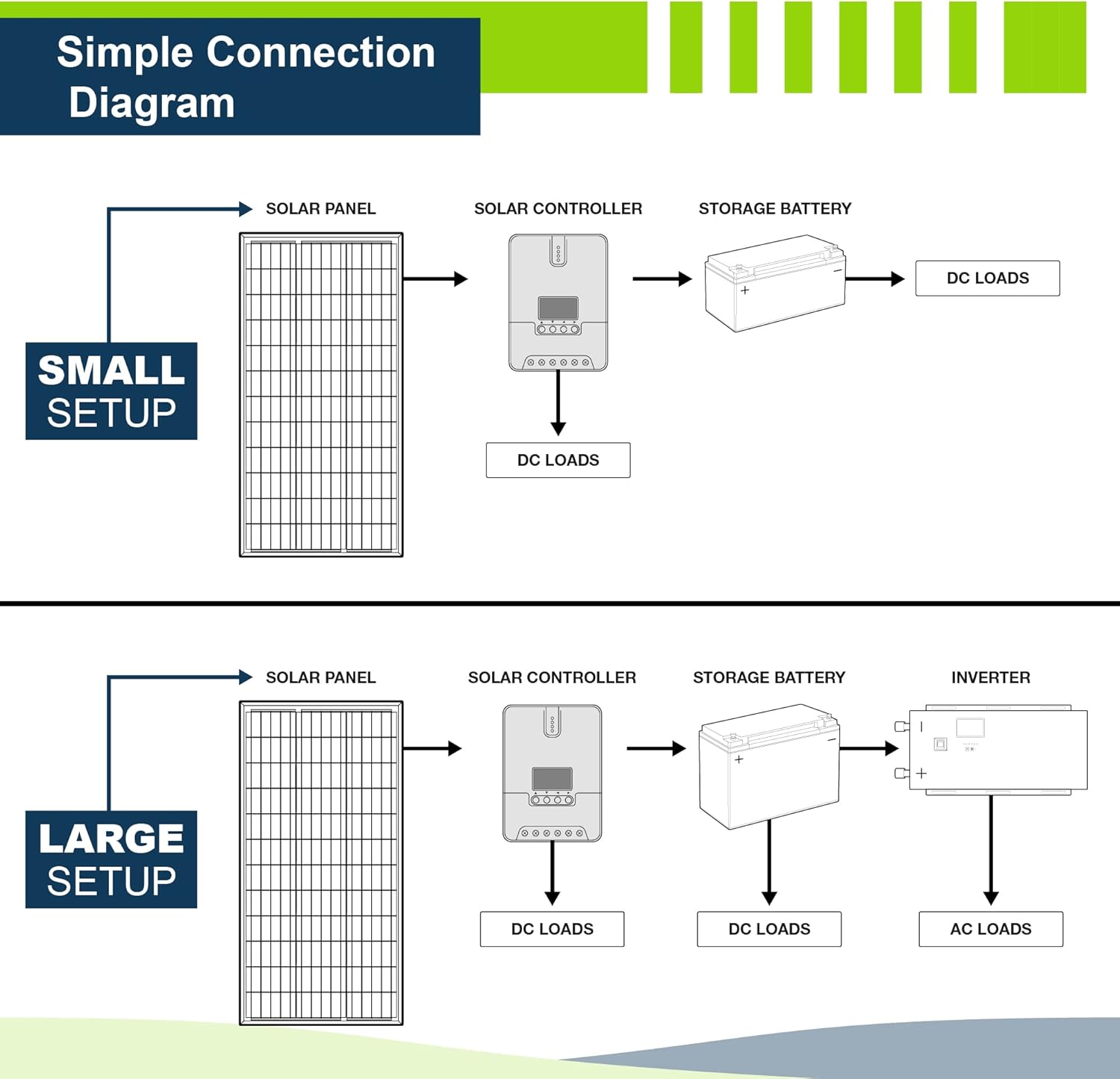
Image: Simple connection diagrams for both small and large solar setups. The small setup shows a solar panel connected to the solar controller, then to a storage battery and DC loads. The large setup includes an inverter for AC loads in addition to DC loads.
7. Operating Instructions
7.1 Initial Power-Up
Once the battery is connected, the controller will power on and display system information on the LCD. It will automatically detect whether it is a 12V or 24V system.
7.2 LCD Display and Buttons
The LCD provides real-time information about your solar system. Use the control buttons (up, down, enter) to navigate through menus and adjust settings.
- Charging State: Indicates MPPT, Boost, Float, or Equalize charging stages.
- System Voltage: Displays the current battery voltage.
- Unit Values: Shows current, voltage, power, and energy readings.
- Unit Type: Displays units like %V°C or kWh.
- Battery Type Selection: Allows selection of battery chemistry (User Defined, Flooded, Gel, Sealed Lead Acid, LiFePO4).
7.3 LED Indicators
The LED indicators provide a quick visual status of the system:
- Panel Status: Indicates if solar panels are connected and generating power.
- Battery Status: Shows battery charge level and charging activity.
- Load Status: Indicates if the DC load is active.
- Error Indication: Lights up to signal system abnormalities or faults.
7.4 Battery Type Configuration
It is crucial to select the correct battery type in the controller's settings to ensure proper charging and prolong battery life. Refer to your battery's specifications for recommended charging parameters. The controller supports user-defined settings for advanced customization.
8. Maintenance
Regular maintenance helps ensure the longevity and optimal performance of your solar charge controller:
- Cleaning: Periodically clean the controller's exterior with a dry cloth to remove dust and debris. Ensure ventilation openings are clear.
- Connections: Annually check all wiring connections for tightness and corrosion. Loose connections can lead to power loss or overheating.
- Environment: Ensure the installation environment remains within the specified temperature and humidity ranges.
- Firmware: Check the ExpertPower website for any available firmware updates for your model.
9. Troubleshooting
If you encounter issues with your solar charge controller, consider the following common troubleshooting steps:
- No Display/Power:
- Check battery connections and ensure the battery has sufficient voltage.
- Verify polarity of battery connections.
- No Charging:
- Check solar panel connections and polarity.
- Ensure solar panels are receiving adequate sunlight.
- Verify that the solar panel voltage (Voc) is within the controller's specified range (Max PV Input 100V).
- Error Indicator Lit:
- Refer to the controller's display for specific error codes or messages.
- Check for over-voltage, over-current, or short-circuit conditions in the system.
- Ensure the battery type setting matches the connected battery.
- Incorrect Voltage Readings:
- Verify all connections are secure and free of corrosion.
- Ensure the temperature sensor (if connected) is properly installed and functioning.
If problems persist after performing these checks, please contact ExpertPower customer support.
10. Warranty Information
ExpertPower products are designed for reliability and performance. For specific warranty terms and conditions applicable to your 20A MPPT Solar Charge Controller, please refer to the warranty card included with your product or visit the official ExpertPower website.
Typically, warranties cover defects in materials and workmanship under normal use. Damage resulting from improper installation, misuse, or unauthorized modifications is generally not covered.
11. Customer Support
For technical assistance, product inquiries, or warranty claims, please contact ExpertPower customer support:
- Online: Visit the official ExpertPower website or their Amazon store page for FAQs and contact information.
- Amazon Store: ExpertPower Amazon Store
Related documentsEPSML2420

Ask a question about this manual
Ask about setup, troubleshooting, compatibility, parts, safety, or missing instructions. Manuals+ will review the question and use this page’s manual context to help answer it.