
ATOTO S8G2109UP-N-US01
Contents
ATOTO S8 Ultra Plus In-Dash Video Receiver
Instruction Manual
Introduction
The ATOTO S8 Ultra Plus (Model S8G2109UP-N) is a second-generation Android car stereo designed to enhance your driving experience. Featuring a powerful ARM Cortex Octa-Core processor, 6GB RAM, and 128GB ROM, it delivers high performance and efficiency. The device integrates seamlessly with your smartphone through wireless CarPlay and Android Auto, offers multiple internet access options including a built-in 4G cellular modem, and provides advanced audio processing with a Digital Signal Processor (DSP) and powerful amplifier.
Key features include a vibrant 10.1-inch QLED display, intuitive gesture operation, and support for advanced camera systems like Virtual Surround-View (VSV) and Live Rear-View (LRV). This manual provides detailed instructions for setup, operation, maintenance, and troubleshooting to ensure optimal use of your ATOTO S8 Ultra Plus.
Setup and Installation
Proper installation is crucial for the optimal performance of your ATOTO S8 Ultra Plus. The unit features an ISO Standard Double DIN base with a 10.1-inch floating display, allowing for height and angle adjustments to suit various vehicle dashboards.
Physical Installation Steps
- Carefully remove the 10.1-inch display module from the main unit by unscrewing the two screws on top of the joint part.
- Mount the main unit (double-DIN base) into your dashboard opening using the provided mounting brackets and screws. Ensure a secure fit.
- Connect all necessary cables: power, GPS antenna, external microphone, WiFi antenna, 4G LTE antenna, and other audio/video inputs/outputs.
- Re-attach the display module to the main unit. Adjust the height and viewing angle as desired, then tighten all screws to secure the display.
Important Note: When installing the display module, ensure all screw holes are covered and screws are tightened to prevent display issues such as stripes, freezing, or blurry screens.

Figure 1: Step-by-step guide for installing the ATOTO S8 Ultra Plus head unit and display.
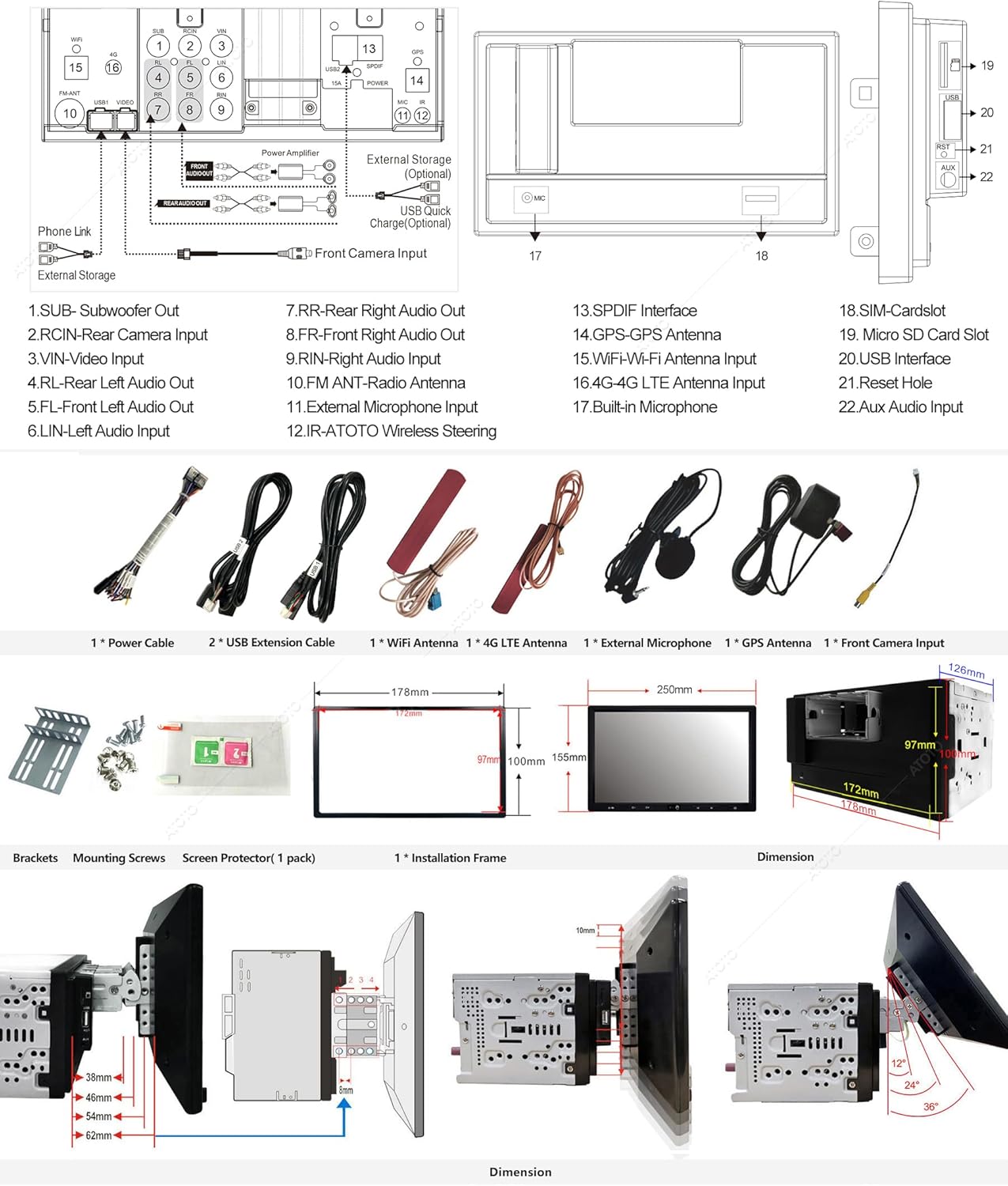
Figure 2: Detailed diagram showing the rear connections, dimensions, and mounting options for the ATOTO S8 Ultra Plus.
Inputs, Outputs & Slots
- Audio/Video Inputs: AUX Audio (L/R), FCAM front camera video input, Rearview camera input (supports 720P HD video signal).
- Audio Outputs: 4-CH RCA Audio Out (2V) for external amplifiers, Separate Sub-woofer Out (0.8V).
- Digital Output: Optical SPDIF Out (S8 Ultra Plus only).
- Storage: One Micro SD slot (up to 512GB storage card).
- USB Interfaces: 5 USB interfaces (4 for data communication, including USB Drive and optional USB devices; 1 for fast phone charging).
- Antenna Ports: FM/AM radio antenna, WiFi antenna, 4G LTE antenna, GPS antenna.
- Other: Built-in Microphone, Reset Hole.
Operating Instructions
Display and User Interface
The S8 Ultra Plus features a 10.1-inch 1280x720 QLED display, offering high resolution, vivid picture quality, and a 178° full-viewing angle. The ATOTO AICE UI 11.0, based on Android Q (10.0), provides a user-friendly interface. The floating display allows for physical adjustments to height and viewing angles for optimal visibility.

Figure 3: The main user interface of the ATOTO S8 Ultra Plus, displaying various application icons.
Internet Access
The S8 Ultra Plus offers four methods for internet access:
- Built-in 4G Cellular Modem: Insert a Nano SIM card (not included) to access 4G LTE networks. Supports main frequency bands for major North American operators.
- Wi-Fi Hotspots: Connect to your phone's Wi-Fi hotspot (2.4 GHz & 5 GHz supported).
- Bluetooth Tethering: Connect to your phone's Bluetooth tethering for internet access, which uses less power than Wi-Fi.
- USB Tethering: Share your phone's data via a USB connection, which can also slightly charge your phone's battery.
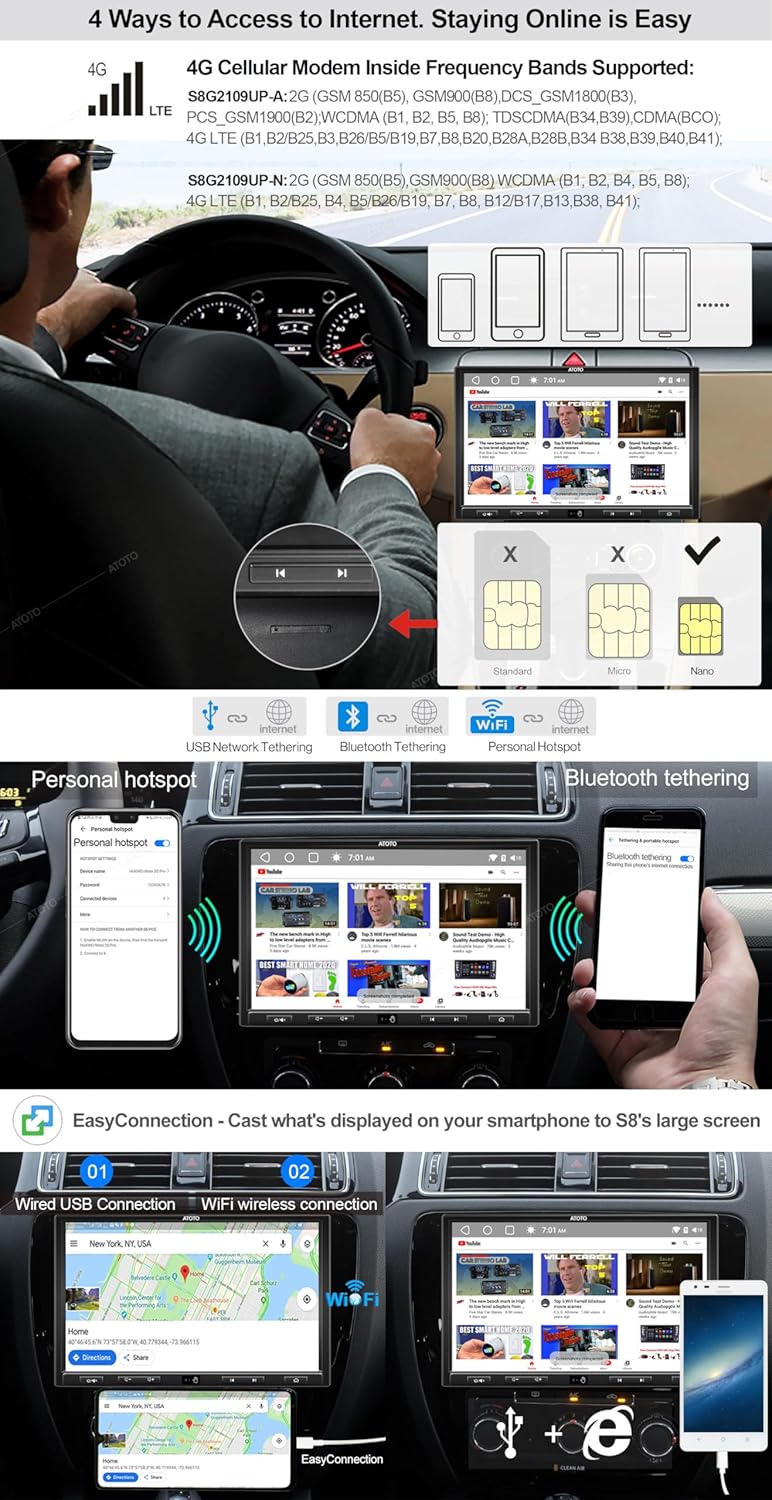
Figure 4: Visual representation of the four internet access methods available on the S8 Ultra Plus.
Dual Bluetooth Connectivity
The unit features dual Bluetooth chips. BT1 (Bluetooth 5.0 with Qualcomm aptX HD codec) supports high-resolution audio streaming (HFP/HSP/A2DP/AVRCP/PBAP protocols) and hands-free calling with noise cancellation. BT2 (Bluetooth 4.1) is primarily for Bluetooth tethering internet and connecting to other Bluetooth devices like gamepads, OBD2 scanners, or TPMS.
Video 1: Overview of the ATOTO S8 Ultra Plus Android Car Stereo, demonstrating its key features including display, connectivity, and audio capabilities.
Audio Features
Experience superior sound quality with the built-in Digital Signal Processor (DSP), allowing for precise equalization (32 adjustable frequency bands), signal delay, bass boost, and bass filter. The powerful BTL Amplifier provides Max 4*49W with RMS 4*29W output.
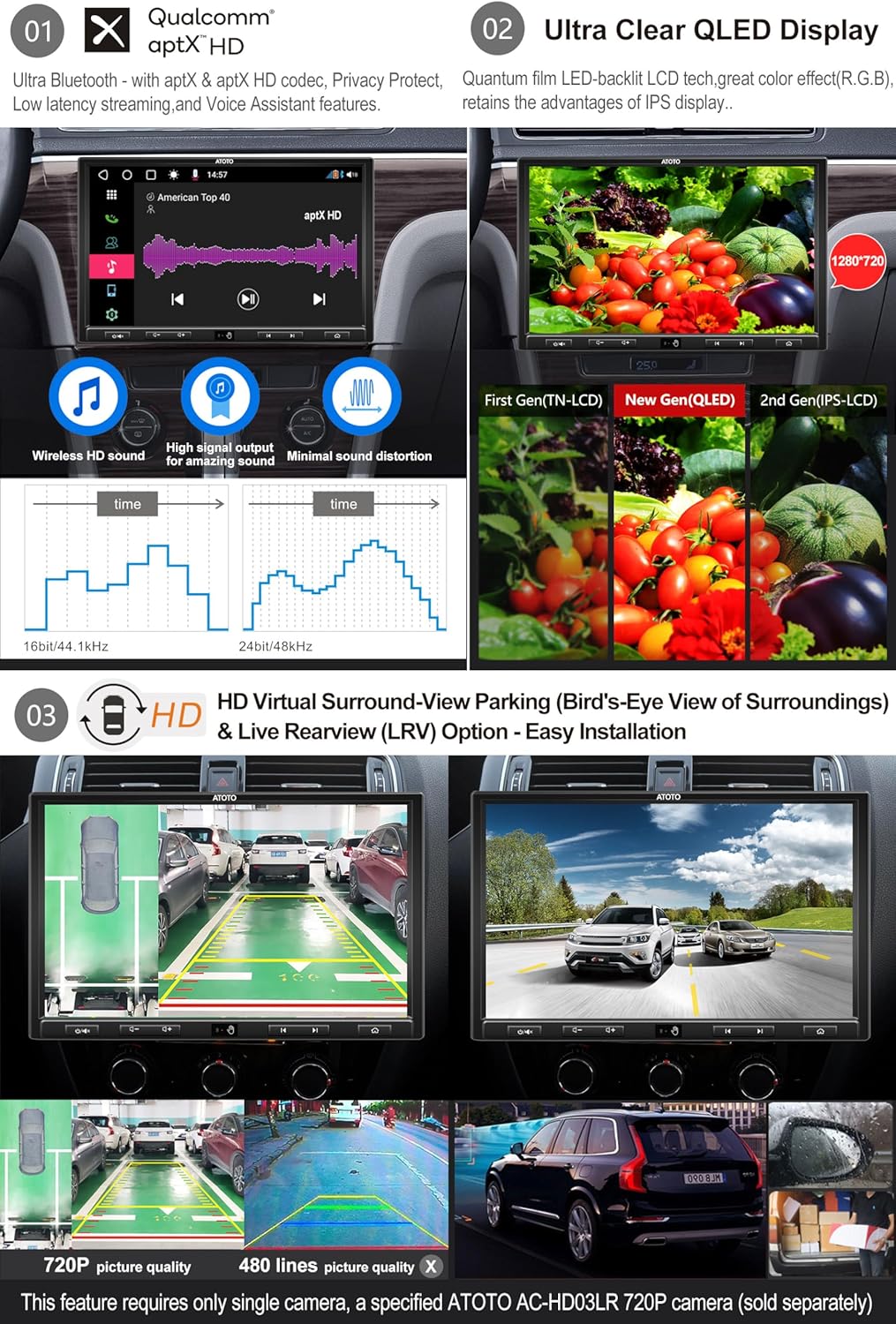
Figure 5: Highlights the QLED display, Qualcomm aptX HD audio codec for high-resolution sound, and the HD Virtual Surround-View parking feature.
Phone Integration (CarPlay & Android Auto)
The S8 Ultra Plus supports both wired and wireless CarPlay and Android Auto. This allows seamless integration of your iOS or Android smartphone with the head unit's display, enabling access to phone calls, music, messages, and navigation. For wired connections, use the original USB cable that came with your phone.
Gesture Control
The embedded Hands Gesture Sensor recognizes 9 hand-gestures, with up to 24 programmable options. This allows for quick control of functions like skipping tracks, adjusting volume, and accessing other operations without touching the screen.

Figure 6: Illustrates the gesture recognition feature and compatibility with wireless steering wheel remote controls.
Camera Features (VSV & LRV)
When paired with specific ATOTO AC-HD03LR cameras (sold separately), the S8 Ultra Plus provides HD Virtual Surround-View (VSV) and Live Rear-View (LRV) display. VSV uses a panoramic image stitching algorithm to create a dynamic, virtual surroundings view for parking. LRV allows you to access the rearview even when the vehicle is moving forward, improving visibility by removing obstructions.
GPS Tracking with TrackHU
Utilize ATOTO's exclusive TrackHU GPS tracking app for real-time vehicle monitoring. Features include 15-second refresh rates, OsmAnd's 4-satellite positioning, track playback with speed control, detailed reports, and instant online/offline status and geofence alerts.

Figure 7: Depicts the GPS tracking capabilities of the TrackHU app, including real-time tracking and detailed reports.
DriveChat AI Voice Assistant
The DriveChat app, powered by ChatGPT, offers an intelligent AI voice assistant experience. It supports multiple AI chatbots and allows for effortless voice control, enabling you to manage tasks, get information, and interact with the system using custom wake-up words.

Figure 8: Illustrates the DriveChat AI voice assistant interface, highlighting its conversational capabilities.
Maintenance
To ensure the longevity and optimal performance of your ATOTO S8 Ultra Plus, follow these general maintenance guidelines:
- Cleaning: Use a soft, dry cloth to clean the display and exterior. Avoid abrasive cleaners or solvents that could damage the screen or finish.
- Software Updates: Regularly check for and install firmware updates provided by ATOTO. These updates often include performance improvements, bug fixes, and new features. Updates can typically be performed Over-The-Air (OTA) via the FindApps application.
- Environmental Conditions: Avoid exposing the unit to extreme temperatures, direct sunlight for prolonged periods, or excessive moisture.
- Cable Connections: Periodically check all cable connections to ensure they are secure and free from damage.
Troubleshooting
If you encounter issues with your ATOTO S8 Ultra Plus, refer to the following common troubleshooting tips:
- No Power: Ensure all power cables are securely connected. Check the vehicle's fuse box for any blown fuses related to the stereo.
- No Sound: Verify speaker connections. Check the volume level and audio settings (DSP, EQ). Ensure the correct audio source is selected.
- Display Issues (Stripes, Freezing, Blurry): Re-check the display module installation. Ensure all screws are tightened and the module is properly seated.
- Bluetooth Connectivity Problems: Ensure Bluetooth is enabled on both the S8 Ultra Plus and your device. Try unpairing and re-pairing the devices. Clear Bluetooth cache if necessary.
- GPS Signal Loss: Ensure the GPS antenna is properly installed and has a clear line of sight to the sky. Check map application settings.
- System Unresponsive: Perform a soft reset by pressing the reset button (usually a small pinhole) or by disconnecting the power for a few minutes.
- App Crashes/Performance Issues: Ensure the system firmware is up to date. Clear app data/cache for problematic applications.
For persistent issues, consult the ATOTO online support resources or contact customer service.
Specifications
| Feature | Detail |
|---|---|
| Product Dimensions | 4.96 x 9.84 x 6.1 inches |
| Item Weight | 6.65 pounds |
| Item Model Number | S8G2109UP-N-US01 |
| Wireless Communication Technologies | AM/FM, Bluetooth, Wi-Fi |
| Connectivity Technologies | 4G LTE, WIFI, Dual Bluetooth, USB |
| Special Features | Compatible with SXM, GPS Tracking, Gesture Operation, HD Virtual Surround-View (VSV)&Live Rear-View (LRV) Display, Wireless CarPlay & Android Auto |
| Human Interface Input | Buttons |
| Controller Type | Google Assistant, Siri |
| Compatible Devices | Amplifier, Smartphone, Speaker |
| Total HDMI Ports | 1 |
| Connector Type | RCA, USB Type A |
| Audio Output Mode | Mono, Stereo |
| Surround Sound Channel Configuration | 5.1 |
| Video Encoding | H.263, H.264, DIVX4-6, XVID Decoder |
What's in the Box
The product package for the ATOTO S8 Ultra Plus includes:
- Car Stereo Unit
- GPS Antenna
- External Microphone
- WiFi Antenna
- Power Cable
- 4G LTE Antenna
Warranty and Support
ATOTO provides continuous firmware updates for the S8 Ultra Plus. The product typically comes with 12+6 months of product care. For support, you can visit the ATOTO Brand Store on Amazon or contact customer service via your order center, eproductcase, or support@atotoglobal.
Optional accessories for the ATOTO S8 Ultra Plus (sold separately) include:
- ATOTO AC-44P2 1080P On-dash DVR Camera
- ATOTO AC-44F5 Steering Wheel IR Remote
- ATOTO AC-4450 Bluetooth OBD II Scanner / Code Reader
- ATOTO AC-HD02LR HD Live Rear-view Camera or AC-HD03LR Wide-angle HD Rear View Camera
- ATOTO AC-UTP1 USB TPMS (Tire Pressure Monitoring Sensor)
- ATOTO Video Output Adaptor (AC-AHV68: USB to HDMI Adaptor; AC-AHV48: USB To RCA Adaptor)
- ATOTO AC-HAV50 HDMI to AHD Video Converter
- ATOTO CS-101SW 10" Slim Amplified Subwoofer
- ATOTO CS-651DST 6.5" 2-Way Component Speaker System
- ATOTO CA-AEC02 Plug-n-Play 4 Channel Power Pack Amplifier
- ATOTO CS-651DC 6.5in coaxial 2-way car speakers
Documents and downloads
Ask a question about this manual
Ask about setup, troubleshooting, compatibility, parts, safety, or missing instructions. Manuals+ will review the question and use this page’s manual context to help answer it.