
Dorcy 41-4328
Dorcy 2,000-Lumen USB Rechargeable Flashlight with Powerbank User Manual
Model: 41-4328
Introduction
This manual provides detailed instructions for the operation, maintenance, and troubleshooting of your Dorcy 2,000-Lumen USB Rechargeable Flashlight with Powerbank. Designed for versatility, this flashlight features both intense spot and wide COB flood lights, along with power bank functionality for charging other devices.
Constructed from durable, aircraft-grade anodized aluminum, it is built to withstand various conditions. Please read this manual thoroughly to ensure proper use and to maximize the lifespan of your device.
Product Features
- 2,000 Lumens Max Output: Provides powerful illumination for various tasks.
- USB Rechargeable: Convenient charging via a micro USB port.
- Integrated Power Bank: Capable of charging smart phones and other devices in emergency situations.
- Multiple Light Modes: Includes Flood + Spot (2,000 lumens), Spot High (1,000 lumens), Spot Low (300 lumens), and Flood (1,500 lumens).
- Durable Construction: Made from aircraft-grade anodized aluminum.
- Beam Distance: Projects light up to 639 feet (195 meters).
- Water Resistance: Not water resistant.
- Drop Proof: Designed to withstand drops from 1 meter.
Product Overview

Front view of the Dorcy 2,000-Lumen USB Rechargeable Flashlight.
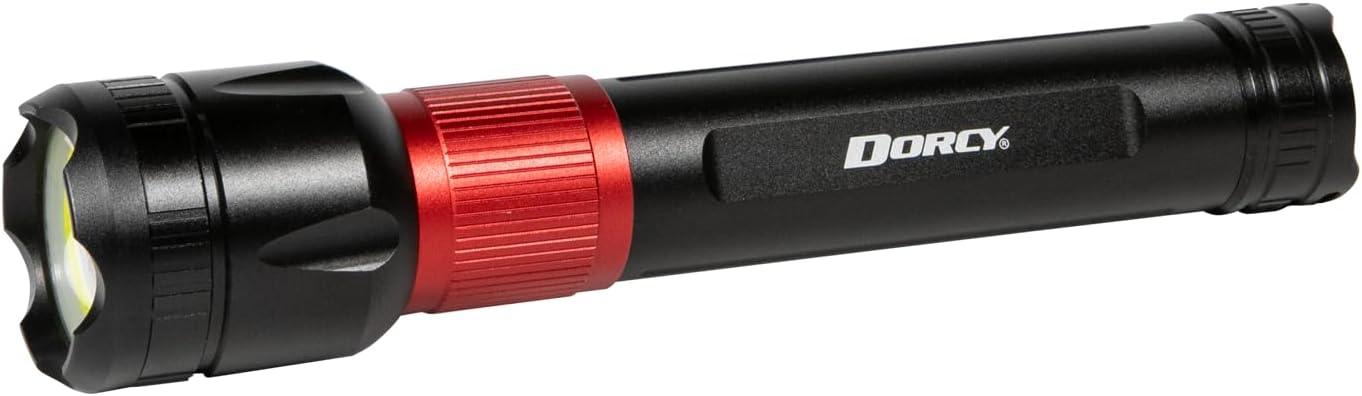
Angled view showing the flashlight's head and body.

Side view of the flashlight, highlighting the Dorcy branding.

Close-up of the flashlight's tail cap, where the power button is located.

Detailed view of the flashlight's head, showing the COB flood light ring and central spot light.
Setup and Charging
Your Dorcy flashlight is equipped with a 4000mAh 18650 Lithium-ion rechargeable battery. Before first use, it is recommended to fully charge the flashlight.
Charging the Flashlight:
- Locate the red ring near the head of the flashlight.
- Twist the red ring to open the cover, revealing the Micro USB input port.
- Connect the included Micro USB cable to the flashlight's input port and the other end to a USB power source (e.g., wall adapter, computer USB port).
- A red flashing indicator light signifies that the device is charging.
- The indicator light will turn solid green when the flashlight is fully charged.
- Charging time is approximately 5-6 hours for a full charge.
- Once charging is complete, twist the red ring back to close the cover and protect the port.
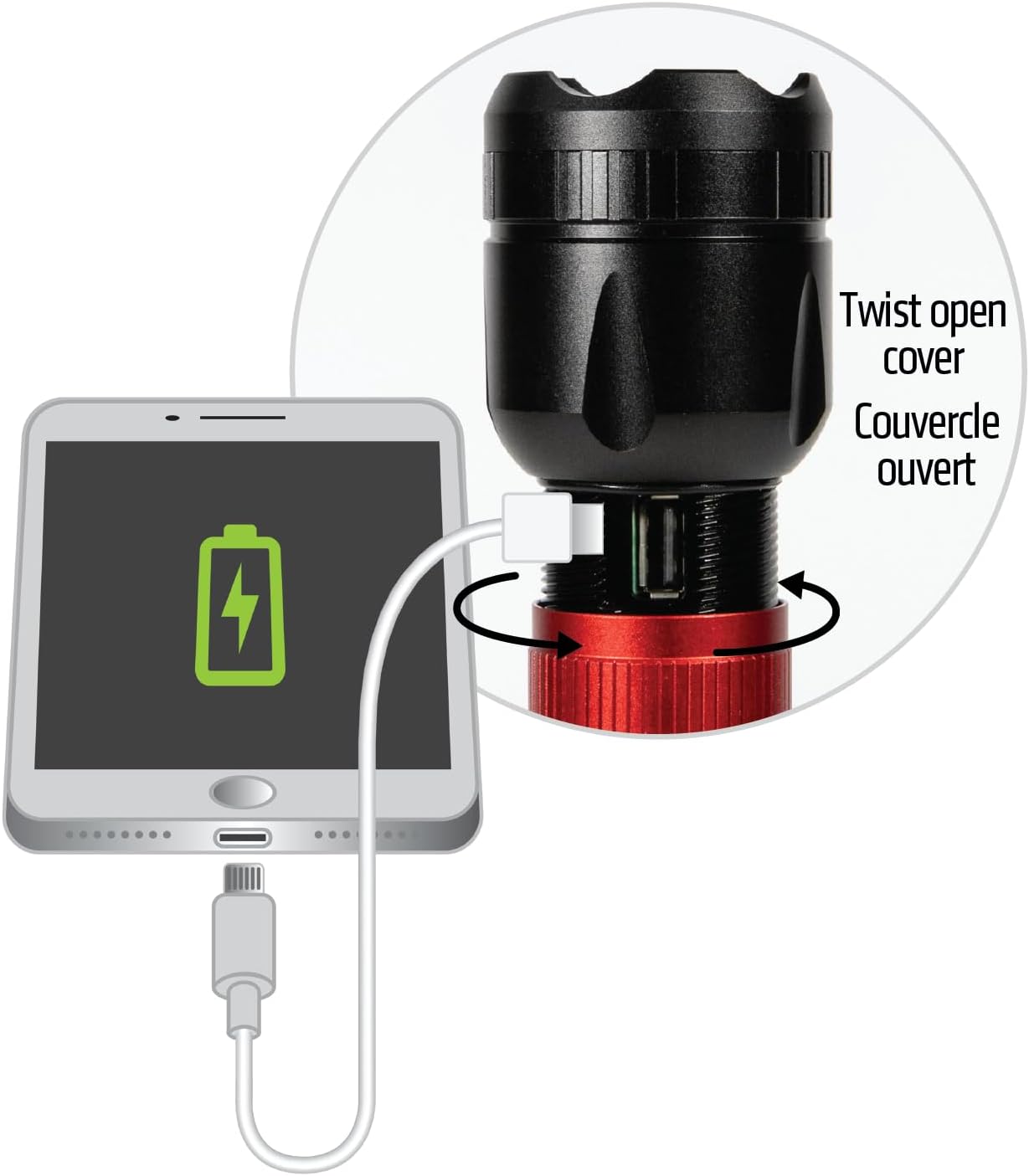
Twist the red ring to reveal the USB charging port.
Power Bank Functionality:
The flashlight can also serve as a power bank to charge other devices, such as smartphones, in an emergency.
- Twist the red ring to open the cover, revealing the USB output port.
- Connect your device's charging cable to the flashlight's USB output port.
- The flashlight will begin charging your device.

The flashlight can charge external devices via its USB output port.
Operating Instructions
The flashlight features a 4-mode power switch located at the tail cap. Press the button to cycle through the different lighting modes.
Light Modes:
- Spot + COB Flood (2,000 Lumens): Combines the focused spot beam with the wide COB flood light for maximum illumination. Runtime: 3 hours 30 minutes.
- Spot High (1,000 Lumens): Provides a powerful, focused beam. Runtime: 5 hours 30 minutes.
- Spot Low (300 Lumens): Offers a lower intensity, focused beam for extended runtime. Runtime: 17 hours 30 minutes.
- COB Flood (1,500 Lumens): Activates the wide COB flood light for broad area illumination. Runtime: 4 hours.
Note: If the flashlight is in any mode for more than 5 seconds, the flashlight will reset to Spot + COB mode once it is turned off, then on again.
Product Demonstration Video:
Official product video demonstrating the features and light modes of the Dorcy 2,000-Lumen USB Rechargeable Flashlight, including its charging capabilities and different beam patterns.
Maintenance
- Cleaning: Wipe the flashlight with a clean, dry cloth. Do not use abrasive cleaners or solvents.
- Battery Care: To optimize battery performance and longevity, fully charge the battery before first use and periodically if unused. Avoid storing the product in extreme cold or heat, as this can reduce battery life. Optimal performance is between 59°F to 77°F (15°C to 25°C).
- Storage: Store the flashlight in a cool, dry place away from direct sunlight.
Troubleshooting
| Problem | Possible Cause | Solution |
|---|---|---|
| Flashlight does not turn on. | Battery is depleted. | Charge the flashlight fully using the provided USB cable. |
| Flashlight not charging. | USB cable or power source issue; charging port cover not fully open. | Ensure the USB cable is securely connected and the power source is functional. Verify the red ring is twisted fully open to expose the charging port. |
| Power bank not charging external device. | Flashlight battery is low; incorrect cable; device not compatible. | Ensure the flashlight is sufficiently charged. Use the correct charging cable for your external device. |
| Light modes not cycling correctly. | Button pressed too quickly; internal malfunction. | Press the power button deliberately to cycle through modes. If issue persists, contact customer support. |
Specifications
| Feature | Detail |
|---|---|
| Brand | Dorcy |
| Model Number | 41-4328 |
| Light Source Type | LED (Spot and COB Flood) |
| Max Brightness | 2000 Lumens |
| Beam Distance | 639 Feet (195 meters) |
| Battery Type | 1 x 4000mAh 18650 Lithium-ion (included) |
| Charging Port | Micro USB (Input) |
| Power Bank Output | USB (Output) |
| Material | Aircraft-grade Anodized Aluminum |
| Color | Black |
| Dimensions | 2 x 2 x 10 inches |
| Item Weight | 14.4 ounces |
| Water Resistance Level | Not Water Resistant |
| Drop Resistance | 1 meter |
Warranty and Support
Warranty Information:
This Dorcy product comes with a 1-year limited warranty. Please retain your proof of purchase for warranty claims. The warranty covers manufacturing defects and does not cover damage resulting from misuse, accidents, or unauthorized modifications.
Customer Support:
For technical assistance, warranty claims, or general inquiries, please visit the official Dorcy website or contact their customer service department. Refer to the product packaging or the Dorcy website for the most current contact information.
You can also visit the Dorcy Store on Amazon for more product information and support resources.
Ask a question about this manual
Ask about setup, troubleshooting, compatibility, parts, safety, or missing instructions. Manuals+ will review the question and use this page’s manual context to help answer it.