
ARCADE1UP 8223
Arcade1Up Pac-Man Party Cade Instruction Manual
Model: 8223
1. Introduction
Welcome to the world of retro gaming with your new Arcade1Up Pac-Man Party Cade! This compact arcade machine brings the classic arcade experience right into your home. Featuring 8 iconic games in one unit, real-feel arcade controls, and a vibrant 17-inch LCD screen, it's designed for hours of entertainment for one to two players.
Please read this manual thoroughly before setting up and operating your Party Cade to ensure safe and optimal performance.
2. Safety Information
Always observe the following safety precautions to prevent injury or damage to the unit:
- Keep the unit away from water or excessive moisture.
- Do not expose the unit to direct sunlight or extreme temperatures.
- Ensure the unit is placed on a stable, level surface to prevent tipping.
- Use only the provided power adapter.
- Do not attempt to open or repair the unit yourself. Refer all servicing to qualified personnel.
- Keep small parts away from children to prevent choking hazards.
3. Package Contents
Verify that all components are present in your package:
- Arcade1Up Pac-Man Party Cade Unit
- Power Adapter
- Instruction Manual (this document)
- Assembly Hardware (if applicable for minor assembly)
4. Setup
Follow these steps to set up your Arcade1Up Pac-Man Party Cade:
- Unpack the Unit: Carefully remove all components from the packaging. Retain packaging for future storage or transport.
- Placement: Choose a stable, flat surface for the arcade machine. Ensure there is adequate space around the unit for ventilation and comfortable play.
- Power Connection: Locate the power input port on the back or bottom of the unit. Insert the power adapter cable firmly into the port. Plug the other end of the power adapter into a standard wall outlet.
- Initial Power On: Locate the power switch (usually on the back or side of the unit) and turn it to the 'ON' position. The screen should illuminate, and the system will boot up.
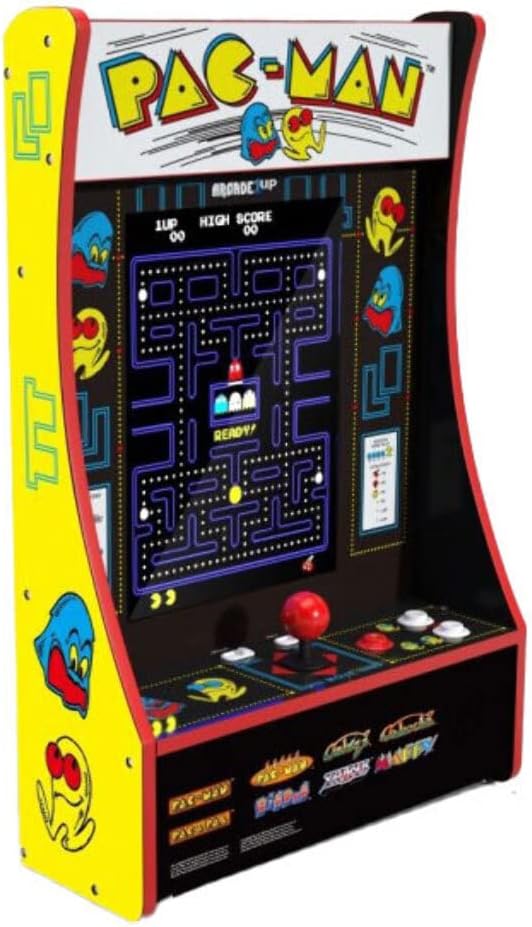
Figure 4.1: Front view of the Arcade1Up Pac-Man Party Cade, showcasing the screen and control panel.

Figure 4.2: Angled view of the Arcade1Up Pac-Man Party Cade, showing the joystick and buttons.
5. Operating Instructions
Your Party Cade is designed for intuitive play. Here’s how to get started:
5.1 Game Selection
The unit comes with 8 classic games. Upon powering on, you will typically see a game selection menu. Use the joystick to navigate through the available games and press the 'Player 1' or 'Enter' button to select your desired game.
5.2 Controls
The Party Cade features real-feel arcade controls for an authentic experience:
- Joystick: Used for character movement and menu navigation.
- Player 1 / Player 2 Buttons: Start games for single or two players. Also used for selection in menus.
- Action Buttons: Used for in-game actions (e.g., shooting, jumping, eating dots). Refer to individual game instructions for specific button functions.
5.3 Volume Settings
The unit has three volume settings. Locate the volume control button or switch (typically on the control panel or side of the unit) to adjust the sound level to your preference.
5.4 Coinless Operation
This arcade machine operates without coins. Simply select a game and press the start button to begin playing.
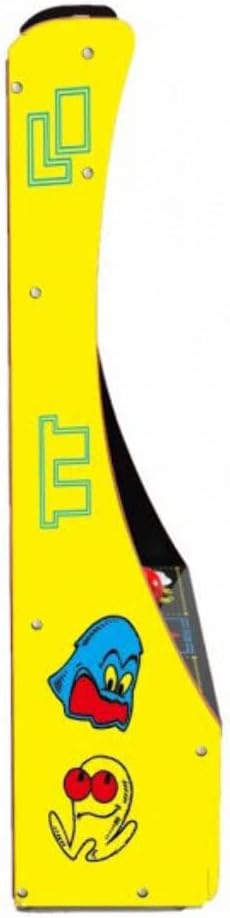
Figure 5.1: Left side panel of the Arcade1Up Pac-Man Party Cade.

Figure 5.2: Right side panel of the Arcade1Up Pac-Man Party Cade.
6. Maintenance
To keep your Arcade1Up Party Cade in optimal condition:
- Cleaning: Use a soft, dry cloth to wipe down the cabinet and screen. For stubborn marks, a slightly damp cloth can be used, but avoid excessive moisture. Do not use abrasive cleaners or solvents.
- Storage: If storing the unit for an extended period, unplug it from the power outlet and store it in a cool, dry place away from direct sunlight.
- Component Care: Avoid spilling liquids on the control panel or screen. Do not apply excessive force to the joystick or buttons.
7. Troubleshooting
If you encounter issues with your Party Cade, try these common solutions:
- No Power: Ensure the power adapter is securely plugged into both the unit and the wall outlet. Check if the power switch is in the 'ON' position. Try a different outlet.
- No Sound: Check the volume setting. Ensure it is not set to the lowest level or muted.
- Screen Issues (No Picture/Distorted): Power off the unit, wait 10 seconds, then power it back on. Ensure the power cable is firmly connected.
- Controls Unresponsive: Power cycle the unit. Ensure no debris is obstructing the joystick or buttons.
- Game Freezes: Power off the unit and restart it.
If problems persist after trying these steps, please contact customer support.
8. Specifications
| Feature | Detail |
|---|---|
| Model Number | 8223 |
| Brand | ARCADE1UP |
| Product Dimensions | 58.4L x 29.2W x 86.4H centimeters |
| Item Weight | 44 Grams |
| Screen Size | 17 Inches |
| Number of Players | Two |
| Games Included | 8 Games in 1 (e.g., Pac-Man, Pac-Land, Pac-Mania, Pac-Man Plus, Galaga, Galaxian, Dig Dug, Dig Dug II) |
| Controls | Real-feel arcade joystick and buttons |
| Power Source | Corded Electric |
| Operation | Coinless |
| Volume Settings | Three levels |
9. Warranty and Support
For warranty information and customer support, please refer to the official Arcade1Up website or the warranty card included with your product. You can also contact their customer service directly for assistance with technical issues, parts replacement, or general inquiries.
Online Support: Visit the official Arcade1Up support page for FAQs, troubleshooting guides, and contact options.
Contact Information: Refer to your product packaging or the manufacturer's website for the most current customer service contact details.
Related documents8223


Ask a question about this manual
Ask about setup, troubleshooting, compatibility, parts, safety, or missing instructions. Manuals+ will review the question and use this page’s manual context to help answer it.