
Moukey MTs10-2
Moukey Portable Bluetooth PA System User Manual
Model: MTs10-2
Brand: Moukey
Introduction
This user manual provides detailed instructions for the operation and maintenance of your Moukey Portable Bluetooth PA System (Model MTs10-2). Please read this manual thoroughly before using the product to ensure proper function and longevity.
Product Features
- Ultimate Sound: Equipped with a 100-watt 10-inch subwoofer and a 3-inch tweeter for omni-directional stereo reproduction. Functions as a karaoke machine, music player, amplifier system, and FM radio.
- Professional TWS Function: Connect two MTs10-2 units wirelessly via Bluetooth for a stereo sound system.
- Strong Compatibility: Built-in Bluetooth 5.0 for wireless connection to devices like iPhones, Android phones, iPads, tablets, and PCs. Supports FM radio, Micro TF-card, and Flash USB connections (below 32G).
- Portable & PA System Design: Features a pull rod and wheels for easy transport. Includes a 1.4-inch (35 mm) bracket interface for use with a speaker stand (stand not included).
- Powerful Rechargeable Battery: Provides uninterrupted long-term music playback at maximum volume.
Package Contents
Please check the package to ensure all items are present:
- Moukey Portable Bluetooth PA System (MTs10-2)
- 2 x Wireless Microphones
- 1 x Remote Control
- Power Adapter/Charging Cable
- User Manual (this document)

Image: Moukey Portable Bluetooth PA System, showing the main unit, two wireless microphones, and the remote control.
Setup
1. Charging the Battery
Before first use, fully charge the speaker's built-in lithium-ion battery. Connect the provided power adapter to the DC 9V IN port on the speaker and plug it into a power outlet. The LED display will indicate charging status.
2. Powering On/Off
Locate the POWER switch on the control panel. Toggle it to the "ON" position to power on the speaker. Toggle to "OFF" to power off.

Image: Detail of the LED switch on the speaker's control panel.
3. Portability Features
The speaker is designed with a retractable pull rod and rolling wheels for easy transportation. Simply extend the pull rod and tilt the speaker to roll it to your desired location.
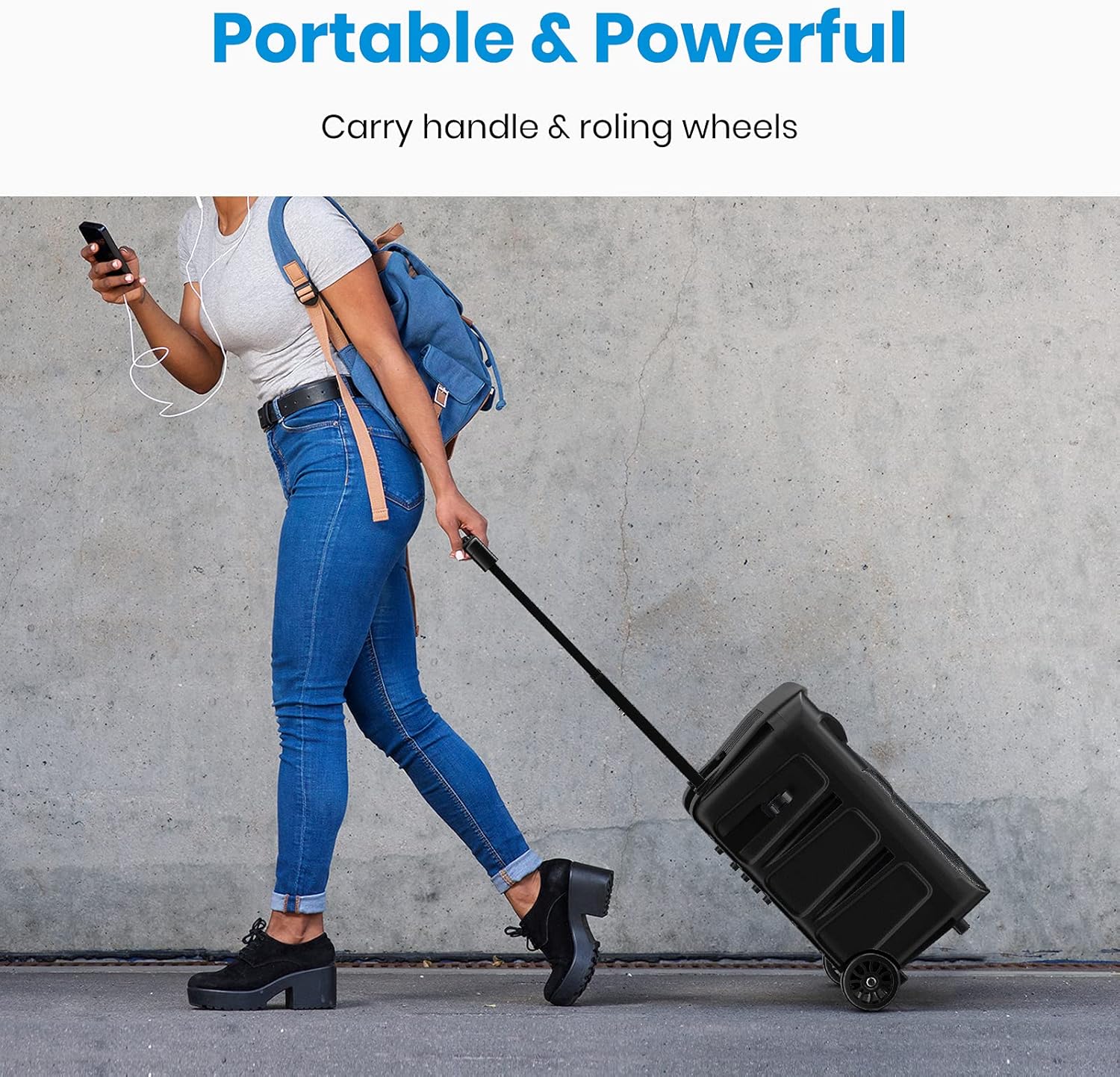
Image: A person demonstrating the portability of the speaker using its retractable handle and wheels.
4. Speaker Stand Mounting
The bottom of the speaker features a 1.4-inch (35 mm) interface for mounting on a compatible speaker stand. This allows for elevated sound projection. (Note: Speaker stand is not included and must be purchased separately).
Operating Instructions
1. Control Panel Overview
Familiarize yourself with the main control panel located on the top of the speaker. It includes controls for volume, bass, treble, echo, microphone volume, and input selection.

Image: The speaker's control panel, showing the LED display, volume, bass, treble, echo, and microphone volume knobs, along with input mode buttons.
2. Bluetooth Pairing
- Power on the speaker. The LED display will show "BLUE" indicating Bluetooth mode. If not, press the "MODE" button to switch to Bluetooth.
- Enable Bluetooth on your device (smartphone, tablet, etc.).
- Search for "MTs10-2" in your device's Bluetooth list and select it to pair.
- Once connected, the speaker will emit a confirmation tone, and you can play audio from your device.
3. TWS (True Wireless Stereo) Function
To achieve true wireless stereo sound, you can connect two MTs10-2 speakers together:
- Ensure both MTs10-2 speakers are powered on and in Bluetooth mode.
- On one of the speakers (this will be the primary speaker), press and hold the "TWS" button for a few seconds.
- The primary speaker will search for the secondary speaker. Once connected, both speakers will emit a confirmation tone.
- Now, connect your Bluetooth device to the primary speaker as described in the "Bluetooth Pairing" section. Audio will play through both speakers in stereo.

Image: A visual guide demonstrating how to connect two MTs10-2 speakers using the TWS function for stereo sound.
4. AUX Input
Connect an external audio device (e.g., MP3 player, computer) to the "AUX IN" port using a 3.5mm audio cable (not included). The speaker will automatically switch to AUX mode, or you can select it using the "MODE" button.
5. USB/TF Card Playback
Insert a USB flash drive or TF (Micro SD) card (up to 32GB) containing MP3 audio files into the respective ports. The speaker will automatically detect and begin playing the audio files. Use the playback controls (Play/Pause, Next/Previous) on the control panel or remote.
6. FM Radio
Press the "MODE" button to switch to FM radio mode. Press and hold the "Play/Pause" button to auto-scan and save available radio stations. Use the "Next/Previous" buttons to navigate between saved stations.
7. Microphone Usage
The speaker comes with two wireless microphones. They are pre-paired with the speaker. Simply turn on the microphones to use them. Adjust the "MIC VOL" knob on the control panel to control microphone volume. Use the "ECHO", "TREBLE", and "BASS" knobs to adjust the microphone's sound effects.
8. Recording Function (REC)
Insert a USB flash drive or TF card. While a microphone is connected, press the "REC" button to start recording. Press it again to stop recording. The recorded audio will be saved to the inserted storage device.
Video: An official product video demonstrating the features and portability of the Moukey Portable Bluetooth PA System.
Maintenance
- Clean the speaker with a soft, dry cloth. Do not use abrasive cleaners or solvents.
- Avoid exposing the speaker to extreme temperatures, direct sunlight, or high humidity.
- Store the speaker in a cool, dry place when not in use.
- To prolong battery life, avoid fully discharging the battery frequently and charge it regularly, even if not in use for extended periods.
Troubleshooting
| Problem | Possible Cause | Solution |
|---|---|---|
| No sound from speaker. | Speaker is off; Volume is too low; Incorrect input mode; Device not paired. | Ensure speaker is on; Increase volume; Select correct input mode (Bluetooth, AUX, USB/TF, FM); Re-pair Bluetooth device. |
| Bluetooth pairing failed. | Speaker not in pairing mode; Device too far; Interference. | Ensure speaker is in Bluetooth mode and discoverable; Move device closer to speaker; Turn off other Bluetooth devices. |
| Microphone not working. | Microphone off; Low microphone battery; MIC VOL too low. | Turn on microphone; Replace microphone batteries; Increase MIC VOL. |
| Poor FM radio reception. | Weak signal; Antenna not extended. | Extend the antenna fully; Try moving the speaker to a different location. |
| TWS connection issues. | Speakers too far apart; Only one speaker connected to Bluetooth device. | Ensure speakers are within 1-2 feet (6-8 meters) during TWS pairing; Only connect your device to the primary speaker after TWS pairing. |
Specifications
| Feature | Detail |
|---|---|
| Model Number | MTs10-2 |
| Output Wattage | 100 Watts |
| Speaker Components | 10-inch Subwoofer, 3-inch Tweeter |
| Connectivity Technology | Bluetooth 5.0, AUX, USB, TF Card, FM Radio |
| Power Source | Battery Powered (1 Lithium Ion battery included) |
| Product Dimensions (L x W x H) | 12.99 x 13 x 20.07 inches (33 x 33 x 51 cm) |
| Item Weight | 12.76 pounds (5.8 Kilograms) |
| Material | Plastic |
| Color | Black |
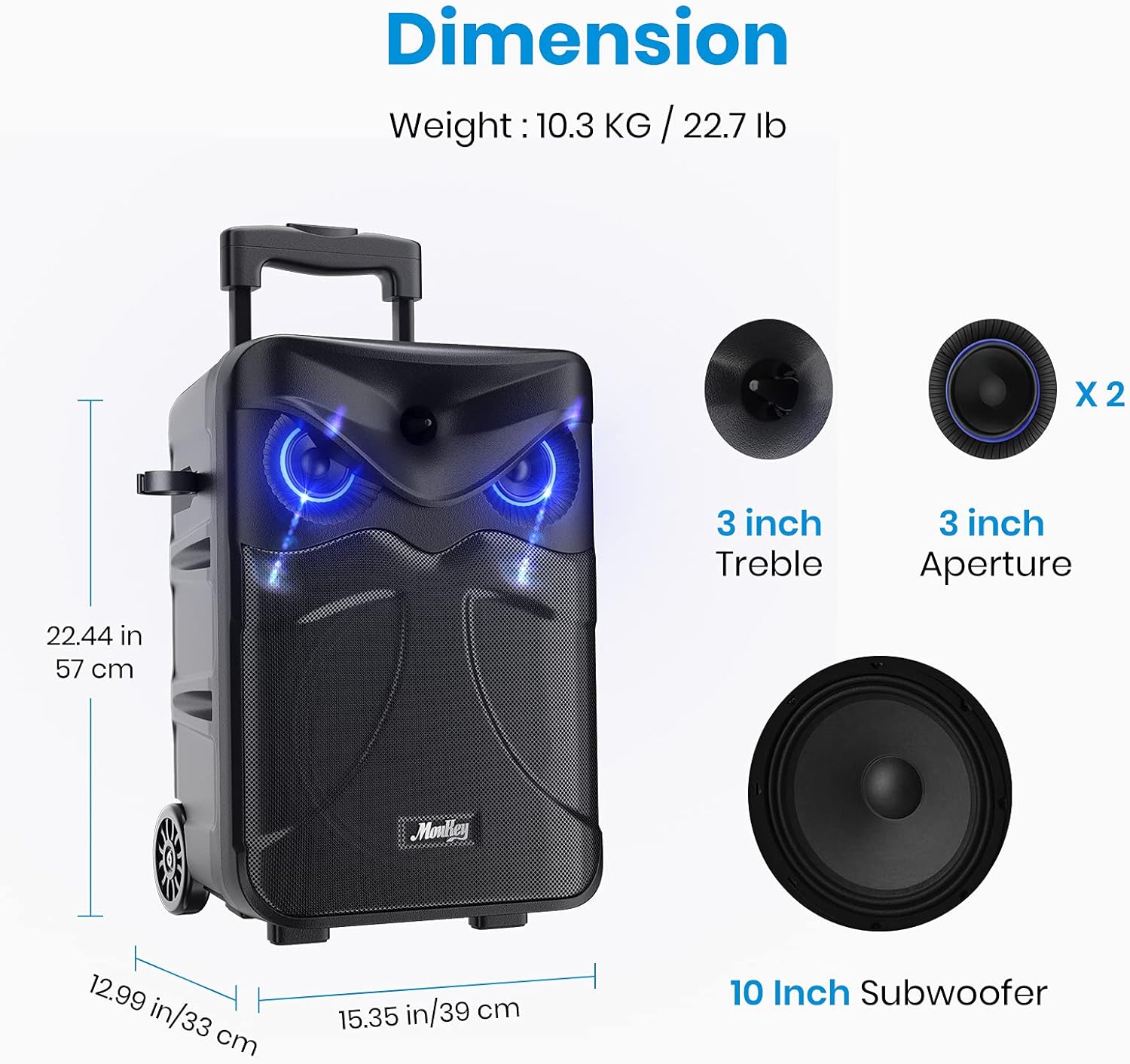
Image: Visual representation of the speaker's dimensions and internal components (10-inch subwoofer, 3-inch treble/aperture).
Warranty and Support
For warranty information or technical support, please contact Moukey customer service. Refer to the contact details provided on the product packaging or the official Moukey website.
Official Moukey Store: Visit the Moukey Store on Amazon
Ask a question about this manual
Ask about setup, troubleshooting, compatibility, parts, safety, or missing instructions. Manuals+ will review the question and use this page’s manual context to help answer it.