1. Introduction
This manual provides detailed instructions for the safe and efficient operation, maintenance, and troubleshooting of your EENOUR S32 32L Car Refrigerator. Please read this manual thoroughly before using the product and retain it for future reference.

Image: The EENOUR S32 32L Car Refrigerator, a portable compressor-type cooler.
2. Safety Information
To ensure safe operation and prevent damage, observe the following safety precautions:
- Do not operate the appliance if the power cord is damaged.
- Ensure proper ventilation around the unit. Do not block ventilation openings.
- Avoid placing the unit in direct sunlight or near heat sources.
- Do not immerse the unit in water or expose it to heavy rain.
- Keep children away from the appliance.
- Disconnect power before cleaning or performing maintenance.
- The power interface direction has been updated. Please be aware of this change.
3. Product Features
- Compressor Cooling System: Achieves rapid cooling and freezing, reaching -20°C from 25°C in approximately 65 minutes. Offers HH (High Speed) and ECO (Energy Saving) modes.
- Large Capacity: 32-liter capacity, capable of holding approximately 40x 350ml cans, 25x 500ml PET bottles, or 23x 1L milk cartons. Features a divided interior for simultaneous freezing and cooling.
- User-Friendly Control Panel: Equipped with a clear LCD touch panel for real-time temperature display and precise 1°C temperature adjustments. Includes a memory function to retain previous settings and an interior light for visibility in low-light conditions.
- Portable and Durable Design: Weighs 12.5 kg, designed for compact storage in vehicle trunks. Features a 180° rotating handle for easy transport by one or two people. The flat top surface supports up to 100 kg, allowing it to be used as a temporary table or seat.
- Versatile Power Options: Supports both DC (12V/24V) for vehicle use and AC (100V) for home use. Can be powered by an EENOUR portable power station for outdoor activities or emergency situations.

Image: Graph illustrating rapid cooling performance, reaching -20°C in 65 minutes.

Image: The refrigerator's interior showing separate compartments for freezing and cooling.

Image: Visual representation of the 32L capacity, showing how many cans and bottles it can hold.

Image: Illustration highlighting the quiet operation of the refrigerator, rated at 49dB.
4. Setup
4.1 Unpacking
Carefully remove the refrigerator from its packaging. Inspect the unit for any signs of damage. Retain packaging materials for future transport or storage.
4.2 Component Identification
Familiarize yourself with the components of your refrigerator:

Image: Diagram showing the main parts of the EENOUR S32 Car Refrigerator, including the lid, fixing chain, lock, interior light, control panel, handle, ventilation, and power input terminal. Also shown are the AC adapter, AC power cord, DC power cord, warranty card, and instruction manual.
- Lid: Top cover of the refrigerator.
- Fixing Chain: Prevents the lid from opening too far.
- Lock: Secures the lid.
- Interior Light: Illuminates the interior compartment.
- Control Panel: For temperature adjustment and mode selection.
- Handle: For carrying the unit.
- Ventilation: Ensures proper airflow for the compressor.
- Power Input Terminal: Connects to AC or DC power.
4.3 Power Connection
The refrigerator supports both AC and DC power sources.
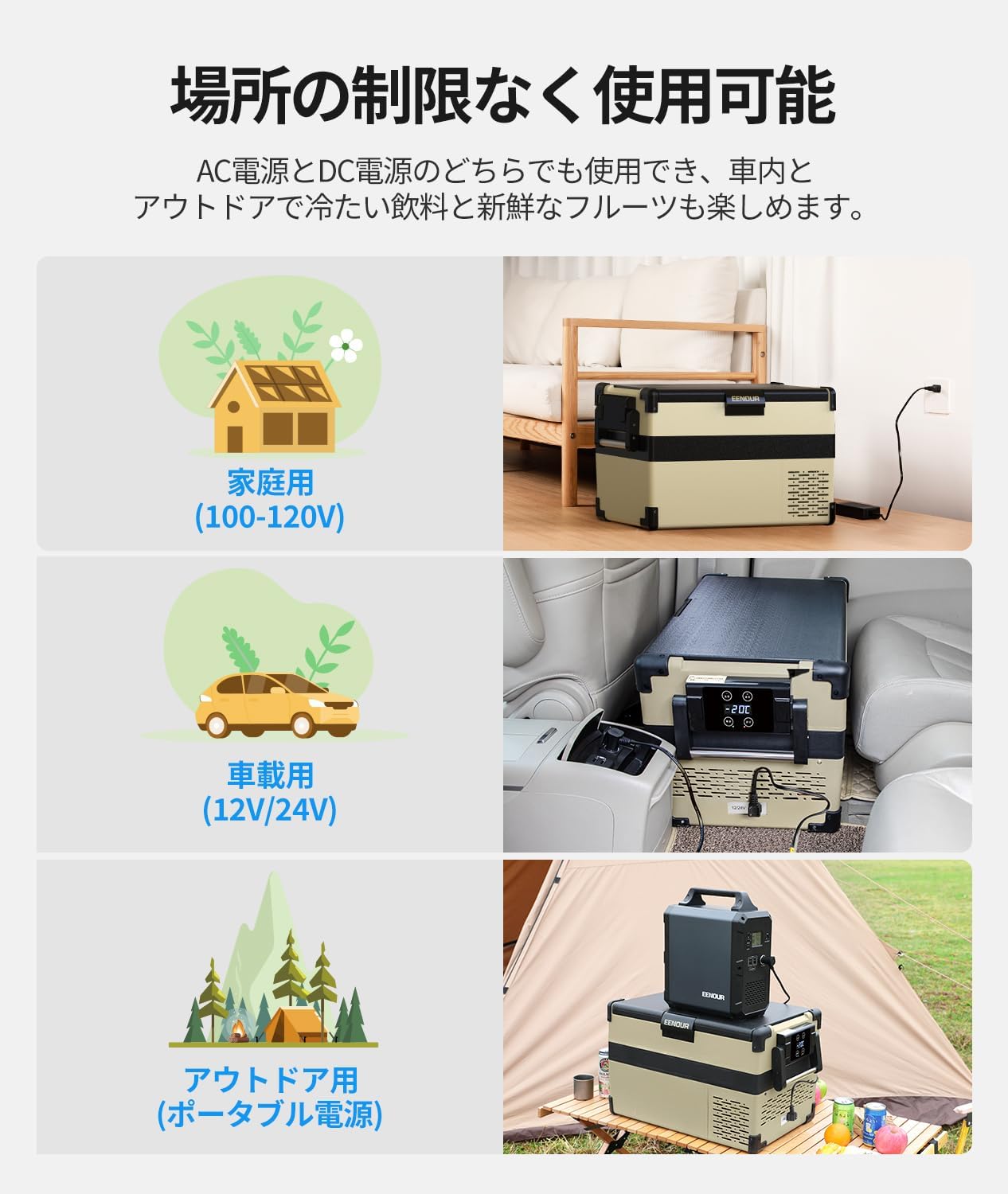
Image: Demonstrates various power connection methods: household AC (100-120V), vehicle DC (12V/24V), and outdoor portable power station.
- For Home Use (AC 100V): Connect the AC adapter and AC power cord to the refrigerator and a standard wall outlet.
- For Vehicle Use (DC 12V/24V): Connect the DC power cord to the refrigerator and your vehicle's cigarette lighter socket.
- For Outdoor Use: Connect to an EENOUR portable power station using the appropriate power cord.
Note: The power interface direction has been updated. Ensure correct orientation when connecting the power cords.
5. Operating Instructions
5.1 Power On/Off
Press the POWER button on the control panel to turn the unit on or off.
5.2 Temperature Adjustment
Use the + and - buttons on the LCD touch panel to set the desired temperature. The temperature can be adjusted in 1°C increments, ranging from -20°C to 10°C.
5.3 Mode Selection
Press the SET button to cycle through operating modes:
- HH Mode (High Speed): Provides faster cooling performance.
- ECO Mode (Energy Saving): Optimizes power consumption for extended operation.
5.4 Memory Function
The refrigerator retains the last temperature setting even after being powered off, eliminating the need to reset it each time.
5.5 Interior Light
The interior light automatically illuminates when the lid is opened, providing visibility in dark environments.

Image: Close-up of the EENOUR S32 control panel with LCD display and buttons for power, temperature adjustment, and mode selection.
6. Maintenance
6.1 Cleaning
- Always disconnect the power before cleaning.
- Wipe the interior and exterior surfaces with a damp cloth and mild detergent.
- Do not use abrasive cleaners or harsh chemicals.
- Ensure the unit is completely dry before reconnecting power.
6.2 Defrosting
If ice accumulates inside the unit, turn off the refrigerator and allow the ice to melt naturally. Drain any water and wipe the interior dry.
6.3 Storage
When storing the refrigerator for an extended period, ensure it is clean and dry. Store it in a cool, dry place away from direct sunlight.
7. Troubleshooting
| Problem | Possible Cause | Solution |
|---|---|---|
| Unit does not power on. | No power supply; loose connection; damaged power cord. | Check power connection; ensure outlet is functional; inspect power cord for damage. |
| Insufficient cooling. | Lid not closed properly; ventilation blocked; ambient temperature too high; too much content. | Ensure lid is sealed; clear ventilation openings; move to a cooler area; reduce contents. |
| Unusual noise. | Unit not level; objects touching the compressor. | Place unit on a flat, stable surface; ensure nothing is obstructing the compressor. |
| Error code displayed. | Internal malfunction. | Refer to the specific error code in the full manual or contact customer support. |
If the problem persists after attempting these solutions, please contact EENOUR customer support.
8. Specifications
| Feature | Specification |
|---|---|
| Model Number | S32-JP |
| Capacity | 32 Liters |
| Temperature Range | -20°C to 10°C |
| Power Input | AC 100V, DC 12V/24V |
| Product Dimensions (D x W x H) | 63.5 cm x 37.5 cm x 37.6 cm |
| Product Weight | 14.7 Kilograms |
| Defrost Function | Automatic / Semi-automatic |
| Shelves | 2 |
| Special Features | Portable, LCD Temperature Display, Interior Light, Low Voltage Protection, Memory Function |
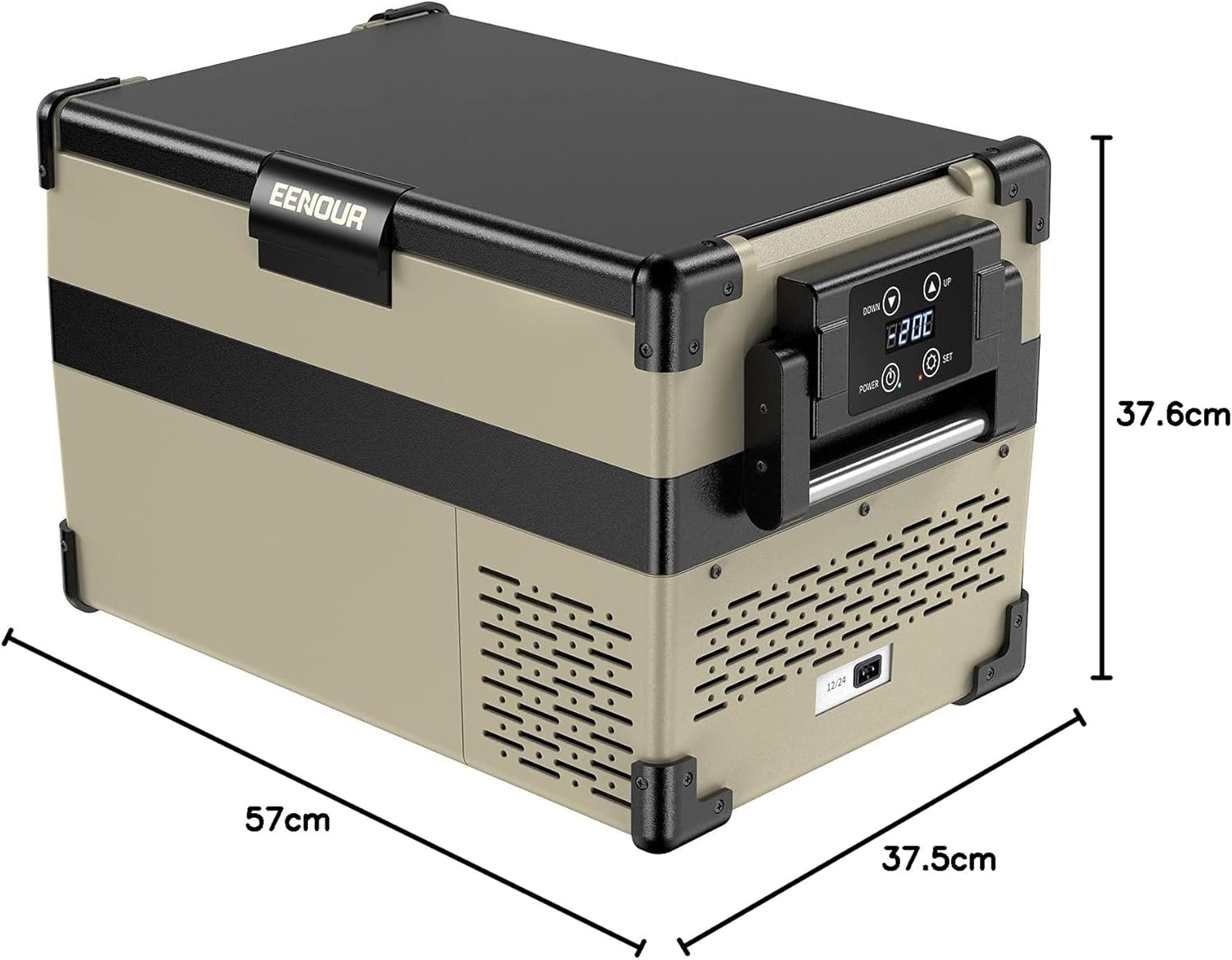
Image: Diagram showing the dimensions of the EENOUR S32 Car Refrigerator.
9. Warranty and Support
This product comes with a 12-month warranty from the date of purchase, extendable by an additional 12 months upon product registration. This warranty covers malfunctions occurring under normal use as described in this instruction manual.
For initial defects or any other issues, please contact EENOUR customer support with your order number. You can also download the full instruction manual from the product page under "Product Guides and Documents."
For product registration and further support, please visit the official EENOUR website.


