
De'Longhi PACEL98
Contents
De'Longhi Pinguino PACEL98 Portable Air Conditioner
User Manual
1. Introduction
Thank you for choosing the De'Longhi Pinguino PACEL98 Portable Air Conditioner. This unit is designed to provide optimal comfort in your home, offering 3-in-1 functionality: cooling, dehumidifying, and fan operation. With its powerful 10,700 BTU cooling capacity and Eco Real Feel Technology, it is suitable for rooms up to 100m³. This manual provides essential information for safe operation, installation, and maintenance of your appliance.
2. Safety Information
Please read all safety warnings and instructions carefully before using the appliance to prevent personal injury or damage to the unit. Keep this manual for future reference.
- Always ensure the appliance is placed on a stable, level surface.
- Do not block the air inlets or outlets. Maintain adequate clearance around the unit for proper airflow.
- Do not operate the appliance with a damaged cord or plug. If the power cord is damaged, it must be replaced by the manufacturer, its service agent, or similarly qualified persons to avoid a hazard.
- This appliance uses R-290 refrigerant. Do not puncture the refrigerant circuit.
- Unplug the appliance from the power outlet before cleaning or performing any maintenance.
- Keep children and pets away from the appliance during operation.
3. Product Overview
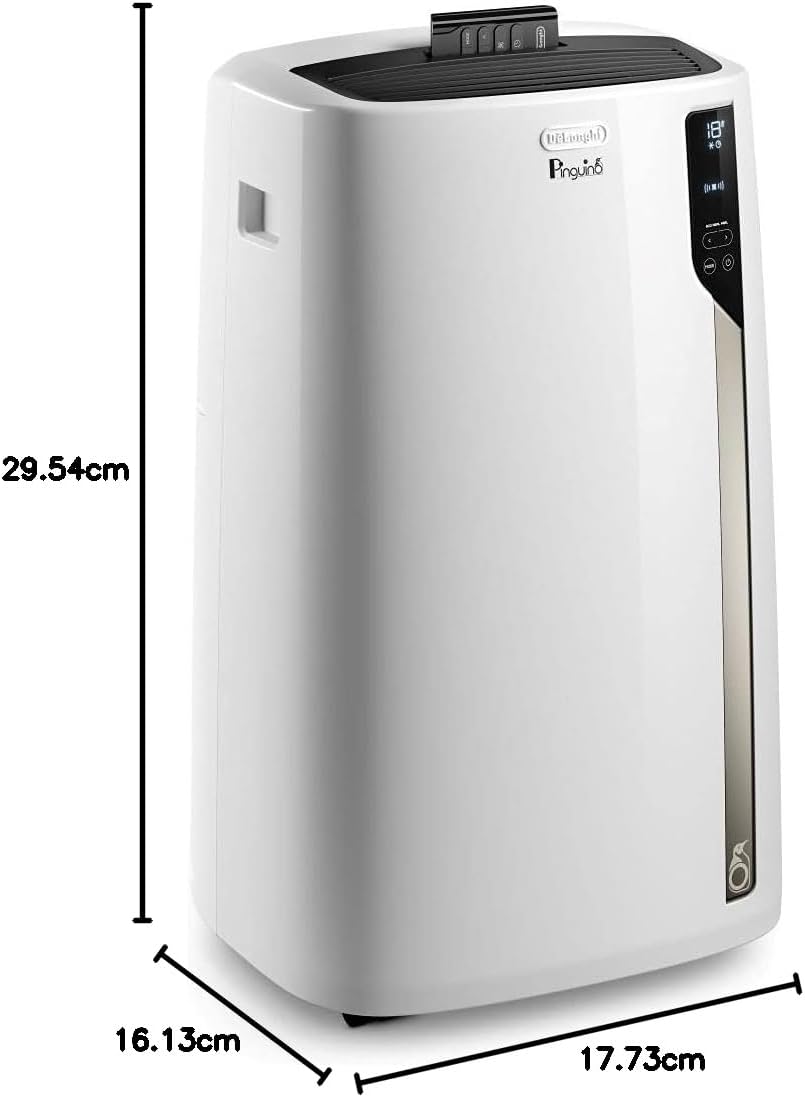
The De'Longhi Pinguino PACEL98 is a sleek, portable unit designed for efficient air conditioning. It features intuitive controls and integrated handles and castors for easy mobility.
3.1 Unit Components


3.2 Control Panel and Remote Control
The unit features a user-friendly touch control panel on the front, allowing direct management of all functions. A remote control is also included for convenient operation from a distance.

3.3 Mobility Features
Integrated handles and smooth-rolling castor wheels ensure easy transportation of the unit between rooms.

4. Setup
Proper setup is crucial for the efficient operation of your portable air conditioner.
4.1 Placement
Place the unit near a window or an opening that allows for the exhaust hose to be vented outdoors. Ensure there is sufficient space around the unit for air circulation.

4.2 Window Kit Installation
A window kit with a 1.2m hose length is included for easy installation. Follow the instructions provided with the window kit to securely vent the hot air outside. This prevents hot air from re-entering the room, maximizing cooling efficiency.
5. Operating Instructions
Your De'Longhi Pinguino PACEL98 offers multiple operating modes to suit your comfort needs.
5.1 Powering On/Off
Press the Power button on the control panel or remote control to turn the unit on or off.
5.2 Mode Selection
Press the Mode button to cycle through the available functions:
- Cooling Mode: Provides powerful cooling for rooms up to 100m³. Adjust the desired temperature using the temperature adjustment buttons.
- Dehumidifying Mode: Removes excess moisture from the air, with a capacity of 36 litres per 24 hours. Ideal for humid environments.
- Fan Mode: Circulates air without cooling, offering three speed settings.
5.3 Temperature and Fan Speed Adjustment
Use the Up and Down arrows on the control panel or remote to set the desired temperature in cooling mode or adjust the fan speed in fan mode.
5.4 Timer Function
The integrated timer allows you to program the unit to turn on or off automatically, saving energy and ensuring comfort when needed.
5.5 Eco Real Feel Technology
This technology automatically adjusts temperature reduction and humidity control to achieve the best comfort level while saving up to 30% on energy consumption.
6. Maintenance
Regular maintenance ensures the longevity and optimal performance of your air conditioner.
6.1 Cleaning the Air Filter
The air filter should be cleaned regularly (e.g., every two weeks) to maintain air quality and unit efficiency. Refer to the specific instructions in the full manual for filter removal and cleaning.
6.2 Draining the Water Tank (Dehumidifying Mode)
When operating in dehumidifying mode, the unit collects water. The internal tank will need to be drained periodically. The unit may have an indicator to signal when the tank is full. Follow the manual's instructions for safe and proper drainage.
6.3 External Cleaning
Wipe the exterior of the unit with a soft, damp cloth. Do not use harsh chemicals or abrasive cleaners.
7. Troubleshooting
If you encounter issues with your De'Longhi Pinguino PACEL98, refer to the following common troubleshooting tips:
- Unit does not turn on: Check if the power cord is securely plugged into a working outlet. Ensure the unit is not in standby mode.
- Insufficient cooling: Verify that the exhaust hose is properly installed and vented outdoors. Check if windows and doors are closed. Clean the air filter if it is dirty. Ensure the room size is within the unit's capacity (up to 100m³).
- Unit is noisy: While the unit operates quietly (47-64dB), some operational noise is normal. Ensure the unit is on a flat, stable surface and not vibrating against other objects.
- Water leakage: Check the drainage plug and ensure it is securely closed, unless continuous drainage is set up. Drain the water tank if it is full.
For more complex issues, please contact customer support.
8. Specifications
| Feature | Specification |
|---|---|
| Brand | De'Longhi |
| Model Number | PACEL98 |
| Cooling Power | 10,700 BTU |
| Recommended Room Size | Up to 100m³ |
| Energy Efficiency Rating | A |
| Dehumidifying Capacity | 36 litres/24 hours |
| Noise Level | 47-64 dB |
| Product Dimensions (DxWxH) | 16.1D x 29.5W x 17.7H cm |
| Item Weight | 33 kg |
| Voltage | 220 Volts |
| Refrigerant | R-290 |
| Included Components | Remote control, window sealing kit |
9. Warranty and Support
For warranty information and customer support, please refer to the documentation included with your purchase or visit the official De'Longhi website. You can also visit the De'Longhi Store on Amazon for additional product information and support resources.
Ask a question about this manual
Ask about setup, troubleshooting, compatibility, parts, safety, or missing instructions. Manuals+ will review the question and use this page’s manual context to help answer it.