
Introduction
The SEGA Astro City Mini Console is a miniature reproduction of the classic SEGA Astro City arcade cabinet. This console allows users to experience 37 pre-installed SEGA arcade games, including the 720p-HD version of Virtua Fighter, on a 4-inch screen with an integrated joystick and six buttons. It is designed for both standalone play and connection to an external display.
This manual provides essential information for setting up, operating, maintaining, and troubleshooting your Astro City Mini Console. Please read it thoroughly before use.
Included Items
Verify that all the following items are present in the package:
- SEGA Astro City Mini Console
- USB Cable for Power Supply
- HDMI Cable
- Instruction Manual (this document)
Setup
1. Power Connection
Connect the supplied USB cable to the console's power input port. Connect the other end of the USB cable to a compatible USB power adapter (not included) or a USB port on a device capable of providing sufficient power (e.g., 5V/1.0A or higher).

Image: The Astro City Mini Console, illustrating its compact design and control layout. The power input port is located on the rear.
2. Connecting to an External Display (Optional)
To play on a larger screen, connect one end of the supplied HDMI cable to the HDMI output port on the Astro City Mini Console. Connect the other end to an HDMI input port on your television or monitor. Select the corresponding HDMI input on your display device.
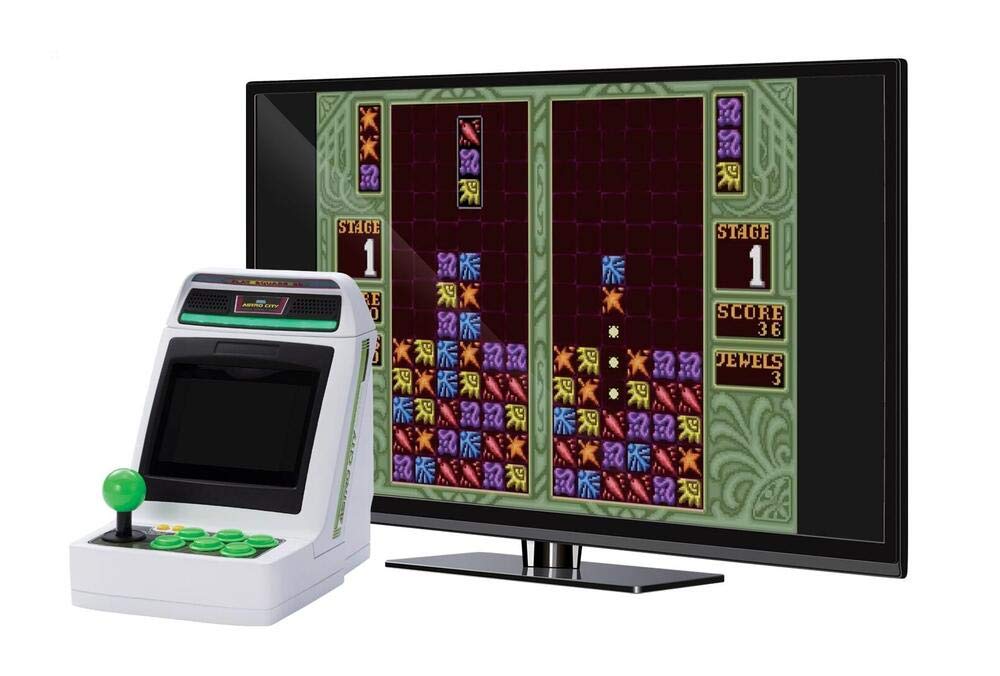
Image: The Astro City Mini Console connected via HDMI to a television, displaying a puzzle game. This setup allows for a larger viewing experience.
3. External Controller Connection (Optional)
The Astro City Mini Console supports external USB controllers for two-player gameplay or alternative control methods. Connect compatible USB controllers to the USB ports located on the console.

Image: The Astro City Mini Console positioned alongside an external controller, demonstrating the option for multi-player or alternative control setups.
Operation
1. Powering On/Off
To power on the console, ensure it is connected to a power source, then press the power button. To power off, press and hold the power button until the console shuts down.
2. Navigating the Menu
Use the joystick to navigate through the game selection menu. The action buttons are used to select games and confirm choices.
3. Playing Games
Once a game is selected, it will load automatically. The integrated joystick and six buttons replicate the original arcade experience. Refer to the on-screen instructions within each game for specific controls.

Image: A user's hands operating the joystick and buttons of the Astro City Mini Console, with a fighting game displayed on the screen and other game titles floating in the background.

Image: A detailed view of the green joystick and six green action buttons on the Astro City Mini Console, highlighting the tactile controls.
4. Adding Credits
The yellow button on the console functions as a credit button, allowing you to add virtual credits to continue playing games, similar to a traditional arcade machine.
Pre-installed Games
The SEGA Astro City Mini Console comes with 37 classic arcade games pre-installed. A selection of these titles includes:
- Alex Kidd with Stella The Lost Stars
- Alien Storm
- Alien Syndrome
- Altered Beast
- Arabian Fight
- Bonanza Bros.
- Columns
- Columns II
- Cotton: Fantastic Night Dreams
- Crack Down
- Cyber Police Eswat
- Dark Edge
- Dottori Kun
- Fantasy Zone
- Flicky
- Gain Ground
- Golden Axe
- Golden Axe – The Revenge Of Death Adder
- Ichidant-R
- My Hero
- Puyo Puyo
- Puyo Puyo 2
- Quartet 2
- Rad Mobile
- Scramble Spirits
- Sega Ninja
- Shadow Dancer
- Shinobi
- Sonic Boom (not Hedgehog related)
- Space Harrier
- Stack Columns
- Tant-R
- Thunder Force AC
- Virtua Fighter
- Wonder Boy
- Wonder Boy III Monster Lair
- Wonder Boy In Monster Land

Image: A screenshot from the game "Alien Syndrome", one of the pre-installed titles on the Astro City Mini Console.

Image: A screenshot from the game "Fantasy Zone", showcasing its vibrant graphics on the Astro City Mini Console.

Image: A screenshot from the 720p-HD version of "Virtua Fighter", demonstrating the console's graphical capabilities for fighting games.

Image: A screenshot from a classic puzzle game, likely "Columns", available on the Astro City Mini Console.
Maintenance
Cleaning
To clean the console, use a soft, dry cloth. Do not use liquid cleaners, solvents, or abrasive materials, as these can damage the surface. Avoid spraying cleaners directly onto the console.
Storage
Store the console in a cool, dry place away from direct sunlight and extreme temperatures. Protect it from dust and moisture when not in use for extended periods.
Troubleshooting
No Power
- Ensure the USB power cable is securely connected to both the console and a working power source.
- Verify that the power adapter or USB port provides sufficient power (5V/1.0A or higher).
- Try a different USB cable or power adapter.
No Image on External Display
- Check that the HDMI cable is securely connected to both the console and the display.
- Ensure your television or monitor is set to the correct HDMI input channel.
- Try a different HDMI cable or display.
Controls Unresponsive
- Restart the console.
- If using an external controller, ensure it is properly connected and compatible.
Game Freezes or Crashes
- Power off the console, wait a few seconds, and then power it back on.
- Ensure the console is not overheating. Provide adequate ventilation.
Specifications
| Model Number | FG-SACM-CON-EFIGS-SHP |
| Dimensions (L x W x H) | 6.69 x 5.12 x 6.69 inches (17 x 13 x 17 cm) |
| Weight | 2.16 pounds (0.98 kg) |
| Screen Size | 4 Inches |
| Material | Plastic, Acrylonitrile Butadiene Styrene (ABS) |
| Form Factor | Handheld Console |
| Power Input | USB (5V/1.0A recommended) |
| Video Output | HDMI |
| Pre-installed Games | 37 Titles |
| Language | English |
| Manufacturer | SEGA |
| Release Date | July 2, 2021 |
Warranty Information
Specific warranty details are typically provided with the product at the time of purchase or can be found on the manufacturer's official website. Please retain your proof of purchase for warranty claims. This product is generally covered by a limited manufacturer's warranty against defects in materials and workmanship under normal use.
For detailed warranty terms and conditions, please refer to the documentation included in your product packaging or visit the official SEGA support website.
Customer Support
For technical assistance, troubleshooting beyond this manual, or inquiries regarding your SEGA Astro City Mini Console, please contact SEGA customer support.
Manufacturer: SEGA
Online Support: Visit the official SEGA website for support resources, FAQs, and contact information. www.sega.com/support
When contacting support, please have your product model number (FG-SACM-CON-EFIGS-SHP) and proof of purchase readily available.