1. Introduction
Thank you for choosing the GP ReCyko B631 Universal Battery Charger. This manual provides essential information for the safe and efficient operation of your charger. This device is designed to simultaneously charge various types of rechargeable batteries, including AAA, AA, C, D, and 9V.

Figure 1: GP ReCyko B631 Universal Battery Charger in its retail packaging, showing the charger's design and compatibility.
2. Safety Information
- Read all instructions before use.
- This charger is designed for NiMH/NiCd rechargeable batteries only. Do not attempt to charge non-rechargeable batteries or other battery types, as this may lead to explosion, rupture, or leakage, causing personal injury or property damage.
- Do not expose the charger to rain or moisture.
- Do not operate the charger if it has been dropped or damaged.
- Do not disassemble the charger. Refer servicing to qualified personnel.
- Keep out of reach of children.
- Ensure proper ventilation during charging. Do not cover the charger.
- Unplug the charger from the power source when not in use.
3. Package Contents
- GP ReCyko B631 Universal Battery Charger
- Micro-USB charging cable
4. Product Features
- Simultaneously charges AAA, AA, C, D, and 9V NiMH/NiCd batteries.
- Compact design with a protective lid to shield batteries from dust and dirt.
- Automatic shut-off function prevents overcharging, allowing batteries to remain in the charger safely.
- Rechargeable via any standard Micro-USB power source.
5. Setup
- Connect the provided Micro-USB cable to the charger's Micro-USB port.
- Connect the other end of the USB cable to a compatible USB power adapter (e.g., a wall adapter, computer USB port, or power bank). The charger is now ready for use.

Figure 2: The charger with its protective lid open, showing the various battery slots for different sizes.
6. Operating Instructions
6.1. Battery Compatibility
The GP ReCyko B631 charger supports the following rechargeable battery types:
- AAA (NiMH/NiCd)
- AA (NiMH/NiCd)
- C (NiMH/NiCd)
- D (NiMH/NiCd)
- 9V (NiMH/NiCd)
6.2. Charging Process
- Open the protective lid of the charger.
- Insert rechargeable batteries into the appropriate slots, ensuring correct polarity (+ and -). For AAA, AA, C, and D batteries, ensure they are inserted in pairs for optimal charging. The 9V battery can be charged individually.
- Close the protective lid.
- The charging indicator lights will illuminate to show that charging is in progress.
- Once charging is complete, the charger's automatic shut-off feature will activate. The indicator lights may change or turn off, depending on the battery type and charge status. Batteries can safely remain in the charger after charging is complete.
- Remove batteries when needed.

Figure 3: The charger with different battery sizes inserted and the protective lid closed, indicating charging in progress.
7. Maintenance
- Cleaning: Disconnect the charger from the power source before cleaning. Use a soft, dry cloth to wipe the exterior. Do not use liquid cleaners or solvents.
- Storage: Store the charger in a cool, dry place away from direct sunlight and extreme temperatures. Ensure no batteries are left in the charger during long-term storage.
8. Troubleshooting
- Batteries not charging:
- Ensure the charger is properly connected to a power source.
- Verify that batteries are inserted with correct polarity.
- Confirm that the batteries are rechargeable NiMH/NiCd types.
- For AAA, AA, C, and D batteries, ensure they are inserted in pairs. The charger may not initiate charging if only a single battery of these types is present.
- Uneven or incomplete charging:
- If batteries are not charging evenly or fully, try removing and re-inserting them.
- Consider using a different charging slot or a different charger if the issue persists, especially with deeply discharged batteries.
- Charger indicator lights not working:
- Check the power connection.
- Ensure batteries are properly seated.
9. Specifications
| Model Number | B631 (202247GP) |
| Supported Battery Types | NiMH/NiCd: AAA, AA, C, D, 9V |
| Input | Micro-USB |
| Product Dimensions | 0.39"D x 0.39"W x 0.39"H (15.5cm x 9cm x 5.25cm) |
| Item Weight | 11.3 ounces (320 Grams) |
| Manufacturer | GP Battery |
| Date First Available | April 20, 2022 |
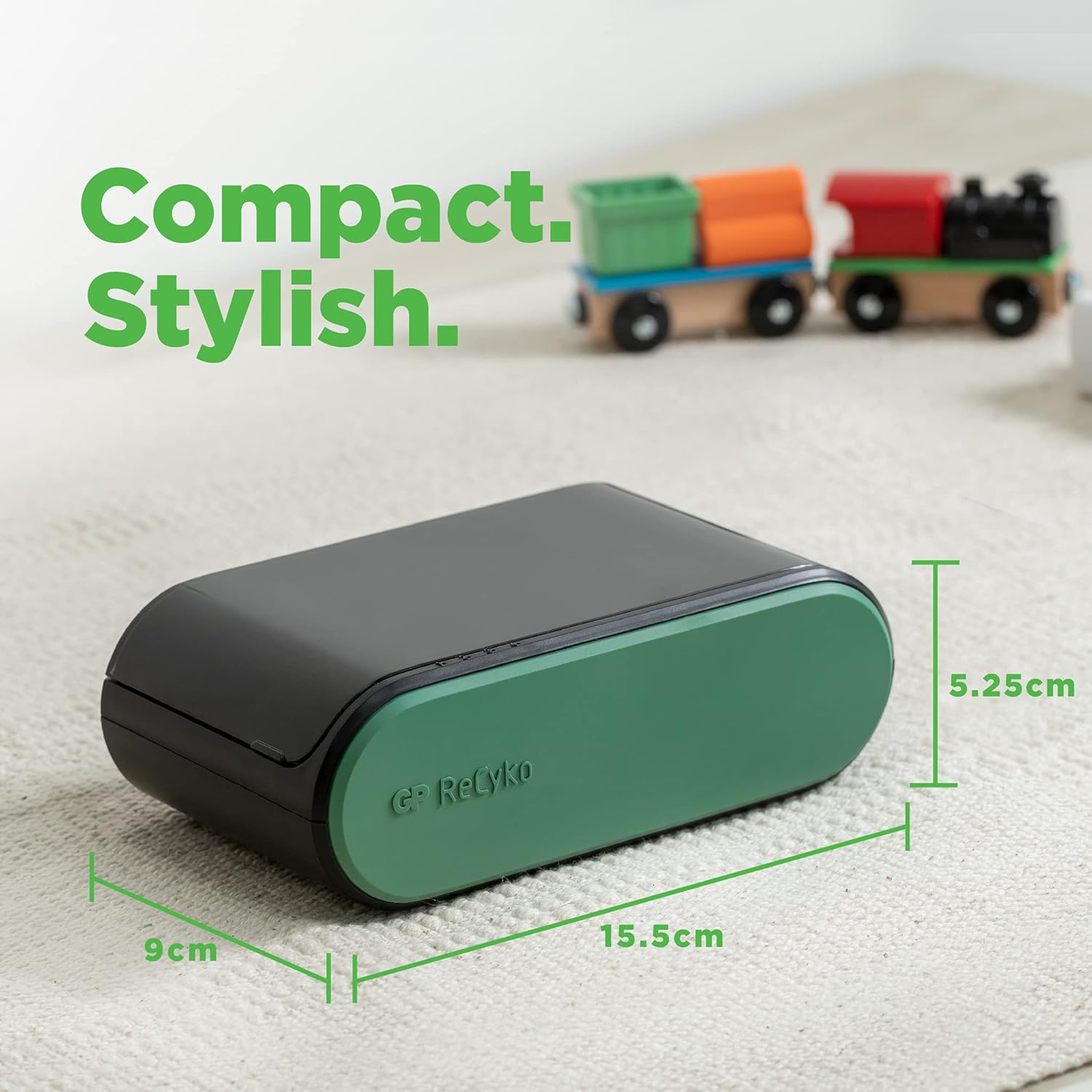
Figure 4: Dimensions of the GP ReCyko B631 Universal Battery Charger.
10. Warranty and Support
For warranty information or technical support, please refer to the documentation included with your purchase or contact GP Battery customer service directly. Contact details can typically be found on the manufacturer's official website.