
Introduction
This manual provides detailed instructions for the setup, operation, and maintenance of your New Direction Tackle N1 Bite Alarm and S9R Receiver set. Please read this guide thoroughly to ensure proper use and to maximize the performance and longevity of your equipment. This system is designed to enhance your fishing experience by providing reliable bite indication.
Package Contents
Carefully unpack your New Direction Tackle N1/S9R set and verify that all components are present. The standard package includes:
- N1 Bite Alarms (quantity as per set, e.g., 2 alarms)
- S9R Receiver
- Quick Coupling System bases
- USB Charging Cable
- Protective Carry Case

Image: The N1/S9R bite alarm set, including alarms, receiver, and accessories, neatly organized within its protective carry case.
Setup
1. Attaching Bite Alarms
The N1 bite alarms feature a quick coupling system for easy and secure attachment to your rod rests or banksticks.
- Screw the quick coupling base onto your rod rest or bankstick. Ensure it is tightened securely.
- Align the N1 bite alarm with the quick coupling base and push it down until it clicks into place.
- To remove, simply pull the alarm upwards from the base.

Image: A New Direction Tackle N1 bite alarm shown with its quick release mechanism, ready for attachment to a rod rest.

Image: A detailed view of the quick coupling system, illustrating how the bite alarm connects to its base.
2. Initial Charging
Before first use, ensure both the N1 bite alarms and the S9R receiver are fully charged using the provided USB cable. Refer to the 'Charging' section for detailed instructions.
3. Rod Placement
Once the alarms are mounted, place your fishing rods securely on them. Ensure the fishing line passes correctly through the alarm's roller wheel for accurate bite detection.

Image: Multiple N1 bite alarms deployed on rod rests, indicating a typical fishing setup with rods in place.
Operating Instructions
1. Powering On/Off
- Bite Alarms (N1): Press and hold the power button on the N1 alarm until the LED illuminates. Repeat to power off.
- Receiver (S9R): Press and hold the power button on the S9R receiver until the screen activates. Repeat to power off.

Image: A close-up of the S9R receiver, showing the power button and display for operational control.
2. Pairing Alarms with Receiver
The N1 alarms and S9R receiver typically come pre-paired. If re-pairing is necessary:
- Ensure both the alarm and receiver are powered on.
- On the S9R receiver, enter pairing mode (refer to the receiver's on-screen menu for specific steps).
- Activate the N1 alarm (e.g., by rolling the line wheel) while the receiver is in pairing mode. The receiver will confirm successful pairing.
3. Adjusting Settings via Receiver (Remote Control Mode)
A unique feature of this system is the ability to adjust N1 alarm settings directly from the S9R receiver.
- Navigate the S9R receiver's menu to select the desired N1 alarm.
- Adjust parameters such as Sensitivity, Volume, and Tone. These changes will be transmitted wirelessly to the selected N1 alarm.
- LED Color: Double-press the button on the N1 alarm to cycle through available LED colors (Red, Green, Blue, Yellow, White). The receiver will display the corresponding color.

Image: An N1 bite alarm illustrating its customizable LED color options, which can be set to Red, Green, Blue, Yellow, or White.
4. Mobile Application Integration
For extended functionality and control, download the dedicated mobile application. The app allows for comprehensive management of your N1/S9R system, including advanced settings and monitoring.
- Download the official New Direction Tackle app from your device's app store.
- Follow the in-app instructions to connect your S9R receiver.
- Access additional features and fine-tune settings directly from your smartphone or tablet.

Image: A representation of the mobile application interface, demonstrating its use on a smartphone and tablet for controlling the bite alarm system.
Features Overview
- Unique Remote Control: The S9R receiver acts as a central control unit, allowing you to adjust all N1 bite alarm settings remotely. This eliminates the need to physically interact with each alarm for adjustments.
- ND Radio System Compatibility: The N1 and S9R utilize the ND radio system, ensuring compatibility with other smart devices from New Direction Tackle, specifically S9, K9s, and TH9s models. Note: Not compatible with K9 and TH9 models.
- P11-Style Quick Coupling System: This integrated system facilitates rapid and secure attachment and detachment of the bite alarms, making setup and pack-down efficient.
- Customizable LED Colors: Personalize your bite alarms with a choice of five LED colors: Red, Green, Blue, Yellow, and White. This allows for easy identification of which rod is receiving a bite.
- Integrated USB Rechargeable Battery: Both the N1 alarms and S9R receiver are equipped with internal, rechargeable Lithium-ion batteries, eliminating the need for disposable batteries.
- Sound Output Options: Receive bite indications audibly through the S9R receiver or connect an external speaker for enhanced sound.
- Comprehensive Mobile Application: Unlock additional features and control options through the dedicated mobile app, providing a seamless user experience.
- Extended Range: The system offers a reliable operating range of up to 150 meters, ensuring you receive notifications even when away from your rods.

Image: An illustration showing multiple N1 bite alarms alongside the S9R receiver, highlighting the system's integrated functionality.

Image: The N1 bite alarm and S9R receiver depicted with an indicator showing their effective communication range of 150 meters.
Charging
Both the N1 bite alarms and the S9R receiver are powered by internal Lithium-ion batteries and are rechargeable via USB.
- Locate the USB charging port on each device. For the N1 alarm, this is typically on the side.
- Connect the provided USB charging cable to the device and to a standard USB power source (e.g., wall adapter, power bank, computer USB port).
- An indicator light on the device will show charging status (e.g., red for charging, green/off for fully charged).
- Charging time may vary. Disconnect the cable once fully charged to preserve battery life.
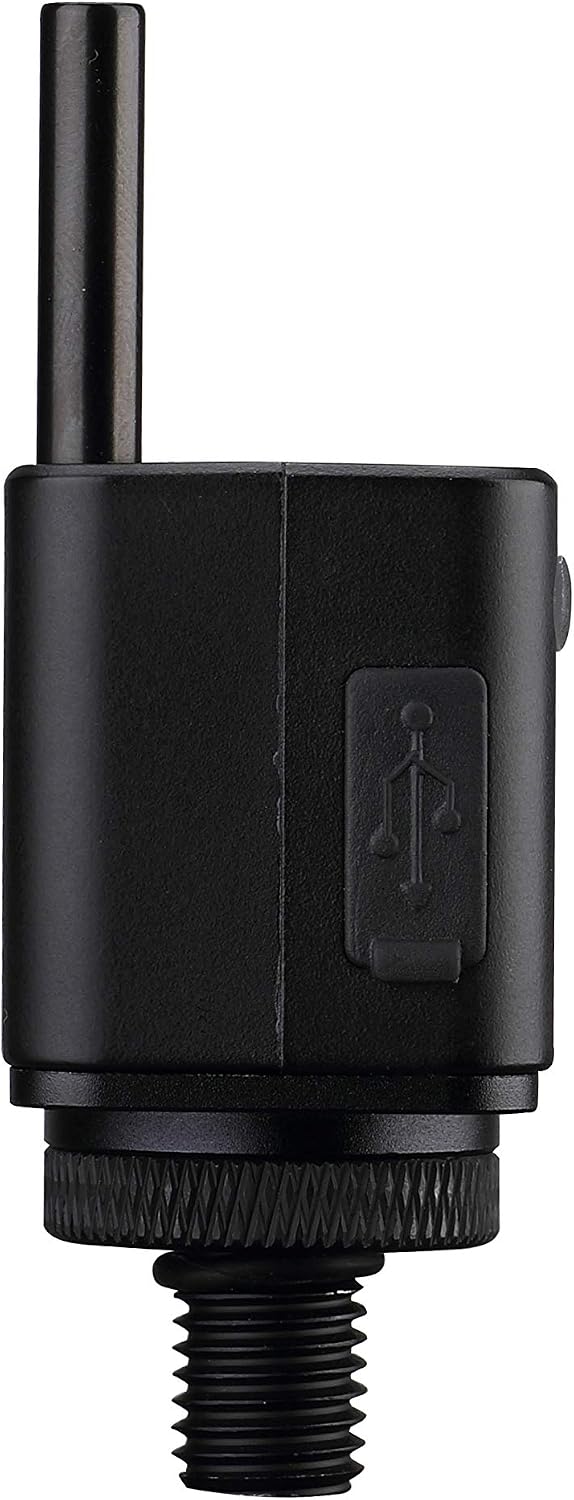
Image: A detailed view of the N1 bite alarm, clearly showing the integrated USB charging port for convenient power replenishment.

Image: A representation of the Lithium-ion battery pack used in New Direction Tackle devices, emphasizing its rechargeable nature.
Maintenance
Proper maintenance ensures the longevity and optimal performance of your N1/S9R bite alarm set.
- Cleaning: After each use, especially in wet or dirty conditions, wipe down the alarms and receiver with a soft, damp cloth. Avoid abrasive cleaners or solvents.
- Storage: Store the devices in their protective carry case in a cool, dry place when not in use. Avoid extreme temperatures.
- Battery Care: For long-term storage, ensure batteries are charged to approximately 50-70%. Recharge every few months to prevent deep discharge.
- Inspection: Periodically check for any signs of wear or damage to the casing, buttons, or charging ports.
Troubleshooting
If you encounter issues with your N1/S9R set, refer to the following common problems and solutions:
| Problem | Possible Cause | Solution |
|---|---|---|
| No power | Low or depleted battery | Charge the device using the USB cable. |
| No signal/connection between alarm and receiver | Out of range, interference, or unpaired devices | Move closer to the alarms. Check for strong interference sources. Re-pair the alarm and receiver as per 'Operating Instructions'. |
| Alarm not detecting bites | Incorrect line placement, low sensitivity setting | Ensure the fishing line is correctly seated in the roller wheel. Increase the sensitivity setting via the receiver or mobile app. |
| Receiver sound issues | Volume too low, external speaker not connected properly | Adjust receiver volume. Check connection of any external speaker. |
If the problem persists after attempting these solutions, please contact New Direction Tackle customer support for further assistance.
Specifications
- Brand: New Direction Tackle
- Model: N1 Bite Alarm / S9R Receiver
- Power Source: 1 Lithium-ion battery (included) per device
- Charging: USB Rechargeable
- Dimensions (Package): 23.2 x 19 x 6.9 cm
- Weight (Package): 440 grams
- Connectivity: ND Radio System, Mobile Application
- Operating Range: Up to 150 meters
- LED Colors: Red, Green, Blue, Yellow, White
Warranty and Support
New Direction Tackle products are manufactured to high-quality standards. For information regarding warranty coverage, returns, or technical support, please refer to the official New Direction Tackle website or contact their customer service directly. Keep your purchase receipt as proof of purchase for any warranty claims.


