1. Introduction
Thank you for purchasing the Ivation 12,000 BTU Portable Air Conditioner with Wi-Fi. This manual provides essential information for the safe and efficient operation, maintenance, and troubleshooting of your appliance. Please read this manual thoroughly before use and retain it for future reference.
2. Safety Information
WARNING: To reduce the risk of fire, electrical shock, or injury, read and follow all instructions and warnings before using this appliance.
- Always use a grounded 3-prong outlet. Do not remove the grounding prong.
- Do not operate the unit with a damaged cord or plug.
- Ensure the unit is placed on a flat, stable surface.
- Do not block air inlets or outlets. Maintain at least 20 inches of clearance around the unit.
- Unplug the unit before cleaning or servicing.
- Do not use in wet areas like bathrooms or laundry rooms.
- Keep children and pets away from the unit.
- This appliance contains R410A refrigerant. Servicing should only be performed by authorized personnel.
3. Package Contents
Verify that all items are present and in good condition:
- Ivation 12,000 BTU Portable Air Conditioner Unit
- Remote Control (with batteries)
- Exhaust Hose (59 inches extendable)
- Window Panel Assembly (adjustable from 26.5 to 50 inches)
- User Manual
4. Product Overview
4.1 Control Panel and Remote Control
The unit features an easy-to-read LCD display and a control panel for direct operation. A remote control is also included for convenient adjustments from a distance.

Image: Top-down view of the Ivation portable air conditioner's control panel, showing buttons for Power, Mode, Temperature Up/Down, Fan, and Timer. An accompanying remote control is also pictured, displaying similar functions and an LCD screen.
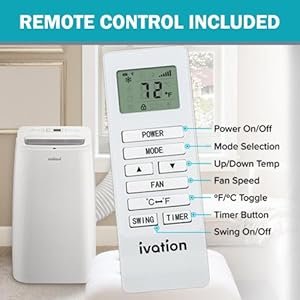
Image: Close-up of the remote control for the Ivation portable air conditioner, highlighting buttons for Power On/Off, Mode Selection, Up/Down Temperature, Fan Speed, °F/°C Toggle, Timer, and Swing On/Off.
4.2 My Ivation Smart App Control
The unit is Wi-Fi enabled, allowing control via the free My Ivation app on Android or Apple devices. This enables remote monitoring and adjustment of temperature, mode, fan speed, and timer settings.

Image: A smartphone screen displaying the My Ivation app interface, showing current temperature, mode display, fan speed, swing on/off, timer, schedule, and power on/off controls.
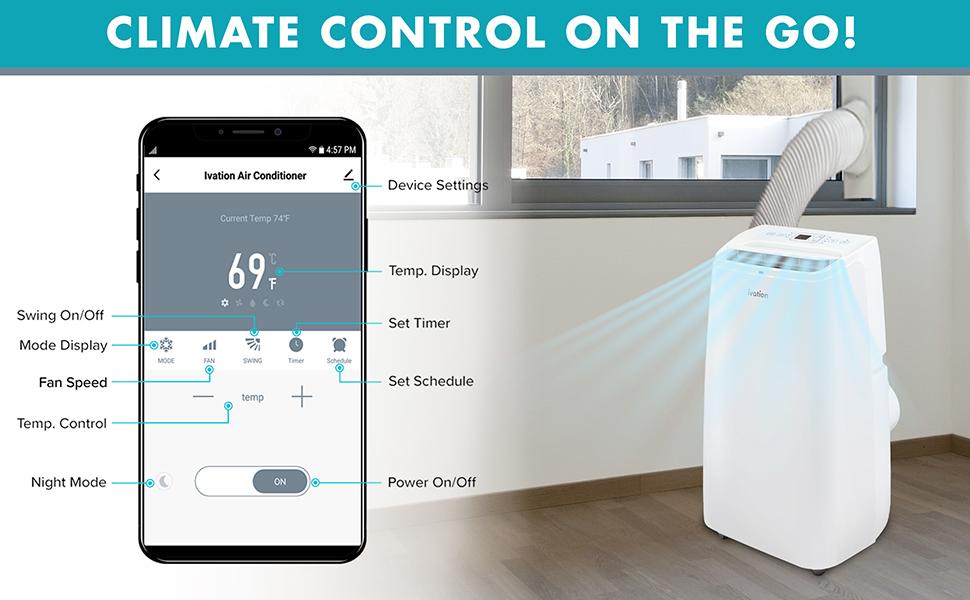
Image: A portable air conditioner unit next to a window with its exhaust hose connected, while a smartphone displays the My Ivation app, illustrating remote climate control capabilities.
5. Setup
5.1 Exhaust Hose and Window Kit Installation
The unit requires proper ventilation to exhaust hot air. Install the exhaust hose and window panel assembly as follows:
- Connect the exhaust hose to the rear of the air conditioner unit.
- Assemble the adjustable window panel to fit your window opening (26.5 to 50 inches).
- Insert the other end of the exhaust hose into the opening of the window panel.
- Secure the window panel in the window, ensuring a tight seal to prevent air leakage.

Image: The Ivation portable air conditioner unit shown with its exhaust hose connected to the back and extending to a window, where it is fitted into an adjustable window panel.
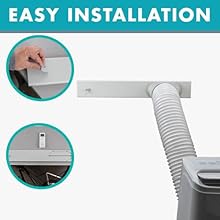
Image: Diagram illustrating the simple steps for installing the exhaust hose and adjustable window panel for the portable air conditioner.
5.2 Drainage Options
The unit offers two drainage methods for condensed water:
- Manual Drainage: The internal reservoir collects water. When full, the unit will indicate and stop operation. Manually drain the water using the drain plug.
- Continuous Drainage: Connect a drain hose (not included) to the continuous drain port for automatic water removal.
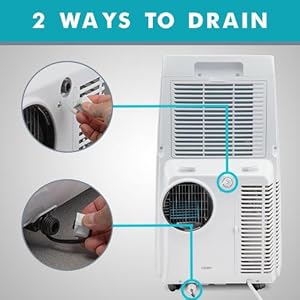
Image: Diagrams showing the two drainage options for the portable air conditioner: manual drainage from a lower port and continuous drainage from an upper port.
6. Operating Instructions
6.1 Modes of Operation
This 3-in-1 unit offers the following modes:
- Cool: Provides powerful cooling for rooms up to 450 sq ft.
- Dehumidifier: Removes excess moisture from the air.
- Fan: Circulates air without cooling.

Image: A smartphone screen showing the mode selection within the My Ivation app, with options for 'Cold', 'Fan', and 'Dry' (dehumidifier).
6.2 Temperature and Fan Speed Adjustment
Adjust the desired temperature using the up/down arrows on the control panel or remote. Select from High, Mid, or Low fan speeds to control airflow.
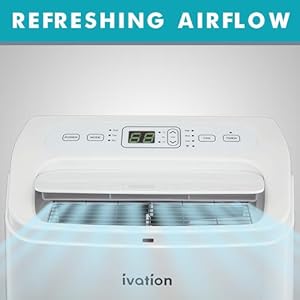
Image: Close-up of the top of the Ivation portable air conditioner, showing the air outlet with refreshing airflow indicated by blue lines.
6.3 Timer and Scheduling
Set a timer for automatic power on/off using the Timer button on the unit or remote. For advanced scheduling, use the My Ivation app.
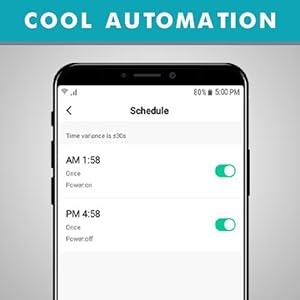
Image: A smartphone screen showing the 'Schedule' feature in the My Ivation app, allowing users to set specific times for the air conditioner to power on or off.
6.4 Wi-Fi Connectivity
To connect your unit to Wi-Fi, download the My Ivation app. Follow the in-app instructions for pairing. The Wi-Fi status light on the control panel indicates connectivity.
Video: This video demonstrates the Wi-Fi connectivity and smart app control features of the Ivation Portable Air Conditioner, showing how to pair the device and adjust settings remotely.
7. Maintenance
7.1 Filter Cleaning
Regularly clean the washable air filter to maintain optimal performance and air quality. Remove the filter from the back of the unit, wash with mild detergent and water, then dry completely before reinserting.

Image: Rear view of the Ivation portable air conditioner, highlighting the removable air filter for cleaning and maintenance.
7.2 Water Drainage
If using manual drainage, regularly check the water reservoir and drain it when full to prevent the unit from stopping operation.
8. Troubleshooting
| Problem | Possible Cause | Solution |
|---|---|---|
| Unit does not turn on | No power, power cord not plugged in, circuit breaker tripped. | Check power connection, reset circuit breaker. |
| Unit not cooling effectively | Air filter dirty, room too large, windows/doors open, exhaust hose not properly installed. | Clean air filter, ensure room size is within specifications, close windows/doors, check exhaust hose installation. |
| Water leakage | Drain plug loose, continuous drain hose not properly connected. | Secure drain plug, ensure continuous drain hose is tightly connected. |
| Unit is noisy | Normal operation sound, unit not on a level surface. | Ensure unit is on a level surface. Some operational noise is normal for portable AC units. |
9. Specifications
| Feature | Detail |
|---|---|
| Brand | Ivation |
| Model Number | IVAPACWIFI12K |
| Cooling Power (ASHRAE) | 12,000 BTU/Hr |
| Cooling Power (SACC) | 8,000 BTU/Hr |
| Area Coverage | Up to 450 Sq Ft |
| Functions | Air Conditioner, Dehumidifier, Fan |
| Control | Control Panel, Remote, Wi-Fi App |
| Noise Level | 55 Decibels |
| Voltage | 115 Volts |
| Wattage | 1150 watts |
| Item Weight | 60.5 pounds |
| Product Dimensions | 14.17"D x 20.51"W x 28.74"H |
| Refrigerant | R 410A |
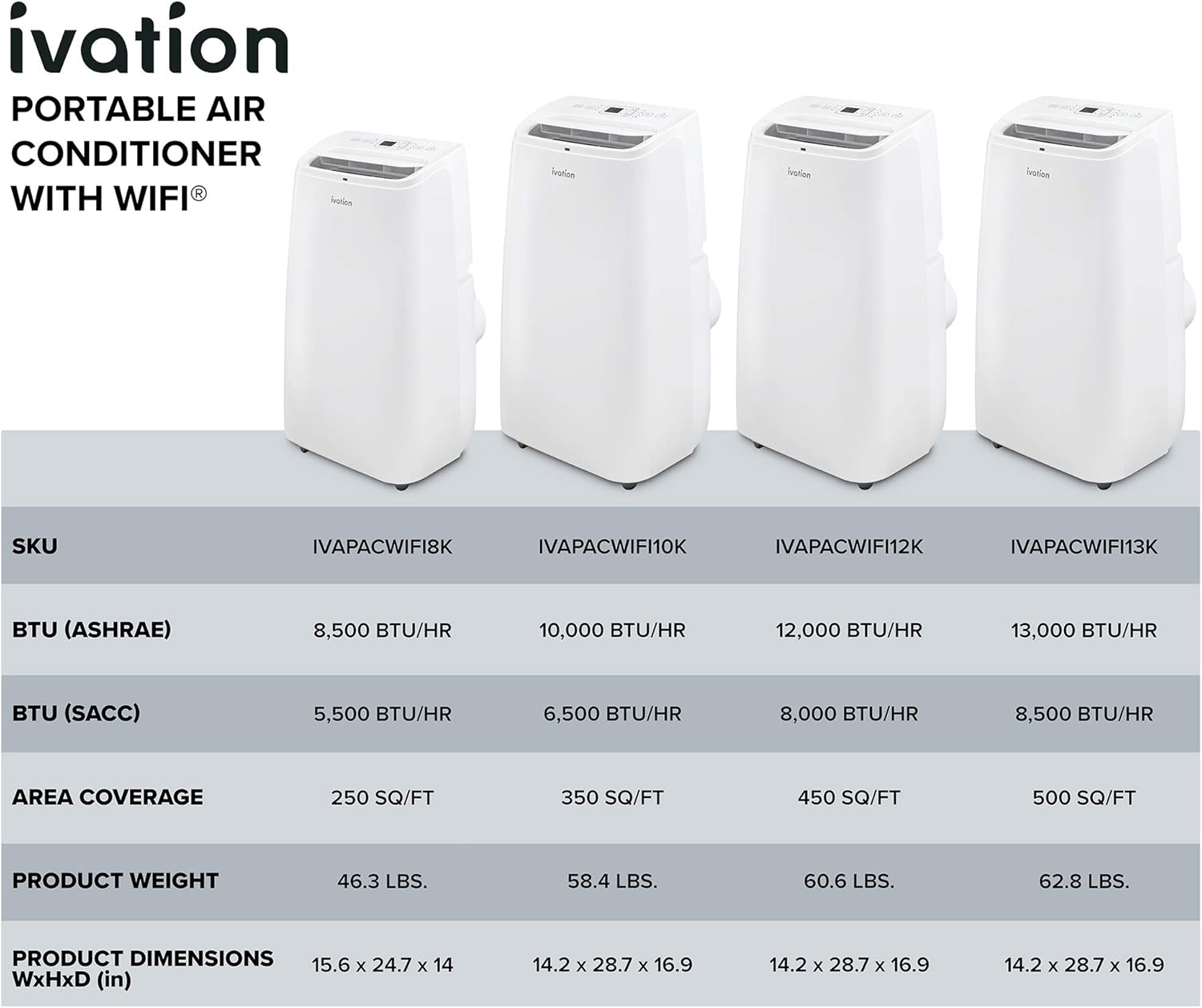
Image: A table comparing different Ivation portable air conditioner models (IVAPACWIFI8K, IVAPACWIFI10K, IVAPACWIFI12K, IVAPACWIFI13K) by SKU, BTU (ASHRAE), BTU (SACC), Area Coverage, Product Weight, and Product Dimensions.
Image: A diagram showing the dimensions of the Ivation portable air conditioner: 28.74 inches in height, 14.17 inches in depth, and 20.51 inches in width.
10. Warranty and Support
For warranty information and customer support, please refer to the contact details provided in your product packaging or visit the official Ivation website. Keep your purchase receipt as proof of purchase for any warranty claims.


