
Product Overview
The techno line WS9218 is a wireless weather station designed to provide comprehensive weather information for your home. It features a DCF-77 radio-controlled clock, 12/24 hour time display, time zone setting, calendar function, and day of the week display in 7 languages. The station monitors indoor and outdoor temperature, indoor and outdoor humidity, atmospheric pressure, and provides a weather forecast. It also includes an alarm with a 5-minute snooze function and moon phase display. The system supports up to three outdoor sensors (one TX106-TH sensor is included).
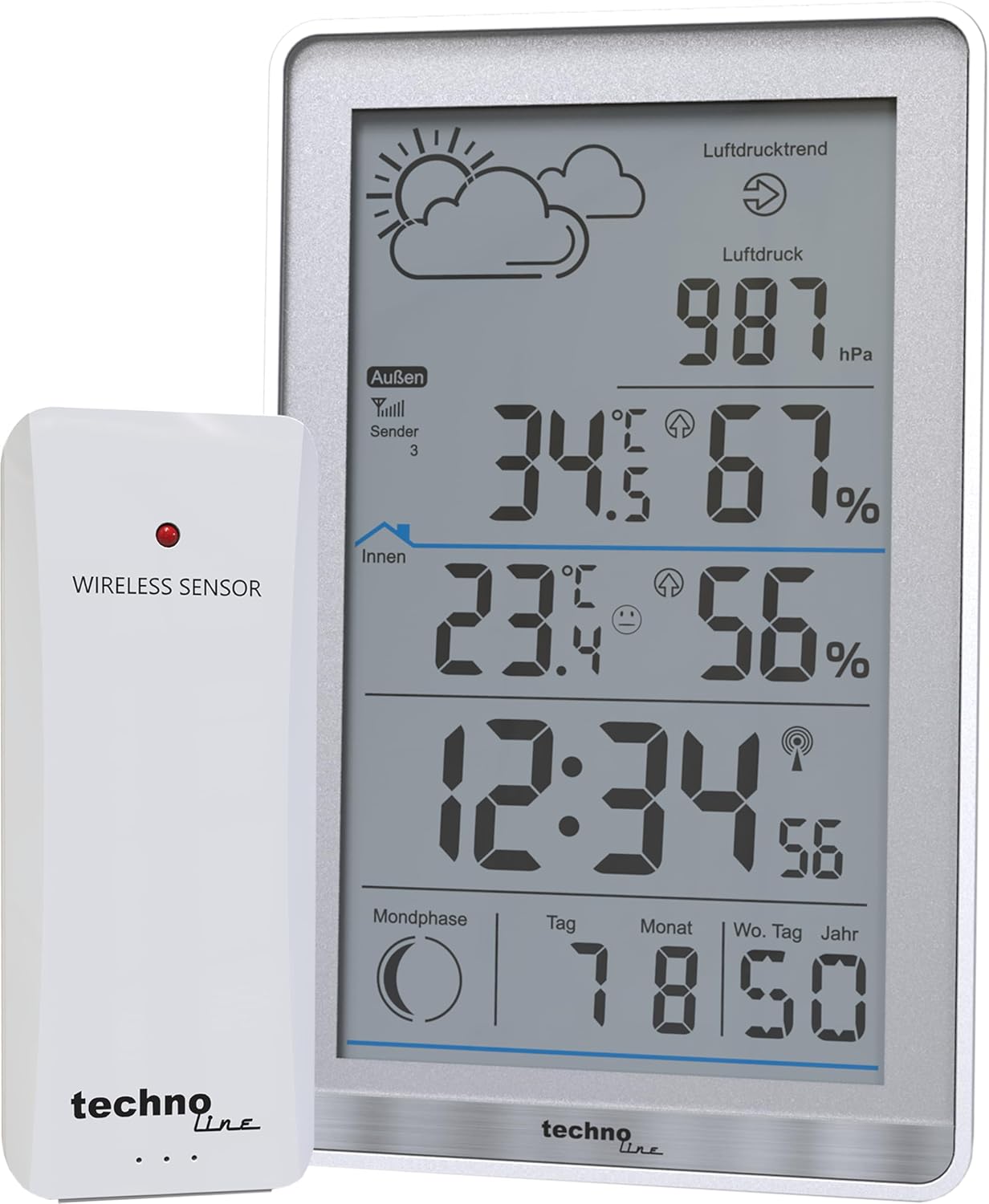
Image: The techno line WS9218 main unit and its accompanying wireless outdoor sensor.
Setup
1. Battery Installation
The weather station requires 4 AAA batteries for operation. Ensure correct polarity when inserting batteries.
- Outdoor Sensor (TX106-TH): Open the battery compartment on the back of the outdoor sensor. Insert the required batteries. Close the compartment securely.
- Main Unit (WS9218): Open the battery compartment on the back of the main weather station unit. Insert the required batteries. Close the compartment securely.

Image: The TX106-TH wireless outdoor sensor, where batteries are installed.
2. Sensor Pairing and Initial Data Reception
After battery installation, the main unit will automatically attempt to connect with the outdoor sensor and receive the DCF-77 radio signal for time synchronization.
- Place the outdoor sensor within 100 meters (open field) of the main unit.
- The main unit will display outdoor temperature and humidity once connected.
- The DCF-77 signal reception icon will flash during synchronization and become solid once the time is set.
3. Placement Recommendations
- Main Unit: Place the main unit on a flat surface indoors, away from direct sunlight and heat sources, for accurate indoor readings.
- Outdoor Sensor: Mount the outdoor sensor in a shaded, well-ventilated area, protected from direct rain and sunlight, to ensure accurate outdoor temperature and humidity measurements. Avoid placing it near large metal objects or electrical appliances that could interfere with the wireless signal.
Operating Instructions
Display Overview

Image: The main display unit of the techno line WS9218, showing various weather parameters.
The main unit's display is organized to show various data points clearly:
- Top Section: Weather forecast icons (sunny, cloudy, rainy), atmospheric pressure trend, and current atmospheric pressure in hPa.
- Middle-Top Section: Outdoor temperature and humidity, along with the outdoor sensor signal strength and channel number.
- Middle-Bottom Section: Indoor temperature and humidity.
- Bottom Section: Current time (radio-controlled), moon phase, and calendar (day, month, day of week, year).
Key Functions
- Time and Date: The DCF-77 radio-controlled clock automatically sets the time and date. You can switch between 12/24 hour format and adjust the time zone. The calendar displays the day, month, and year, with the day of the week available in 7 languages (English, German, French, Italian, Spanish, Dutch, Danish).
- Temperature and Humidity: Displays current indoor and outdoor temperature (in Celsius or Fahrenheit) and humidity percentages.
- Atmospheric Pressure: Shows the current atmospheric pressure in hPa and indicates the pressure trend.
- Weather Forecast: Provides a graphical weather forecast based on atmospheric pressure changes.
- Alarm with Snooze: Set an alarm with a 5-minute snooze function. Refer to the specific buttons on the device for setting the alarm.
- Moon Phases: Displays the current moon phase.
- Low Battery Indicator: An icon will appear on the display when batteries need replacement for either the main unit or the outdoor sensor.
- Multiple Sensors: The station can receive data from up to three outdoor sensors. The included TX106-TH is one such sensor.
Maintenance
- Battery Replacement: Replace batteries in both the main unit and outdoor sensor when the low battery indicator appears. Always replace all batteries at the same time.
- Cleaning: Clean the display and casing of the weather station and sensor with a soft, damp cloth. Do not use abrasive cleaners or solvents.
- Environmental Protection: Ensure the outdoor sensor remains protected from extreme weather conditions to prolong its lifespan and accuracy.
Troubleshooting
- Outdoor Sensor Not Receiving Data: If the outdoor transmitter data is not displayed or is incorrect, perform a restart:
- Take both the main station and the outdoor transmitter.
- Remove all batteries from both devices.
- Wait for a few moments (e.g., 1-2 minutes).
- First, insert the batteries into the outdoor transmitter.
- Then, insert the batteries into the main station.
- The data should be received and displayed within a few minutes.
- Incorrect Time Display: Ensure the main unit is placed in an area where it can receive the DCF-77 radio signal. Avoid placing it near electronic devices that may cause interference. Allow sufficient time for synchronization.
- Display is Dim or Blank: Check the batteries in the main unit and replace them if necessary. Ensure the display is viewed from an optimal angle.
- Inaccurate Readings: Verify that both the main unit and the outdoor sensor are placed according to the recommendations in the Setup section, away from direct heat, cold, or moisture sources.
Specifications
| Feature | Detail |
|---|---|
| Model Number | WS9218 |
| Brand | techno line |
| Power Source | Battery Powered (4 AAA batteries required) |
| Product Dimensions (L x W x H) | 3.19 x 1.57 x 5.2 cm; 230 grams |
| Indoor Temperature Range | 0 ℃ to +50 ℃ (32 ℉ to 122 ℉) |
| Outdoor Temperature Range | -40 ℃ to +70 ℃ (-40 ℉ to 158 ℉) |
| Air Humidity Range | 20% to 95% |
| Atmospheric Pressure Range | 800-1100 hPa |
| Transmitter Frequency | 434 MHz |
| Wireless Range (Transmitter - Station) | Up to 100 m (open field) |
| Connectivity Technology | Wireless |
| Material | Plastic |
| Special Feature | Alarm |
Warranty and Support
Warranty information for the techno line WS9218 Wireless Weather Station is typically provided with your purchase documentation or can be found on the manufacturer's official website. Please retain your proof of purchase for warranty claims.
For further support, technical assistance, or to inquire about spare parts, please visit the official techno line website or contact their customer service department. Specific contact details are usually available on the product packaging or the manufacturer's website.