
Zing ZG789R
Zing Go Go Bird - Remote Control Flying Toy User Manual
Model: ZG789R | Brand: Zing
Introduction
The Zing Go Go Bird is an innovative remote-controlled flying toy designed to mimic the flight of a real bird. It combines bionics, AI, aerodynamics, and precision machinery to offer an engaging and realistic flying experience. This manual provides essential information for setting up, operating, maintaining, and troubleshooting your Go Go Bird.
Key features include flapping wings, autonomous obstacle avoidance, a 6-axis sensor for stable flight, and a lightweight, durable design. It is suitable for outdoor use and features LED lights for enhanced visibility during night flights.
Package Contents
Please verify that all items listed below are present in your package:
- 1 x Go Go Bird Flying Toy (Red)
- 1 x Remote Control
- 2 x Rechargeable Lithium Batteries for Go Go Bird
- 1 x USB Charging Cable/Adapter
- 1 x Display Stand
- 1 x Small Screwdriver (for battery compartment)
- 1 x User Manual (this document)
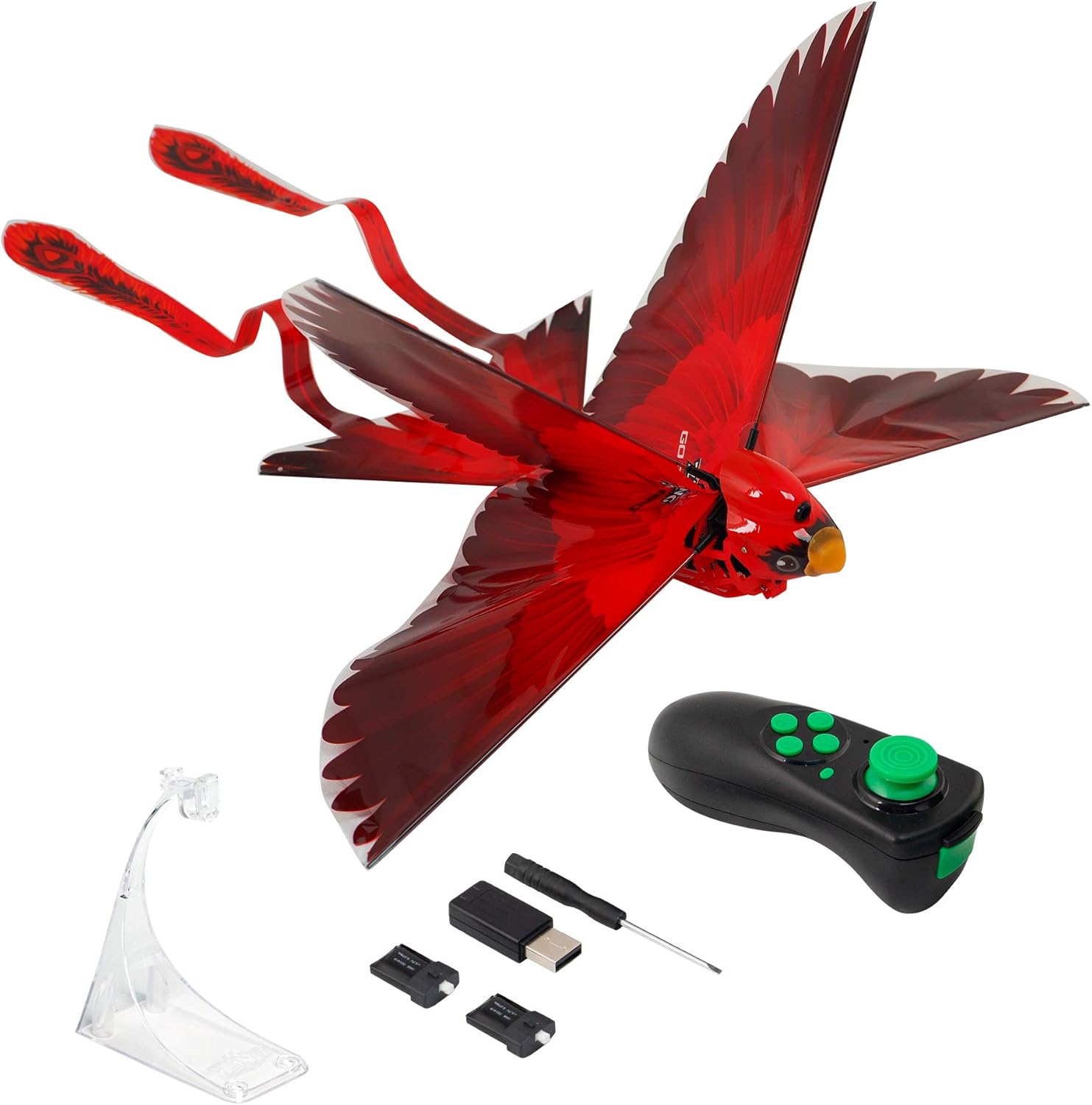
Image: The Go Go Bird, its remote control, and the clear display stand, as typically found in the product package.

Image: The Go Go Bird in its eco-friendly packaging, alongside the quick start guide and included accessories.
Setup
- Install Remote Control Batteries:
The remote control requires 2 AAA batteries (included). Open the battery compartment on the back of the remote using the provided screwdriver. Insert the batteries, ensuring correct polarity (+/-), then close the compartment.
- Charge Go Go Bird Batteries:
The Go Go Bird uses rechargeable Lithium batteries. Connect the battery to the USB charging cable and plug it into a USB power source (e.g., computer, wall adapter). The battery indicator light will show charging status. A full charge takes approximately 20 minutes and provides about 15 minutes of flight time. Ensure the battery is fully charged before first use.
- Insert Go Go Bird Battery:
Locate the battery compartment on the Go Go Bird. Carefully insert a charged battery, ensuring it is securely connected. The bird's power indicator light should illuminate.
- Power On:
Press the power button on the Go Go Bird to turn it on. The bird's LED lights will activate. Ensure the remote control is also powered on.
Operating Instructions
The Go Go Bird is designed for outdoor flight in open spaces, away from obstacles, people, and animals. Always ensure a clear flight path.
Basic Flight
- Launch: Hold the Go Go Bird gently and give it a soft toss forward. The wings will begin flapping automatically.
- Remote Control: Use the joystick on the remote control to steer the bird.
- Left Joystick: Controls altitude (up/down) and turning (left/right).
- Right Joystick/Buttons: May control pre-set circling flight options or special maneuvers.
- Flight Range: The Go Go Bird can be controlled from up to 200 feet away.

Image: Two Go Go Birds in flight, demonstrating the ability to control them from a distance of up to 200 feet.

Image: The Go Go Bird in mid-flight, showcasing its realistic bird-like movement and the potential for aerial maneuvers via the remote control.
Advanced Features
- Autonomous Obstacle Avoidance: The Go Go Bird is equipped with infrared sensors that enable it to detect and avoid obstacles. It will automatically turn approximately 6 feet away from walls or trees.

Image: The Go Go Bird demonstrating its smart obstacle avoidance by veering away from a tree.
- 6-Axis Sensor: An internal 6-axis sensor provides stable flight and automatically stops the wings when the bird lands on the ground.
- Night Flying: The Go Go Bird features 7 bright color-changing LED lights, making it visible and spectacular for flying in low-light conditions or at night.
Maintenance
- Battery Care: Always fully charge the Go Go Bird batteries before use. Do not overcharge. If storing for extended periods, charge the batteries to about 50% capacity. Remove batteries from the remote control if not in use for a long time.
- Cleaning: Wipe the Go Go Bird and remote control with a soft, dry cloth. Do not use harsh chemicals or immerse in water.
- Storage: Store the Go Go Bird in a cool, dry place, away from direct sunlight and extreme temperatures. The included display stand can be used for convenient storage and display.
- Durability: The Go Go Bird is made from lightweight, flexible, and collision-resistant materials. While designed to withstand minor impacts, avoid intentional crashes or rough handling to prolong its lifespan.
Troubleshooting
| Problem | Possible Cause | Solution |
|---|---|---|
| Go Go Bird does not fly or loses power quickly. |
|
|
| Obstacle avoidance not working effectively. |
|
|
| Bird flies erratically or is difficult to control. |
|
|
Specifications
| Model Number | ZG789R |
| Product Dimensions | 17.78 x 30.48 x 7.62 cm (7 x 12 x 3 inches) |
| Item Weight | 257.98 g (9.1 Ounces) |
| Power Source | Battery Powered (Rechargeable Lithium for Bird, AAA for Remote) |
| Batteries Required | Yes (2 AAA for remote, 2 Lithium for bird - included) |
| Manufacturer Recommended Age | 8 years and up |
| Special Features | Portable, Rechargeable, Autonomous Obstacle Avoidance, 6-Axis Sensor, LED Lights |
| Color | Red |

Image: Detailed diagram illustrating the Go Go Bird's dimensions and internal components such as the rechargeable battery, lightweight body, infrared sensor, and rudder for steering.
Warranty and Support
For product support, warranty information, or to report issues not covered in this manual, please contact Zing customer service. Refer to the product packaging or the official Zing website for the most current contact details.
Please retain your proof of purchase for warranty claims.
Ask a question about this manual
Ask about setup, troubleshooting, compatibility, parts, safety, or missing instructions. Manuals+ will review the question and use this page’s manual context to help answer it.