
Billboard BB2530
Contents
Billboard Dual 8" Rechargeable Bluetooth Speaker
Model: BB2530
Introduction
Thank you for purchasing the Billboard Dual 8" Rechargeable Bluetooth Speaker. This manual provides essential information for the safe and efficient operation of your new speaker. Please read it thoroughly before use and retain it for future reference.
This speaker is designed to deliver powerful audio with versatile connectivity options, including Bluetooth, FM radio, USB, SD card, and auxiliary input. Its full panel lighting effect enhances any gathering, making it ideal for outdoor events, karaoke parties, and general music enjoyment.
Safety Information
To ensure safe operation and prevent damage, please observe the following precautions:
- Do not expose the speaker to water or excessive moisture. This product is not waterproof.
- Do not open the speaker casing. There are no user-serviceable parts inside. Refer all servicing to qualified personnel.
- Keep the speaker away from heat sources, direct sunlight, and flammable materials.
- Use only the specified charging adapter (if included) or a compatible power source.
- Ensure proper ventilation around the speaker during operation.
- Avoid placing heavy objects on top of the speaker.
- Clean only with a dry cloth. Do not use liquid cleaners or aerosol sprays.
- Keep out of reach of children.
Package Contents
Please check the box for the following items:
- Billboard Dual 8" Rechargeable Bluetooth Speaker (Model: BB2530)
- Power Adapter (AC cable)
- User Manual
- Remote Control
Note: While the product description mentions microphone inputs, microphones are not included in the standard package.
Product Overview
Familiarize yourself with the main components and controls of your speaker.
Front Panel

Figure 1: Front View of the Speaker. Shows the dual 8-inch woofers with dynamic LED lighting and the Billboard logo at the bottom.
The front panel features the dual 8-inch woofers, which are illuminated by the full panel lighting effect. The display screen is located at the top, showing the current mode or status.
Top Control Panel

Figure 2: Top Control Panel. This image displays the layout of all controls, including microphone inputs, USB/SD slots, volume knobs, and mode selection buttons.
The top panel houses all the primary controls and input/output ports:
- MIC-1 / MIC-2 Inputs: For connecting wired microphones.
- LINE IN (AUX) Input: 3.5mm jack for connecting external audio devices.
- USB Port: For playing audio from USB flash drives.
- TF CARD (SD) Slot: For playing audio from TF/SD cards.
- LED ON/OFF Switch: Controls the front panel lighting.
- POWER ON/OFF Switch: Turns the speaker on or off.
- MIC VOL Knob: Adjusts microphone volume.
- VOLUME Knob: Adjusts master volume.
- ECHO- / ECHO+ Buttons: Adjusts microphone echo effect.
- LIGHT Button: Cycles through different lighting modes.
- REC Button: Records microphone input (if supported).
- REPEAT Button: Repeats current track or playlist.
- PREVIOUS / NEXT Buttons: Skips tracks or tunes radio stations.
- PLAY/PAUSE Button: Plays or pauses audio.
- TWS Button: Initiates True Wireless Stereo pairing.
- MODE Button: Switches between input modes (Bluetooth, FM, USB, SD, AUX).
- BLUE (Bluetooth) Button: Activates Bluetooth pairing mode.
- MEGA BASS Button: Enhances bass output.
- MENU Button: Accesses additional settings or functions.
Setup
Charging the Speaker
- Locate the AC power input on the rear panel of the speaker.
- Connect the provided power adapter cable to the speaker's AC input.
- Plug the other end of the power adapter into a standard wall outlet (AC 100-240V, 50/60Hz).
- The charging indicator light (if present) will illuminate, typically red, to show that the speaker is charging. It will turn off or change color (e.g., green) when fully charged.
- For optimal battery life, fully charge the speaker before first use. A full charge typically takes several hours.
Initial Power On
- Ensure the speaker is charged or connected to power.
- Flip the POWER ON/OFF switch on the top control panel to the "ON" position.
- The display will light up, and the speaker will typically enter Bluetooth pairing mode by default.
Operating Instructions
Bluetooth Mode
- Turn on the speaker. It should automatically enter Bluetooth mode, indicated by "BLUE" on the display and a flashing Bluetooth icon or audible prompt. If not, press the MODE button until "BLUE" is displayed.
- Enable Bluetooth on your mobile device (smartphone, tablet, laptop).
- Search for available Bluetooth devices. You should see "BB2530" or "Billboard Speaker" in the list.
- Select the speaker to pair. Once connected, the speaker will confirm with an audible tone, and "BLUE" on the display may stop flashing.
- You can now play audio from your device through the speaker. Use the VOLUME knob on the speaker or your device's volume controls to adjust the sound level.
FM Radio Mode
- Press the MODE button repeatedly until "FM" is displayed.
- To auto-scan and save available stations, press and hold the PLAY/PAUSE button. The speaker will scan and store stations automatically.
- Use the PREVIOUS and NEXT buttons to navigate between saved FM stations.
USB / SD Card Mode
- Insert a USB flash drive into the USB Port or an SD card into the TF CARD (SD) Slot.
- The speaker will automatically switch to USB or SD mode and begin playing audio files (MP3, WAV, etc.) from the inserted media. If not, press the MODE button until "USB" or "SD" is displayed.
- Use the PLAY/PAUSE, PREVIOUS, and NEXT buttons to control playback.
- Press the REPEAT button to cycle through repeat modes (e.g., repeat one, repeat all).
AUX (Line In) Mode
- Connect one end of a 3.5mm audio cable (not included) to the LINE IN port on the speaker.
- Connect the other end of the audio cable to the headphone jack or audio output of your external device (e.g., MP3 player, computer).
- Press the MODE button until "LINE" or "AUX" is displayed.
- Play audio from your external device. Adjust volume using both the speaker's VOLUME knob and your device's volume controls.
Microphone and Karaoke Function
- Plug a wired microphone (not included) into either the MIC-1 or MIC-2 input.
- Adjust the microphone volume using the MIC VOL knob.
- Use the ECHO- and ECHO+ buttons to add or reduce echo effect to your voice.
- To record your microphone input (if supported by the speaker's firmware), press the REC button. Ensure a USB drive or SD card is inserted to save recordings.
True Wireless Stereo (TWS) Function
The TWS function allows you to pair two BB2530 speakers together for a true stereo sound experience.
- Ensure both BB2530 speakers are powered on and in Bluetooth mode, but not connected to any device.
- On one of the speakers (this will be the primary speaker), press the TWS button. The speaker will emit a pairing tone and search for the second speaker.
- The two speakers will automatically connect to each other. Once connected, you will hear a confirmation tone.
- Now, connect your mobile device to the primary speaker via Bluetooth as described in the "Bluetooth Mode" section.
- Audio will now play in stereo across both speakers.
- To disconnect TWS, press the TWS button on either speaker again.
Lighting Effects
The speaker features dynamic full panel lighting. You can control it using the dedicated buttons.
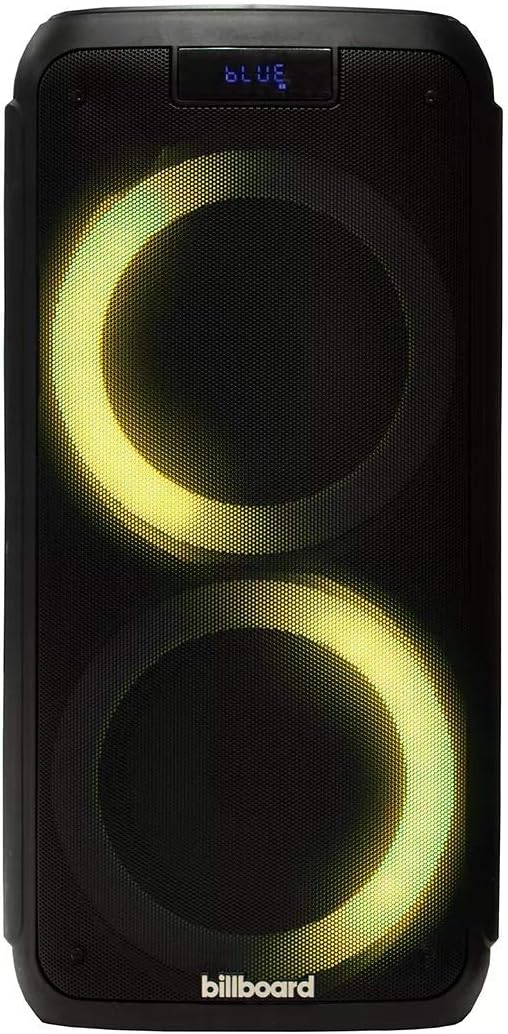
Figure 3: Speaker with Yellow Lighting. Demonstrates one of the available lighting color options.
- Flip the LED ON/OFF switch to turn the lighting on or off.
- Press the LIGHT button to cycle through different lighting modes and colors.
Maintenance
- Cleaning: Use a soft, dry cloth to wipe the exterior of the speaker. Do not use abrasive cleaners, waxes, or solvents.
- Storage: When not in use for extended periods, store the speaker in a cool, dry place, away from direct sunlight and extreme temperatures.
- Battery Care: To prolong battery life, avoid fully discharging the battery frequently. Recharge the speaker regularly, even if not in use, to maintain battery health.
- Ventilation: Ensure the speaker's ventilation openings are not blocked to prevent overheating.
Troubleshooting
| Problem | Possible Cause | Solution |
|---|---|---|
| Speaker does not turn on. | Battery is depleted. Power switch is off. | Charge the speaker. Ensure the POWER switch is in the "ON" position. |
| No sound from speaker. | Volume is too low. Incorrect input mode selected. Device not connected properly. | Increase the speaker's VOLUME knob and your device's volume. Press the MODE button to select the correct input (Bluetooth, AUX, USB, SD, FM). Re-pair Bluetooth device or re-connect AUX cable/USB/SD card. |
| Bluetooth pairing fails. | Speaker not in pairing mode. Device too far from speaker. Interference. | Ensure speaker is in Bluetooth mode (flashing "BLUE"). Press the BLUE button if needed. Move device closer to the speaker (within 30 feet/10 meters). Avoid obstacles or other wireless devices. |
| FM radio reception is poor. | Weak signal. Environmental interference. | Reposition the speaker for better reception. Try auto-scanning again. |
| USB/SD card not playing. | Unsupported file format. Corrupted media. Incorrect mode. | Ensure files are in supported formats (e.g., MP3, WAV). Try a different USB drive or SD card. Press MODE to select USB or SD. |
Specifications
| Model Name | BB2530 |
| Brand | Billboard |
| Speaker Type | Woofer |
| Speaker Size | 8 Inches (Dual Woofers) |
| Maximum Output Power | 8000W P.M.P.O |
| Connectivity Technology | Bluetooth, Auxiliary (3.5mm), USB, SD Card, FM Radio |
| Wireless Communication | Bluetooth |
| Power Source | Battery Powered (Rechargeable) |
| Control Method | Remote, On-board Controls |
| Microphone Inputs | 2 (MIC-1, MIC-2) |
| Special Features | Full Panel Lighting, TWS (True Wireless Stereo), FM Radio, Karaoke Function |
| Dimensions (L x W x H) | 30.5 x 14.15 x 13.25 inches |
| Item Weight | 26 pounds |
| Water Resistance Level | Not Water Resistant |
Warranty and Support
This Billboard speaker comes with a Limited Warranty. Please refer to the warranty card included in your package for specific terms and conditions, including coverage period and limitations.
For technical support, troubleshooting assistance, or warranty claims, please contact Billboard customer service. Contact information can typically be found on the product packaging, the warranty card, or the official Billboard website.
When contacting support, please have your product model number (BB2530) and proof of purchase readily available.
Documents and downloads
Ask a question about this manual
Ask about setup, troubleshooting, compatibility, parts, safety, or missing instructions. Manuals+ will review the question and use this page’s manual context to help answer it.