
EPOS ADAPT 160 USB II
EPOS I SENNHEISER Adapt 160 USB II Headset User Manual
Model: ADAPT 160 USB II | Brand: EPOS
1. Introduction and Overview
The EPOS I SENNHEISER Adapt 160 USB II is an on-ear, double-sided USB headset designed for unified communications (UC) professionals. It offers in-line call control and superior stereo sound, making it ideal for the demands of today's hybrid workplace. This manual provides detailed instructions for setting up, operating, and maintaining your headset, ensuring optimal performance and comfort.

Figure 1.1: The EPOS I SENNHEISER Adapt 160 USB II Headset, showcasing its sleek black design and integrated boom microphone.
2. What's in the Box
Upon opening your package, please verify that all components are present:
- EPOS I SENNHEISER Adapt 160 USB II Headset with integrated USB-A cable and in-line call control.

Figure 2.1: The headset with its in-line control unit and USB-A connector, ready for connection.
3. Setup
3.1 Connecting Your Headset
- USB-A Connection: Plug the USB-A connector of the headset into an available USB-A port on your computer (laptop or desktop).
- 3.5 mm Jack Option: If your model includes a 3.5 mm jack option, you can connect it to compatible devices.
- Driver Installation: The headset is typically plug-and-play. Your operating system should automatically detect and install the necessary drivers. Allow a few moments for this process to complete.
- Audio Settings: After connection, verify that the EPOS I SENNHEISER Adapt 160 USB II is selected as the default audio input and output device in your computer's sound settings.
3.2 Adjusting for Comfort
- Adjust the headband to ensure a comfortable and secure fit on your head.
- Position the ear pads over your ears. The headset features large on-ear leatherette or foam ear pads for comfort and noise dampening.
- Rotate the pivoting boom arm to position the microphone approximately 1-2 inches from your mouth for optimal voice pickup.
Video 3.1: An official product video demonstrating the features and setup of the EPOS Adapt 160 USB II Headset.
4. Operating Instructions
4.1 In-line Call Control
The headset features an intuitive in-line control unit for managing calls and audio:
- Answer/End Call: Press the call button (usually indicated by a phone icon) to answer or end a call.
- Volume Up/Down: Use the '+' and '-' buttons to adjust the listening volume.
- Microphone Mute: Press the microphone icon button to mute or unmute your microphone. An indicator light on the control unit may show the mute status.
4.2 Microphone Usage
- The integrated microphone is designed for clear voice pickup. Ensure it is positioned correctly in front of your mouth.
- When not in use, the pivoting boom arm can be folded discreetly into the headband for convenience and protection.
5. Features
5.1 Design and Comfort
- Contemporary Look: The headset boasts a stylish design suitable for both work and on-the-go use.
- Pivoting Boom Arm: The microphone boom arm can be pivoted and folds discreetly into the headband when not needed, enhancing portability and aesthetics.
- Comfortable Ear Pads: Equipped with large on-ear leatherette or foam ear pads, providing comfort during extended use and contributing to noise dampening for focused listening.
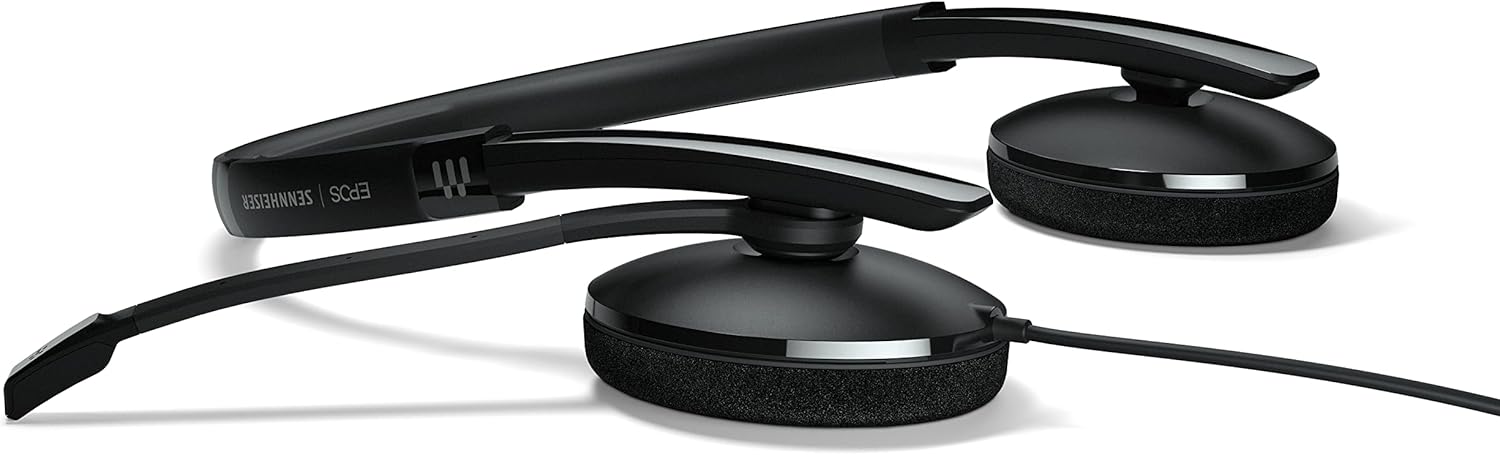
Figure 5.1: The headset in its folded position, demonstrating its compact design for easy storage and transport.
5.2 Audio Quality and Connectivity
- Superior Stereo Sound: Delivers clear audio for calls and multimedia, enhancing your communication experience.
- Flexible Device Connectivity: Offers options for USB-A or 3.5 mm jack connections, ensuring compatibility with a wide range of devices.
- Optimized for UC Professionals: Designed to integrate seamlessly with unified communications platforms, providing reliable performance for business use.
6. Troubleshooting
If you encounter issues with your headset, please refer to the following common problems and solutions:
- No Sound/Microphone Not Working:
- Ensure the headset is securely plugged into the USB-A port.
- Check your computer's sound settings to confirm the headset is selected as the default playback and recording device.
- Verify that the microphone is not muted via the in-line control or your software settings.
- Try plugging the headset into a different USB port.
- Poor Audio Quality:
- Ensure the microphone is positioned correctly near your mouth.
- Check for background noise in your environment. The ear pads provide some noise dampening.
- Update your computer's audio drivers.
- In-line Controls Not Responding:
- Ensure the headset is properly connected.
- Restart the application you are using (e.g., communication software).
- Try restarting your computer.
7. Specifications
| Feature | Description |
|---|---|
| Model Name | ADAPT 160 USB II |
| Connectivity Technology | Wired (USB-A, 3.5 mm Jack option) |
| Ear Placement | On Ear |
| Control Type | In-line Call Control (Volume, Mute, Answer/End) |
| Microphone | Integrated, Pivoting Boom Arm |
| Ear Pad Material | Leatherette or Foam |
| Color | Black |
| Item Weight | 4.8 ounces (136 Grams) |
| Product Dimensions | 4.53 x 2.69 x 1.59 inches |
| Recommended Uses | Calling, Business, UC Professionals |
| Compatible Devices | Laptops, Desktops |
| UPC | 840064407168 |
8. Warranty and Support
For information regarding warranty coverage, technical support, and service, please refer to the official EPOS website or contact your local dealer. Keep your proof of purchase for warranty claims.
Official EPOS Website: www.eposaudio.com
Related documentsADAPT 160 USB II


Ask a question about this manual
Ask about setup, troubleshooting, compatibility, parts, safety, or missing instructions. Manuals+ will review the question and use this page’s manual context to help answer it.