
1. Introduction
Thank you for choosing the SHW Mission 40-Inch Home Office Computer Desk. This manual provides essential information for the safe assembly, proper use, and maintenance of your new desk. Please read these instructions carefully before beginning assembly and retain this manual for future reference.

Image 1.1: The SHW Mission 40-Inch Home Office Computer Desk in Maple.
2. Safety Information
- Read all instructions: Ensure you understand all assembly steps and safety warnings before proceeding.
- Keep children away: Small parts can be a choking hazard. Keep children and pets away from the assembly area.
- Use on a level surface: Assemble the desk on a clean, flat, and stable surface to prevent damage and ensure stability.
- Do not overtighten screws: Overtightening can strip threads or crack materials. Tighten fasteners firmly but do not force them.
- Weight capacity: Do not exceed the maximum weight capacity of 50 kg (110.2 lbs) to prevent structural failure and injury.
- Regular checks: Periodically check all connections and fasteners to ensure they remain tight and secure.
- Proper lifting: When moving the assembled desk, lift it carefully with assistance if necessary, to avoid injury or damage.
3. Package Contents
Verify that all components are present before beginning assembly. If any parts are missing or damaged, please contact customer support.
- Desktop Panel (Engineered Wood)
- Desk Legs (Powder-Coated Steel Frame)
- Assembly Hardware (Screws, Allen Wrench)
- Instruction Manual
4. Setup and Assembly
Assembly is designed to be straightforward and can typically be completed by one person. All necessary hardware is included.
- Unpack Components: Carefully remove all parts from the packaging and lay them out on a soft, clean surface to prevent scratches.
- Attach Legs to Desktop: Align the desk legs with the pre-drilled holes on the underside of the desktop panel.
- Secure Fasteners: Insert the provided screws into the holes and tighten them using the included Allen wrench. Ensure all screws are securely fastened.
- Final Check: Once assembled, gently lift and place the desk in its desired location. Verify that the desk is stable and all connections are tight.

Image 4.1: Visual guide for desk assembly, illustrating the two main steps.
5. Operating and Usage
The SHW Mission 40-Inch Desk is designed for versatile use in various environments, including home offices, dormitories, and small work areas.
- Work Surface: The 40-inch wide desktop provides ample space for a laptop, monitor, keyboard, mouse, and other essential accessories.
- Stability: The powder-coated steel frame ensures a stable and durable work surface for daily tasks.
- Placement: Position the desk on a flat, stable floor. Consider using the desk against a wall for added stability if desired.

Image 5.1: The desk in use as a home office workstation.
6. Maintenance
To ensure the longevity and appearance of your SHW Mission Desk, follow these maintenance guidelines:
- Cleaning the Desktop: The engineered wood desktop is designed to be waterproof and scratch-resistant. Wipe spills immediately with a dry cloth. For general cleaning, use a soft, damp cloth with a mild, non-abrasive cleaner. Avoid harsh chemicals.
- Cleaning the Frame: The powder-coated steel frame can be cleaned with a soft, damp cloth. Avoid abrasive cleaners that may damage the finish.
- Protecting Surfaces: Use coasters for drinks and placemats for hot items to further protect the desktop surface.
- Anti-Skid Pads: The desk is equipped with anti-skid pads to protect your floor and enhance stability. Ensure these pads are clean and free of debris.
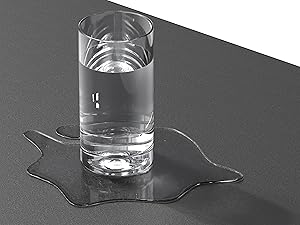
Image 6.1: Waterproof desktop surface.
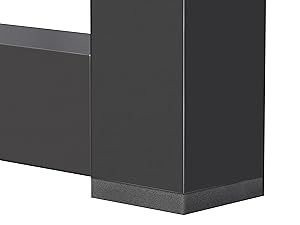
Image 6.2: Anti-skid pads for floor protection.
7. Troubleshooting
- Desk is wobbly:
- Ensure all screws are tightened securely.
- Verify the desk is on a level surface. Adjust the floor levelers if present, or place shims under the legs if needed.
- Scratches on surface:
- While the desktop is scratch-resistant, it is not scratch-proof. Use desk pads or mats for items that may cause scratches.
- Minor scratches may be minimized with furniture repair kits designed for engineered wood.
- Difficulty with assembly:
- Re-read the assembly instructions carefully.
- Ensure you are using the correct hardware for each step.
- Do not force parts together. If parts do not fit, double-check alignment.
8. Specifications
| Feature | Detail |
|---|---|
| Model Number | OD-11F-M |
| Product Dimensions (D x W x H) | 19" x 40" x 28" (48.26 cm x 101.6 cm x 71.12 cm) |
| Item Weight | 8.26 kg (18.21 lbs) |
| Maximum Weight Capacity | 50 kg (110.2 lbs) |
| Top Material | Engineered Wood |
| Base Material | Alloy Steel (Powder Coated) |
| Color | Maple |
| Assembly Required | Yes (1 person recommended) |

Image 8.1: Key dimensions of the desk.
9. Warranty and Support
This SHW Mission 40-Inch Home Office Computer Desk is covered by a 5-Year Limited Warranty. This warranty covers manufacturing defects under normal use and service.
For warranty claims, missing parts, or any questions regarding your product, please contact SHW customer support through the retailer where the product was purchased or visit the official SHW website for contact information.
Please retain your proof of purchase for warranty validation.