Introduction
This manual provides detailed instructions for the setup, operation, maintenance, and troubleshooting of your Knox Gear KN-LAPAS01 Line Array Speaker System. Please read this manual thoroughly before using the product to ensure proper function and longevity.
Package Contents
Verify that all items listed below are present in your package:
- 1 x 8-inch Subwoofer (Base Unit)
- 1 x Column Speaker Array (containing 4 x 2.5" Full-range speakers)
- 2 x Listening Height Spacers
- 1 x XLR cable
- 1 x USB cable
- 1 x 1/4-inch jack cable

Image: All components of the Knox Gear Line Array Speaker System, including the subwoofer base, the column speaker array, and two height spacers, as they appear when unboxed.
Setup Instructions
Assembly
- Place the 8-inch subwoofer base unit on a stable, flat surface.
- Insert one or both listening height spacers into the top of the subwoofer base unit. The number of spacers used will determine the overall height of the speaker system.
- Carefully align and insert the column speaker array onto the top of the last spacer (or directly onto the subwoofer if no spacers are used). Ensure it is securely seated.
- Connect the power cord to the subwoofer and then to a power outlet.
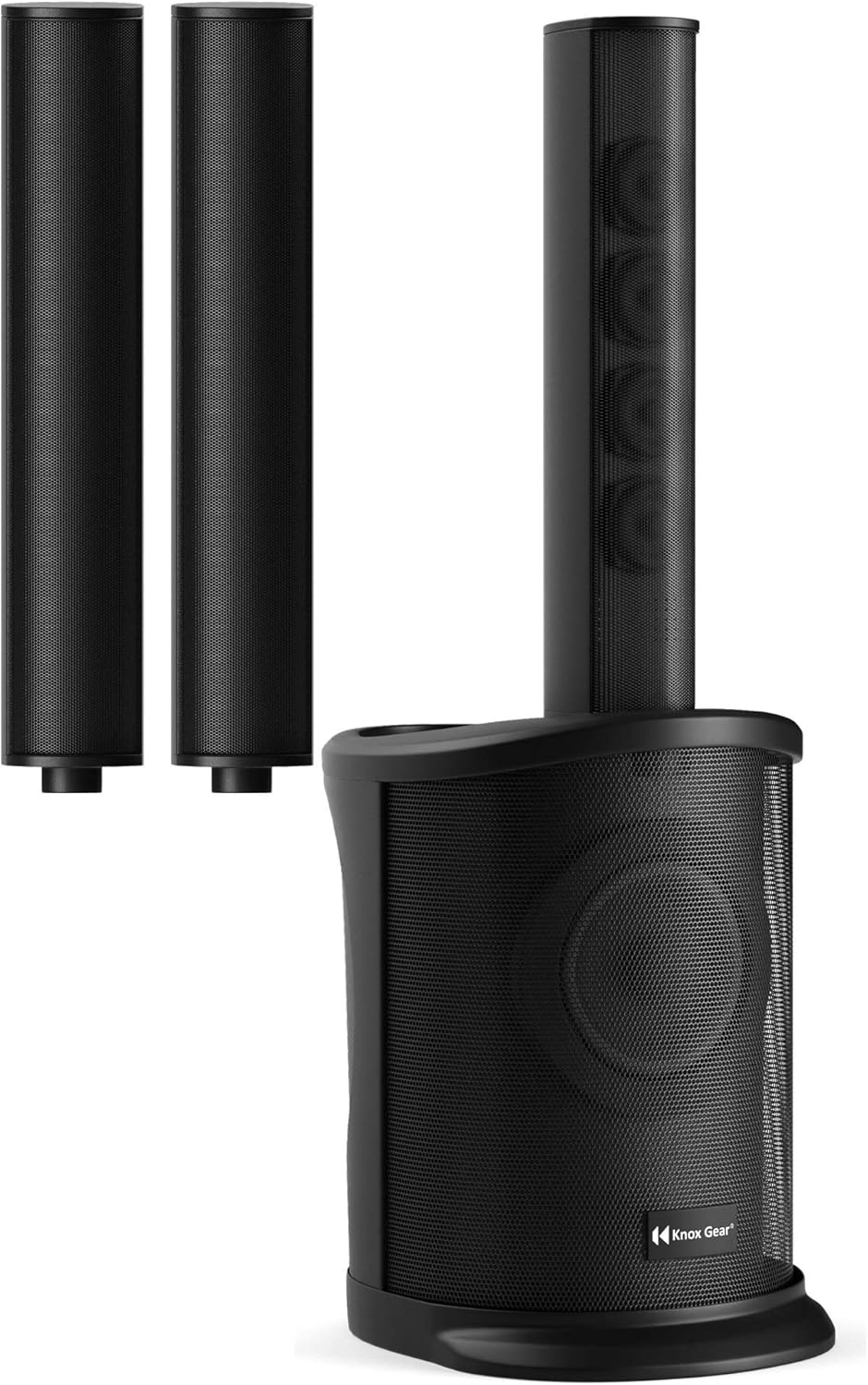
Image: The Knox Gear Line Array Speaker System fully assembled, showing the subwoofer base, two height spacers, and the column speaker array.

Image: Two individual listening height spacers, which can be used to adjust the overall height of the speaker system.
Placement
For optimal sound dispersion, position the speaker system in a central location within the listening area. The system is designed for wide spatial sound coverage, suitable for both indoor and outdoor environments. The maximum height with spacers is 78.5 inches, and the minimum height is 16.5 inches.

Image: Diagram illustrating the minimum (16.5 inches) and maximum (78.5 inches) height configurations of the Knox Gear Line Array Speaker System using the provided spacers.
Operating Instructions
Powering On/Off
Locate the power switch on the rear panel of the subwoofer. Flip the switch to the "ON" position to power on the system. Flip to "OFF" to power down.
Audio Connections
The system supports various audio input methods:
- Bluetooth: For wireless connection to smartphones, tablets, and other Bluetooth-enabled devices.
- USB Input: For playing audio files directly from a USB storage device.
- XLR/Mic Input: For connecting microphones or other professional audio equipment using an XLR cable.
- SD/MMC Support: For playing audio files from SD or MMC memory cards.
- 1/4-inch Jack Input: For connecting instruments like guitars or other audio sources.
- Auxiliary Input: For general wired audio connections.

Image: Visual representation of the various input options available on the speaker system, including USB, XLR/Mic, and SD/MMC card slots.
Bluetooth Pairing
- Ensure the speaker system is powered on.
- Activate Bluetooth on your audio device (e.g., smartphone, tablet).
- Search for available Bluetooth devices. The speaker system should appear as "Knox Gear KN-LAPAS01" or similar.
- Select the speaker system to pair. A confirmation sound may indicate successful pairing.

Image: The Knox Gear Line Array Speaker System positioned in a room, highlighting its Bluetooth and USB connectivity features.
4-Channel Mixer Control
The integrated 4-channel mixer allows for control over multiple audio inputs. Refer to the control panel on the subwoofer for individual channel volume adjustments, equalization, and effects (if applicable). Consult the detailed diagrams on the product itself for specific knob and button functions.
Maintenance
- Cleaning: Use a soft, dry cloth to clean the exterior surfaces of the speaker system. Do not use liquid cleaners or abrasive materials.
- Storage: When not in use, store the speaker system in a cool, dry place, away from direct sunlight and extreme temperatures.
- Handling: Avoid dropping or subjecting the system to strong impacts.
Troubleshooting
If you encounter issues with your speaker system, refer to the following common problems and solutions:
| Problem | Possible Cause | Solution |
|---|---|---|
| No sound output. | Power not connected, volume too low, incorrect input selected, faulty cable. | Ensure power is on. Check all cable connections. Increase volume. Select the correct input source on the mixer. Test with a different audio source or cable. |
| XLR input not functional. | Faulty XLR cable, incorrect mixer settings, microphone issue. | Test with a known working XLR cable. Verify the specific XLR channel on the mixer is active and its volume is up. Ensure the microphone is powered (if required). |
| Sound fades out when music is quiet. | Automatic noise gate or compression setting. | This behavior may be due to an internal noise compression system. Check the mixer controls for any adjustable noise gate or compressor settings. If not adjustable, this is a characteristic of the system's design. |
| Bluetooth pairing issues. | Device too far, speaker not in pairing mode, interference. | Ensure the speaker is in Bluetooth mode. Move your device closer to the speaker. Turn off and on Bluetooth on your device and the speaker. Clear previous Bluetooth connections on your device. |
Specifications
Technical specifications for the Knox Gear KN-LAPAS01 Line Array Speaker System:
| Feature | Detail |
|---|---|
| Model Name | KN-LAPAS01 |
| Speaker Type | Line Array |
| Subwoofer Diameter | 6.5 Inches |
| Included Components | 4 x 2.5" Full-range speaker, 8-inch subwoofer, Column Speaker Array, XLR cable, USB cable, 1/4-inch jack cable |
| Wireless Communication Technology | Bluetooth, Wi-Fi |
| Speaker Size (Overall) | 8 Inches (referring to subwoofer) |
| Power Source | Corded Electric |
| Audio Driver Type | Dynamic Driver |
| Product Dimensions | 18.8 x 19.7 x 22.1 inches |
| Item Weight | 31 pounds |
| Speaker Maximum Output Power | 150 Watts |
| Connectivity Technology | Auxiliary |
| Audio Output Mode | Stereo |
| Mounting Type | Freestanding, Plug Mount |
| UPC | 040962845813 |

Image: A visual summary of key technical specifications for the speaker system, such as frequency response, driver configuration, and amplifier details.
Warranty Information
This Knox Gear Line Array Speaker System is covered by a Limited Warranty. For specific terms, conditions, and duration of the warranty, please refer to the warranty card included with your product or contact Knox Gear customer support.
Customer Support
For further assistance, technical support, or inquiries regarding your Knox Gear KN-LAPAS01 Line Array Speaker System, please visit the official Knox Gear website or contact their customer service department. Contact information can typically be found on the product packaging or the official brand website.


