1. Introduction
Thank you for choosing the Briza Evaporative Air Cooler. This appliance combines the functions of an air cooler, fan, and humidifier to enhance your indoor comfort. It operates by evaporating water to cool the air, providing a refreshing breeze. Please note that this is an evaporative air cooler, not an air conditioner, and it will not cool an entire room to the same extent as a traditional air conditioning unit. Its effectiveness is highest in dry climates.
Please read this manual thoroughly before operating your new Briza Air Cooler to ensure safe and efficient use. Keep this manual for future reference.
2. Product Overview
Key Features
- 3-in-1 Functionality: Operates as an air cooler, fan, and humidifier.
- Evaporative Cooling: Utilizes water evaporation to provide a cool breeze.
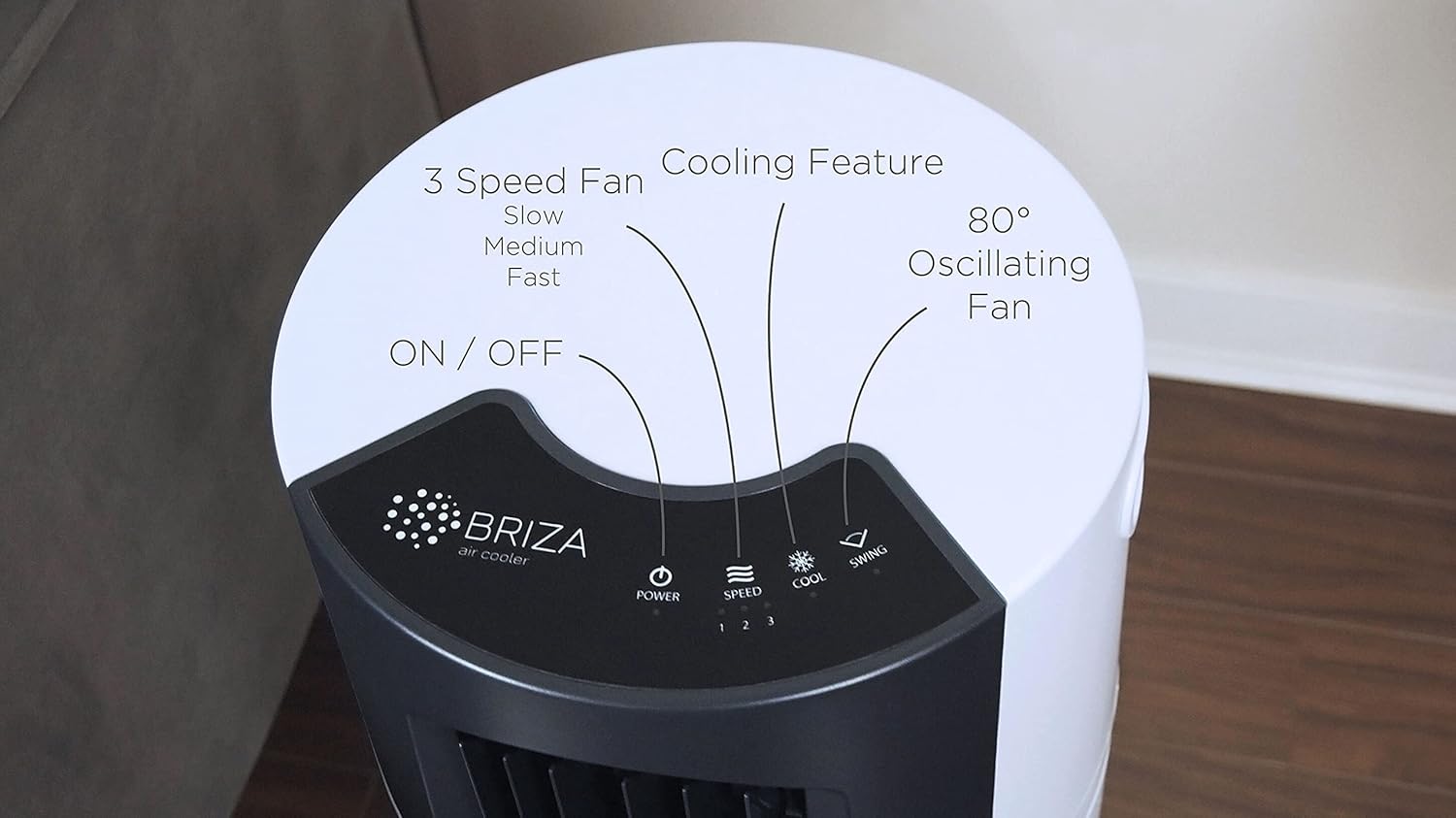
- 80° Swing Oscillation: Distributes air evenly across the room.
- Three Fan Speeds: Low, Medium, and High settings for customized airflow.
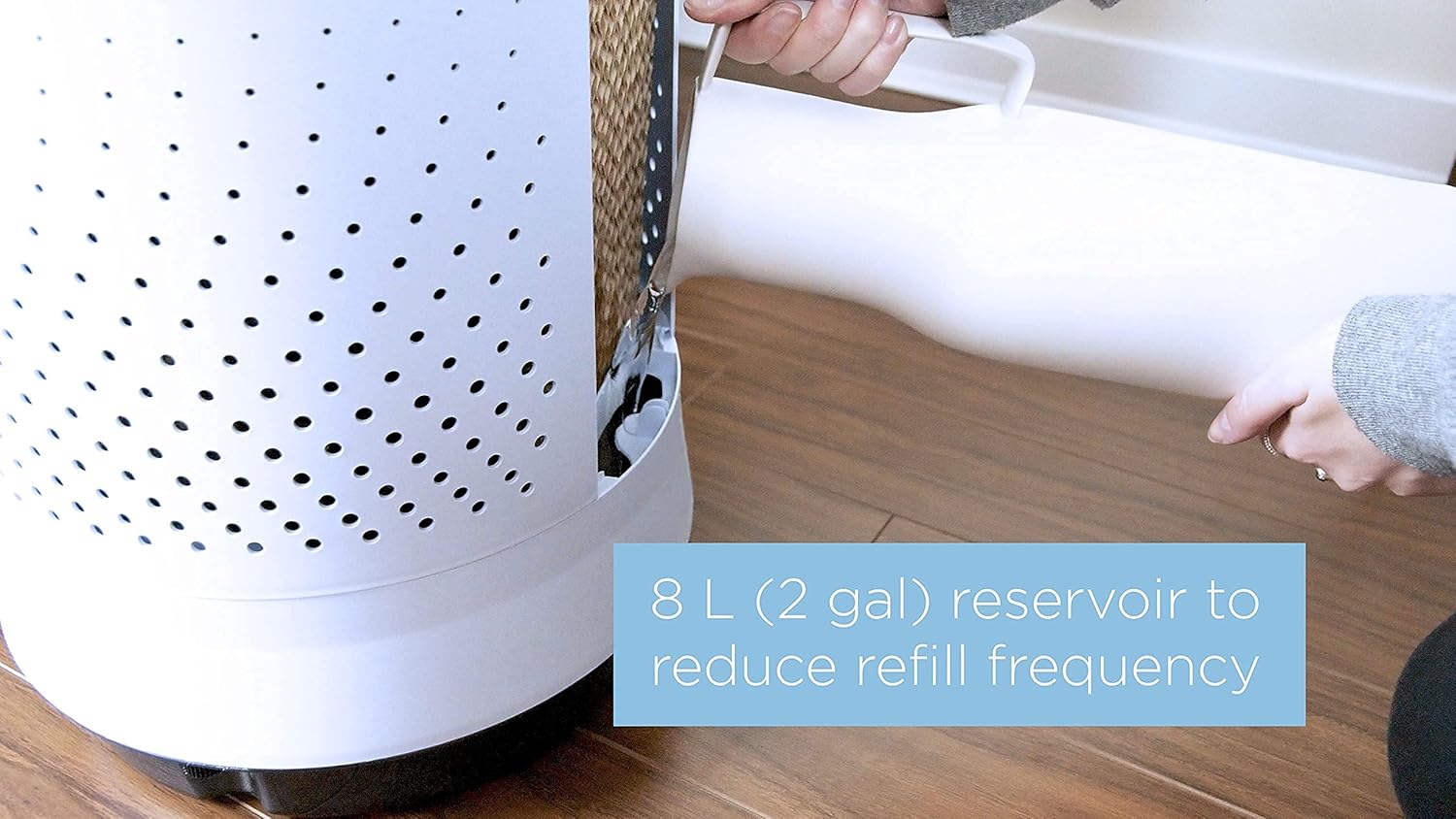
- 8-Liter Water Tank: Large capacity reduces the frequency of refills.
- Remote Control: Convenient operation from a distance.
- Low Energy Consumption: Draws only 80 Watts, offering an energy-efficient cooling solution.
Components
Familiarize yourself with the main components of your Briza Air Cooler:
- Main Unit (Housing, Fan, Control Panel)
- Water Tank (8-liter capacity)
- Evaporative Cooling Pads
- Remote Control
- Power Cord


3. Setup
3.1 Unpacking
- Carefully remove the air cooler from its packaging.
- Remove all packing materials and ensure no components are missing or damaged.
- Retain the packaging for future storage or transport.
3.2 Placement
Place the air cooler on a flat, stable surface. Ensure there is adequate space around the unit for proper airflow. The unit is lightweight and portable, featuring a carrying handle for easy relocation.

3.3 Filling the Water Tank
The Briza Air Cooler features an 8-liter water tank. For optimal cooling, use cold water. Ice can also be added if the fill port allows, though the port may be small for standard ice cubes.
- Locate the water tank fill port.
- Carefully pour clean, cold water into the tank. Do not exceed the maximum fill line indicated on the unit.
- Ensure the water tank is properly sealed after filling to prevent leaks.
3.4 Power Connection
Once the unit is placed and the water tank is filled, connect the power cord to a standard electrical outlet (110V).

4. Operating Instructions
The Briza Air Cooler can be operated using the touch control panel on the top of the unit or the included remote control.

4.1 Power On/Off
- Press the POWER button on the control panel or remote to turn the unit on or off.
4.2 Adjusting Fan Speed
- Press the SPEED button to cycle through the three fan speeds: Low, Medium, and High.
4.3 Activating Cooling Function
- Press the COOL button to activate the evaporative cooling function. The unit will begin to pump water over the cooling pads.
- Press the COOL button again to deactivate the cooling function and operate as a fan only.
4.4 Oscillation
- Press the SWING button to activate the 80° oscillation feature, which helps distribute air across a wider area.
- Press the SWING button again to stop oscillation at the desired direction.
5. Maintenance
Regular maintenance ensures optimal performance and longevity of your Briza Air Cooler.
5.1 Cleaning the Water Tank
To prevent mold and mildew growth, clean the water tank regularly, especially if the unit is not used daily.
- Ensure the unit is unplugged before cleaning.
- Drain any remaining water from the tank.
- Clean the tank with a mild detergent and water. Rinse thoroughly to remove all soap residue.
- Allow the tank to air dry completely before refilling or storing the unit.
5.2 Cleaning/Replacing Evaporative Pads
The evaporative pads (sometimes referred to as aspen wood filters) are crucial for the cooling process. They should be inspected and cleaned periodically.


- Unplug the unit.
- Refer to the unit's design to access the evaporative pads. This may involve removing a back panel or specific screws.
- Gently remove the pads. Rinse them under clean water to remove dust and mineral deposits. Do not use harsh chemicals.
- If the pads are heavily soiled or damaged, they may need to be replaced. Contact customer support for replacement parts.
- Allow the pads to dry completely before reinserting them into the unit.
6. Troubleshooting
If you encounter issues with your Briza Air Cooler, refer to the following common problems and solutions:
| Problem | Possible Cause | Solution |
|---|---|---|
| Unit does not power on | No power supply; Power button not pressed | Ensure power cord is securely plugged into a working outlet. Press the POWER button. |
| No cool air / Not cooling effectively | Water tank empty; Cooling function not activated; Evaporative pads are dry or dirty; High humidity environment | Fill water tank with cold water. Press the COOL button. Clean or replace evaporative pads. Note that evaporative coolers are less effective in high humidity. |
| Water pump not working | Water tank empty; Pump clogged or faulty | Ensure water tank is filled. Clean the water tank and check for obstructions around the pump intake. If the issue persists, contact customer support. |
| Unit is noisy | Fan speed too high; Unit not on a level surface; Internal obstruction | Reduce fan speed. Place the unit on a flat, stable surface. Check for any loose parts or obstructions inside the unit (after unplugging). |
| Remote control not working | Batteries dead or incorrectly inserted; Obstruction between remote and unit | Replace batteries. Ensure batteries are inserted with correct polarity. Remove any obstructions. |
If the problem persists after attempting these solutions, please contact Briza customer support.
7. Specifications
| Feature | Specification |
|---|---|
| Brand | Briza |
| Model Name | 810648003482 |
| Part Number | VES1704 |
| Mounting Type | Freestanding |
| Special Feature | Oscillating Fan |
| Color | White |
| Controls Type | Touch |
| Reservoir Capacity | 8 Liters |
| Recommended Uses | Residential |
| Included Components | Fan, Remote |
| Power Consumption | 80 Watts |
| Number of Speeds | 3 |
| Product Dimensions | 15"D x 15"W x 25"H (38.1 cm D x 38.1 cm W x 63.5 cm H) |
| Amperage | 0.67 Amps |
| Voltage | 110 Volts |
| Item Weight | 10 pounds (4.5 kg) |
8. Safety Information
- Always unplug the unit before cleaning, maintenance, or when not in use.
- Do not operate the unit with a damaged cord or plug.
- Do not place the unit near heat sources, open flames, or in direct sunlight for extended periods.
- Ensure the unit is placed on a stable, level surface to prevent tipping.
- Do not immerse the unit in water or other liquids.
- Keep out of reach of children and pets.
- Do not block air inlets or outlets during operation.
- Use only clean water in the water tank.
9. Warranty and Support
Briza provides a one-year unlimited warranty for this air cooler. If anything goes wrong with your unit within this period, please contact Briza customer support for assistance.
For further support, troubleshooting, or warranty claims, please visit the official Briza website or contact their customer service department.


