DTKID Digital Kids Watch
Model: 8203B Instruction Manual
Introduction
This manual provides detailed instructions for the setup, operation, and maintenance of your DTKID Digital Kids Watch Model 8203B. Please read this manual thoroughly to ensure proper use and to maximize the watch's features. Keep this manual for future reference.
Safety Information
- Water Resistance: The watch is 30M water-resistant. Do not press any buttons while the watch is submerged in water. Avoid using in extreme hot or cold temperatures, or under high pressure, as this may compromise the water seal.
- Battery: The watch contains a non-rechargeable lithium metal battery. Do not attempt to open the watch case or replace the battery yourself unless you have the proper tools and expertise. Improper handling can damage the watch or cause injury.
- Cleaning: Clean the watch with a soft, dry cloth. Avoid using harsh chemicals or abrasive materials.
- Age Recommendation: This watch is suitable for children aged 3 years and above.
Product Overview
Familiarize yourself with the buttons and display features of your DTKID Digital Kids Watch.
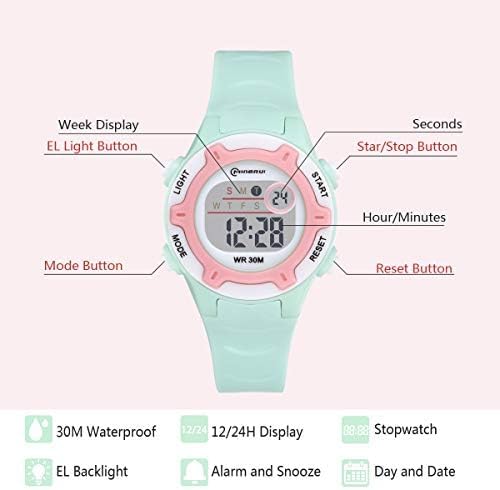
An annotated diagram showing the location and function of each button on the DTKID Digital Kids Watch: LIGHT, MODE, START, and RESET, along with indicators for Week Display, EL Light Button, Star/Stop Button, Hour/Minutes, and Reset Button.
- LIGHT Button: Activates the backlight. Hold for 3 seconds to change backlight color.
- MODE Button: Cycles through display modes (Time, Alarm, Stopwatch).
- START Button: Used to start/stop stopwatch, adjust settings, or view alarm time.
- RESET Button: Used to reset stopwatch, confirm settings, or clear alarm.
Setup Instructions
Setting Time and Date
- From the normal time display, press the MODE button three times to enter time setting mode. The seconds will flash.
- Press the RESET button to set seconds to zero.
- Press the START button to move to the next setting (hours).
- Press the RESET button to adjust the hours.
- Repeat steps 3 and 4 for minutes, month, date, and day of the week.
- Once all settings are adjusted, press the MODE button to exit time setting mode.
12/24 Hour Format
In time setting mode (when hours are flashing), press the START button to toggle between 12-hour (with AM/PM indicator) and 24-hour formats.
Operating Instructions
Alarm Function
- From the normal time display, press the MODE button once to enter alarm setting mode. The alarm hours will flash.
- Press the RESET button to adjust the alarm hours.
- Press the START button to move to alarm minutes.
- Press the RESET button to adjust the alarm minutes.
- Press the MODE button to exit alarm setting mode.
- To activate/deactivate the alarm, press and hold the START button, then press the RESET button. An alarm icon will appear/disappear on the display.
- To stop a sounding alarm, press any button.
Stopwatch Function
- From the normal time display, press the MODE button twice to enter stopwatch mode.
- Press the START button to begin timing.
- Press the START button again to pause timing.
- Press the RESET button to reset the stopwatch to zero.
- Press the MODE button to return to normal time display.
Hourly Chime
To activate/deactivate the hourly chime, press and hold the MODE button, then press the START button. A chime icon will appear/disappear on the display.
Changing Backlight Colors
The watch features 7 different backlight colors. To change the color, press and hold the LIGHT button for approximately 3 seconds. The backlight color will cycle through the available options with each press and hold.

An illustration demonstrating the 7-color backlight feature of the DTKID Digital Kids Watch. It shows the watch face changing between different LED colors like red, purple, yellow, white, blue, and green, activated by holding the LIGHT button.
Water Resistance
The DTKID Digital Kids Watch is designed with 30M (3ATM) water resistance, making it suitable for daily activities such as:
- Hand washing
- Face washing
- Sweating
- Rainy conditions
- Showering (brief exposure)
Important Note: To maintain water resistance, do not press any buttons while the watch is underwater. Avoid prolonged exposure to hot water or steam, and do not use the watch in saunas or hot tubs.

Image showing children enjoying water activities in a swimming pool while wearing DTKID watches, emphasizing the 30M water resistance feature. Icons for hand-washing, showering, sweating, and rain are also displayed.
Maintenance
To ensure the longevity and optimal performance of your DTKID Digital Kids Watch, follow these maintenance guidelines:
- Cleaning: Regularly wipe the watch case and strap with a soft, damp cloth to remove dirt and sweat. Ensure the watch is dry before storage.
- Storage: Store the watch in a cool, dry place away from direct sunlight and extreme temperatures.
- Battery Replacement: The watch uses a Lithium Metal battery. When the display dims or functions become erratic, the battery may need replacement. It is recommended to have the battery replaced by a qualified watch technician to ensure the water resistance seal is properly maintained.
- Avoid Impact: While durable, avoid dropping the watch or subjecting it to strong impacts, which can damage internal components.
Troubleshooting
- Display is blank or dim: The battery may be low. Consider replacing the battery.
- Time is incorrect: Re-set the time and date following the 'Setting Time and Date' instructions. Ensure the 12/24 hour format is correctly selected.
- Alarm not sounding: Check if the alarm function is activated (alarm icon visible on display). Ensure the alarm time is set correctly.
- Water inside the watch: If condensation or water appears inside the watch, stop using it immediately and seek professional repair to prevent further damage.
- Buttons not responding: Ensure the watch is not in a locked mode (if applicable, though this model does not feature a lock). If the issue persists, a battery replacement or professional inspection may be required.
Specifications
| Feature | Specification |
|---|---|
| Model Number | 8203B |
| Product Dimensions | 3.54 x 3.54 x 2.36 inches |
| Item Weight | 0.81 ounces (29g) |
| Water Resistance | 30 Meters (3ATM) |
| Battery Type | 1 Lithium Metal battery (included) |
| Display Type | Digital |
| Backlight Colors | 7 Colors |
| Functions | Time, Date, Week, Alarm, Stopwatch, Hourly Chime, 12/24H |

A diagram illustrating the physical dimensions of the DTKID Digital Kids Watch, including case thickness (1.6cm/0.63in), case diameter (3.7cm/1.46in), maximum fit wrist (21.5cm/8.64in), minimum fit wrist (16cm/6.3in), and total product weight (29g/1.02oz).
Warranty and Support
For warranty information or technical support, please refer to the product packaging or contact DTKID customer service through the retailer where the product was purchased. Please have your model number (8203B) and purchase details ready when contacting support.