
VOCOlinc VC1-1Pack
VOCOlinc VC1 Smart Home Security Camera User Manual
Model: VC1-1Pack
Introduction
Thank you for choosing the VOCOlinc VC1 Smart Home Security Camera. This indoor pan/tilt IP camera is designed to provide secure and reliable home monitoring with advanced features like 1080P HD video, night vision, two-way audio, and smart motion detection. Exclusively designed for Apple HomeKit Secure Video, the VC1 ensures your privacy and data security. This manual provides detailed instructions for setup, operation, maintenance, and troubleshooting to help you get the most out of your device.

The VOCOlinc VC1 camera, shown next to a smartphone displaying its live video feed, highlighting its use for monitoring pets and children.
Safety Information
- Do not expose the camera to extreme temperatures, humidity, or direct sunlight.
- Avoid placing the camera near strong magnetic fields or sources of interference.
- Use only the provided power adapter. Using unauthorized adapters may damage the device and void the warranty.
- Keep the camera out of reach of children and pets.
- Do not attempt to disassemble or repair the camera yourself. Contact customer support for assistance.
- Ensure the camera is placed on a stable surface or securely mounted to prevent accidental falls.
Package Contents
Please check the package contents upon opening to ensure all items are present:
- VOCOlinc VC1 Smart Home Security Camera
- Power Adapter
- USB-C to USB-A Cable (2 meters)
- Mounting Kit (screws, wall anchors)
- User Manual (this document)
Product Overview
Familiarize yourself with the components of your VOCOlinc VC1 camera.

An overview of the VOCOlinc Opto Smart Indoor Camera, highlighting its sleek design.
- Camera Lens: Captures 1080P HD video.
- Infrared LEDs: Provide night vision capabilities.
- Microphone: For two-way audio communication.
- Speaker: For two-way audio communication.
- Privacy Button: Physically tilts the lens down to hide it, ensuring privacy.
- Power Port: USB-C input for power.
- Reset Button: Used for factory reset (typically a small pinhole).
Setup
1. Initial Power On
- Connect the USB-C cable to the camera's power port.
- Plug the USB-A end of the cable into the provided power adapter.
- Plug the power adapter into a wall outlet. The camera will power on and begin its startup sequence.
2. Download the VOCOlinc App
The VOCOlinc app is required for initial setup, firmware updates, and accessing certain camera features like Pan/Tilt control.
- Search for "VOCOlinc" in the Apple App Store.
- Download and install the app on your iOS/iPadOS device (iOS/iPadOS 13.2 or later required).
3. Add Camera to HomeKit
The VOCOlinc VC1 is designed for Apple HomeKit Secure Video.
- Open the Apple Home app on your iOS/iPadOS device.
- Tap the + icon in the top right corner and select "Add Accessory".
- Scan the HomeKit setup code located on the camera or in the quick start guide.
- Follow the on-screen prompts to add the camera to your HomeKit setup, assign it to a room, and configure recording options.
- Ensure your device is connected to a 2.4GHz Wi-Fi network during setup.

The VOCOlinc app interface, demonstrating the control panel for the camera, including pan, tilt, and zoom options, and settings for privacy mode and night vision.
Operating the Camera
Privacy Mode
The VC1 camera prioritizes your privacy. You can activate Privacy Mode in two ways:
- Physical Button: Press the physical button on the camera. The lens will tilt downwards and hide itself.
- VOCOlinc App: Access Privacy Mode settings within the VOCOlinc app.

The VOCOlinc VC1 camera emphasizes data security, with a note indicating it passed Apple HomeKit safety certification and encrypts cloud data to prevent leakage.
Pan/Tilt Control
The camera offers a 350° horizontal and 93° vertical rotation range for full coverage. This feature is exclusively controlled via the free VOCOlinc app.
- Open the VOCOlinc app.
- Select your VC1 camera.
- Use the directional controls within the app to adjust the camera's viewing angle.

The VOCOlinc VC1 camera demonstrating its pan (350°) and tilt (117°) capabilities, controlled via the VOCOlinc app for comprehensive room coverage.
Two-Way Audio
Communicate through the camera using the two-way audio feature.
- From the Home app or VOCOlinc app, access the live view of your camera.
- Tap the microphone icon to speak. Your voice will be transmitted through the camera's speaker.
- Listen for responses through your device's speaker.

A child interacting with the VOCOlinc VC1 camera, illustrating the two-way audio feature for communication.
Smart Motion Detection & Notifications
Leverage HomeKit's advanced motion detection capabilities.
- Configure motion detection settings within the Apple Home app.
- The HomeKit algorithm can distinguish between people, animals, and vehicles.
- Receive instant push notifications to your iPhone when motion is detected.
- Set up automations based on motion events (e.g., turn on lights when motion is detected).

The VOCOlinc VC1 camera's smart motion detection feature, illustrated by a notification on a smartphone indicating a person has been detected.
Night Vision
The camera provides clear visibility in low-light conditions.
- Four built-in IR LEDs enable visibility up to 19.56ft / 6m in the dark.
- The camera automatically switches to night vision mode when ambient light is low.

A visual comparison demonstrating the VOCOlinc VC1 camera's ability to provide crystal clear 1080P HD video both during the day and in complete darkness using night vision.
Voice Control with Siri
Control your camera and view live feeds using Siri voice commands.
- Ensure your camera is added to HomeKit.
- Say "Hey Siri, show me the [Room Name] camera" (e.g., "Hey Siri, show me the living room").
- Siri will display the live video feed on your iPhone, iPad, or Apple computer.
iCloud+ Storage for Recordings
The VC1 camera utilizes Apple HomeKit Secure Video for encrypted cloud storage.
- A supported iCloud+ plan is required to store 10-day motion-based recording history.
- A 50GB iCloud+ plan supports one camera.
- A 200GB iCloud+ plan supports up to five cameras.
- VOCOlinc does not have access to your data; all communication is within HomeKit.
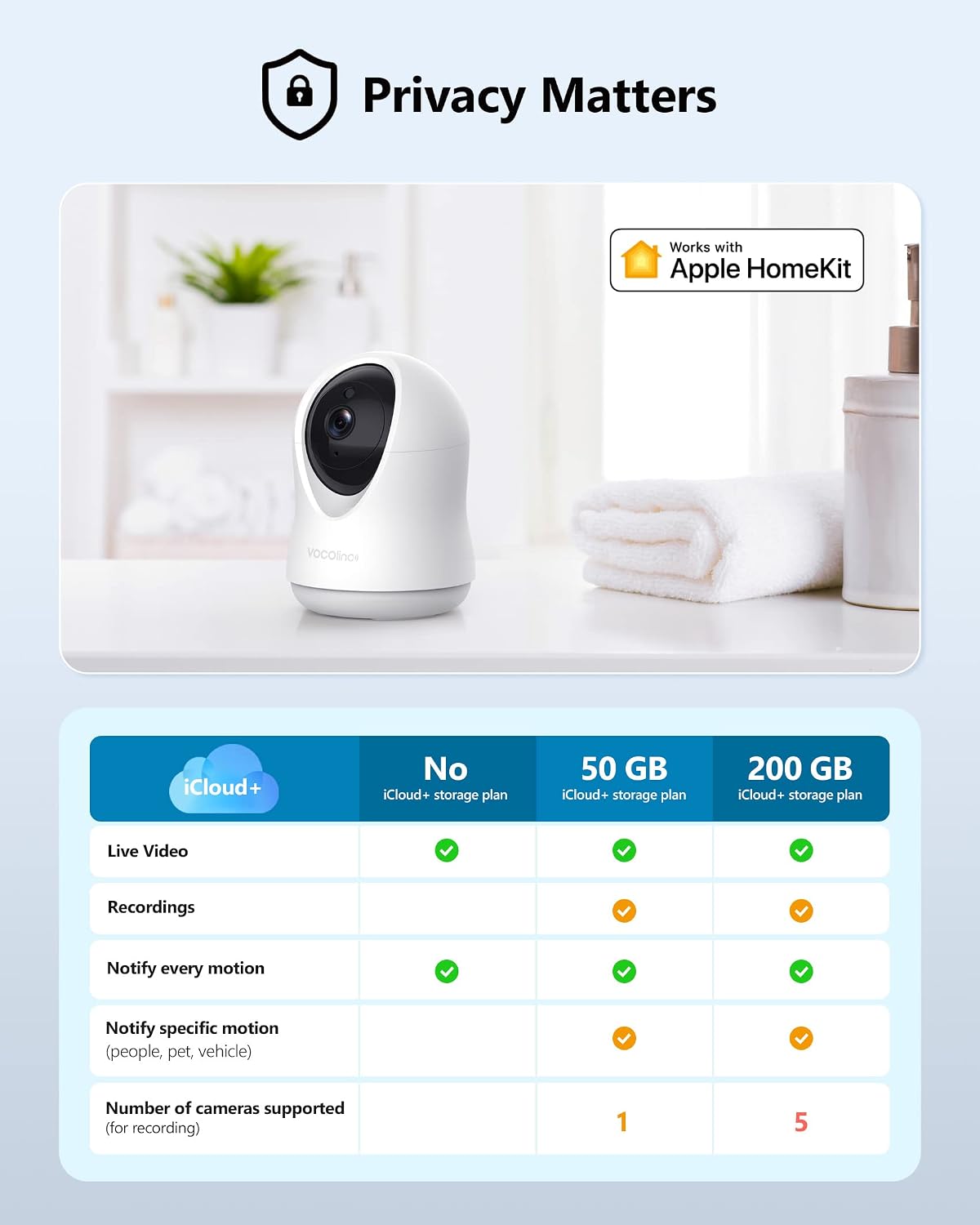
A table detailing the benefits of different iCloud+ storage plans for HomeKit Secure Video, including live video, recordings, motion notifications, and the number of cameras supported.
Maintenance
- Cleaning: Use a soft, dry cloth to clean the camera lens and body. Do not use liquid cleaners or abrasive materials.
- Firmware Updates: Regular firmware updates are available exclusively via the VOCOlinc app. Ensure your camera's firmware is up-to-date for optimal performance and security.
Troubleshooting
| Problem | Possible Cause / Solution |
|---|---|
| Camera not powering on. |
|
| Cannot add camera to HomeKit. |
|
| Live video feed is choppy or offline. |
|
| Pan/Tilt control not working. |
|
| Night vision is unclear. |
|
Specifications
| Feature | Detail |
|---|---|
| Model | VC1-1Pack |
| Video Capture Resolution | 1080p HD |
| Maximum Webcam Image Resolution | 3 MP |
| Pan Range | 350° Horizontal |
| Tilt Range | 93° Vertical (117° wide-angle lens) |
| Night Vision Range | Up to 19.56 ft / 6 m |
| Connectivity Protocol | Wi-Fi (2.4GHz only) |
| Controller Type | Apple HomeKit |
| Power Source | AC/DC (5 Volts) |
| Indoor/Outdoor Usage | Indoor |
| Special Features | Night Vision, Motion Sensor, 2-Way Audio, Privacy Mode |
| Item Weight | 12 ounces |
| UPC | 631851544704 |
Warranty and Support
VOCOlinc products come with a limited warranty. For detailed warranty information, please refer to the warranty card included in your product packaging or visit the official VOCOlinc website. If you encounter any issues or have questions not covered in this manual, please contact VOCOlinc customer support:
- Website: www.vocolinc.com
- Email: Refer to the website for support contact details.
Please have your product model (VC1-1Pack) and purchase information ready when contacting support.
Ask a question about this manual
Ask about setup, troubleshooting, compatibility, parts, safety, or missing instructions. Manuals+ will review the question and use this page’s manual context to help answer it.