
1. Introduction and Overview
The iSnatch Hey Pure A50 is an advanced smart Wi-Fi air purifier designed to significantly improve indoor air quality. It features a comprehensive 3-stage filtration system, including a pre-filter, HEPA filter, and activated carbon filter, further enhanced by an integrated UV-C lamp. This combination effectively removes harmful gases, unpleasant odors, bacteria, viruses, pollen, pet dander, and other airborne allergens. With a Clean Air Delivery Rate (CADR) of 400 m³/h, it is suitable for rooms up to 50 m². The device offers convenient smart control through the HEYSMART app and is compatible with popular voice assistants like Amazon Alexa and Google Assistant.
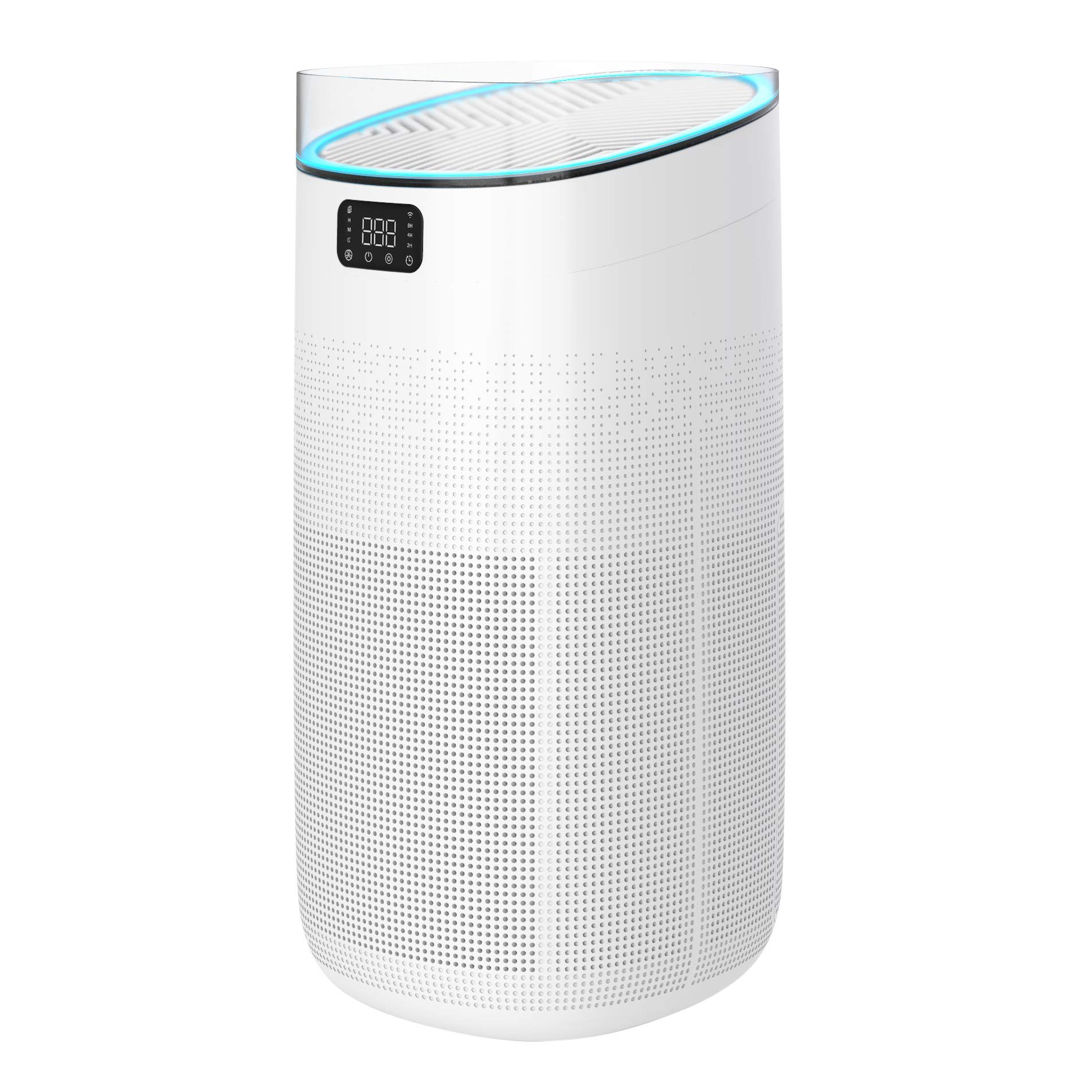
Image 1.1: The iSnatch Hey Pure A50 Smart Wi-Fi Air Purifier, showcasing its sleek design and smart features like voice control and app integration.
2. Safety Information
Please read all safety instructions carefully before using the appliance to prevent injury or damage.
- UV-C Light Warning: Do not look directly at the UV-C lamp when it is active. Ensure the device is unplugged before performing any maintenance that requires accessing the UV-C lamp area.
- Always unplug the air purifier from the power outlet before cleaning, performing maintenance, or when not in use for extended periods.
- Do not operate the appliance with a damaged cord or plug. If the cord or plug is damaged, contact customer support for assistance.
- Keep the air purifier away from water or other liquids. Do not use it in wet environments such as bathrooms.
- Ensure that air inlets and outlets are not blocked by curtains, furniture, or other objects to maintain proper airflow and prevent overheating.
- This appliance is not intended for use by persons (including children) with reduced physical, sensory, or mental capabilities, or lack of experience and knowledge, unless they have been given supervision or instruction concerning use of the appliance by a person responsible for their safety.
- Only use original iSnatch replacement filters and parts.
3. Product Features
The iSnatch Hey Pure A50 air purifier is equipped with several features designed for optimal air purification and user convenience:
- High CADR: A Clean Air Delivery Rate of 400 m³/h, effectively purifying air in spaces up to 50 square meters.
- Advanced 3-Stage Filtration: Includes a pre-filter to capture large particles, a HEPA filter to trap fine particulate matter, and an activated carbon filter to absorb odors and harmful gases.
- Integrated UV-C Lamp: Provides an additional layer of purification by neutralizing bacteria and viruses.
- Smart Control: Manage the air purifier remotely using the HEYSMART app on your smartphone.
- Voice Assistant Compatibility: Seamlessly integrates with Amazon Alexa and Google Assistant for hands-free operation.
- Quiet Operation: Operates at a noise level below 56 dB, ensuring minimal disturbance.
- Energy Efficient: Low power consumption of 50 W.
- Multiple Modes: Features Fast Ventilation, Night Mode, and Automatic Mode for various purification needs.
- LED Display: Provides real-time information and status updates.
- Night Light Function: Offers a soft ambient light for nighttime use.

Image 3.1: Overview of the Hey Pure A50's functional properties, including Wi-Fi connectivity, UV-C sanitizer, multiple operating modes, air quality sensor light, LED display, and night light.
4. Setup
Follow these steps to set up your iSnatch Hey Pure A50 air purifier:
- Unpack the Device: Carefully remove the air purifier and all its components from the packaging. Retain packaging for future transport or storage.
- Remove Filter Packaging: Before first use, open the filter compartment (usually located at the bottom or back of the unit) and remove all plastic packaging from the filters. The air purifier typically comes with a pre-filter, HEPA filter, and activated carbon filter already installed but wrapped.
- Install Filters: Place the filters back into the unit in the correct order and orientation. Ensure the filter compartment cover is securely closed.
- Position the Air Purifier: Place the air purifier on a firm, level surface. Ensure there is at least 20-30 cm of clear space around all sides for optimal airflow. Avoid placing it directly against walls or furniture.
- Connect to Power: Plug the power cord into a standard electrical outlet.
- Initial Power On: Press the power button on the control panel to turn on the device.
- Connect to HEYSMART App (Optional but Recommended):
- Download the HEYSMART app from your smartphone's app store (available for iOS and Android).
- Register or log in to your HEYSMART account.
- Follow the in-app instructions to add your Hey Pure A50 air purifier to your smart home network. This typically involves putting the device into pairing mode (refer to the device's LED display for indicators) and connecting it to your 2.4GHz Wi-Fi network.

Image 4.1: The iSnatch Hey Pure A50 air purifier positioned in a bedroom, demonstrating suitable placement for effective air circulation.
5. Operating Instructions
The iSnatch Hey Pure A50 offers various operating modes and control options:
- Power On/Off: Press the power button on the control panel to turn the unit on or off.
- Mode Selection: Cycle through available modes by pressing the mode button. Available modes typically include:
- Automatic Mode: The air purifier automatically adjusts fan speed based on detected air quality.
- Fast Ventilation Mode: Operates at maximum fan speed for rapid air purification.
- Night Mode: Operates quietly with reduced fan speed and dimmed lights for undisturbed sleep.
- Night Light: Activate or deactivate the integrated night light function via the control panel or HEYSMART app.
- LED Display: The LED display shows real-time air quality indicators (often color-coded), current mode, and timer settings.
- Timer Function: Set the air purifier to operate for a specific duration (e.g., 2, 4, or 8 hours) using the timer button on the control panel or through the app.
- Smart Control (HEYSMART App): Use the HEYSMART app to remotely control all functions, monitor air quality, set schedules, and receive filter replacement reminders.
- Voice Control: Once connected to Alexa or Google Assistant, use voice commands to turn the air purifier on/off, change modes, or check status.

Image 5.1: A close-up view of the air purifier's control panel and LED display, showing a finger interacting with the buttons.
6. Maintenance
Regular maintenance ensures the optimal performance and longevity of your iSnatch Hey Pure A50 air purifier.
6.1 Filter Replacement
The air purifier utilizes a multi-layer filter system that requires periodic replacement. The HEPA and activated carbon filters should be replaced approximately every 2200 hours of use, or when the filter replacement indicator light illuminates, or if you notice a decrease in performance or an increase in odors.
- Power Off and Unplug: Always turn off and unplug the air purifier before attempting any filter maintenance.
- Access Filter Compartment: Locate and open the filter compartment cover, usually at the bottom or back of the unit.
- Remove Old Filters: Carefully remove the used filters. Dispose of them according to local regulations.
- Install New Filters: Insert new iSnatch original replacement filters, ensuring they are correctly oriented and seated. Remove any plastic packaging from new filters.
- Close Compartment: Securely close the filter compartment cover.
- Reset Filter Indicator: After replacing filters, press and hold the filter reset button (refer to your device's specific button layout or app instructions) to reset the filter life counter.

Image 6.1: Illustration of the triple filtration system, highlighting the HEPA and activated carbon filters, which are crucial for effective air purification and require periodic replacement.
6.2 Cleaning the Exterior
Wipe the exterior of the air purifier with a soft, dry cloth. Do not use abrasive cleaners, waxes, or solvents, as these can damage the surface. Ensure no liquid enters the air inlets or outlets.
6.3 UV-C Lamp
The UV-C lamp is integrated and generally not user-serviceable. If you suspect an issue with the UV-C lamp, contact customer support. Do not attempt to open the UV-C lamp compartment yourself.
7. Troubleshooting
If you encounter issues with your iSnatch Hey Pure A50, refer to the following common troubleshooting steps:
- Device Not Turning On:
- Ensure the power cord is securely plugged into a working electrical outlet.
- Check if the filter compartment cover is properly closed. The device may have a safety switch that prevents operation if the cover is open.
- Poor Air Purification / Unusual Odors:
- Check if the filters are installed correctly and if all plastic packaging has been removed.
- The filters may need to be replaced. Refer to Section 6.1 for filter replacement instructions.
- Ensure air inlets and outlets are not obstructed.
- Wi-Fi Connection Issues:
- Ensure your Wi-Fi network is 2.4GHz. The device may not connect to 5GHz networks.
- Check your Wi-Fi router and ensure it is working correctly.
- Restart the air purifier and your Wi-Fi router.
- Follow the HEYSMART app's pairing instructions carefully.
- Unusual Noise:
- Check for any foreign objects caught in the fan or filter area.
- Ensure filters are properly seated.
- Filter Replacement Indicator Light Remains On After Replacement:
- You need to manually reset the filter life counter. Refer to Section 6.1 for instructions on resetting the filter indicator.
If the problem persists after trying these steps, please contact iSnatch customer support for further assistance.
8. Specifications
| Feature | Specification |
|---|---|
| Model Number | ap680095 |
| Brand | iSnatch |
| Color | White |
| Power Source | Corded Electric |
| Item Weight | 4.8 Kilograms |
| Filter Type | HEPA |
| Floor Area Coverage | 50 Square meters |
| Noise Level | 56 Decibels |
| Power Consumption | 50 W |
| Dimensions (L x W x H) | 270 x 303 x 562 mm |
| Special Features | Triple filtration, UV-C lamp, Smart Wi-Fi control, Voice assistant compatibility, LED display, Night light |
9. Warranty and Support
For warranty information, please refer to the documentation provided with your purchase or contact your retailer. iSnatch provides customer support for product inquiries, technical assistance, and warranty claims.
Please visit the official iSnatch website or contact their customer service for the most up-to-date support information.