
Introduction
This manual provides essential information for the installation, operation, maintenance, and troubleshooting of your XFX Speedster SWFT309 AMD Radeon RX 6700 XT CORE Gaming Graphics Card. The AMD Radeon RX 6700 XT graphics card, powered by AMD RDNA 2 architecture, featuring 40 powerful enhanced Compute Units, the all new AMD Infinity Cache and 12GB of dedicated GDDR6 memory, is engineered to deliver ultra-high frame rates and powerhouse 1440p resolution gaming.
Official product video showcasing the XFX Speedster SWFT309 AMD Radeon RX 6700 XT graphics card from various angles.
Setup
Physical Installation
The XFX Speedster SWFT309 AMD Radeon RX 6700 XT is a substantial graphics card, measuring approximately 11.97 x 4.84 x 1.65 inches. Ensure your PC case has adequate clearance for installation. Due to its size and weight, a GPU support bracket is highly recommended to prevent sagging and potential damage to the PCIe slot over time.

The XFX Speedster SWFT309 AMD Radeon RX 6700 XT graphics card alongside its packaging.

Side view of the graphics card, highlighting its triple-fan cooling system.
Power Requirements
This graphics card requires two 8-pin PCIe power connectors. Ensure your Power Supply Unit (PSU) has sufficient wattage and the necessary connectors. A PSU of at least 650W is generally recommended, though higher wattage PSUs (e.g., 1000W) may be beneficial for overall system stability and future upgrades.
Driver Installation
For optimal performance and to avoid conflicts, it is crucial to perform a clean driver installation. If you are switching from a different graphics card brand (e.g., NVIDIA), use a Display Driver Uninstaller (DDU) tool to completely remove all previous graphics drivers before installing the AMD Radeon drivers. This helps prevent potential software conflicts and instability.
Operating
Software Configuration
Utilize the AMD Software: Adrenalin Edition for managing your graphics card settings. This software provides various options for performance tuning, display settings, and media capture. Familiarize yourself with the different sections such as 'Gaming', 'Performance', 'Display', and 'Audio & Video' to customize your experience. While offering extensive control, some users may find the initial configuration requires careful attention to achieve desired stability and performance.
Gaming Performance
The AMD Radeon RX 6700 XT is designed to deliver high frame rates and excellent performance for 1440p resolution gaming. Its 12GB GDDR6 memory and AMD RDNA 2 architecture provide a powerful foundation for modern titles.
Maintenance
Fan Maintenance
The XFX Speedster SWFT309 features a triple-fan cooling system. For long-term performance, periodic cleaning of the fans and heatsink is recommended to ensure optimal airflow and prevent dust buildup. The design allows for relatively easy access to the fans for cleaning or replacement, often involving accessible screws on the faceplate.
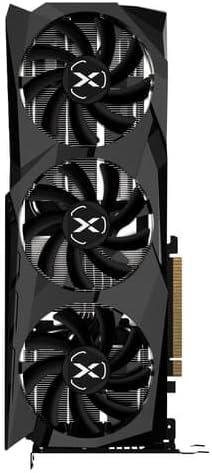
Backplate of the graphics card, showing the robust construction and ventilation.
General Cleaning
Regularly clean your PC case and components to maintain optimal operating temperatures and extend the lifespan of your graphics card. Use compressed air to remove dust from fans, heatsinks, and other components.
Troubleshooting
Driver Stability Issues
If you experience flickering, glitching, stuttering, or crashes, especially after a new installation or driver update, ensure you have performed a clean driver installation using a tool like DDU. Experiment with different settings within AMD Software: Adrenalin Edition, particularly in the 'Tuning' and 'Display' sections, to find a stable configuration. Updating to the latest recommended drivers from the official AMD website is also crucial.
Coil Whine
Some users may experience 'coil whine' (a high-pitched buzzing sound) from the graphics card or Power Supply Unit (PSU) under heavy load. This can sometimes be mitigated by ensuring your PSU is adequately rated for the graphics card's power draw and is not an older model struggling to provide stable power. While often harmless, excessive coil whine can be a sign of an underpowered or aging PSU.
Specifications
| Feature | Detail |
|---|---|
| Brand | XFX |
| Model Number | RX-67XTYJFDV |
| Graphics Coprocessor | AMD Radeon RX 6700 XT |
| Chipset Brand | AMD |
| Memory | 12GB GDDR6 |
| Memory Speed | 16 GBPS (16 GHz) |
| Boost Clock | Up To 2581MHz |
| Cooling | XFX Speedster SWFT309 Triple Fan |
| Max Screen Resolution | 1440 Pixels |
| Video Output Interface | HDMI, 3x DisplayPort |
| Product Dimensions (LxWxH) | 11.97 x 4.84 x 1.65 inches |
| Item Weight | 2.93 pounds |
Warranty and Support
For detailed warranty information, installation guides, and the latest drivers, please refer to the official XFX support resources. You may find QR codes on the product packaging that link directly to these resources. Keeping your drivers updated is essential for optimal performance and compatibility with new games and software.


