1. Introduction
The LinkTech G5 Bluetooth Car Kit Audio Receiver LMP-G5 is designed to enhance your in-car audio experience by providing seamless wireless connectivity. This device allows you to stream music and manage phone calls through your vehicle's audio system, especially beneficial for cars without built-in Bluetooth functionality. It ensures clear audio transmission and hands-free communication while driving.
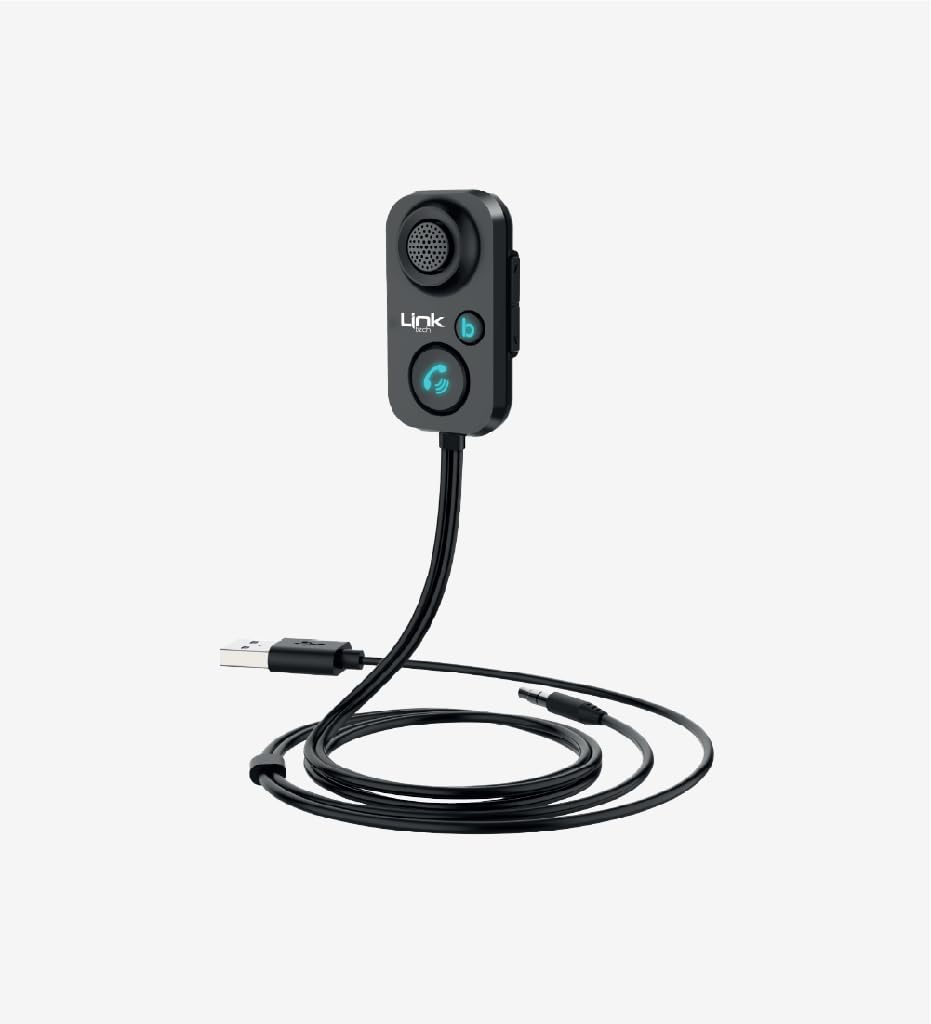
Figure 1: LinkTech G5 Bluetooth Car Kit Audio Receiver LMP-G5. This image displays the compact design of the audio receiver, highlighting its main body and connection ports.
2. What's in the Box
Please check the package contents upon unboxing:
- LinkTech G5 Bluetooth Audio Receiver
- Micro USB Cable (for power)
- 3.5mm Aux Audio Cable
- User Manual
3. Key Features
- Transmits audio and music to the car system via AUX and Bluetooth.
- Automatic switching to incoming calls during music playback.
- Noise cancellation technology for clear communication.
- Siri and Google Assistant activation support.
- Bluetooth 5.1 version for stable and clear audio transmission.
- Ability to make and receive phone calls hands-free.
4. Setup Guide
Follow these steps to set up your LinkTech G5 Bluetooth Car Kit Audio Receiver:
- Connect to Power: Plug the Micro USB cable into the receiver's power input and connect the other end to a USB power source in your car (e.g., a USB car charger or a car's USB port). The device will power on automatically.
- Connect to Car Audio: Insert one end of the 3.5mm Aux audio cable into the AUX output port of the LinkTech G5 receiver. Plug the other end into your car's 3.5mm AUX input jack.
- Select AUX Input: On your car's stereo system, select the AUX input source.
- Pair with Bluetooth Device:
- On your mobile device (smartphone, tablet, etc.), enable Bluetooth.
- Search for available Bluetooth devices. The LinkTech G5 will appear as "LMP-G5" or similar.
- Select "LMP-G5" to pair. Once paired, the device will indicate a successful connection (e.g., an LED indicator or an audio prompt).
Your LinkTech G5 is now ready for use.
5. Operation
Once connected, you can use the LinkTech G5 for music playback and hands-free calls:
- Music Playback: Play music from your paired mobile device. The audio will be transmitted wirelessly to the LinkTech G5 and then through the AUX cable to your car's speakers.
- Answering Calls: When an incoming call is received, the device will automatically switch from music playback to call mode. Use the integrated microphone for hands-free conversation.
- Voice Assistant: Activate Siri or Google Assistant on your paired device through the LinkTech G5 for voice commands.
6. Technical Specifications
| Brand | LinkTech |
| Model Name | LMP-G5 |
| Hardware Interface | Bluetooth |
| Compatible Devices | Car Stereo System |
| Audio Input | 3.5mm AUX |
| Audio Output Mode | A2DP |
| Audio Output Type | Bluetooth, Aux |
| Voltage | 5 Volts (DC) |
| Power Source | Corded Electric |
| Wireless Type | Bluetooth |
| Connectivity Technology | AUX, Bluetooth |
| Supported Standards | Bluetooth 5.1, AVRCP, HFP, A2DP |
| Product Weight | 45 grams |
| Product Dimensions | 51.2 x 30.6 x 15.4 mm |
| Cable Length | 1 meter |
| Material | ABS |
7. Troubleshooting
If you encounter issues with your LinkTech G5, please refer to the following common solutions:
- No Power: Ensure the Micro USB cable is securely connected to both the receiver and a working USB power source in your car. Check if the car's USB port or charger is functional.
- Cannot Pair Bluetooth:
- Make sure the LinkTech G5 is powered on.
- Ensure Bluetooth is enabled on your mobile device.
- Move your mobile device closer to the receiver.
- If previously paired, try unpairing and re-pairing the device.
- Restart both the receiver (by unplugging and replugging) and your mobile device.
- No Audio Output:
- Verify that the 3.5mm Aux audio cable is firmly connected to both the receiver and your car's AUX input.
- Ensure your car stereo is set to the correct AUX input source.
- Check the volume levels on both your mobile device and car stereo.
- Confirm that your mobile device is playing audio and is successfully paired with the LinkTech G5.
- Poor Call Quality: Ensure the receiver's microphone is not obstructed. Reduce background noise in the car if possible.
8. Warranty and Support
The LinkTech G5 Bluetooth Car Kit Audio Receiver LMP-G5 comes with a standard manufacturer's warranty. Please refer to the warranty card included in your package for specific terms and conditions, including the warranty period and coverage details. For technical support, troubleshooting assistance beyond this manual, or warranty claims, please contact LinkTech customer service through their official website or the retailer where the product was purchased.