
1. Introduction
The BWT Pool Robot D500 is an advanced robotic pool cleaner designed to provide optimal cleaning performance for your pool's floor, walls, and waterline. Featuring intelligent navigation, superior filtration, and robust construction, the D500 ensures a sparkling clean pool with minimal effort. This manual provides essential information for the safe and efficient operation, maintenance, and troubleshooting of your BWT Pool Robot D500.
2. Safety Instructions
Please read and understand all safety instructions before operating the robot. Failure to follow these instructions may result in electric shock, fire, or serious injury.
- Always disconnect the power supply before performing any maintenance or cleaning on the robot.
- Do not operate the robot if the power cable is damaged. Contact qualified service personnel for repair.
- Ensure the power outlet is protected by a Ground Fault Circuit Interrupter (GFCI) or Residual Current Device (RCD).
- Keep children and pets away from the pool area while the robot is operating.
- Do not enter the pool while the robot is in operation.
- Use only original BWT replacement parts and accessories.
- Store the robot in a cool, dry place when not in use, away from direct sunlight and extreme temperatures.
- The robot is designed for pool cleaning only. Do not use it for other purposes.
3. Package Contents
Verify that all items are present in the package:
- BWT Pool Robot D500 Unit
- Power Supply Unit
- Floating Cable
- 4D Filter Cartridge(s)
- Premium Transport Caddy
- User Manual (this document)
4. Setup
4.1 Initial Preparation
- Unpack all components from the box.
- Place the robot on its transport caddy.
- Connect the floating cable to the robot and the power supply unit. Ensure a secure connection.
- Plug the power supply unit into a GFCI/RCD protected electrical outlet.
4.2 Placing the Robot in the Pool
Carefully lower the BWT D500 into the pool. Allow it to sink to the bottom. Ensure the floating cable is not tangled and has enough slack for the robot to move freely.

Figure 4.2.1: The BWT Pool Robot D500 ready for deployment. This image shows the robot from a front-side angle, highlighting its compact design and handle.
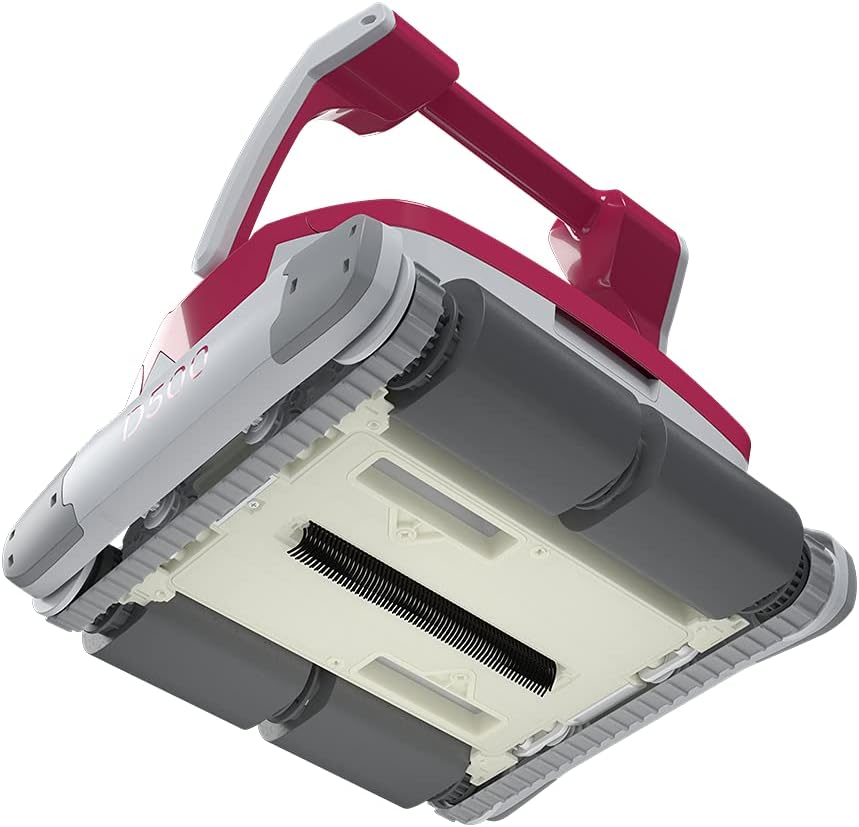
Figure 4.2.2: Underside of the BWT D500, revealing the cleaning brushes and adjustable suction nozzles. The nozzles can be adjusted to optimize suction performance based on the type of debris.
5. Operating the Robot
5.1 Starting a Cleaning Cycle
Once the robot is submerged and the power supply is connected, simply press the ON/OFF button on the power supply unit. The robot will begin its cleaning cycle automatically. The D500 utilizes Smart Navigation, an innovative control system with an integrated gyroscope, to calculate the optimal cleaning path for your pool, ensuring efficient and thorough coverage.
5.2 LED Lighting Feature
The BWT D500 features a unique pulsating pink LED light that illuminates your pool during operation. This aesthetic feature enhances the pool environment while the robot performs its cleaning tasks.

Figure 5.2.1: An internal view of the BWT D500, illustrating the "Breezer & Ultimate Power Technology" drive system with its two motors and powerful pump, which contribute to its efficiency and reliability.
5.3 Ending a Cleaning Cycle
The robot will automatically switch off once its cleaning program is complete. To manually stop the robot, press the ON/OFF button on the power supply unit. Carefully pull the robot out of the pool using the floating cable or handle.
6. Maintenance
6.1 Cleaning the 4D Filter
Regular cleaning of the 4D filter is crucial for maintaining optimal suction performance. The 4D filter consists of elastic 3D microfiber loops designed to capture even the smallest impurities, from leaves to sand grains.
- Disconnect the robot from the power supply.
- Open the top cover of the robot.
- Remove the filter cartridge(s) by lifting them using the integrated handle/shackle.
- Rinse the filter cartridge(s) thoroughly with a garden hose until all debris is removed.
- Reinsert the clean filter cartridge(s) into the robot, ensuring they are properly seated.
- Close the top cover securely.

Figure 6.1.1: The BWT D500 with its top cover open, illustrating the easy access to the filter cartridges for cleaning. The filters can be easily removed with the shackle.
6.2 General Cleaning and Storage
- After each use, rinse the exterior of the robot with fresh water to remove any chlorine or chemical residue.
- Inspect the brushes and tracks for any trapped debris and remove them.
- When storing for extended periods, ensure the robot and power supply are completely dry.
- Store the robot in a shaded, dry area, preferably on its transport caddy.

Figure 6.2.1: Side view of the BWT D500, showing the robust handle for easy lifting and transport.
7. Troubleshooting
| Problem | Possible Cause | Solution |
|---|---|---|
| Robot does not start. | No power supply; cable not connected; power button not pressed. | Check power connection; ensure cable is securely plugged in; press ON/OFF button. |
| Poor cleaning performance. | Filter clogged; suction nozzles blocked; brushes worn. | Clean filter cartridge(s); clear any blockages from suction nozzles; inspect and replace worn brushes. |
| Robot gets stuck or moves erratically. | Cable tangled; large debris obstructing movement; pool surface too slippery. | Untangle cable; remove large debris from pool; ensure pool chemistry is balanced to prevent slippery surfaces. |
| Robot does not climb walls. | Filter clogged; water chemistry imbalance (algae); worn brushes. | Clean filter; check and balance pool water chemistry; inspect and replace brushes if necessary. |
8. Specifications
| Feature | Detail |
|---|---|
| Model | D500 (Item model number: 125259035) |
| Brand | BWT |
| Product Dimensions | 16.26 x 16.97 x 11.97 inches |
| Item Weight | 39 pounds |
| Cleaning Area | Floor, Wall, Water Line |
| Filter Type | 4D Filter (Elastic 3D microfiber loops) |
| Navigation System | Smart Navigation with integrated gyroscope |
| Drive System | Breezer & Ultimate Power Technology (Two motors, powerful pump) |
| Pool Length Capacity | Up to 12 meters (approx. 40 feet) |
| Pool Types | Stainless steel, concrete, PVC film, ceramic, tile pools of all shapes |
| Special Features | Adjustable nozzles, LED lighting, Plug and Play operation |
9. Warranty and Support
BWT products are manufactured to the highest quality standards and are backed by a manufacturer's warranty. Please refer to the warranty card included with your product for specific terms and conditions.
For technical support, spare parts, or warranty claims, please contact BWT customer service through their official website or the contact information provided in your product packaging. When contacting support, please have your model number (D500) and serial number ready.
Online Resources: For additional information, FAQs, and video tutorials, visit the official BWT website.


