
Potensic A20
Contents
Potensic A20 Mini Drone User Manual
Model: A20 (SB4467)
1. Introduction
Welcome to the user manual for your Potensic A20 Mini Drone. This compact and easy-to-fly quadcopter is designed for beginners and children, offering a stable and enjoyable flight experience indoors. It features auto hovering, headless mode, and comes with extra batteries for extended fun.
Please read this manual carefully before operating the drone to ensure safe and proper use. Keep this manual for future reference.
2. What's in the Box

Image: All components included in the Potensic A20 Mini Drone package.
- Potensic A20 Mini Drone (Yellow)
- Remote Control
- 3 x Lithium Ion Batteries
- USB Charging Cable
- Spare Propellers
- User Manual
3. Product Overview
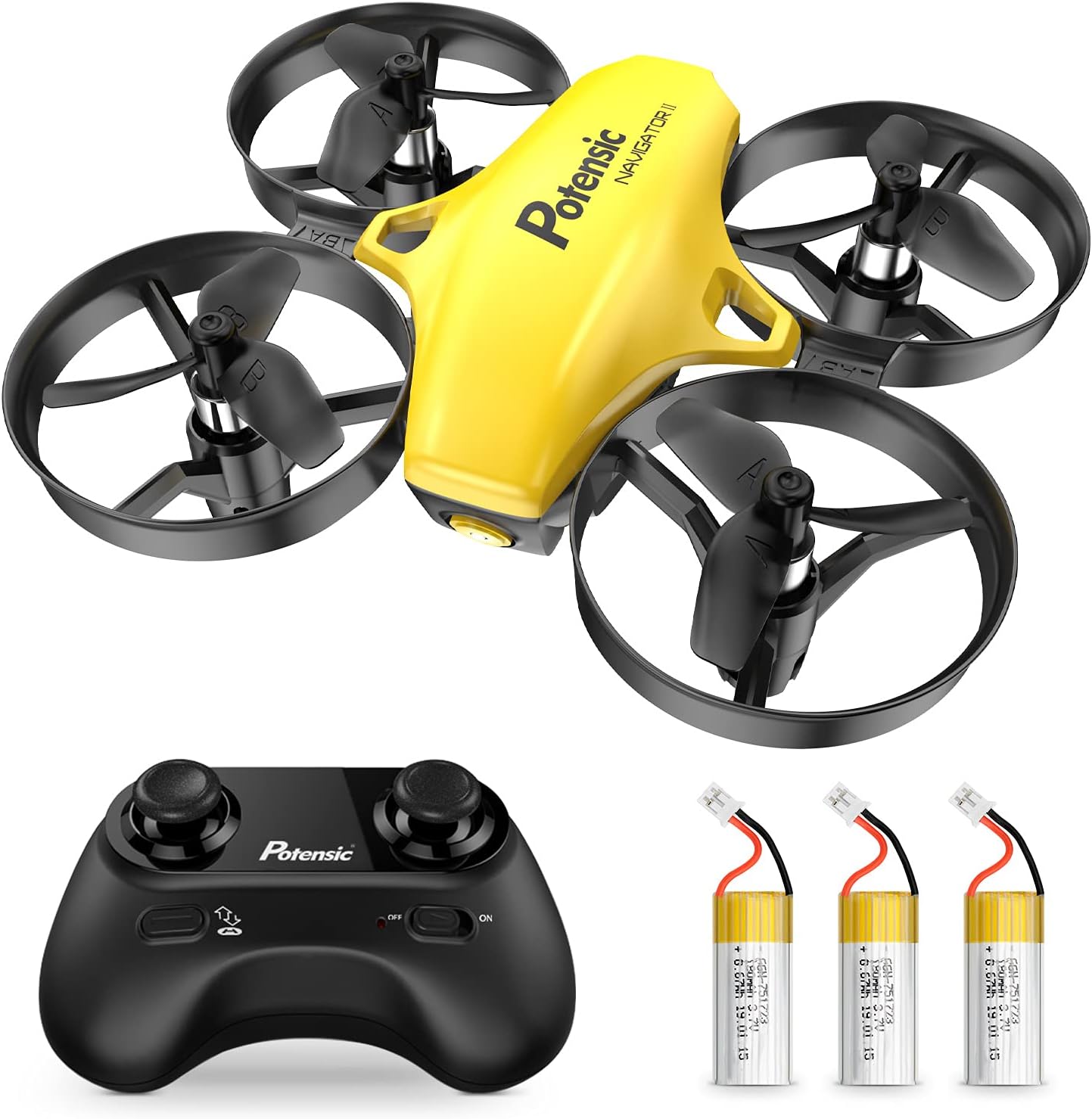
Image: The Potensic A20 Mini Drone and its accompanying remote control.
The Potensic A20 Mini Drone is a compact quadcopter with protective propeller guards, making it durable and safe for indoor use. Its palm-sized design and small controller are ideal for easy handling and portability.

Image: Visual representation of the drone's compact size, measuring approximately 3.1 x 3.5 x 1.25 inches.
4. Setup
4.1. Battery Installation
Drone Battery: Carefully insert the drone battery into its compartment. Ensure the connector is securely plugged in. The drone comes with 3 Lithium Ion batteries included.
Remote Control Batteries: Open the battery compartment on the back of the remote control. Insert 3 AAA batteries (not included), ensuring correct polarity. Close the compartment.
4.2. Pairing the Drone and Remote
- Place the drone on a flat, level surface.
- Turn on the drone. The indicator lights will flash.
- Turn on the remote control.
- Push the left joystick (throttle) all the way up, then all the way down. The drone lights will become solid, indicating successful pairing.
4.3. Calibration
After pairing, if the drone drifts or flies erratically, perform a calibration. Place the drone on a flat surface, then push both joysticks down and to the right simultaneously. The drone lights will flash rapidly and then become solid, indicating successful calibration.
5. Charging the Batteries

Image: Illustration of extended flight time achieved by using the three included batteries.
To charge the drone battery, connect the USB charging cable to the drone battery and a suitable USB power source (e.g., computer USB port, USB wall adapter). The charging indicator will show the charging status.
Each battery provides approximately 5-6 minutes of flight time, and with 3 batteries, you can achieve up to 18 minutes of total flight time. Charging typically takes 30-45 minutes per battery.
A low battery alarm will sound when the drone's battery is running low, prompting you to land safely.
6. Operating the Drone
6.1. One-Key Takeoff and Landing

Image: Demonstrates the simplicity of one-key takeoff/landing and the drone's altitude hold capability.
- Takeoff: After pairing and calibration, press the One-Key Takeoff button (usually indicated by an arrow pointing up) on the remote control. The drone will automatically lift off and hover at a certain height.
- Landing: During flight, press the One-Key Landing button (usually indicated by an arrow pointing down). The drone will slowly descend and land automatically.
6.2. Altitude Hold Mode
The drone is equipped with an altitude hold function, allowing it to maintain a stable height without constant throttle input. This feature makes it easier for beginners to control the drone and focus on directional movements.
6.3. Headless Mode
In Headless Mode, the drone's orientation is relative to the pilot, regardless of which way the drone's front is facing. This simplifies control, especially for new pilots, as you don't need to worry about the drone's actual head direction.
6.4. Speed Adjustment
The Potensic A20 offers 3 speed modes (low, medium, high) to suit different skill levels and environments. Press the speed switch button on the remote control to cycle through the speeds. Start with low speed for learning and gradually increase as you gain confidence.
6.5. Safety Features

Image: Highlights the drone's safety features including propeller guards, low battery warning, and out-of-range alert.
- Propeller Guards: The propellers are isolated by protective guards to prevent injury and protect the drone from damage during collisions.
- Low Battery Alarm: The remote control will emit a warning sound when the drone's battery is low, indicating it's time to land.
- Out-of-Range Alarm: If the drone flies beyond its control range, an alarm will sound to notify you, helping to prevent loss.
7. Maintenance
- Cleaning: Use a soft, dry cloth to clean the drone and remote control. Avoid using water or harsh chemicals.
- Propeller Replacement: If a propeller is damaged, carefully remove it and replace it with a spare propeller from the package. Ensure the new propeller is installed correctly.
- Battery Care: Store batteries in a cool, dry place. Do not overcharge or over-discharge the batteries. If not used for a long period, charge them periodically to maintain battery health.
8. Troubleshooting
| Problem | Possible Cause | Solution |
|---|---|---|
| Drone does not respond to remote. | Not paired or low battery. | Ensure drone and remote are paired correctly. Check battery levels and recharge if necessary. |
| Drone flies erratically or drifts. | Not calibrated or damaged propellers. | Perform calibration on a flat surface. Check propellers for damage and replace if needed. |
| Short flight time. | Battery not fully charged or aged battery. | Ensure battery is fully charged. Consider replacing old batteries. |
| Drone crashes frequently. | Pilot inexperience or high speed mode. | Practice in low speed mode. Ensure sufficient space for flight. |
9. Specifications
| Feature | Detail |
|---|---|
| Brand | Potensic |
| Model Name | A20 |
| Model Number | SB4467 |
| Special Features | Auto Hovering, Headless Mode, Altitude Hold, Extra Batteries |
| Age Range (Description) | Kid (Manufacturer recommended: 14 years and up) |
| Color | Yellow |
| Skill Level | Beginner |
| Control Type | Remote Control |
| Remote Control Technology | 2.4GHz frequency with 6-axis gyroscope stabilization |
| Material | Plastic |
| Item Weight | 8.1 ounces |
| Package Dimensions | 5 x 4.02 x 3.23 inches |
| Batteries | 3 Lithium Ion batteries required (included) |
| UPC | 884017688365 |
10. Warranty and Support
Potensic products are designed and manufactured to the highest quality standards. For information regarding warranty coverage and customer support, please refer to the official Potensic website or contact their customer service directly. Contact details are typically provided on the product packaging or the official brand website.
Documents and downloads
Ask a question about this manual
Ask about setup, troubleshooting, compatibility, parts, safety, or missing instructions. Manuals+ will review the question and use this page’s manual context to help answer it.