
1. Introduction
This manual provides essential information for the safe and efficient installation, operation, and maintenance of your Giosolar 100W Monocrystalline Solar Panel. Please read this manual thoroughly before using the product and retain it for future reference.
2. Safety Information
- Always wear appropriate personal protective equipment (PPE) including gloves and eye protection during installation and maintenance.
- Do not attempt to disassemble or modify the solar panel. This can cause damage and void the warranty.
- Ensure all electrical connections are secure and properly insulated to prevent electric shock.
- Avoid touching the glass surface or frame of the panel when it is wet or during a thunderstorm.
- Keep children and unauthorized personnel away from the installation area.
- Handle the solar panel with care to prevent damage to the glass or frame.
3. Product Overview
The Giosolar 100W Monocrystalline Solar Panel is designed for efficient power generation in various applications, including 12V/24V battery charging for on-grid, off-grid, and hybrid power systems. It features a durable construction suitable for diverse environments.
Key Features:
- High Efficiency: Monocrystalline silicon cells provide excellent performance.
- Durable Construction: Low iron tempered glass and corrosion-resistant aluminum alloy frame withstand high wind (2400Pa) and snow loads (5400Pa).
- Integrated Junction Box: IP-67 rated junction box with pre-installed bypass diodes minimizes power drop due to shading.
- Easy Installation: Equipped with 90cm extension cables and pre-drilled holes for quick mounting.

Figure 3.1: Full view of the Giosolar 100W Monocrystalline Solar Panel.

Figure 3.2: Detail of the IP-67 rated junction box with pre-installed bypass diodes.

Figure 3.3: Illustration of current flow within the monocrystalline solar cells.
4. Setup and Installation
4.1 Site Selection
Choose a location that receives maximum direct sunlight throughout the day, free from shading by trees, buildings, or other obstructions. Consider the angle and orientation for optimal energy capture based on your geographical location.
4.2 Mounting
The solar panel features pre-drilled holes on its aluminum frame for secure mounting. Use appropriate mounting hardware (not included) suitable for your chosen surface (e.g., roof, ground mount, RV, boat). Ensure the mounting structure is robust enough to support the panel's weight and withstand environmental conditions.

Figure 4.1: Example of a solar panel installation on a residential roof.
4.3 Electrical Connection
The panel comes with a pair of 90cm extension cables and plug-and-play connectors for easy wiring. Connect the positive (+) terminal of the solar panel to the positive input of your charge controller, and the negative (-) terminal to the negative input. Ensure correct polarity to prevent damage to the panel or connected equipment. If connecting multiple panels, refer to a qualified electrician or solar system designer for series or parallel wiring configurations.
5. Operating Instructions
Once installed and connected to a compatible charge controller and battery bank, the Giosolar 100W Monocrystalline Solar Panel will begin generating electricity when exposed to sunlight. The charge controller regulates the voltage and current from the solar panel to safely charge your 12V or 24V battery system.
- Monitoring: Regularly check your charge controller's display (if applicable) to monitor charging status, battery voltage, and current output from the panel.
- System Compatibility: This panel is suitable for various applications including RVs, boats, cabins, and other off-grid or hybrid systems. Ensure your entire system (charge controller, inverter, batteries) is compatible with a 100W 12V solar input.
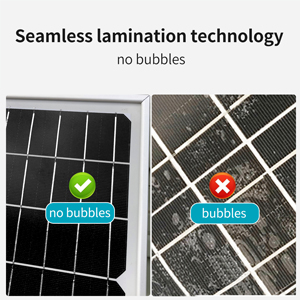
Figure 5.1: Diverse application scenarios for the Giosolar 100W solar panel.
6. Maintenance
Regular maintenance ensures optimal performance and longevity of your solar panel.
- Cleaning: Clean the glass surface of the panel periodically to remove dust, dirt, leaves, or snow. Use a soft cloth and water. Avoid abrasive materials or harsh chemicals that could scratch the glass or damage the frame.
- Inspection: Annually inspect the panel for any physical damage, such as cracks in the glass, bent frames, or loose connections. Check the wiring for signs of wear, corrosion, or rodent damage.
- Shading: Ensure no new obstructions are casting shadows on the panel, as even partial shading can significantly reduce power output due to the bypass diodes.

Figure 6.1: The solar panel is designed to withstand snow loads, but regular cleaning is recommended for optimal performance.
7. Troubleshooting
If your solar panel system is not performing as expected, consider the following common issues:
- No Power Output:
- Check all electrical connections for looseness or corrosion.
- Ensure the panel is receiving direct sunlight and is not shaded.
- Verify the charge controller is functioning correctly and is properly connected to the battery.
- Low Power Output:
- Clean the panel surface if it is dirty.
- Check for partial shading.
- Ensure the panel is oriented correctly towards the sun.
- Verify battery health; a faulty battery can affect charging efficiency.
- Overheating: Ensure adequate airflow around the panel and charge controller.
For persistent issues, consult a qualified solar technician or contact Giosolar customer support.
8. Specifications
| Specification | Value |
|---|---|
| Brand | Giosolar |
| Material | Monocrystalline Silicon |
| Product Dimensions (L x W x H) | 40.16" x 20.08" x 1.18" (1020 x 510 x 30mm) |
| Maximum Power | 100 Watts |
| Maximum Voltage | 12 Volts |
| Amperage Capacity | 5.56 Amps |
| Connector Type | Standard Solar Connectors (MC4 compatible) |
| Wind Load Resistance | 2400 Pa |
| Snow Load Resistance | 5400 Pa |
| Junction Box Rating | IP-67 |
9. Warranty and Support
9.1 Warranty Information
For specific warranty terms and conditions, please refer to the documentation provided with your purchase or contact Giosolar directly. Warranty coverage typically includes defects in materials and workmanship under normal use and service.
9.2 Customer Support
If you have any questions, require technical assistance, or need to report an issue, please contact Giosolar customer support through their official website or the retailer from whom you purchased the product. Provide your product model and purchase date for faster service.