
Eurom 262845
Eurom Cool-Eco 120 A+ Mobile Air Conditioner User Manual
Model: 262845
Introduction
Thank you for choosing the Eurom Cool-Eco 120 A+ Mobile Air Conditioner. This manual provides important information regarding the safe operation, installation, maintenance, and troubleshooting of your new appliance. Please read this manual thoroughly before using the air conditioner and keep it for future reference.
Important Safety Information
WARNING: To reduce the risk of fire, electric shock, or injury, always follow basic safety precautions when using this appliance.
- Ensure the power supply matches the voltage specified on the rating label.
- Do not operate the air conditioner with a damaged cord or plug.
- Do not insert fingers or foreign objects into the air inlet or outlet.
- Keep the appliance away from flammable materials and open flames.
- Always unplug the unit before cleaning or servicing.
- This appliance is not intended for use by persons (including children) with reduced physical, sensory or mental capabilities, or lack of experience and knowledge, unless they have been given supervision or instruction concerning use of the appliance by a person responsible for their safety.
- Children should be supervised to ensure that they do not play with the appliance.
Product Overview
Main Unit
The Eurom Cool-Eco 120 A+ is a compact and portable air conditioning unit designed for efficient cooling. It features a sleek white design with integrated wheels for easy mobility.

This image shows the front of the Eurom Cool-Eco 120 A+ mobile air conditioner, highlighting its clean, white design and the Eurom logo at the bottom.

This image displays the side profile of the air conditioner, revealing the connection point for the exhaust hose and the unit's compact dimensions.
Control Panel
The control panel is located on the top of the unit, providing easy access to all functions and settings.

This image shows a close-up of the air conditioner's top control panel, featuring buttons for power, mode, fan speed, timer, sleep, and swing, along with LED indicators.

This image provides a detailed view of the digital display on the unit, showing the current temperature setting.
Remote Control
A convenient remote control is included for operating the air conditioner from a distance.

This image displays the remote control, which includes a small screen and buttons for adjusting temperature, mode, fan speed, and other functions.
Accessories
The package includes essential accessories for installation and operation.

This image shows the various accessories provided, such as the flexible exhaust hose, window slider kit, and a small drainage tube.
Setup
Unpacking
Carefully remove the air conditioner and all accessories from the packaging. Retain the packaging for future storage or transport.
Placement
Place the air conditioner on a flat, stable surface. Ensure there is at least 30 cm (12 inches) of space around the unit for proper airflow. Do not block the air inlets or outlets.
Exhaust Hose Installation
- Screw one end of the exhaust hose onto the exhaust port on the back of the unit.
- Extend the hose to the nearest window or opening.
- Attach the window adapter to the other end of the exhaust hose.
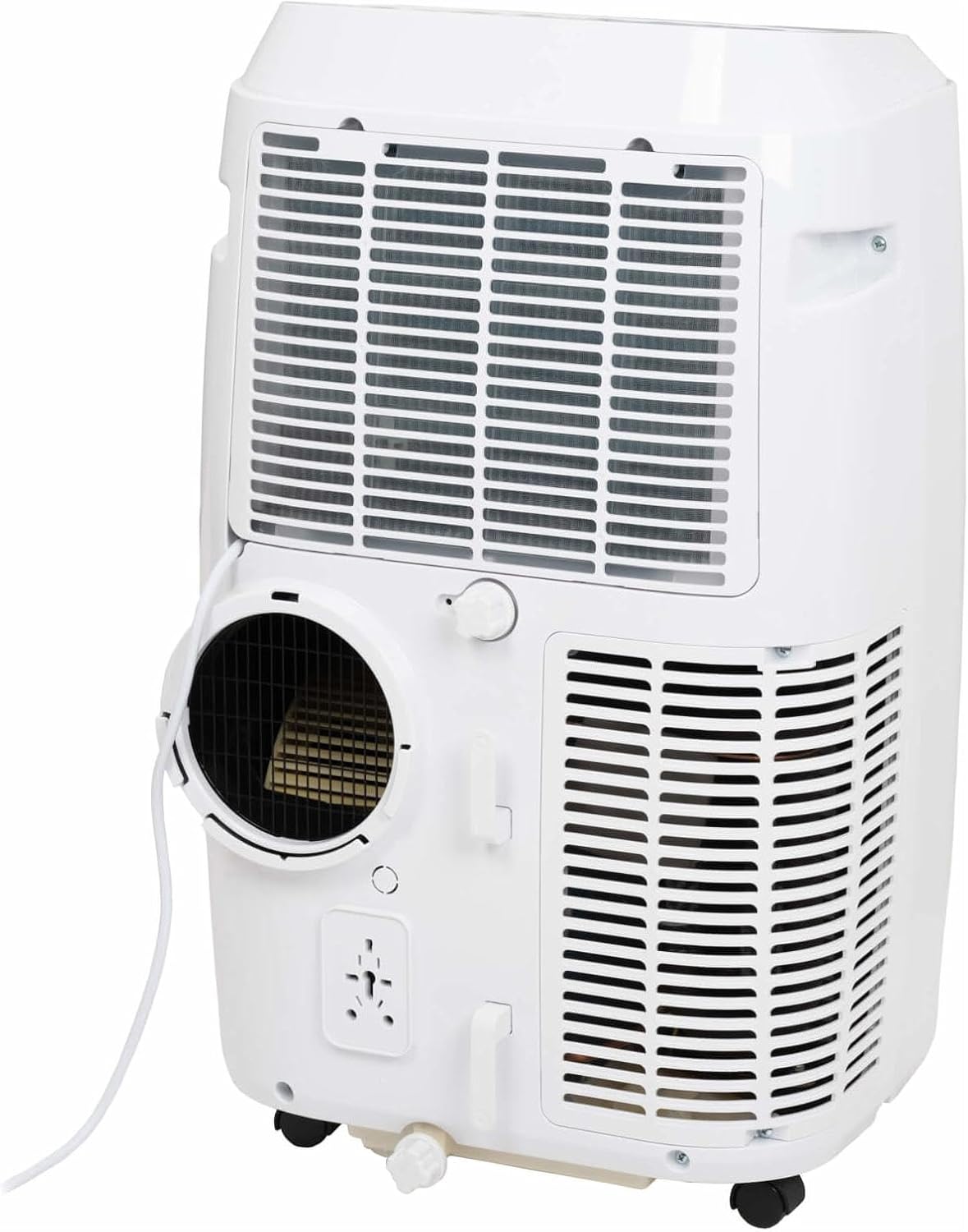
This image shows the rear of the air conditioner, illustrating where the exhaust hose connects to the unit.
Window Kit Installation
Use the provided window sealing kit to secure the exhaust hose in a window opening. Adjust the slider kit to fit your window, then place the window adapter into the opening.
Operating Your Air Conditioner
Control Panel Functions
The control panel on top of the unit allows you to manage all settings. Press the POWER button to turn the unit on or off. Use the MODE button to cycle through cooling, fan, and dehumidification modes.
- POWER: Turns the unit on or off.
- MODE: Selects operating mode (Cool, Fan, Dry/Dehumidify).
- UP/DOWN Arrows: Adjusts temperature setting or timer.
- SPEED: Changes fan speed (Low, Medium, High).
- TIMER: Sets the auto-on or auto-off time.
- SWING: Activates or deactivates the automatic louver swing.
- SLEEP: Activates sleep mode for quieter operation and gradual temperature adjustment.
Remote Control Functions
The remote control duplicates most functions available on the control panel, offering convenience. Ensure the remote control is pointed towards the unit's receiver when pressing buttons.
The remote control features a display showing the current settings and buttons for power, mode selection, temperature adjustment, fan speed, timer, and sleep mode.
Operating Modes
- Cool Mode: Provides cooling. Set your desired temperature using the UP/DOWN arrows.
- Fan Mode: Circulates air without cooling. Adjust fan speed as desired.
- Dry (Dehumidify) Mode: Reduces humidity in the room. The fan speed is fixed in this mode.
Smart App Control
This model supports Smart App Control. Refer to the separate Smart App manual or the manufacturer's website for detailed instructions on connecting and controlling your unit via the app.
Care and Maintenance
Cleaning the Air Filter
The air filter should be cleaned every two weeks or more frequently depending on usage. A dirty filter can reduce efficiency and airflow.
- Unplug the air conditioner from the power outlet.
- Locate the air filter panel (usually on the back or side of the unit).
- Remove the filter.
- Wash the filter with warm, soapy water. Rinse thoroughly and allow it to air dry completely before reinserting.
Draining Water
During dehumidification or in very humid conditions, water will accumulate inside the unit. The unit has an internal water tank that will trigger a "Full" indicator when full. You will need to drain the water manually.
- Place a shallow pan or container under the drainage port at the bottom rear of the unit.
- Remove the drain plug.
- Allow all water to drain out.
- Replace the drain plug securely.
Storage
Before storing the unit for an extended period, ensure the water tank is completely drained. Clean the air filter and store the unit in a dry, cool place, preferably in its original packaging.
Troubleshooting Guide
| Problem | Possible Cause | Solution |
|---|---|---|
| Unit does not turn on. | No power; power cord unplugged; circuit breaker tripped. | Check power connection; reset circuit breaker. |
| Unit not cooling effectively. | Dirty air filter; exhaust hose not properly installed; room too large; windows/doors open. | Clean air filter; ensure hose is sealed; close windows/doors; check room size suitability. |
| Water tank full indicator is on. | Internal water tank is full. | Drain the water from the unit. |
| Unit is noisy. | Unit not on a flat surface; fan obstruction. | Place on a flat surface; check for obstructions in fan area. |
Technical Specifications
| Feature | Specification |
|---|---|
| Brand | Eurom |
| Model Number | 262845 |
| Cooling Capacity | 12000 BTU |
| Power Source | Electric Cable |
| Water Capacity (Internal Tank) | 1.2 Litres |
Warranty and Customer Support
Warranty Information
This product comes with a manufacturer's warranty. Please refer to the warranty card included with your purchase or visit the official Eurom website for detailed warranty terms and conditions. Keep your proof of purchase for warranty claims.
Customer Support
For technical assistance, spare parts, or service, please contact Eurom customer support. Contact details can typically be found on the Eurom website or in the product packaging. When contacting support, please have your model number (262845) and serial number ready.
Related documents262845


Ask a question about this manual
Ask about setup, troubleshooting, compatibility, parts, safety, or missing instructions. Manuals+ will review the question and use this page’s manual context to help answer it.