
1. Introduction
This manual provides essential information for the safe and efficient use of your GIRA S3000 RTR Display System 55, model 539303. Please read these instructions carefully before installation and operation, and retain them for future reference.
The GIRA S3000 RTR Display System 55 is a durable electrical component designed for integration into various electrical systems. It features a display and control buttons for user interaction.
2. Safety Information
WARNING: Electrical shock hazard. Installation and maintenance should only be performed by a qualified electrician in accordance with local electrical codes and regulations.
- Always disconnect power before installing, servicing, or cleaning the device.
- Do not operate the device if it is damaged.
- Ensure proper grounding to prevent electrical hazards.
- Keep the device away from moisture and extreme temperatures.
3. Package Contents
Verify that all components are present before beginning installation:
- GIRA S3000 RTR Display System 55 (Model 539303)
- Installation material (screws, mounting brackets, etc.)
- This instruction manual
4. Product Overview
The GIRA S3000 RTR Display System 55 features a clear display and intuitive controls for managing your electrical system. Below is an image illustrating the main components and controls.
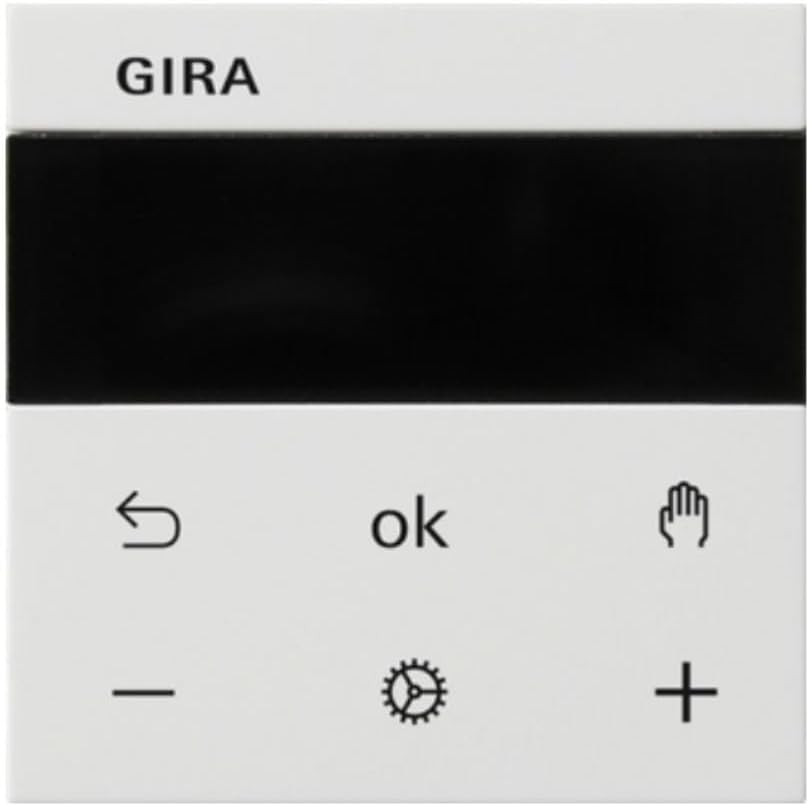
Figure 1: Front view of the GIRA S3000 RTR Display System 55. The top section features the GIRA brand logo and a black display area. The bottom section includes control buttons: a return arrow, 'ok' button, a hand icon, a minus sign, a gear icon (settings), and a plus sign.
4.1. Controls and Indicators
| Symbol/Indicator | Description |
|---|---|
| GIRA Logo | Brand identification. |
| Display Area | Shows current status, settings, and menu options. |
| ↶ (Return Arrow) | Used to go back to the previous menu or cancel an action. |
| ok | Confirms selections or enters menu options. |
| ⚙ (Gear Icon) | Accesses system settings or configuration menus. |
| ➕ (Plus Sign) | Increases values or navigates forward in menus. |
| ➖ (Minus Sign) | Decreases values or navigates backward in menus. |
| 🖐 (Hand Icon) | Specific function, typically related to manual override or special mode activation. Refer to advanced settings for details. |
5. Setup and Installation
This section outlines the steps for installing the GIRA S3000 RTR Display System 55. Ensure all safety precautions are followed.
5.1. Mounting
- Prepare the Installation Site: Ensure the mounting surface is clean, dry, and free from obstructions.
- Disconnect Power: Turn off the main power supply to the installation area at the circuit breaker. Verify with a voltage tester.
- Position the Device: Place the GIRA S3000 RTR Display System 55 in the desired location.
- Secure with Screws: Use the provided installation material to securely fasten the device to the wall or mounting box. Do not overtighten.
5.2. Wiring
IMPORTANT: All wiring must comply with local electrical codes and be performed by a qualified professional.
- Identify Terminals: Refer to the wiring diagram (if provided separately or on the device itself) to identify the power input, output, and communication terminals.
- Connect Power: Connect the live, neutral, and ground wires to the corresponding terminals.
- Connect Load/System: Connect the wires for the controlled load or system to the appropriate output terminals.
- Secure Connections: Ensure all wire connections are tight and secure.
5.3. Initial Power-Up
- Restore Power: Once installation is complete and verified, restore power at the circuit breaker.
- Check Display: The display should illuminate, indicating the device is receiving power.
- Perform Initial Configuration: Follow the on-screen prompts to set basic parameters such as language, time, and date.
6. Operating Instructions
This section details how to operate your GIRA S3000 RTR Display System 55.
6.1. Basic Navigation
- Use the ➕ (Plus) and ➖ (Minus) buttons to scroll through menu options or adjust values.
- Press the ok button to select an option or confirm a setting.
- Press the ↶ (Return) button to go back to the previous screen or exit a menu.
6.2. Accessing Settings
To access the main settings menu:
- From the main screen, press the ⚙ (Gear Icon) button.
- Use the ➕ (Plus) and ➖ (Minus) buttons to navigate through the settings options.
- Press ok to enter a sub-menu or modify a setting.
- Press ↶ (Return) to exit the settings menu.
6.3. Specific Functions (Hand Icon)
The 🖐 (Hand Icon) button typically activates a manual override or a specific quick-access function. The exact behavior may vary depending on the system configuration. Consult your system integrator or the advanced configuration guide for detailed information on this function.
7. Maintenance
Regular maintenance ensures the longevity and optimal performance of your GIRA S3000 RTR Display System 55.
7.1. Cleaning
- Disconnect Power: Always disconnect power to the device before cleaning.
- Wipe Surface: Use a soft, dry, or slightly damp cloth to clean the exterior surface.
- Avoid Harsh Chemicals: Do not use abrasive cleaners, solvents, or strong detergents, as these can damage the finish and display.
7.2. Inspection
- Periodically inspect the device for any signs of physical damage, loose connections, or discoloration.
- If any damage is observed, disconnect power immediately and contact a qualified technician for repair or replacement.
8. Troubleshooting
This section provides solutions to common issues you might encounter with your GIRA S3000 RTR Display System 55.
| Problem | Possible Cause | Solution |
|---|---|---|
| Device does not power on. | No power supply; loose wiring; faulty device. |
|
| Display is blank or flickering. | Power fluctuation; internal fault. |
|
| Buttons are unresponsive. | Software glitch; physical damage. |
|
9. Specifications
Detailed technical specifications for the GIRA S3000 RTR Display System 55 (Model 539303).
| Feature | Detail |
|---|---|
| Brand | Gira |
| Model Number | 539303 |
| Material | Metal |
| Dimensions (L x W x H) | 27 x 19 x 19 cm |
| Item Weight | 14 Kilograms |
| Energy Class | B |
| Color | N.A (Not Applicable/Specified as pure white in title) |
| Style | European |
| Exterior Finish | Powder coating |
| Included Components | Installation material |
10. Warranty and Support
For warranty information and technical support, please contact your authorized GIRA dealer or visit the official GIRA website. Keep your purchase receipt as proof of purchase.
Spare parts availability information is currently unavailable. Please contact GIRA support for further details.


