
1. Introduction
The Luminous NXI 130 is a high-efficiency Grid Tie UPS designed to integrate solar power directly into the utility grid. This system allows for the conversion of solar energy into usable electricity for your premises, with any excess power potentially fed back into the grid. It incorporates advanced features to ensure reliable and safe operation, including rapid disconnection from the grid during outages (anti-islanding) to protect utility workers.
This manual provides essential information for the proper installation, operation, and maintenance of your NXI 130 Grid Tie UPS. Please read it thoroughly before proceeding with any procedures.
2. Key Features
- High Efficiency: Achieves up to 97.5% maximum efficiency for optimal power conversion.
- Advanced Switching Technology: Utilizes super high frequency switching technology.
- Comprehensive Protection: Includes features such as short-circuit protection, reverse polarity protection, anti-islanding, and residual current detection for enhanced safety.
- Integrated MPPT Charge Controller: The inbuilt MPPT (Maximum Power Point Tracking) charge controller extracts up to 30% more power from solar panels.
- User-Friendly Display: Features an informative LCD display for easy monitoring of system status.
- IP65 Protection: Certified with IP65 rating, making it suitable for outdoor installation and resistant to dust, heavy rains, and extreme temperatures.
3. What's in the Box
Upon unpacking, verify that all components are present and undamaged. The package for your Luminous NXI 130 Grid Tie UPS should contain:
- Luminous NXI 130 Grid Tie UPS Unit
- Connector(s)
- User Manual (this document)
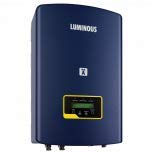
Figure 1: Front view of the Luminous NXI 130 Grid Tie UPS, showing the blue casing and LCD display.
4. Setup and Installation
Installation of the Luminous NXI 130 Grid Tie UPS should only be performed by qualified personnel in accordance with all local and national electrical codes and regulations. Incorrect installation can lead to equipment damage, personal injury, or fire.
4.1 Site Selection
- Choose a location that is well-ventilated and protected from direct sunlight, excessive heat, and moisture.
- Ensure the mounting surface is sturdy enough to support the weight of the unit (approximately 9.5 kg).
- Maintain adequate clearance around the unit for proper airflow and heat dissipation.
- Given its IP65 rating, the unit is suitable for outdoor installation, but protection from direct impact and extreme weather conditions is still recommended.
4.2 Mounting the Unit
Mount the NXI 130 vertically using appropriate mounting hardware (not included unless specified). Ensure the unit is securely fastened to prevent accidental dislodgement.
4.3 Electrical Connections
All electrical connections must be made with the main AC power supply disconnected and solar panels covered to prevent accidental power generation. Refer to the wiring diagram provided with the unit for specific connection points.
- DC Input (Solar Panels): Connect the positive and negative terminals from your solar panel array(s) to the designated DC input terminals. Observe correct polarity. The NXI 130 features Dual MPPTs, allowing for multiple array connections.
- AC Output (Grid Connection): Connect the AC output of the UPS to your electrical panel or designated grid connection point. Ensure proper grounding.
- Grounding: Connect the unit to a reliable earth ground.
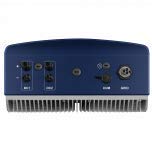
Figure 2: Bottom view of the Luminous NXI 130 Grid Tie UPS, illustrating the various connection ports for DC input and AC output.
5. Operating Instructions
Once installation is complete and all connections are verified, you can proceed with powering on the NXI 130.
5.1 Initial Power-Up
- Ensure all DC and AC circuit breakers are in the OFF position.
- Turn on the DC disconnect switch for the solar panels.
- Turn on the AC circuit breaker connecting the UPS to the grid.
- The UPS will perform a self-test and then begin to operate, converting solar DC power to AC power for grid injection.
5.2 Monitoring Operation
The LCD display on the front panel provides real-time information about the system's performance, including:
- Input DC voltage and current from solar panels.
- Output AC voltage, current, and frequency.
- Power generation (kW) and total energy generated (kWh).
- System status and fault codes.
Refer to the detailed display guide in the appendix (if provided with the physical manual) for specific navigation and interpretation of display messages.
5.3 Shutting Down the System
- Turn off the AC circuit breaker connecting the UPS to the grid.
- Turn off the DC disconnect switch for the solar panels.
- Wait for the LCD display to turn off, indicating the unit is fully powered down.
6. Maintenance
Regular maintenance ensures the longevity and optimal performance of your Luminous NXI 130 Grid Tie UPS.
6.1 Routine Checks
- Visual Inspection (Monthly): Check the unit for any visible damage, loose connections, or signs of corrosion. Ensure ventilation openings are clear of dust and debris.
- Performance Monitoring (Daily/Weekly): Regularly check the LCD display for normal operation and power generation figures. Note any unusual readings.
- Cleaning (As Needed): Gently clean the exterior of the unit with a soft, dry cloth. Do not use abrasive cleaners or solvents. Ensure the display is clean for clear readability.
6.2 Professional Inspection (Annually)
It is recommended to have a qualified technician perform an annual inspection of the entire solar power system, including the NXI 130, to ensure all components are functioning correctly and safely.
7. Troubleshooting
This section provides guidance for common issues. For problems not listed here or if issues persist, contact Luminous customer support.
| Problem | Possible Cause | Solution |
|---|---|---|
| No power output / Display off | No DC input from solar panels; AC grid disconnected; Unit not powered on. | Check solar panel connections and sunlight exposure. Verify AC grid connection and circuit breakers. Ensure proper power-up sequence. |
| Low power output | Shading on solar panels; Dirty solar panels; Faulty solar panel; MPPT not optimizing. | Clear any shading. Clean solar panels. Inspect panels for damage. Monitor MPPT status on display. |
| Error code on display | Internal fault; Grid issue; Over-voltage/current. | Note the error code and refer to the specific error code list in the full manual (if available). Attempt a system restart. If persistent, contact support. |
| Unit frequently disconnects from grid | Grid instability; Anti-islanding protection triggered. | This may be normal behavior if the grid is unstable or experiencing outages. If it happens frequently without apparent grid issues, contact support. |
8. Specifications
The following table outlines the technical specifications for the Luminous NXI 130 Grid Tie UPS:
| Specification | Value |
|---|---|
| Model Number | NXI 130 |
| Manufacturer | Luminous Power technologies pvt ltd |
| Product Dimensions (LxWxH) | 31 x 16 x 37.3 cm |
| Item Weight | 9.5 kg |
| Max. Efficiency | 97.5% |
| MPPT Charge Controller | Inbuilt, Dual/Quad MPPT (extracts up to 30% more power) |
| Protection Rating | IP65 |
| Safety Features | Short-circuit, Reverse polarity, Anti-islanding, Residual current detection |
| Compliance | MNRE & IEC (IEC – 61683, IEC – 60068, IEC – 61000, IEC – 61727, IEC – 62116) |
| Generic Name | 3 KW ONGRIDE SOLAR INVERTER |
9. Safety Information
The Luminous NXI 130 is designed with multiple safety features to protect both the equipment and personnel. Adherence to these safety guidelines is crucial:
- Anti-Islanding Protection: The unit is equipped with anti-islanding protection, which ensures it disconnects from the grid if the utility grid fails. This prevents electricity from being fed back into a downed grid, safeguarding line workers.
- MNRE & IEC Compliance: The NXI 130 complies with all relevant National (MNRE) and International (IEC) standards for safety, efficiency, and reliability, including IEC – 61683, IEC – 60068, IEC – 61000, IEC – 61727, and IEC – 62116.
- Electrical Hazard: High voltages are present within the unit. Only qualified and authorized personnel should perform installation, maintenance, or troubleshooting.
- Grounding: Always ensure the unit is properly grounded to prevent electrical shock.
- Environmental Conditions: While IP65 rated, avoid exposing the unit to extreme physical impact or prolonged submersion.
10. Warranty and Support
For warranty information, terms, and conditions, please refer to the warranty card included with your product or visit the official Luminous website. In case of technical issues, questions, or to request service, please contact Luminous customer support.
Luminous Customer Care: 18001033039