
1. Introduction
The Bauer AP Products 013-5091 is an advanced electric towable lock designed for RV entry doors, offering multiple access methods for enhanced convenience and security. This lock features Close Field Technology, allowing for unlocking when a paired device is in close proximity. It is designed for easy installation and can be integrated with other Bauer locks for a Keyed-A-Like system. This manual provides detailed instructions for installation, operation, and maintenance of your new lock.

Figure 1: Overview of the Bauer AP Products 013-5091 Bluetooth Electric Towable Lock and included hardware.
2. What's in the Box
Verify that all components are present before beginning installation:
- AP Products 013-5091 Bauer Keyed-A-Like Bluetooth Electric Towable Lock - RH
- Mounting Hardware (screws, strike plates)
- Two (2) Physical Keys
- Four (4) AA Batteries (Energizer Ultimate Lithium recommended)
3. Installation Guide
The Bauer 013-5091 lock is designed to be retrofittable in most RV towable entry doors. It fits into a standard 2-3/4” x 3-3/4” opening. Basic tools such as a screwdriver are typically required for installation.
- Prepare the Opening: Ensure your RV door has a compatible opening of 2-3/4 inches by 3-3/4 inches. If replacing an existing lock, carefully remove the old unit.
- Insert the Lock: Gently slide the new lock assembly into the prepared opening, ensuring the deadbolt mechanism aligns correctly with the door frame.
- Secure the Lock: Use the provided mounting hardware to secure the lock to the door. Ensure all screws are tightened firmly but do not overtighten.
- Install Strike Plates: Attach the strike plates to the door frame, aligning them with the deadbolt and latch mechanisms of the lock. Test the door closure and locking action to ensure smooth operation.
- Install Batteries: Open the battery compartment (typically on the interior side of the lock) and insert the four (4) AA batteries, observing correct polarity.
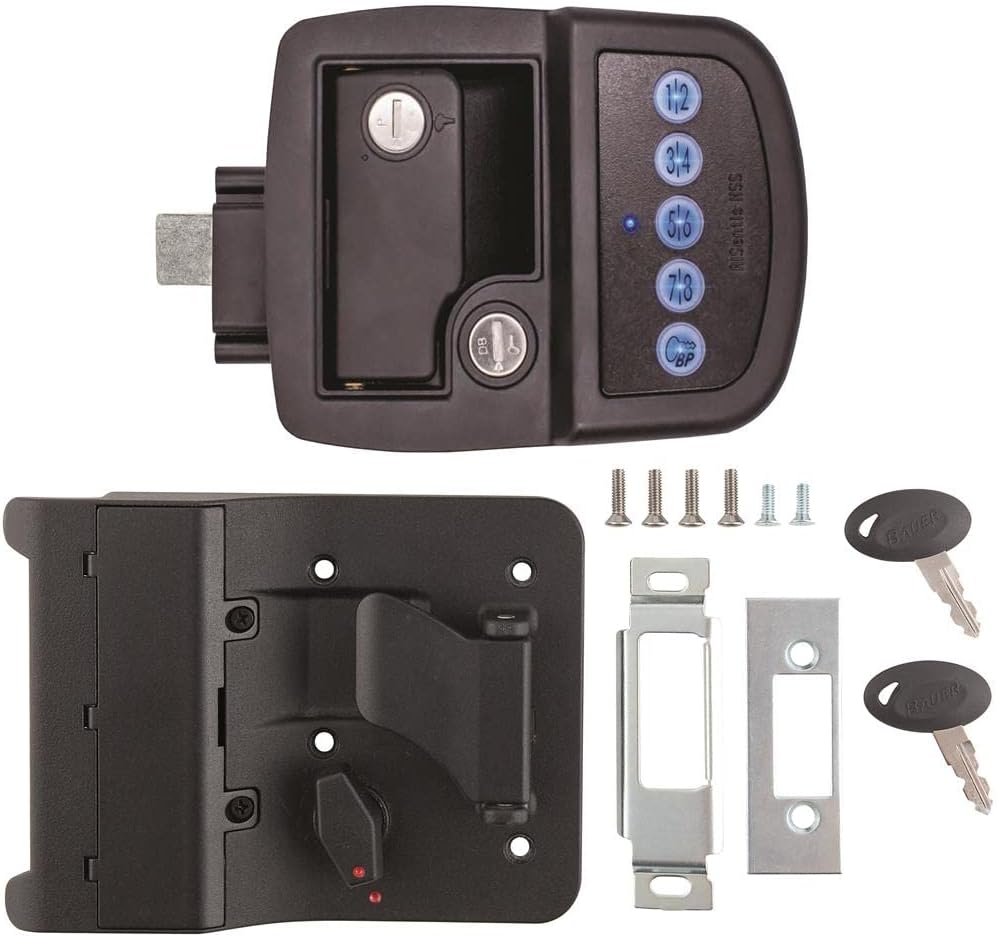
Figure 2: Interior view of the lock, showing the battery compartment and internal mechanism.
4. Operating Instructions
4.1. Keyed Entry
The lock comes with two physical keys for traditional manual unlocking. Insert the key into the keyhole and turn to unlock or lock the deadbolt as needed. This serves as a reliable backup access method.
4.2. PIN Code Operation
The lock features a programmable 4-digit PIN number for keyless entry.
- Setting Your PIN: Refer to the specific programming instructions provided with your lock for setting or changing the 4-digit PIN. This typically involves pressing a program button on the interior unit, entering the new PIN, and confirming.
- Unlocking with PIN: Enter your 4-digit PIN on the keypad. The lock will disengage, allowing you to open the door.
- Locking with PIN: Press any button on the keypad to engage the deadbolt.
4.3. Bluetooth Connectivity (Close Field Technology)
The lock utilizes Bluetooth and Close Field Technology (CFT) for convenient unlocking via a paired mobile device.
- Pairing Devices: The lock can pair with up to six (6) devices. Download the official Bauer lock application from your device's app store (compatible with Android and iOS). Follow the in-app instructions to pair your device with the lock.
- Unlocking with Bluetooth: With a paired device in close proximity, simply push a designated button on the lock (or within the app, depending on the specific model's functionality) to unlock. Two paired devices can be active at the same time.
- Locking with Bluetooth: Use the lock's app to engage the deadbolt remotely, or press a button on the lock itself.
- Locking/Unlocking History: The lock keeps track of its locking and unlocking history, which can typically be accessed through the mobile application.
5. Battery Information & Maintenance
The Bauer 013-5091 lock is self-contained and powered by four (4) AA batteries. Energizer Ultimate Lithium batteries are recommended for optimal performance and longevity.
- Battery Replacement: When battery power is low, the lock may provide an audible or visual indicator. To replace, open the battery compartment on the interior side of the lock, remove the old batteries, and insert new AA batteries, ensuring correct polarity.
- Battery Life: Battery life varies depending on usage frequency and environmental conditions. Regular checks are recommended.
- Cleaning: Clean the exterior of the lock with a soft, damp cloth. Avoid abrasive cleaners or solvents that could damage the finish or electronic components.
6. Troubleshooting
If you encounter issues with your Bauer 013-5091 lock, refer to the following common solutions:
| Problem | Possible Cause / Solution |
|---|---|
| Lock does not respond to PIN or Bluetooth. |
|
| Bluetooth range is limited or inconsistent. |
|
| Deadbolt does not fully extend or retract. |
|
If issues persist, contact AP Products customer support for further assistance.
7. Specifications
| Brand | AP Products |
| Model Name | 013-5091 |
| Lock Type | Key Lock, Electronic Keypad, Bluetooth |
| Material | Plastic |
| Color | Black |
| Item Dimensions (L x W x H) | 9 x 5 x 3 inches |
| Item Weight | 3.8 Pounds |
| Power Source | 4 AA Batteries (Included) |
| Connectivity Protocol | Bluetooth |
| Controller Type | Android, iOS |
| UPC | 711217033131 |
8. Warranty and Support
This product is covered by a manufacturer's warranty. Please refer to the warranty information included with your purchase for details on coverage and duration. For technical support, troubleshooting assistance, or warranty claims, please contact AP Products customer service.
For a complete user guide in PDF format, please refer to the official document: Bauer AP Products 013-5091 User Manual (PDF)