1. Introduction
This manual provides detailed instructions for the installation, operation, and maintenance of your GUZARE GR-305 Marine Bluetooth Stereo Receiver. Please read this manual thoroughly before using the product to ensure proper function and longevity. This device is designed for marine and outdoor environments, offering robust performance and connectivity.
2. Product Features
- Bluetooth Connectivity: Stream and control music wirelessly from your smartphone or MP3 player, supporting apps like Spotify and Pandora.
- Waterproof & Weatherproof: Designed with IP66 water resistance, featuring front panel UV coating and a PC board with conformal coating for durability in harsh environments.
- High Power Output: Built-in 4 x 72 Watt peak high-powered amplifier (28W x 4 RMS) with over-high pressure protection.
- Efficient Heat Dissipation: Equipped with a large heat sink to effectively manage temperature, supporting up to 4 x 6.5-inch speakers without overheating concerns.
- Multiple Media Playback Options: Enjoy music via Bluetooth, USB port, or tune into AM/FM radio stations. USB charging is also available.
- No CD/DVD Mechanism: Streamlined design without a CD or DVD player.

Figure 2.1: The GUZARE GR-305 receiver shown installed in different vehicle types, highlighting its versatility.

Figure 2.2: Displaying the IPX6 water resistance rating and 180 Watts peak power, indicating suitability for marine environments and high audio output.
3. Package Contents
Verify that all items listed below are included in your package:
- 1 x GR-305 Marine Bluetooth Stereo Receiver
- 1 x Wiring Harness
- 2 x Installation Nuts
- 1 x USB Extension Cable
- 1 x Instruction Manual
- 1 x U Bracket

Figure 3.1: Visual representation of all components included in the GR-305 product package.
4. Installation
4.1 Wiring Diagram
Refer to the following diagram for correct wiring connections. Ensure all connections are secure and insulated to prevent short circuits.

Figure 4.1: Detailed wiring connections for the GR-305 unit, including audio inputs/outputs, power, and antenna.
4.2 Dimensions
The GR-305 is designed to fit a standard gauge (tachometer) opening. Use the following dimensions for precise installation planning.
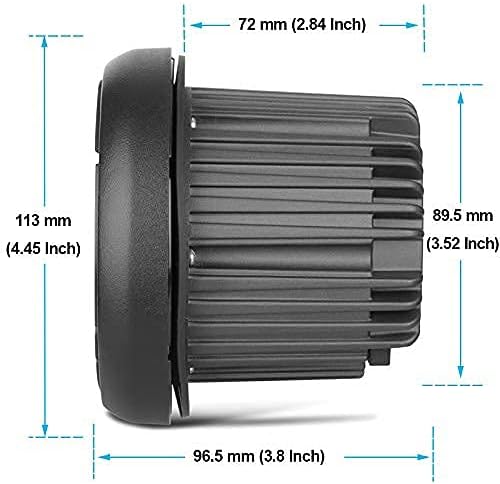
Figure 4.2: Physical dimensions of the GR-305 receiver, useful for mounting and space allocation.
4.3 Mounting
Mount the unit securely using the provided U bracket and installation nuts. Ensure adequate ventilation around the heat sink for optimal performance.
5. Operating Instructions
5.1 Basic Controls
- Power (POW) Button: Press to turn the unit on or off.
- Volume (+/-) Buttons: Adjust the audio output level.
- Mode Button: Cycle through available sources: FM/AM Radio, Bluetooth, USB, AUX-IN.
- Band Button: In FM/AM mode, switch between radio bands (FM1, FM2, FM3, AM1, AM2).
- APS Button: Auto Program Store for radio stations.
- Track Skip (◀◀ / ▶▶) Buttons: Skip tracks in USB/Bluetooth mode; seek stations in FM/AM mode.
- Play/Pause (▶||) Button: Play or pause media in USB/Bluetooth mode.
5.2 Bluetooth Operation
- Turn on the GR-305 receiver.
- Press the Mode button until "BT streaming" appears on the display.
- On your mobile device, enable Bluetooth and search for available devices.
- Select "GR305" from the list to pair. Once connected, the display will show "CONN. OK".
- Start playing audio from your device. Use the receiver's controls or your device to manage playback (play/pause, skip tracks, volume).
Video 5.1: Demonstration of Bluetooth pairing and audio streaming with the GUZARE GR-305 receiver.
5.3 FM/AM Radio Operation
- Press the Mode button to select FM or AM radio.
- Press the Band button to cycle through FM1, FM2, FM3, AM1, AM2 bands.
- Use the Track Skip (◀◀ / ▶▶) buttons to manually seek for stations.
- Press and hold the APS button to automatically scan and store strong stations.
5.4 USB Playback
- Insert a USB drive containing MP3 files into the USB port.
- Press the Mode button to select USB source. The unit will automatically begin playing.
- Use the Track Skip (◀◀ / ▶▶) buttons to navigate between tracks.
- Press the Play/Pause (▶||) button to pause or resume playback.
5.5 AUX-IN Operation
- Connect an external audio device to the AUX-IN port using a 3.5mm audio cable.
- Press the Mode button to select AUX-IN source.
- Control playback directly from your connected external device.
Video 5.2: A demonstration of the GUZARE GR-305's various functions, including Bluetooth, FM/AM radio, and USB playback.
6. Maintenance
- Cleaning: Use a soft, damp cloth to clean the unit. Avoid abrasive cleaners or solvents.
- Water Resistance: While the unit is IP66 water resistant, avoid prolonged submersion or high-pressure water jets. Ensure all caps and covers are securely closed.
- Connections: Periodically check all wiring connections for corrosion or looseness, especially in marine environments.
7. Troubleshooting
| Problem | Possible Cause | Solution |
|---|---|---|
| No power | Loose power connection; Blown fuse | Check power wiring; Replace fuse if necessary |
| No sound | Volume too low; Mute activated; Incorrect source selected; Loose speaker connections | Increase volume; Deactivate mute; Select correct source; Check speaker wiring |
| Bluetooth not connecting | Device not in pairing mode; Incorrect device selected; Interference | Ensure receiver is in Bluetooth mode; Select "GR305" on your device; Move closer to the unit |
| USB playback issues | Unsupported file format; Corrupt USB drive; Loose USB connection | Ensure MP3 format; Try a different USB drive; Reinsert USB drive securely |
| Radio static/poor reception | Weak signal; Antenna not connected; Interference | Extend antenna; Check antenna connection; Move away from interference sources |
8. Specifications
| Feature | Specification |
|---|---|
| Model Number | GR-305 |
| Product Dimensions | 4.45 x 4.45 x 3.82 inches |
| Item Weight | 1.98 pounds (900 Grams) |
| Brand | GUZARE |
| Connectivity Technology | USB, Bluetooth |
| Controller Type | Android (compatible) |
| Special Feature | Spotify (compatible) |
| Compatible Devices | Smartphone, Personal Computer, Speaker |
| Connector Type | 3.5mm Jack, RCA, USB |
| Audio Encoding | Stereo |
| Audio Output Mode | Stereo |
| Color | Black |
| Manufacturer | GUZARE |
| Date First Available | March 5, 2021 |
9. Warranty and Support
This GUZARE GR-305 Marine Bluetooth Stereo Receiver comes with a standard manufacturer's warranty. For specific warranty details, please refer to the warranty card included in your package or contact GUZARE customer support. If you encounter any issues not covered in this manual, or require further assistance, please reach out to our support team through the contact information provided on the GUZARE official website or your purchase platform.