
1. Introduction
This manual provides instructions for the JENSEN MCR-60 Portable Personal Cassette Player/Recorder. This device combines a cassette player/recorder with an AM/FM radio and Bluetooth transmission capabilities. It is designed for portable audio playback and recording.
2. Safety Information
- Do not expose the unit to rain or moisture.
- Avoid placing the unit near heat sources such as radiators, heat registers, stoves, or other apparatus (including amplifiers) that produce heat.
- Use only attachments/accessories specified by the manufacturer.
- Unplug this unit during lightning storms or when unused for long periods.
- Refer all servicing to qualified service personnel.
- Dispose of batteries properly, following local regulations.
3. Package Contents
Verify that all items are present:
- JENSEN MCR-60 Portable Personal Cassette Player/Recorder
- Wired Earbuds
- USB to DC Power Cord
- User Manual (this document)
4. Controls and Features
Familiarize yourself with the various controls and ports on your MCR-60 unit.

Image: Front view of the JENSEN MCR-60 Portable Cassette Player/Recorder, showing the speaker grille, cassette window, and radio dial.

Image: Side view of the JENSEN MCR-60, highlighting the PHONES, LINE OUT, TUNING, and MIC ports.
- Cassette Controls: Play, Stop, Fast Forward, Rewind, Record.
- Volume Control: Adjusts audio output level.
- AM/FM Switch: Selects between AM and FM radio bands.
- Tuning Dial: For selecting radio frequencies.
- PHONES Jack: 3.5mm stereo jack for connecting headphones or earbuds.
- LINE OUT Jack: For connecting the unit to an external audio system.
- MIC Input: For connecting an external microphone (user-supplied).
- Built-in Microphone: For recording audio directly.
- Telescopic Antenna: For improved FM radio reception.
- USB DC Input: For external power supply.
- Battery Compartment: Holds 2 x 'AA' size batteries.
5. Setup
5.1 Powering the Unit
The MCR-60 can be powered by batteries or via the included USB to DC power cord.
Battery Installation
- Open the battery compartment cover located on the back of the unit.
- Insert two (2) 'AA' size batteries (not included), ensuring correct polarity (+ and -) as indicated inside the compartment.
- Close the battery compartment cover securely.
USB Power Connection
- Connect the small end of the included USB to DC power cord to the USB DC Input jack on the unit.
- Connect the standard USB end of the cable to a USB power adapter (not included) or a powered USB port on a computer.

Image: The JENSEN MCR-60 unit connected to a USB power adapter via its USB to DC power cord, illustrating how to power the device without batteries.
5.2 Earbud Connection
To listen privately, connect the included wired earbuds to the PHONES jack on the side of the unit.

Image: The JENSEN MCR-60 with its cassette compartment open, showing a cassette tape inside, and wired earbuds connected to the PHONES jack on the side.
6. Operating Instructions
6.1 Cassette Playback
- Open the cassette compartment door.
- Insert a cassette tape with the exposed tape facing upwards.
- Close the cassette compartment door.
- Press the PLAY button to begin playback.
- Use the FAST FORWARD or REWIND buttons to navigate the tape.
- Press the STOP button to end playback. The unit features an auto-stop function that will stop playback when the tape reaches its end.
- Adjust the VOLUME control to your desired listening level.
6.2 AM/FM Radio
- Slide the function switch to FM or AM.
- Extend the telescopic antenna for optimal FM reception. For AM, rotate the unit for best reception.
- Rotate the TUNING dial to select your desired radio station.
- Adjust the VOLUME control.
6.3 Bluetooth Transmission
The MCR-60 can transmit audio from cassette playback to Bluetooth-enabled headphones or speakers (Bluetooth 4.0 and above) within a range of approximately 33 feet (10 meters).
- Ensure your Bluetooth receiving device (headphones/speaker) is in pairing mode. Refer to your device's manual for instructions.
- Start cassette playback on the MCR-60. The unit will automatically enter Bluetooth transmission mode.
- The MCR-60 will search for and connect to the nearest available Bluetooth device.
- Once connected, audio from the cassette will be transmitted to your Bluetooth device.
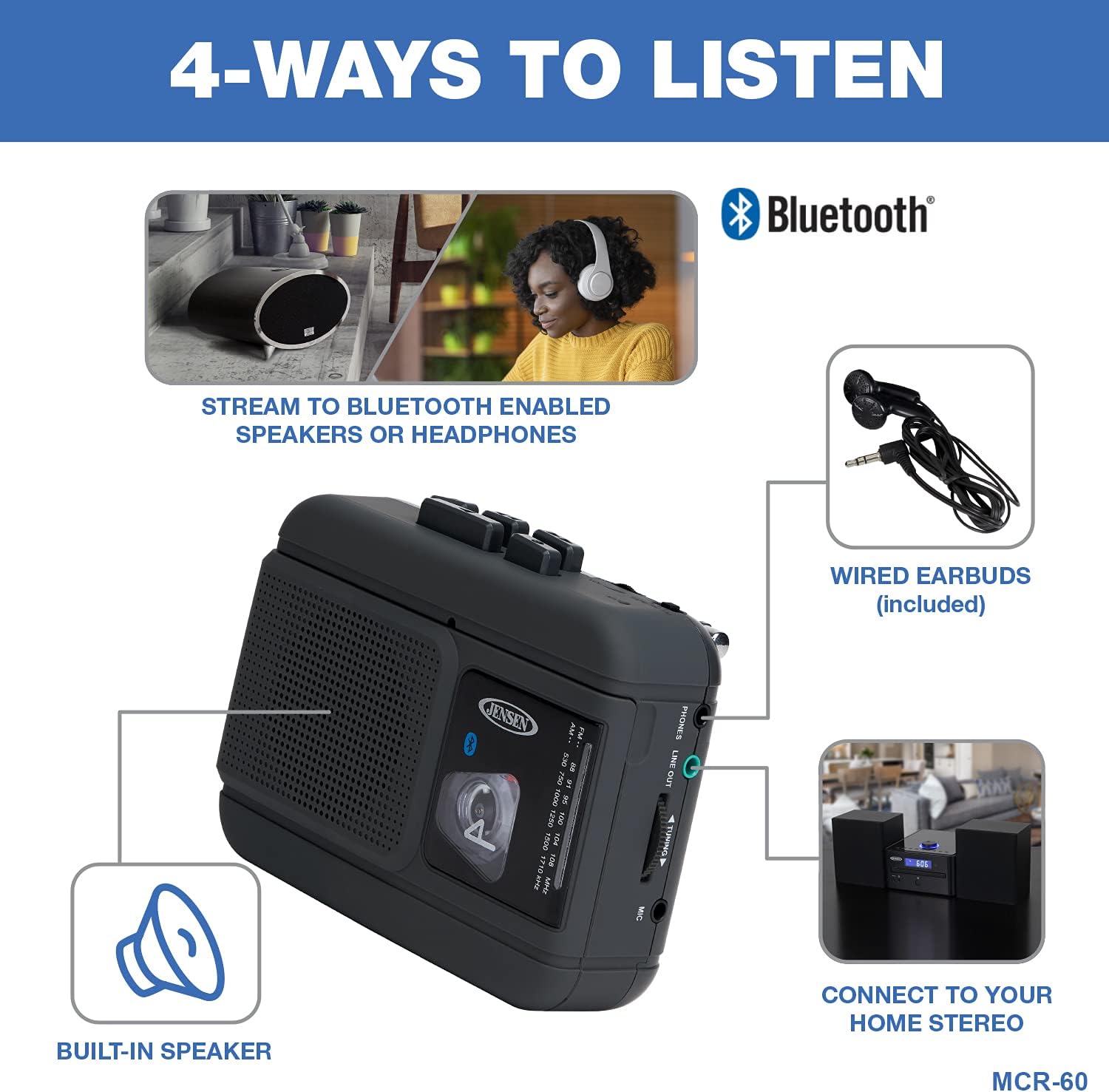
Image: A diagram illustrating the four ways to listen to audio from the JENSEN MCR-60: streaming to Bluetooth-enabled speakers or headphones, using wired earbuds, connecting to a home stereo via Line Out, or using the built-in speaker.
6.4 Recording
The MCR-60 allows recording from the AM/FM radio or the built-in microphone directly to a cassette tape.
- Insert a recordable cassette tape into the unit.
- To record from Radio: Select the desired AM or FM station.
- To record from Built-in Microphone: Ensure the unit is in cassette mode (not radio).
- Press the RECORD button. The PLAY button will also engage.
- Recording will begin.
- To stop recording, press the STOP button.
6.5 Line Out Function
The LINE OUT jack allows you to connect the MCR-60 to an external audio system, such as a home stereo or powered speakers, for amplified sound.
- Connect one end of a 3.5mm audio cable (not included) to the LINE OUT jack on the MCR-60.
- Connect the other end of the cable to an audio input on your external audio system.
- Ensure the external audio system is set to the correct input source.
- Begin playback on the MCR-60 and adjust volume on both devices as needed.
7. Maintenance
7.1 Cleaning the Unit
- Wipe the exterior of the unit with a soft, damp cloth. Do not use abrasive cleaners or solvents.
- Keep the cassette compartment free of dust and debris.
7.2 Battery Care
- Remove batteries if the unit will not be used for an extended period to prevent leakage.
- Do not mix old and new batteries, or different types of batteries.
7.3 Cassette Head Cleaning
Periodically clean the tape heads, pinch roller, and capstan to ensure optimal sound quality and prevent tape damage. Use a cotton swab lightly moistened with isopropyl alcohol.
8. Troubleshooting
| Problem | Possible Cause | Solution |
|---|---|---|
| No power | Batteries are dead or incorrectly inserted; USB power cord not connected properly. | Replace batteries, check polarity; ensure USB power cord is securely connected. |
| Poor sound quality from cassette | Tape heads are dirty; tape is old or damaged. | Clean tape heads; try a different cassette tape. |
| Radio static or poor reception | Antenna not extended; unit position. | Extend FM antenna; rotate unit for AM reception. |
| Bluetooth not connecting | Receiving device not in pairing mode; too far from unit. | Ensure receiving device is in pairing mode; move devices closer (within 33 ft). |
| Tape not playing correctly (e.g., eating tape) | Tape mechanism issue; damaged tape. | Try a different tape. If problem persists, contact customer support. |
9. Specifications
- Model: MCR-60
- Brand: Jensen
- Product Dimensions: 1.75 x 3.63 x 4.63 inches (L x W x H)
- Item Weight: 9 ounces
- Connectivity Technology: Bluetooth
- Color: Black
- Speaker Type: Stereo
- Power Source: 2 x 'AA' Batteries (not included) or USB DC 5V
10. Warranty and Support
For warranty information and customer support, please refer to the warranty card included with your product. You may also visit the official Jensen website or contact their customer service department for assistance.
For more information about Jensen products, visit the Jensen Store.


