
1. Introduction
This manual provides comprehensive instructions for the setup, operation, and maintenance of your new ALLIMITY Replacement Voice Remote Control. Designed for seamless compatibility with various Xiaomi Mi LED Smart TV models, this remote enhances your viewing experience with voice command capabilities.
Please read this manual carefully before using the remote control to ensure proper functionality and to maximize its lifespan.
2. Product Overview
The ALLIMITY Replacement Voice Remote Control is specifically engineered to replace the original remote for select Xiaomi Mi LED TV models. It features voice command technology for convenient control of your television.
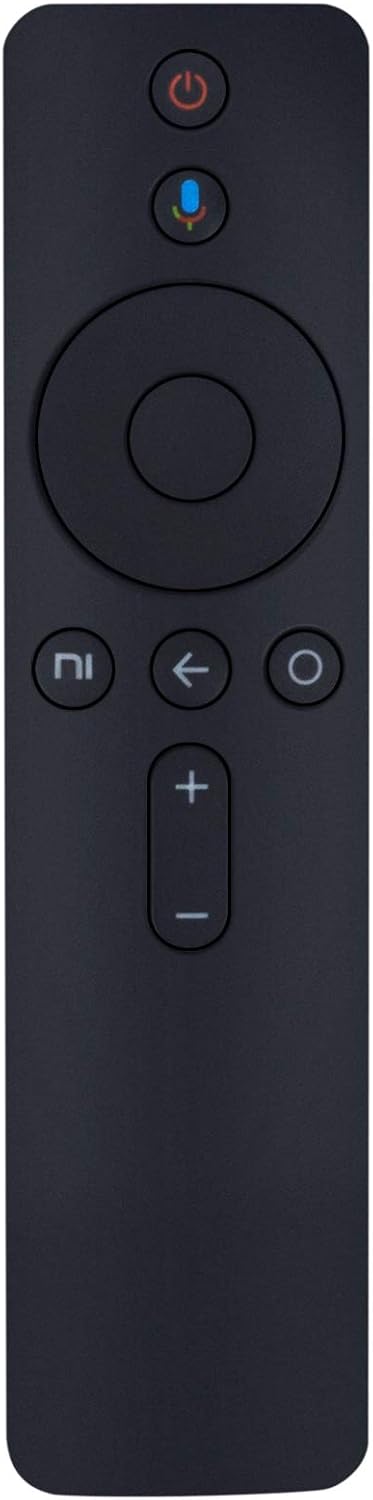
Figure 2.1: Front view of the ALLIMITY Replacement Voice Remote Control, showing the power button, microphone button, navigation ring, back button, home button, and volume controls.
2.1 Compatible Models
This remote control is compatible with the following Xiaomi Mi LED TV models:
- Xiaomi Mi LED TV 4C PRO 32 (HD-Ready Smart TV)
- Xiaomi Mi LED TV 4 PRO 55 (4K + HDR Android LED TV)
- Xiaomi Mi LED Smart TV 4A PRO 49 (Full HD Smart TV)
For optimal performance, ensure your television or set-top box software is updated to the latest version.
3. Setup
3.1 Battery Installation
The remote control requires two AAA batteries (not included) for operation. Follow these steps to install the batteries:
- Locate the battery compartment cover on the back of the remote control.
- Slide the cover downwards to open the compartment.
- Insert two AAA batteries, ensuring the positive (+) and negative (-) terminals align correctly with the markings inside the compartment.
- Slide the battery compartment cover back into place until it clicks securely.

Figure 3.1: Back view of the remote control with the battery compartment open, showing the slots for two AAA batteries.
3.2 Initial Pairing (for Voice Functionality)
For the voice control feature to function, the remote may need to be paired with your Xiaomi Mi LED TV. Refer to your TV's user manual for specific pairing instructions. Generally, this involves:
- Ensuring your TV is powered on.
- Navigating to the Bluetooth or Remote & Accessories settings on your TV.
- Following the on-screen prompts to add a new device or remote control.
- Pressing and holding specific buttons on the remote (e.g., Home and Back buttons simultaneously) to initiate pairing mode.
Note: Ensure your TV's software is up-to-date for optimal compatibility and performance of the voice command feature.
4. Operating Instructions
This remote control provides intuitive access to your Xiaomi Mi LED TV's functions. Below are the primary controls:
- Power Button (●): Turns the TV on or off.
- Microphone Button (●): Activates voice command. Press and hold to speak your commands (e.g., "Open Netflix," "Search for action movies," "Volume up").
- Navigation Ring: Use the directional buttons (Up, Down, Left, Right) to navigate menus and select items. The center button acts as an "OK" or "Enter" button.
- Back Button (←): Returns to the previous screen or menu.
- Home Button (⌂): Returns to the TV's home screen.
- Volume Buttons (+ / -): Adjusts the television's volume level.
Ensure the remote is pointed towards the TV for infrared commands, and within range for Bluetooth voice commands.
5. Maintenance
5.1 Cleaning
To clean the remote control, use a soft, dry cloth. For stubborn dirt, lightly dampen the cloth with water or a mild, non-abrasive cleaner. Avoid using harsh chemicals, solvents, or abrasive materials, as these can damage the remote's surface or internal components.
5.2 Battery Replacement
Replace batteries when the remote's response becomes sluggish or if the voice command feature stops working reliably. Always replace both AAA batteries at the same time with new ones. Do not mix old and new batteries, or different types of batteries.
Dispose of used batteries according to local regulations.
6. Troubleshooting
If you encounter issues with your ALLIMITY Replacement Voice Remote Control, please refer to the following common solutions:
- Remote not responding:
- Check if the batteries are correctly installed and have sufficient charge. Replace them if necessary.
- Ensure there are no obstructions between the remote and the TV's infrared receiver.
- Re-pair the remote with your TV if the issue persists, especially for voice commands.
- Voice command not working:
- Confirm the remote is properly paired with your TV via Bluetooth.
- Ensure your TV's software is updated to the latest version.
- Speak clearly and directly into the microphone.
- Specific buttons not functioning:
- Clean the remote control to remove any dirt or debris that might be obstructing button presses.
- Test with new batteries.
If the remote control still does not work with your Xiaomi device after attempting these steps, please contact ALLIMITY customer service for further assistance. Our customer service team will respond within 24 hours to help resolve your issue.
7. Specifications
| Feature | Detail |
|---|---|
| Brand | ALLIMITY |
| Model Number | AMT-XM-1-BL4AVOICE-NQR4019CN |
| Product Material | Plastic |
| Connectivity Technology | Infrared, Voice Command (Bluetooth) |
| Compatible Devices | Xiaomi Mi LED TV 4C PRO, 4 PRO, 4A PRO series |
| Batteries Required | 2 x AAA batteries |
| Product Dimensions | 7 x 2 x 0.65 inches |
| Item Weight | 0.634 ounces |
| Special Feature | Ergonomic design, Voice Control |
8. Support
For any questions, concerns, or technical assistance regarding your ALLIMITY Replacement Voice Remote Control, please contact ALLIMITY customer service. Our dedicated support team is available to help you resolve any issues you may encounter.
Please refer to the contact information provided with your purchase or visit the official ALLIMITY website for support details.