
1. Introduction
The JENSEN JBS-215 is a versatile wall-mountable music system designed to provide audio entertainment through various sources. This system features Bluetooth connectivity for wireless audio streaming, a vertical-loading CD player compatible with MP3 CD and CD-R/RW discs, an FM digital tuner, and a USB port for charging devices. This manual provides detailed instructions for the proper setup, operation, and maintenance of your JBS-215 music system.
2. Safety Information
- Read all instructions before operating the appliance.
- Keep this manual for future reference.
- Do not expose this appliance to rain or moisture.
- Do not block any ventilation openings.
- Ensure the power cord is not pinched or walked on.
- Unplug the appliance during lightning storms or when unused for long periods.
- Refer all servicing to qualified service personnel.
3. Package Contents
- JENSEN JBS-215 Music System
- Instruction Manual
- Remote Control
- AC Adapter (120-volt)
- Wall Mounting Instructions
4. Product Overview
4.1 Front View
The image below displays the front of the JBS-215 unit, highlighting its sleek design and integrated speakers. The central display shows the current time or function status.

4.2 Front View with Remote Control
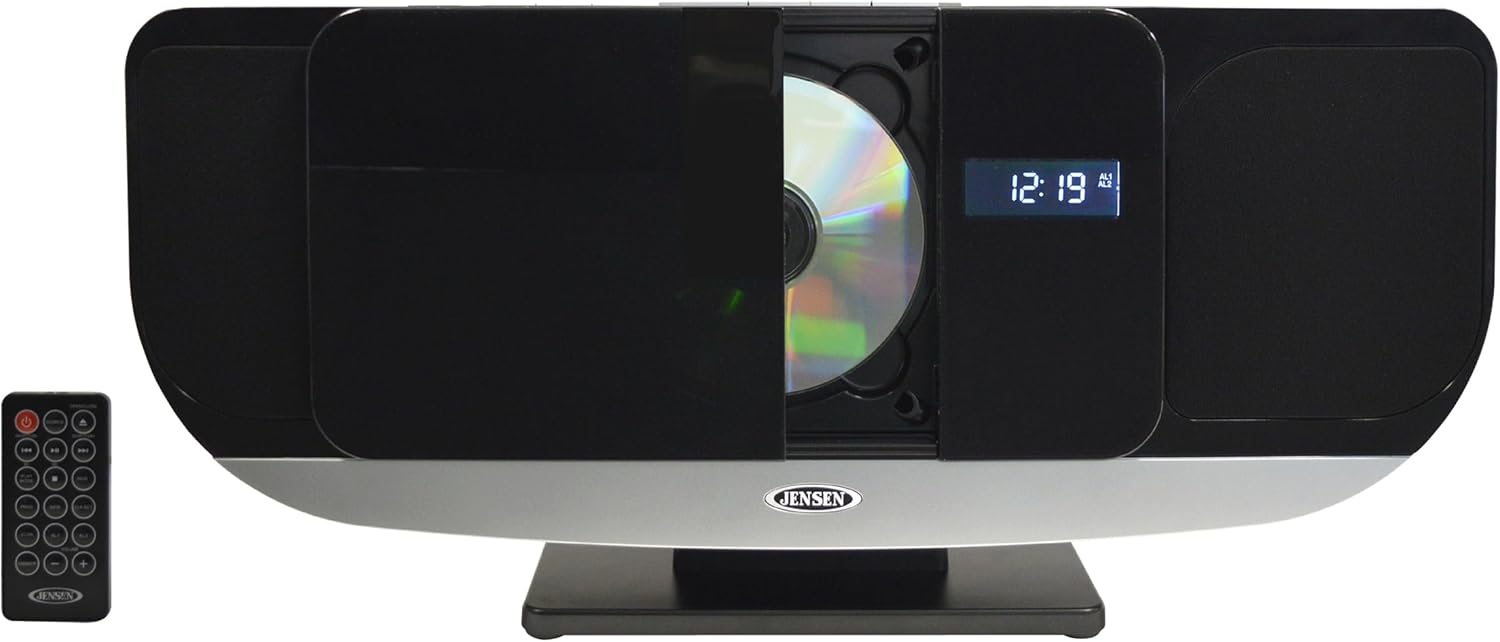
This image shows the JBS-215 music system from the front, accompanied by its remote control. The remote allows for convenient operation of all system functions from a distance.

4.3 CD Player Operation
The image illustrates the vertical-loading CD player in an open state, ready to accept a disc. The CD player supports standard audio CDs, CD-R/RW, and MP3 CD formats.
4.4 USB Charging Port
This top-down view of the JBS-215 shows a smartphone connected to the USB port for charging. The USB port provides 1-amp charging capability for compatible devices.

4.5 Wall-Mounted Installation Example
An example of the JBS-215 music system mounted on a wall in a living room setting. This demonstrates the space-saving benefit of its wall-mountable design.

5. Setup
5.1 Power Connection
- Connect the supplied 120-volt AC adapter to the DC IN jack on the back of the unit.
- Plug the AC adapter into a standard wall outlet.
5.2 Wall Mounting
The JBS-215 can be mounted on a wall to save space. Refer to the separate wall mounting instructions included in the package for detailed steps and hardware requirements. Ensure the mounting surface is sturdy and capable of supporting the unit's weight.
5.3 Stand Installation
If not wall-mounting, attach the included stand to the bottom of the unit as per the diagrams in the wall mounting instructions. Place the unit on a stable, flat surface.
6. Operating Instructions
6.1 General Operation
- Power On/Off: Press the POWER button to turn the unit on or off.
- Volume Control: Use the VOLUME UP/DOWN buttons on the unit or remote to adjust the sound level.
- Mode Selection: Press the MODE button to switch between CD, Bluetooth, FM Radio, and AUX input.
- EQ Presets: The unit features 5 equalizer presets. Press the EQ button to cycle through different sound profiles.
6.2 CD Player
- Press the MODE button to select CD mode.
- Press the OPEN/CLOSE button to open the CD tray.
- Insert a CD (audio CD, CD-R/RW, or MP3 CD) with the label side facing forward.
- Press the OPEN/CLOSE button to close the tray. The disc will begin playing automatically.
- Use the SKIP/SEARCH buttons to navigate tracks and the PLAY/PAUSE button to control playback.
6.3 Bluetooth Connectivity
- Press the MODE button to select Bluetooth mode. The display will show "BT" and flash, indicating pairing mode.
- Enable Bluetooth on your mobile device and search for "JBS-215".
- Select "JBS-215" to pair. Once connected, the "BT" indicator will stop flashing.
- You can now stream audio from your device to the JBS-215.
6.4 FM Radio
- Press the MODE button to select FM Radio mode.
- Press the TUNE UP/DOWN buttons to manually tune to a station.
- Press and hold the TUNE UP/DOWN buttons for automatic scanning to the next available station.
- Storing Presets: To store a station, tune to the desired frequency, then press and hold the MEMORY button. Use the SKIP/SEARCH buttons to select a preset number, then press MEMORY again to confirm. The unit supports 20 FM presets.
6.5 USB Charging
Connect your smartphone or other USB-powered device to the USB port on the unit using a compatible USB cable. The port provides 1-amp charging output.
6.6 Auxiliary Input
Connect an external audio device (e.g., MP3 player, tablet) to the AUX IN jack on the unit using a 3.5mm audio cable. Press the MODE button to select AUX mode to play audio from the connected device.
6.7 Official Product Video
Watch this official video for a visual overview of the JENSEN JBS-215 Bluetooth Wall Mountable Music System, demonstrating its features and functionality.
7. Maintenance
- Cleaning: Use a soft, dry cloth to clean the exterior of the unit. Do not use abrasive cleaners or solvents.
- CD Player: Keep the CD tray clean and free of dust. Avoid touching the lens inside the CD compartment.
- Storage: If storing the unit for an extended period, unplug it from the power outlet and store it in a cool, dry place.
8. Troubleshooting
| Problem | Possible Cause | Solution |
|---|---|---|
| No power | AC adapter not connected or faulty. | Ensure the AC adapter is securely plugged into the unit and a working wall outlet. Try a different outlet. |
| No sound | Volume too low; incorrect mode selected; external device not connected properly. | Increase volume. Select the correct input mode (CD, BT, FM, AUX). Check connections for external devices. |
| CD not playing | CD inserted incorrectly; disc is dirty or scratched; unsupported disc format. | Ensure CD is inserted correctly. Clean the disc with a soft cloth. Use supported CD formats (audio CD, CD-R/RW, MP3 CD). |
| Bluetooth pairing fails | Device too far; Bluetooth not enabled on mobile device; unit not in pairing mode. | Move device closer to the unit. Enable Bluetooth on your mobile device. Ensure the JBS-215 is in Bluetooth pairing mode (flashing 'BT'). |
| Clock loses time or blinks | Power interruption or internal clock issue. | Reset the clock. If the issue persists, ensure a stable power supply. |
9. Specifications
- Model: JBS-215
- Power Output: 10 watts RMS (2 x 5 watts)
- Connectivity: Bluetooth
- Audio Sources: Vertical-loading CD player (MP3 CD, CD-R/RW compatible), FM stereo radio (20 presets, PLL tuning), Aux input
- Speaker Drivers: 3-inch
- Frequency Response: 170 Hz to 20 kHz
- USB Port: 1-amp charging
- Display: Multi-function backlit LCD
- Dimensions (L x W x H): 4.9 x 19.6 x 9.1 inches
- Item Weight: 4.94 pounds
- Power: 120-volt AC adapter
10. Warranty and Support
For warranty information and customer support, please refer to the warranty card included with your product or visit the official Jensen website. Keep your purchase receipt for warranty claims.


