Introduction
Welcome to the user manual for your new Ergohuman Mobile Pedestal. This document provides comprehensive instructions for the proper setup, operation, care, and maintenance of your mobile storage cabinet. Please read this manual thoroughly before using the product to ensure safe and efficient use.
The Ergohuman Mobile Pedestal is designed to offer secure and convenient storage for your files and office essentials, featuring a durable steel construction and smooth-rolling casters for easy mobility.
Key Features
- Stylish Curved Front Steel Box/File Mobile Storage Cabinet with lock
- 90 lb. combined drawer weight capacity
- Integrated side drawer pulls
- Soft Close drawer mechanism
- Anti-tip front wheel caster
Setup and Initial Placement
Your Ergohuman Mobile Pedestal comes fully assembled and ready for use. No complex assembly is required. Simply unbox the unit and place it in your desired location.

Figure 1: Ergohuman Mobile Pedestal, showcasing its sleek design and casters.
Ensure the surface where the pedestal will be used is level and stable. The casters allow for easy movement, and two of the casters are locking to secure the pedestal in place. Press down on the lever of the locking casters to engage the brake.

Figure 2: Product dimensions for proper space planning. The pedestal measures 15"D x 22"W x 22"H.
Operation
Locking Mechanism
The mobile pedestal is equipped with a manual lock located on the top drawer. Insert the provided key into the lock and turn it to secure both drawers simultaneously. A master key system with 150 lock combinations ensures enhanced security. Remember to remove the key after locking to prevent loss or unauthorized access.
Drawer Usage
The pedestal features two drawers: a top box drawer and a bottom file drawer. Both drawers are designed with soft-close mechanisms for quiet and smooth operation. The combined weight capacity for both drawers is 90 lbs.
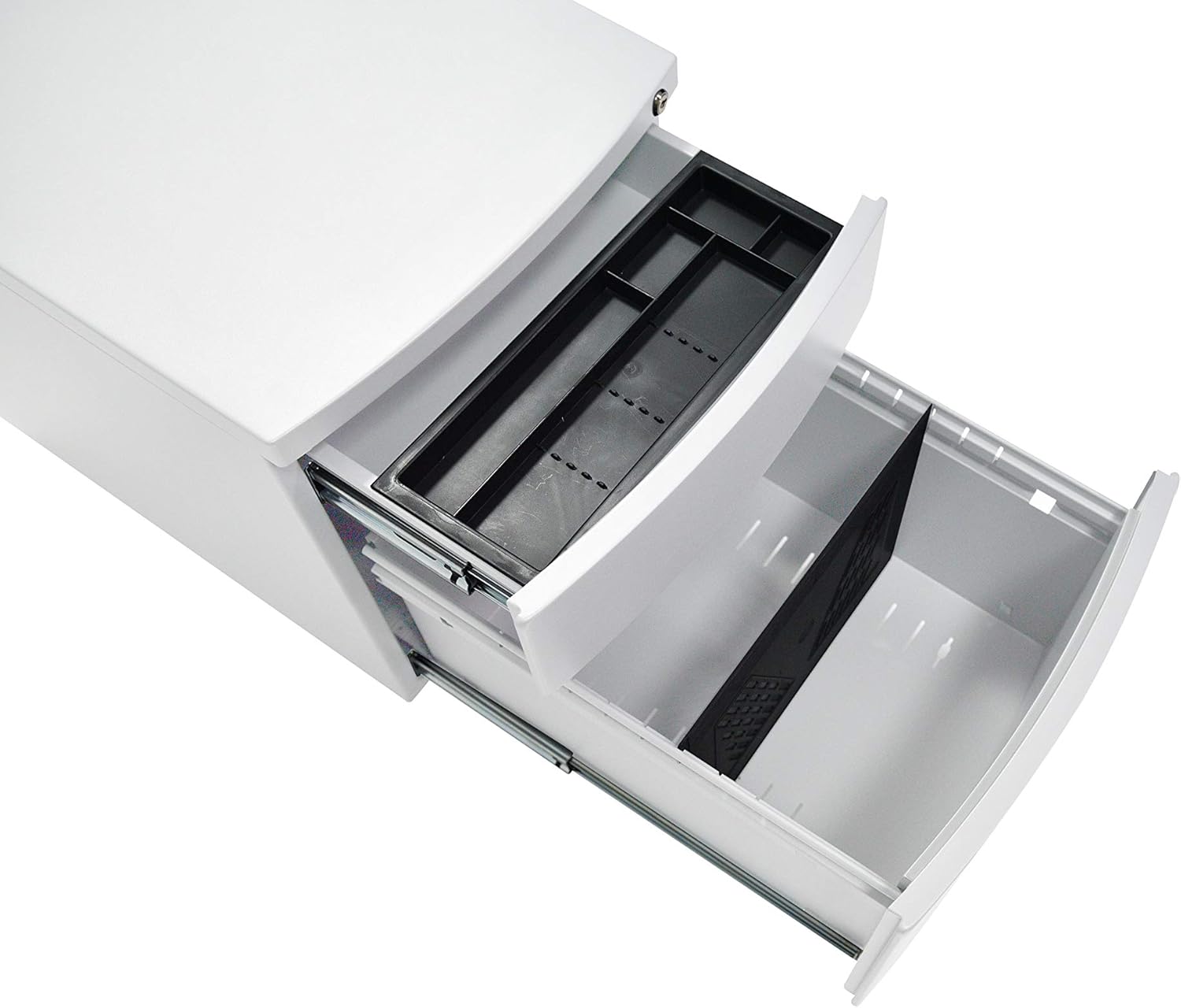
Figure 3: View of the open drawers, highlighting the integrated pencil tray in the top drawer and the file divider in the bottom drawer.
The top drawer includes a removable pencil tray for organizing small office supplies. The bottom drawer is designed with a file divider to accommodate various file sizes, keeping your documents organized.
Care and Maintenance
- Cleaning: Wipe the steel surfaces with a soft, damp cloth. Avoid abrasive cleaners or harsh chemicals that could damage the finish.
- Drawer Slides: Periodically check the drawer slides for any debris. Keep them clean to ensure smooth operation of the soft-close mechanism.
- Casters: Inspect casters regularly for hair or debris that might impede rolling. Clean as necessary to maintain mobility.
- Lock: Ensure the lock mechanism is free of dust. Do not force the key if it feels stiff; apply a small amount of graphite lubricant if necessary.
Troubleshooting
| Problem | Possible Cause | Solution |
|---|---|---|
| Drawers do not close smoothly. | Obstruction in drawer slides; excessive weight. | Check for debris in slides and remove. Reduce drawer contents if exceeding 90 lb. combined capacity. |
| Lock mechanism is stiff or not engaging. | Dust/debris in lock; incorrect key. | Clean lock with compressed air. Ensure you are using the correct key. Do not force. |
| Pedestal rolls unintentionally. | Casters not locked; casters obstructed. | Engage the brake on the locking casters. Clean casters of any debris. |
| Pedestal is unstable or wobbles. | Uneven floor; casters not properly aligned. | Move to a level surface. Ensure all casters are making firm contact with the floor. |
Product Specifications
| Brand | Ergohuman |
| Manufacturer | Eurotech Seating |
| Model Number | T1-PD01ABF-SV |
| Color | White |
| Product Dimensions (D x W x H) | 15"D x 22"W x 22"H |
| Item Weight | 30 Pounds |
| Material | Steel (Top), Alloy Steel (Back), Metal (Frame) |
| Base Type | Casters, Pedestal |
| Lock Type | Manual (Master key with 150 lock combinations) |
| Assembly Required | No |
| Recommended Uses | Files & Folders |
| Included Components | 1 File cabinet |
| UPC | 669245103633 |
| Date First Available | March 3, 2021 |
Warranty Information
This Ergohuman Mobile Pedestal is backed by a Limited Life Time Warranty. This warranty covers defects in materials and workmanship under normal use. For specific terms, conditions, and claim procedures, please refer to the warranty card included with your product or contact customer support.
Customer Support
Should you have any questions, require assistance with your product, or need to report an issue, please contact Ergohuman customer support. Please have your model number (T1-PD01ABF-SV) and purchase information ready when contacting support.
For the most up-to-date contact information, please visit the official Ergohuman website or refer to your purchase documentation.


