
Introduction
This manual provides comprehensive instructions for the safe and effective use of your BlissLights Sky Lite 2.0 RGB LED Laser Star Projector. Please read this manual thoroughly before operating the device and retain it for future reference.
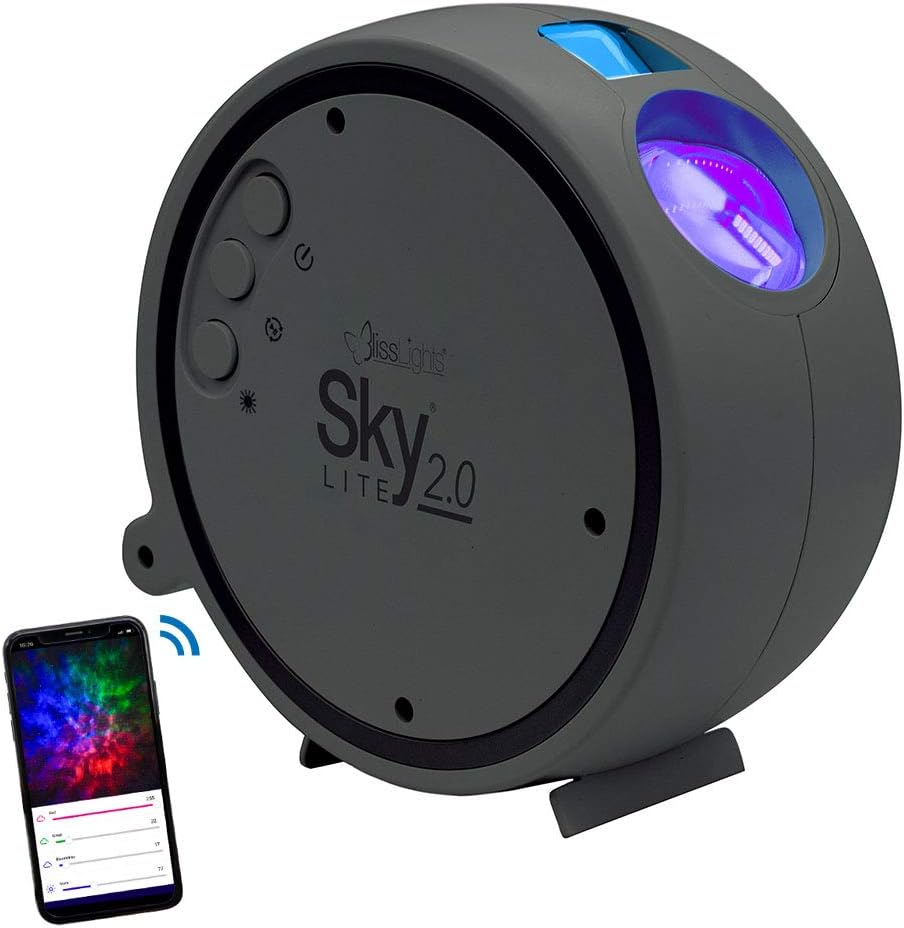
Image: The BlissLights Sky Lite 2.0 projector, a compact gray device, shown alongside a smartphone illustrating its app control interface. The projector features control buttons on its side and projects light from its front lens.
Setup
1. Unpacking and Inspection
- Carefully remove all components from the packaging.
- Inspect the device and included accessories for any signs of damage. If any damage is found, do not use the product and contact customer support.
- Ensure all components are present: Sky Lite 2.0 projector, AC Power Adapter.
2. Placement
Optimal placement is crucial for achieving the desired projection effect. Consider the following:
- For a wider projection spread, place the projector further away from the projection surface (e.g., floor or low surface, angled upwards).
- Avoid placing the projector where the laser beam could directly shine into eyes.
- Ensure the projector is on a stable, flat surface.

Image: A dining table set for two, surrounded by walls and ceiling illuminated with a dynamic, colorful nebula and scattered stars from the Sky Lite 2.0 projector, demonstrating its atmospheric effect.
3. Power Connection
- Connect the AC power adapter to the projector's power input port.
- Plug the AC power adapter into a standard electrical outlet (100-240V AC, 50/60 Hz).
- The device will power on automatically or enter standby mode.
4. App Download and Bluetooth Connection
For full control and customization, download the official BlissLights app.
- Search for "BlissLights" in your device's app store (iOS or Android).
- Download and install the app.
- Open the app and follow the on-screen instructions to pair your Sky Lite 2.0 via Bluetooth. Ensure Bluetooth is enabled on your mobile device.
- The app does not require location or storage data for operation.

Image: A hand holding a smartphone displaying the BlissLights app. The app interface shows controls for multicolor cloud effects, a timer function, and options to customize light shows, demonstrating the device's smart capabilities.
Operation
1. Device Controls
The Sky Lite 2.0 features simple button controls on the unit:
- Power Button: Turns the device on or off.
- Cycle Effects Button: Cycles through various light effects and color combinations.
- Brightness Button: Adjusts the projection brightness.
- Rotation Button: Starts or stops the rotating motion of the nebula.
2. App Control Features
The BlissLights app provides enhanced control and customization options:
- Effect Modes: Select from a variety of preset light effects for stars and nebula.
- Color Customization: Create and save your own unique color combinations using the RGB cloud feature.
- Brightness Adjustment: Fine-tune the brightness levels of both stars and nebula.
- Rotation Control: Start or stop the rotation of the nebula. Note that rotation speed is not adjustable.
- Timer Function: Set an automatic shut-off timer for convenience.

Image: A gaming room featuring a high-back gaming chair, desk with computer, and wall art, all bathed in the immersive galaxy projection from the Sky Lite 2.0, highlighting its use in creating an ambient environment.
Maintenance
1. Cleaning
- Ensure the device is unplugged before cleaning.
- Use a soft, dry cloth to wipe the exterior of the projector.
- Do not use abrasive cleaners, solvents, or harsh chemicals, as these may damage the finish or optical components.
- Gently clean the projection lens with a microfiber cloth if dust or smudges affect projection quality.
2. Storage
- When not in use, store the projector in a cool, dry place, away from direct sunlight and extreme temperatures.
- Keep the device in its original packaging or a protective case to prevent dust accumulation and damage.
Troubleshooting
If you encounter issues with your Sky Lite 2.0, refer to the following common problems and solutions:
| Problem | Possible Cause | Solution |
|---|---|---|
| Device does not power on. | No power, faulty adapter, or device malfunction. |
|
| App cannot connect to the projector. | Bluetooth is off, projector is out of range, or app issue. |
|
| Projection is dim or unclear. | Incorrect placement, ambient light, or dirty lens. |
|
| Nebula rotation speed is not adjustable. | This is a design characteristic of the product. | The Sky Lite 2.0 does not offer adjustable rotation speed for the nebula effect. You can only toggle rotation on or off. |
| Specific colors are missing from the nebula. | Color selection in app or device limitations. | When certain colors are deselected in the app, those areas will not be illuminated by the nebula. The remaining colors will not expand to fill the entire projection area. |
Specifications
The following are the technical specifications for the BlissLights Sky Lite 2.0:
- Model Number: 900-00057_A
- Brand: BlissLights
- Color: Blue (Stars), RGB (Nebula)
- Shape: Round
- Material: Glass (Shade), ABS Plastic (Housing)
- Finish Type: Lacquered
- Light Source Type: Light Emitting Diode (LED)
- Power Source: Corded Electric
- Power Input: 100-240V AC, 50/60 Hz, 0.2A
- USB Power Output: 5V === 2A
- Wattage: 5 watts
- Voltage: 120 Volts (AC)
- Maximum Compatible Light Source Wattage: 100 Watts
- Item Weight: 1.1 Pounds (approx. 0.5 kg)
- Product Dimensions: 6.25" L x 2.75" W x 6.25" H (15.88 cm L x 6.99 cm W x 15.88 cm H)
- Cord Length: 5 ft / 1.5 m
- Operation: Indoor use only
- Laser Classification: Class 2
- Projection Coverage:
- Laser: 30x30 ft
- Nebula: 15x15 ft
- Special Features: App Control, Blue Laser, Bluetooth, RGB Cloud, Dimmable, Adjustable Light Direction, Push Button Switch Style
- Included Components: AC Power Adapter
- Certifications: UL Listed

Image: A technical diagram illustrating the dimensions (6.5 inches / 16.51 cm in height and width, 2.5 inches / 6.35 cm in depth) and key specifications of the Sky Lite 2.0 projector, including power input, operation, and projection coverage.

Image: A visual representation of the Sky Lite 2.0's features, highlighting its moving stars and nebula, multicolor cloud, adjustable brightness, tilting base, app control, customizable effect modes, and USB power with plug adapter.
Warranty and Support
Warranty Information
Specific warranty details for the BlissLights Sky Lite 2.0 are provided by the manufacturer. Please refer to the product packaging or the official BlissLights website for the most current warranty policy and registration information.
Customer Support
For technical assistance, troubleshooting beyond this manual, or warranty claims, please contact BlissLights customer support. Contact information can typically be found on the manufacturer's website or product packaging.
You can also visit the official BlissLights store on Amazon for additional product information and support resources: BlissLights Amazon Store

