
CaDA C61051W
CADA Master C61051W Technical Construction Loader
User Manual
Model: C61051W | Brand: CaDA
1. Introduction
Thank you for choosing the CADA Master C61051W Technical Construction Loader. This advanced building block set allows you to construct a highly detailed and fully functional construction loader, featuring 1469 pieces, a 2.4G remote control, and Dual Control app compatibility. This manual provides essential information for assembly, operation, and maintenance to ensure a rewarding experience.

Image 1.1: The CADA Master C61051W Technical Construction Loader, showcasing the assembled model, its packaging, and various electronic components.
2. Safety Information
- Age Recommendation: This product is suitable for individuals aged 8 and above. Adult supervision is recommended for younger users.
- Small Parts Warning: The set contains small parts which may pose a choking hazard. Keep away from children under 3 years old.
- Battery Safety: Use only the specified battery types. Do not mix old and new batteries, or different types of batteries. Ensure correct polarity. Remove batteries if the product will not be used for an extended period.
- Electrical Components: Handle electronic components with care. Do not expose to water or extreme temperatures.
- Assembly: Follow the provided assembly instructions carefully to prevent damage or injury.
3. Package Contents
The CADA Master C61051W kit includes all necessary building blocks and electronic components to construct and operate the technical construction loader. Please verify that all items listed below are present in your package:
- 1469 x Building Blocks (various shapes and sizes)
- 1 x 2.4GHz Radio Control Remote
- 1 x 7.4V 750mAh Lipo Battery Box (Upgraded)
- 1 x Infrared Receiver
- 2 x Extension Cords
- 1 x M Size Motor Pro
- 1 x Servo Motor Pro
- 1 x L Size Motor Pro
- 2 x LED Lights
- 1 x Detailed Assembly Instruction Manual
- Additional accessories: Loading bucket, Forks
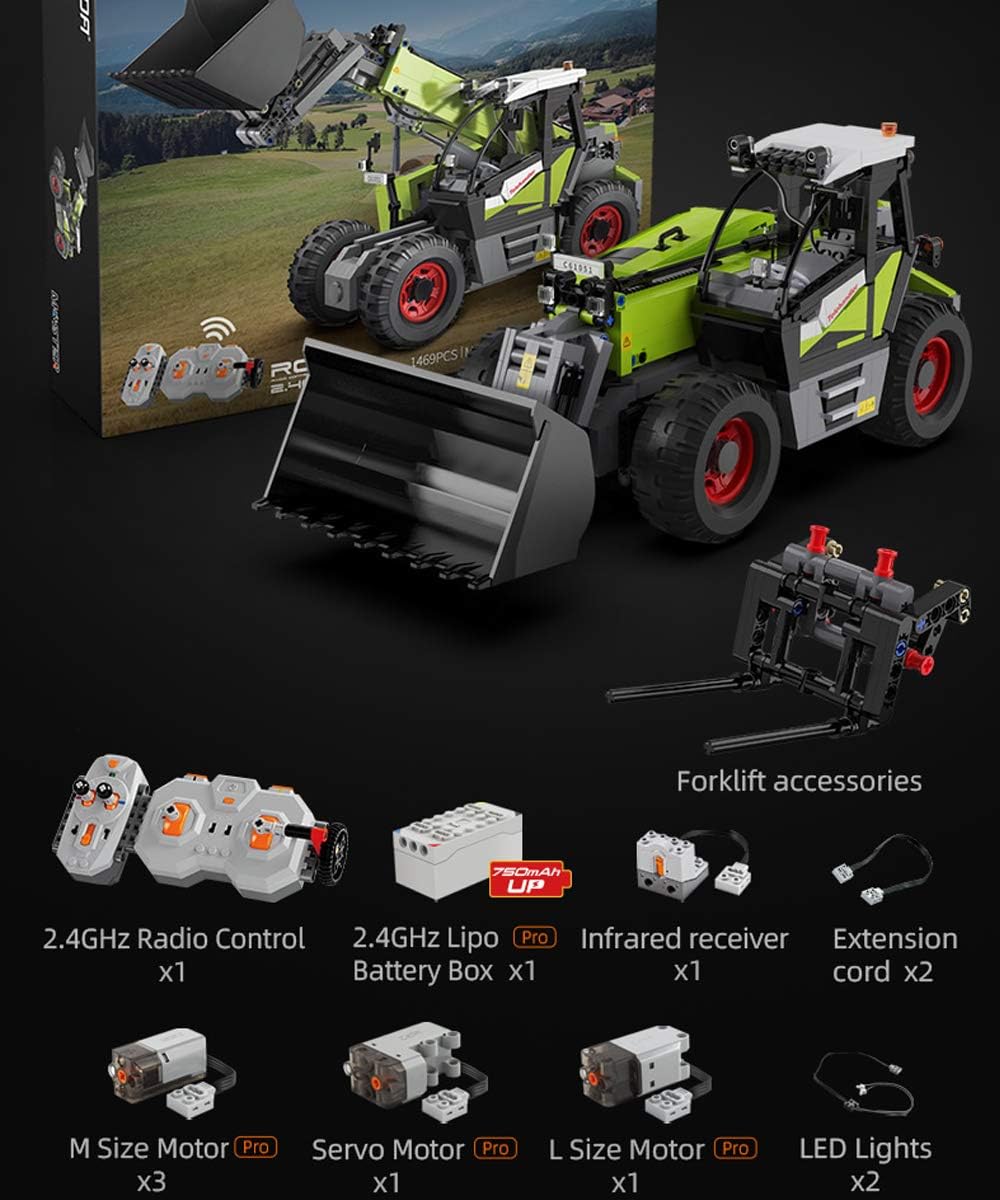
Image 3.1: Overview of the CADA Master C61051W kit, showing the model, remote control, and various electronic components.

Image 3.2: A closer look at the electronic components: 2.4GHz Radio Control, 7.4V Lipo Battery Box, Infrared Receiver, Extension Cords, M Size Motor Pro, Servo Motor Pro, L Size Motor Pro, and LED Lights.
4. Assembly Instructions
The CADA Master C61051W is a complex building set. Detailed, step-by-step assembly instructions are provided in a separate manual included in your package. Please follow these instructions carefully for proper construction.
4.1. General Assembly Tips:
- Organize your pieces before starting.
- Follow the sequence outlined in the assembly manual.
- Ensure all connections are secure.
- Pay close attention to the placement of electronic components and wiring as indicated in the assembly manual.
5. Battery Installation & Charging
5.1. Model Battery Installation:
- Locate the battery compartment on the model (refer to the assembly manual for exact location).
- Open the compartment cover.
- Insert the 7.4V 750mAh Lipo Battery Box, ensuring correct polarity.
- Close the compartment cover securely.
5.2. Remote Control Battery Installation:
- Locate the battery compartment on the back of the 2.4GHz remote control.
- Open the compartment cover.
- Insert the required batteries (typically AA or AAA, check remote for specific type and quantity), observing correct polarity (+/-).
- Close the compartment cover securely.
5.3. Charging the Model Battery:
The 7.4V Lipo Battery Box is rechargeable. Use the provided charging cable and a compatible USB power adapter (not included) to charge the battery. Refer to the battery box instructions for specific charging times and indicators. Do not overcharge the battery.
6. Remote Control & App Pairing
6.1. Remote Control Pairing:
- Ensure batteries are installed in both the model and the remote control.
- Turn on the model's power switch.
- Turn on the remote control.
- The remote and model should automatically pair. If not, refer to the remote control's specific instructions for manual pairing (often involves holding a button on the remote while turning it on).
6.2. Dual Control App Connection:
- Download the official CaDA Dual Control app from your device's app store.
- Ensure your mobile device's Bluetooth is enabled.
- Turn on the model's power switch.
- Open the CaDA Dual Control app and follow the in-app instructions to connect to your C61051W model.
7. Operating the Loader
The CADA Master C61051W offers full remote control functionality for realistic operation. Controls can be managed via the 2.4G remote or the Dual Control app.
7.1. Basic Movement:
- Forward/Backward: Use the designated joystick/control on the remote or app to move the loader forward or backward.
- Left/Right Steering: Use the other joystick/control to steer the loader left or right.
7.2. Boom and Bucket Control:
The loader's boom and bucket are fully articulated and can be controlled remotely.

Image 7.1: The boom lift function, allowing the boom to raise up to a 70-degree angle, controlled via the remote.
- Boom Lift: Use the corresponding control to raise or lower the loader's boom. The boom can lift up to a 70-degree angle.
- Boom Extension: The boom features a telescopic function, allowing it to extend by approximately 9.5 cm. Use the dedicated control for this action.
- Bucket Control: The bucket can be tilted up or down, with a movement range of up to 120 degrees, for scooping and dumping.

Image 7.2: Demonstrates the 9.5cm boom extension and the 120-degree bucket movement, both controlled remotely.
7.3. LED Lights:
The loader is equipped with front and rear LED lights for enhanced realism. These lights can be switched on or off remotely using the dedicated control on the remote or app.

Image 7.3: Illustrates the swappable loading bucket and forks, alongside the remote-controlled front and rear LED lights.
7.4. Interchangeable Parts:
The loading bucket can be easily interchanged with the included forklift accessories, expanding the play experience and functionality of the loader.

Image 7.4: The loader equipped with forklift accessories, highlighting the ease of swapping parts.
8. Maintenance
8.1. Cleaning:
- Wipe the model with a soft, dry cloth to remove dust and dirt.
- Avoid using harsh chemicals or abrasive cleaners, as they may damage the ABS material.
- Do not immerse electronic components in water.
8.2. Storage:
- Store the model in a cool, dry place away from direct sunlight and extreme temperatures.
- Remove batteries from the model and remote control if storing for an extended period to prevent leakage.
9. Troubleshooting
If you encounter issues with your CADA Master C61051W, please refer to the following common solutions:
- Model Not Responding:
- Check if the model's power switch is ON.
- Ensure the model's battery is charged and correctly installed.
- Verify that the remote control batteries are fresh and correctly installed.
- Attempt to re-pair the remote control with the model (refer to Section 6.1).
- Poor Control Range/Interference:
- Ensure there are no other 2.4G devices operating nearby that might cause interference.
- Operate the model in an open area, away from large metal objects or walls.
- Lights Not Working:
- Check the LED light connections to the electronic components.
- Ensure the LED light function is activated via the remote or app.
- Mechanical Parts Not Moving:
- Verify that all motor connections are secure.
- Check for any obstructions in the gears or moving parts.
- Ensure the model's battery has sufficient power.
If the issue persists, please consult the original assembly manual for detailed wiring diagrams or contact CaDA customer support.
10. Specifications
| Feature | Detail |
|---|---|
| Model Number | C61051W |
| Brand | CaDA |
| Number of Pieces | 1469 |
| Main Material | Acrylonitrile Butadiene Styrene (ABS) |
| Control System | 2.4G Remote Control & Dual Control App |
| Battery Type (Model) | 7.4V 750mAh Lipo Battery Box |
| Recommended Age | 8+ Years |
| Loader Vehicle Type | Construction Loader |
| ASIN | B08XY4VYTD |
| UPC | 758544918144 |
| Date First Available | June 1, 2022 |
10.1. Dimensions (Approximate):

Image 10.1: Approximate dimensions of the assembled loader, including length, width, and height.
- Length: 39.0 cm
- Width: 15.0 cm
- Height: 17.5 cm
- Scale: 1:17
11. Warranty and Support
Information regarding specific warranty details and customer support contact methods for the CADA Master C61051W is not provided in the product data. Please refer to the product packaging or the official CaDA website for warranty information and customer service contacts.
For any suggestions or issues encountered during assembly or operation, it is recommended to contact the manufacturer directly.
Ask a question about this manual
Ask about setup, troubleshooting, compatibility, parts, safety, or missing instructions. Manuals+ will review the question and use this page’s manual context to help answer it.