Introduction
Welcome to the comprehensive user manual for your new Kalorik MAXX Complete Digital Air Fryer Oven. This versatile 10-in-1 countertop appliance is designed to simplify your cooking experience, combining the functionalities of an air fryer, toaster, grill, oven, broiler, rotisserie, dehydrator, roaster, pizza oven, and warmer into a single unit.
Equipped with powerful Turbo MAXX Technology, this oven cooks food up to 37% faster than traditional ovens, reaching temperatures up to 500°F for perfect searing and caramelization. Its generous 26-quart capacity is ideal for family-sized meals, accommodating a 14-pound turkey or a 12-inch pizza.
Your Kalorik MAXX comes with 14 deluxe accessories and a hardcover cookbook featuring 60 chef-inspired recipes, providing endless culinary possibilities. Please read this manual thoroughly before first use to ensure safe and optimal operation.
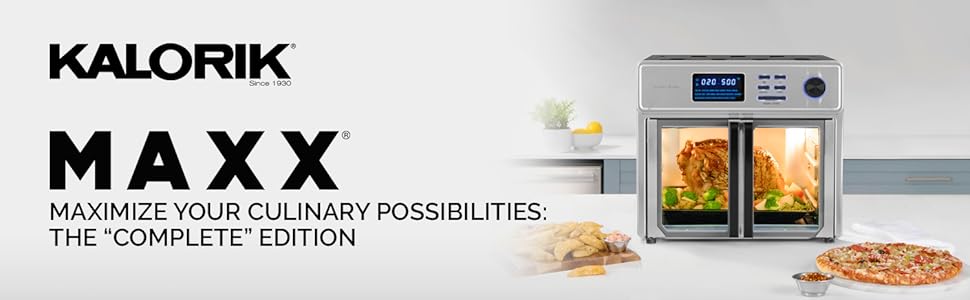
Image: Kalorik MAXX Complete Digital Air Fryer Oven overview.
Important Safety Instructions
When using electrical appliances, basic safety precautions should always be followed, including the following:
- Read all instructions before operating the appliance.
- Do not touch hot surfaces. Use handles or knobs. Always use oven mitts or pot holders when handling hot materials.
- To protect against electric shock, do not immerse cord, plugs, or the appliance in water or other liquid.
- Close supervision is necessary when any appliance is used by or near children.
- Unplug from outlet when not in use and before cleaning. Allow to cool before putting on or taking off parts.
- Do not operate any appliance with a damaged cord or plug, or after the appliance malfunctions or has been damaged in any manner.
- The use of accessory attachments not recommended by the appliance manufacturer may cause injuries.
- Do not use outdoors.
- Do not let cord hang over edge of table or counter, or touch hot surfaces.
- Do not place on or near a hot gas or electric burner, or in a heated oven.
- Extreme caution must be used when moving an appliance containing hot oil or other hot liquids.
- Always attach plug to appliance first, then plug cord into the wall outlet. To disconnect, turn any control to "off", then remove plug from wall outlet.
- Do not use appliance for other than intended household use.
- Oversized foods or metal utensils must not be inserted in the appliance as they may create a fire or risk of electric shock.
- A fire may occur if the appliance is covered or touching flammable material, including curtains, draperies, walls, and the like, when in operation.
- Do not clean with metal scouring pads. Pieces can break off the pad and touch electrical parts, creating a risk of electric shock.
- Do not store any materials, other than manufacturer's recommended accessories, in this oven when not in use.
- Do not place any of the following materials in the oven: paper, cardboard, plastic, or any materials not specifically designed for oven use.
- Do not cover crumb tray or any part of the oven with metal foil. This will cause overheating of the oven.
Product Overview
Main Unit
The Kalorik MAXX Air Fryer Oven features a sleek stainless steel design with a digital control panel and French doors for easy access to the cooking cavity.

Image: Front view of the Kalorik MAXX Air Fryer Oven, showcasing its digital display and French doors.
Dimensions
Understanding the dimensions of your appliance is crucial for proper placement in your kitchen.

Image: Side view of the Kalorik MAXX Air Fryer Oven with dimensions indicated: 13.54 inches (34.39 cm) height, 15.55 inches (39.49 cm) width, and 12.4 inches (31.49 cm) depth.
Included Accessories
Your Kalorik MAXX comes with a comprehensive set of 14 deluxe accessories to maximize your cooking versatility:

Image: A visual representation of the 15 deluxe accessories included with the Kalorik MAXX Air Fryer Oven, laid out on a dark background.
| Accessory | Description / Use |
|---|---|
| Crumb Tray | Collects crumbs and drips for easy cleaning. Always place at the bottom. |
| Baking Tray | For baking, roasting, or catching drips from other accessories. |
| Air Rack | For general cooking, toasting, or supporting other accessories. |
| Air Frying Basket | Designed for optimal air circulation during air frying. |
| Bacon Tray | Specifically designed for cooking bacon, allowing fat to drain. |
| Rotisserie Spit with Forks and Handle | For rotisserie cooking of whole chickens or roasts. |
| 2-in-1 Dehydrator & Steak Tray | Dual-purpose tray for dehydrating and searing steaks. |
| Tray Handle | For safely inserting and removing hot trays and racks. |
| Dehydrating Racks (2x) | Additional racks for dehydrating multiple batches of food. |
| Oven Mitts (2x) | Protective mitts for handling hot items. |
| Cookie Sheet | Flat tray for baking cookies or other flat items. |
| Tongs | For safely handling food inside the oven. |
| Silicone Mat | Protective mat for countertops. |
| Hardcover Cookbook | Features 60 easy-to-follow, chef-inspired recipes. |
Initial Setup
- Unpacking: Carefully remove all packaging materials, stickers, and labels from the appliance and its accessories. Keep packaging for future storage or disposal.
- Initial Cleaning: Before first use, wipe the exterior of the oven with a clean, damp cloth. Wash all accessories (baking tray, air rack, air frying basket, rotisserie spit, etc.) with warm, soapy water. Rinse thoroughly and dry completely. The interior of the oven can be wiped with a damp cloth and mild detergent.
- Placement: Place the Kalorik MAXX Air Fryer Oven on a stable, level, heat-resistant surface. Ensure there is adequate clearance (at least 6 inches) on all sides and above the appliance for proper ventilation. Do not place it directly against a wall or under cabinets.
- First Use Burn-Off: It is recommended to run the oven empty for approximately 15 minutes at 400°F (200°C) before cooking food. This helps to burn off any manufacturing residues and odors. A slight odor or smoke may be present during this process; this is normal and will dissipate. Ensure the area is well-ventilated.
- Familiarization: Open the French doors to view the interior. Note the different rack positions for various cooking methods. The crumb tray should always be in place at the very bottom.

Image: Interior view of the Kalorik MAXX Air Fryer Oven, showing the air frying baskets and lower tray in place.
Operating Instructions
Control Panel Overview
The digital control panel provides intuitive access to all cooking functions and settings.

Image: Close-up of the Kalorik MAXX Air Fryer Oven's digital control panel, showing the display, function buttons, and rotary knob.
- Digital Display: Shows time, temperature, and selected preset.
- Function Buttons: Select between Air Fry and Oven modes.
- Rotary Knob: Used to adjust time, temperature, and navigate through presets. Press to confirm selection.
- Start/Stop Button: Initiates or pauses the cooking cycle.
- Preset Indicators: Lights up to show the active cooking preset.
10-in-1 Functionality
Your Kalorik MAXX replaces multiple kitchen appliances with its diverse cooking modes:
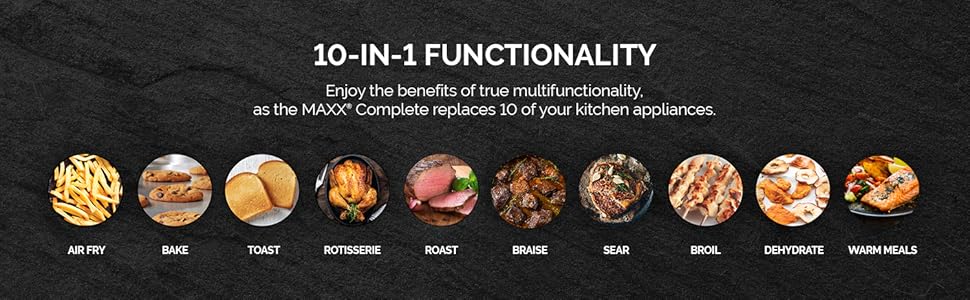
Image: Graphic illustrating the 10-in-1 functionality of the Kalorik MAXX, including Air Fry, Bake, Toast, Rotisserie, Roast, Braise, Sear, Broil, Dehydrate, and Warm Meals.
- Air Fry: For crispy results with little to no oil.
- Bake: Perfect for cakes, cookies, and casseroles.
- Toast: Evenly toasts bread, bagels, and more.
- Rotisserie: Rotates food for even cooking and browning.
- Roast: Ideal for meats and vegetables.
- Braise: Slow cooking for tender results.
- Sear: Achieves high-heat browning for meats.
- Broil: For quick browning and melting.
- Dehydrate: Preserves fruits, vegetables, and meats.
- Warm Meals: Keeps food warm without overcooking.
Using Smart Presets
The oven features 21 smart presets for common dishes, simplifying your cooking process.

Image: The digital display of the Kalorik MAXX Air Fryer Oven showing various cooking presets like Air Fry, Chicken, Ribs, Shrimp, Steak, Wings, Bacon, Fish, Corn, Fries, Dehydrate, Defrost, Veggies, Bake, Broil, Pastry, Pizza, Proof, Roast, and Toast.
- Select Mode: Press the "AIR FRY" or "OVEN" button to choose your desired cooking mode.
- Choose Preset: Rotate the knob to cycle through the available presets. The selected preset will illuminate on the display.
- Adjust Settings (Optional): Once a preset is selected, you can adjust the time and temperature by rotating the knob. Press the knob to toggle between time and temperature adjustment.
- Start Cooking: Press the "START / STOP" button to begin the cooking cycle.
Air Frying
For crispy, golden results with minimal oil, use the Air Fry function. Place food in the Air Frying Basket, ensuring not to overcrowd for optimal air circulation.
Video: An overview of the Kalorik MAXX Air Fryer Oven's features, including its 10-in-1 functionality and fast cooking capabilities. This video demonstrates the appliance in use for various dishes.
Rotisserie Function
The rotisserie function is perfect for evenly roasting whole chickens, roasts, or other large cuts of meat. Secure the food onto the rotisserie spit using the forks, then insert the spit into the designated slots inside the oven. Use the rotisserie handle for safe insertion and removal.

Image: A whole chicken being cooked on the rotisserie spit inside the Kalorik MAXX Air Fryer Oven, demonstrating the rotisserie function.
Searing and Grilling
Achieve perfect caramelization and a delicious crust on meats with the 500°F searing capability. Place food on the 2-in-1 Dehydrator & Steak Tray for optimal results.
Video: A demonstration of the Kalorik MAXX Air Fryer Oven's searing and grilling capabilities, highlighting its ability to reach 500°F for perfect caramelization on foods like steak.
Using the Hardcover Cookbook
The included hardcover cookbook provides 60 easy-to-follow, chef-inspired recipes to help you explore the full potential of your Kalorik MAXX. From appetizers to desserts, these recipes are tailored for optimal results with your new appliance.

Image: The hardcover cookbook included with the Kalorik MAXX, featuring 60 recipes, displayed alongside various fresh ingredients.
Maintenance and Cleaning
Regular cleaning and maintenance will ensure the longevity and optimal performance of your Kalorik MAXX Air Fryer Oven.
- Always Unplug: Before cleaning, always unplug the appliance from the power outlet and allow it to cool completely.
- Crumb Tray: Remove the crumb tray regularly and discard accumulated crumbs. Wash the tray with warm, soapy water, rinse, and dry thoroughly.
- Accessories: All removable accessories (baking tray, air rack, air frying basket, rotisserie spit, etc.) can be washed by hand with warm, soapy water. For stubborn food residue, soak the accessories before cleaning. They are also dishwasher safe.
- Interior: Wipe the interior walls and bottom of the oven with a damp cloth and mild detergent. For baked-on grease, a non-abrasive cleaner designed for oven interiors can be used. Avoid abrasive sponges or metal scouring pads.
- Exterior: Clean the exterior of the oven with a soft, damp cloth. Do not use abrasive cleaners or polishes that may scratch the stainless steel finish.
- Glass Doors: Clean the glass doors with a glass cleaner or a damp cloth. For best results, wipe dry with a lint-free cloth.
- Heating Elements: Do not attempt to clean the heating elements directly. Any food residue on the elements will typically burn off during operation.
Troubleshooting Guide
If you encounter any issues with your Kalorik MAXX Air Fryer Oven, please consult the following table before contacting customer support.
| Problem | Possible Cause | Solution |
|---|---|---|
| Appliance does not turn on. | Not plugged in; power outlet malfunction; unit overheated. | Ensure plug is securely in a working outlet. Check circuit breaker. Unplug and allow unit to cool for 30 minutes before trying again. |
| Food is not cooking evenly. | Overcrowding the basket/tray; incorrect rack position; insufficient cooking time/temperature. | Cook in smaller batches. Refer to recipe for recommended rack position. Adjust time and temperature as needed. Shake or flip food halfway through cooking. |
| White smoke coming from the appliance. | Grease/oil residue from previous cooking; high-fat food. | Clean the crumb tray and interior thoroughly after each use. For high-fat foods, place a small amount of water in the drip tray to reduce smoke. |
| Food is not crispy. | Too much oil; overcrowding; not enough cooking time. | Use minimal oil. Do not overcrowd the air frying basket. Increase cooking time or temperature. Ensure food is dry before air frying. |
| Rotisserie spit is not rotating. | Food is too heavy or not balanced; spit not properly installed. | Ensure food weight is within limits (e.g., 4-5 lbs for chicken). Balance the food on the spit. Re-insert the spit correctly into the motor drive and support bracket. |
Technical Specifications
| Feature | Detail |
|---|---|
| Brand | Kalorik |
| Model Number | AFO 50253 OW |
| Capacity | 26 Quarts |
| Power/Wattage | 1700 Watts |
| Voltage | 120 Volts |
| Product Dimensions | 31.5 x 39.5 x 34.4 cm (12.4 x 15.55 x 13.54 inches) |
| Item Weight | 9.66 kg (21.3 lbs) |
| Material | Stainless steel, ABS, PA, glass |
| Special Features | Timer, Rotisserie Feature, Adjustable Rack, Automatic Shut-Off, Adjustable Thermostat |
| Auto Shut-off | Yes |
| Runtime | 1 hour (max per cycle) |
| Control Type | Knob and Digital Buttons |
| Door Style | French Door |
Warranty Information and Customer Support
Kalorik products are manufactured to the highest quality standards. For detailed warranty information specific to your Kalorik MAXX Complete Digital Air Fryer Oven, please refer to the warranty card included in your product packaging or visit the official Kalorik website.
Should you require assistance with your appliance, have questions about its operation, or need to report a defect, please contact Kalorik Customer Service. Contact information can typically be found on the manufacturer's website or on the product packaging.
When contacting support, please have your model number (AFO 50253 OW) and proof of purchase readily available to expedite the process.
For more information and to register your product, visit: www.kalorik.com