
1. Introduction
Thank you for choosing the JMH Magnifying Glass with Light, Model JMH-030. This handheld magnifier is designed to provide clear, magnified viewing with adjustable illumination, making it ideal for reading small print, examining intricate details, and various hobbies. Please read this manual carefully before use to ensure proper operation and to prevent eye damage.
2. Safety Information
- Do not look directly at the LED light source for a long time to prevent eye damage.
- Avoid sharp objects on the mirror to prevent scratching.
- Do not use a magnifying glass to observe the sun or point at flammable materials.
- Remove batteries if the device will not be used for an extended period to prevent battery leakage.
- Keep the lens clean with a soft flannel cloth.
- Keep out of reach of children.
3. Package Contents
- 1 x JMH Magnifying Glass with Light (Model JMH-030)
- 1 x Instruction Manual
Note: 3x AAA batteries are required and not included in the package.
4. Setup: Battery Installation
- Locate the battery compartment cover on the handle of the magnifying glass.
- Slide the cover open to reveal the battery slots.
- Insert three (3) AAA batteries, ensuring correct polarity (+/-) as indicated inside the compartment.
- Close the battery compartment cover securely until it clicks into place.

5. Operating Instructions
Turning On/Off and Changing Light Modes:
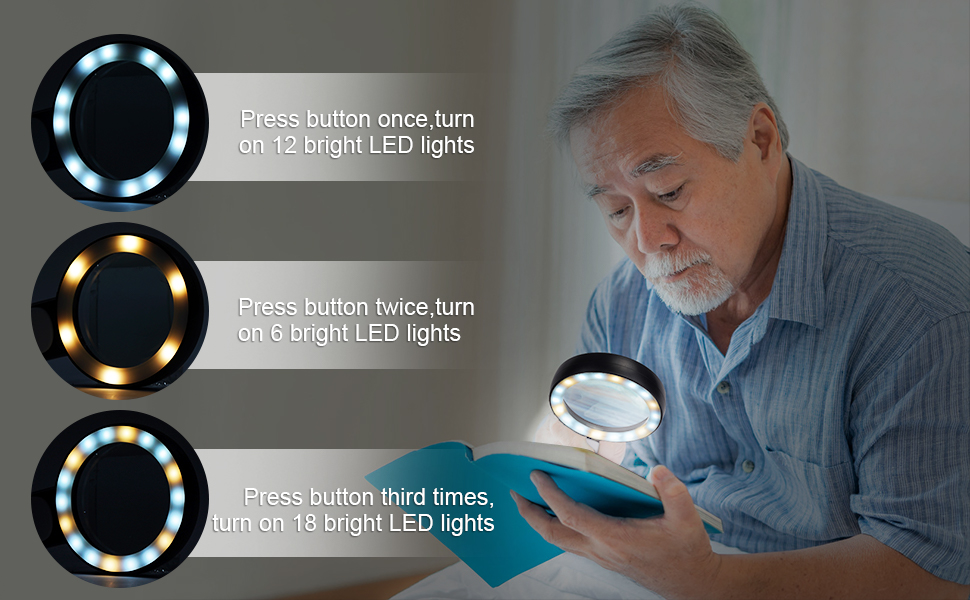
The magnifying glass features an easy-to-use power button on the handle to control the LED lights. It offers three distinct lighting modes:
- Press the power button once: Activates the cold white light (12 LEDs).
- Press the power button twice: Activates the warm yellow light (6 LEDs).
- Press the power button three times: Activates the mixed light (all 18 LEDs, combining cold and warm).
- Press the power button four times: Turns off the LED lighting.


6. Key Features
- High Magnification: Provides 3x optical magnification for clear and distortion-free viewing of small text and details.
- 18 LED Lights: Features 18 energy-saving LEDs for enhanced illumination in various lighting conditions.
- 3 Lighting Modes: Easily switch between cold white light, warm yellow light, and a mixed light setting to suit your preference and environment.
- Large Lens: A 3.15-inch diameter lens offers a wide viewing area.
- Ergonomic Design: Comfortable handheld design for extended use.
- Durable Construction: Made with a glass lens for optical clarity.
7. Recommended Applications
This magnifying glass is versatile and can be used for a variety of tasks, including:
- Reading books, newspapers, magazines, and maps.
- Examining coins, stamps, and jewelry.
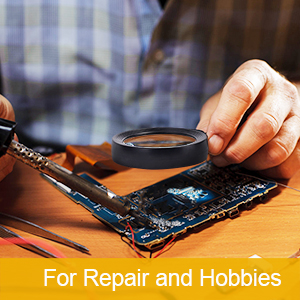
- Detailed work such as crafts, sewing, and electronics repair.
- Assisting individuals with low vision or macular degeneration.
- Educational purposes for children exploring nature.

8. Maintenance
- Cleaning the Lens: Use a soft, lint-free cloth (such as a microfiber cloth) to gently wipe the lens. Avoid abrasive materials or harsh chemicals that could scratch or damage the lens.
- Battery Care: Replace batteries when the light dims. Always use fresh batteries and dispose of old ones responsibly.
- Storage: Store the magnifying glass in a dry, dust-free environment when not in use.
9. Troubleshooting
| Problem | Possible Cause | Solution |
|---|---|---|
| LED lights do not turn on. | Batteries are dead or incorrectly installed. | Check battery polarity or replace with new AAA batteries. |
| Light is dim. | Batteries are low. | Replace with new AAA batteries. |
| Magnified image is blurry. | Lens is dirty or too far/close to the object. | Clean the lens with a soft cloth. Adjust the distance between the lens and the object for optimal focus. |
10. Specifications
- Model: JMH-030
- Brand: JMH
- Magnification: 3x (Optical)
- Lens Diameter: 3.15 inches (8 cm)
- LED Quantity: 18 LEDs
- Lighting Modes: Cold White, Warm Yellow, Mixed
- Power Source: 3 x AAA Batteries (not included)
- Lens Material: Glass
- Product Dimensions: 8.07" L x 4.17" W (20.5 cm L x 10.6 cm W)
- Item Weight: 9.8 ounces (approx. 278g)
11. Warranty and Support
For warranty information or technical support, please refer to the product packaging or contact your retailer. Keep your purchase receipt for any warranty claims.