
1. Introduction and Overview
The PolaTab Q95 mini is a high-quality USB conference speaker and microphone designed for clear and efficient communication in various settings, including business meetings, online courses, and personal chats. It integrates advanced audio technologies to ensure an optimal experience.
- HD Voice and Crystal Clear Sound: Equipped with a 360° omnidirectional microphone and a high-quality speakerphone, the Q95 mini utilizes DSP technology for Acoustic Echo Cancellation (AEC) and Automatic Noise Suppression (ANS). This ensures your voice is heard clearly without distracting background noise or echoes.
- 360° Coverage: The omnidirectional microphone captures voices from all directions, effectively transforming any space into a meeting room. It offers an optimal voice pickup range of up to 3 meters (approximately 10 feet) radius, eliminating the need to speak loudly.
- Built-in USB Hub: The Q95 mini features an innovative integrated USB hub, providing two additional USB 2.0 ports. This allows for convenient connection of peripherals such as a mouse, keyboard, USB flash drive, or other conferencing accessories.
- Universal Compatibility: This device is compatible with leading operating systems like Windows 7-10 and macOS, and supports popular online conferencing platforms including Zoom, Skype, Lync, Teams, WebEx, GoToMeeting, Facetime, and Google Voice.

Figure 1: PolaTab Q95 mini highlighting key features.
2. Setup Instructions
The PolaTab Q95 mini is designed for easy plug-and-play operation, requiring no driver installation.
- Connect to Computer: Use the integrated 3-meter USB cable to connect the Q95 mini directly to an available USB-A port on your computer (laptop or desktop).
- Automatic Recognition: Your operating system will automatically detect and configure the device. No additional software or drivers are needed.
- Verify Connection: Once connected, the device's LEDs will illuminate, indicating it is powered on and ready for use.

Figure 2: Connecting the PolaTab Q95 mini to a laptop.
3. Operating Instructions
Familiarize yourself with the controls and indicators for optimal use.
3.1 Device Controls

Figure 3: PolaTab Q95 mini controls and ports.
- Volume Down Button (-): Press to decrease the speaker volume.
- Volume Up Button (+): Press to increase the speaker volume.
- Mute Button: Press this physical button to quickly mute or unmute the microphone. Note that this button only controls the microphone, not the speaker output.
3.2 LED Indicators
- Green LED: Indicates the microphone is active (unmuted).
- Red LED: Indicates the microphone is muted.
3.3 Using the Built-in USB Hub
The two additional USB ports on the Q95 mini function as a standard USB 2.0 hub. You can connect various USB peripherals to these ports:
- Keyboard
- Mouse (including wireless dongles)
- USB flash drive (U-disk)
- USB webcam
- Other USB devices (for data transfer or power, not for parallel audio input from another microphone)

Figure 4: Utilizing the built-in USB hub for peripheral connections.
4. Maintenance
To ensure the longevity and optimal performance of your PolaTab Q95 mini, follow these maintenance guidelines:
- Cleaning: Use a soft, dry cloth to clean the device. Avoid using abrasive cleaners, solvents, or strong chemicals, as these can damage the surface.
- Storage: Store the device in a cool, dry place away from direct sunlight and extreme temperatures.
- Handling: Handle the device with care. Avoid dropping it or subjecting it to strong impacts.
- Moisture: Keep the device away from water and high humidity to prevent internal damage.
5. Troubleshooting
Here are answers to common questions and solutions for potential issues:
| Issue/Question | Solution/Answer |
|---|---|
| No sound or microphone not working. | Ensure the USB cable is securely connected to your computer. Check your computer's sound settings to confirm the PolaTab Q95 mini is selected as the default input and output device. Ensure the microphone is not muted (check the LED indicator). |
| Does it have Bluetooth or wireless connectivity? | No, the PolaTab Q95 mini is a wired USB speakerphone. It comes with a 3-meter USB cable for a stable connection. |
| Can this conference speaker and microphone be daisy-chained? | No, daisy-chaining multiple units is not supported. |
| Can it work with Android or iPhone mobile phones? | Using a USB adapter to connect to a mobile phone is not recommended. The device is primarily designed for computer-based conferencing systems. |
| What is the optimal voice pickup range? | The optimal voice pickup range is within a 3-meter radius. This makes it suitable for small meeting rooms (fewer than a dozen people) and personal use. |
| How effective is the noise reduction? Can it remove all background noise? | The conference microphone helps reduce some background noise, but it cannot eliminate all loud or persistent background noises. |
| Is this conference speaker and microphone full-duplex audio? | Yes, it supports full-duplex audio, allowing participants to speak and hear simultaneously during a meeting. |
| What are the two extra USB ports for? | These two USB ports function as a general USB 2.0 hub. You can connect peripherals like a keyboard, mouse, USB flash drive, or USB webcam. |
6. Specifications
Detailed technical specifications for the PolaTab Q95 mini:
| Feature | Detail |
|---|---|
| Brand | PolaTab |
| Model Name | Q95 mini |
| Connectivity Technology | USB |
| Connector Type | USB |
| Special Features | Built-in USB Hub, Noise Reduction, Echo Cancellation, 360° Omnidirectional Microphone |
| Compatible Devices | Laptop, Desktop Computer, Conferencing System with USB Type A |
| Polar Pattern | Omnidirectional |
| Impedance | 4 Ohms |
| Microphone Form Factor | Built-in |
| Power Source | Corded Electric (USB powered) |
| Signal-to-Noise Ratio | 70 dB |
| Hardware Platform | Desktop, Laptop, PC |
| Number of Channels | 2 |
| Frequency Response | 20Hz - 20KHz |
| Item Weight | 310 Grams |
| Item Dimensions (L x W x H) | 17.8 x 20.3 x 4 centimeters |
| Material | Plastic |
| Color | Gray |
| UPC | 717014667395 |
| ASIN | B08XWZ81CW |
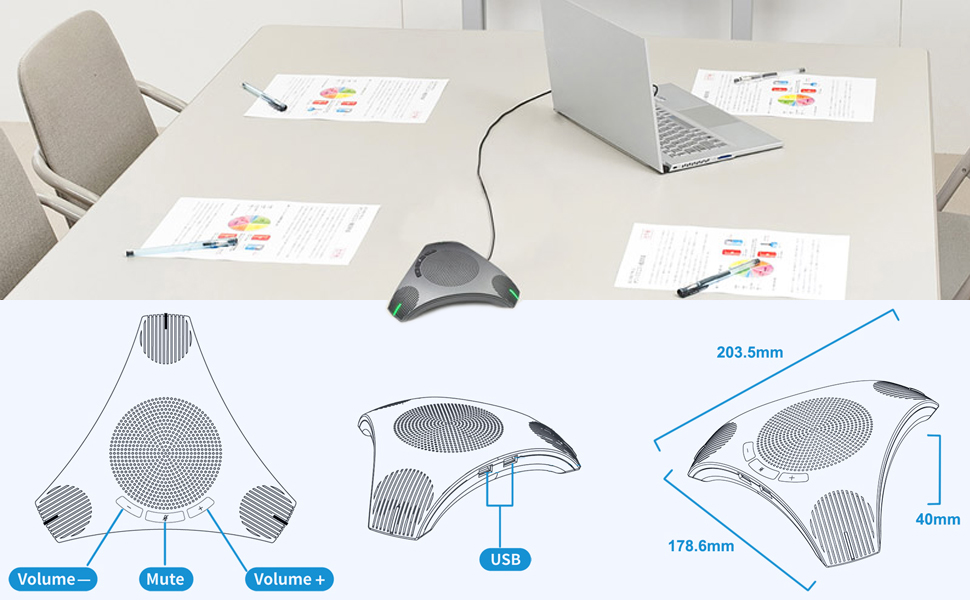
Figure 5: PolaTab Q95 mini dimensions.
7. Warranty and Support
For product support or warranty inquiries, please refer to the following information:
- Return Policy: This product is eligible for a 30-day return policy from the date of purchase. Please refer to your retailer's specific return guidelines.
- Extended Warranty: Extended warranty options may be available for purchase, offering coverage against failures and defects for 12 or 24 months. Check with your retailer for details.
- Technical Support: For technical assistance or further questions, please contact PolaTab customer support through the official website or your purchase platform.