
1. Introduction
The Benro Aero S2PRO Aluminum Video Tripod Kit (A1883FS2PRO) is designed for videographers and photographers seeking a stable, portable, and versatile support solution. This kit features a lightweight aluminum construction, a professional S2PRO fluid video head, and reverse-folding legs for compact storage and transport. This manual provides essential information for the proper setup, operation, and maintenance of your Benro Aero S2PRO tripod kit.
2. Package Contents
Upon unpacking, please verify that all the following items are included in your Benro Aero S2PRO Aluminum Video Tripod Kit:
- Benro Aero S2PRO Aluminum Video Tripod with S2PRO Fluid Head
- Adjustable Pan Handle
- Arca-Swiss Compatible Quick Release Plate
- Padded Carrying Case
- Instruction Manual (this document)
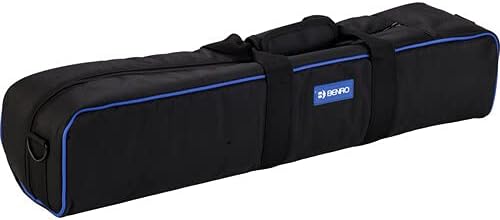
Image: The padded carrying case for the Benro Aero S2PRO tripod kit, designed for convenient transport and protection.
3. Key Features
- Compact Aluminum Build: Lightweight aluminum construction for stability and portability.
- S2PRO Fluid Video Head: Features a 60mm flat base, fixed counterbalance, independent pan and tilt locks, and an Arca-Swiss compatible quick release plate.
- Travel-Optimized Design: Reverse-folding 4-section legs collapse to 24.2 inches (61.5 cm) for easy transport.
- High Load Capacity: Supports up to 5.5 lbs (2.5 kg), suitable for mirrorless, DSLR, and compact video cameras.
- Professional Video Features: Includes adjustable pan handle, leveling column, and mid-level spreader.
4. Setup
4.1 Unfolding the Tripod
- Remove the tripod from its carrying case.
- Release the leg locks on each leg.
- Extend the legs downwards. Due to the reverse-folding design, you may need to rotate the legs 180 degrees outwards from the center column before extending them fully.
- Extend each leg section to the desired height and secure the leg locks firmly.

Image: The Benro Aero S2PRO tripod in its compact, reverse-folded state, ready for transport.

Image: The Benro Aero S2PRO tripod fully extended, showcasing its stability and height.
4.2 Adjusting Leg Angles
Each leg features an angle adjustment mechanism at the top. Press the angle lock release and move the leg to one of the preset angles (e.g., normal, wide, low-angle) to achieve desired stability or shooting height. Ensure the lock engages securely.

Image: A close-up view of the leg angle adjustment mechanism on the Benro Aero S2PRO tripod, allowing for versatile positioning.
4.3 Mounting Your Camera
- Locate the Arca-Swiss compatible quick release plate on the S2PRO fluid head.
- Release the safety lock and slide the quick release plate out of the head.
- Attach the quick release plate to the bottom of your camera using the 1/4"-20 or 3/8"-16 screw. Ensure it is tightened securely.
- Slide the camera with the attached plate back into the fluid head until it clicks into place. Engage the safety lock.
- Verify the camera is securely mounted before releasing your grip.

Image: The Benro Aero S2PRO tripod with a DSLR camera and microphone mounted, demonstrating its readiness for video capture.

Image: A detailed view of the Benro S2PRO fluid head with a camera attached, highlighting the quick release plate and pan handle.
5. Operating the S2PRO Fluid Head
5.1 Pan and Tilt Control
- Pan Lock: The knob located at the base of the fluid head controls the horizontal (pan) movement. Loosen to allow panning, tighten to lock the head in position.
- Tilt Lock: The knob on the side of the fluid head controls the vertical (tilt) movement. Loosen to allow tilting, tighten to lock the head in position.
- Pan Handle: Attach the pan handle to the designated port on the fluid head and tighten its locking screw. Adjust the angle and length of the handle for comfortable operation.
5.2 Fixed Counterbalance
The S2PRO fluid head features a fixed counterbalance system designed to assist with camera balance and prevent accidental tipping, especially with heavier camera setups within its weight limit. This provides smoother tilt movements and added security.
6. Monopod Conversion
One of the tripod legs can be detached and used as a monopod for situations requiring quick setup and mobility.
- Identify the leg with the foam grip and a colored ring near the top. This is typically the detachable monopod leg.
- Unscrew this leg from the tripod's main chassis.
- The center column with the fluid head can then be attached to the top of the detached leg, converting it into a monopod.
- Ensure all connections are securely tightened before use.
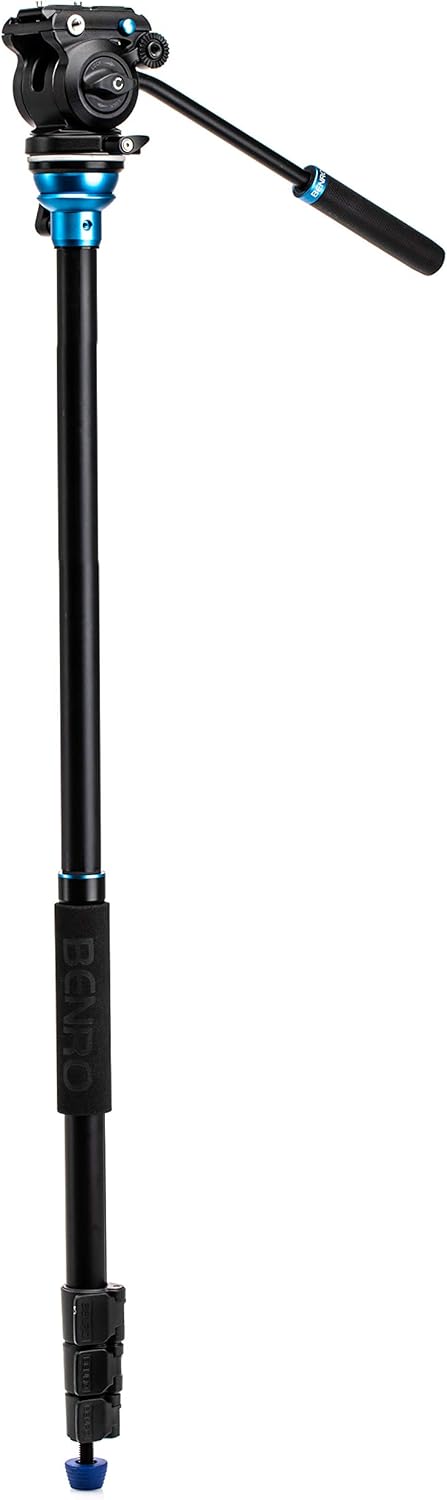
Image: The Benro Aero S2PRO tripod configured as a monopod, demonstrating its versatility for dynamic shooting scenarios.
7. Maintenance
- Cleaning: Wipe down the tripod and fluid head with a soft, dry cloth after each use. For stubborn dirt, use a slightly damp cloth and mild soap, then dry thoroughly. Avoid harsh chemicals.
- Lubrication: The fluid head is factory-lubricated and generally does not require additional lubrication. Do not attempt to disassemble the fluid head for lubrication.
- Storage: Store the tripod in its padded carrying case in a cool, dry place, away from direct sunlight and extreme temperatures.
- Inspection: Periodically check all screws, knobs, and leg locks for tightness. Tighten any loose components.
8. Troubleshooting
| Problem | Possible Cause | Solution |
|---|---|---|
| Tripod is unstable. | Leg locks are not fully tightened; legs are not fully extended; uneven surface. | Ensure all leg locks are securely fastened. Extend legs fully. Adjust leg angles for stability on uneven terrain. |
| Fluid head movement is not smooth. | Pan/tilt locks are partially engaged; excessive weight on head. | Ensure pan and tilt locks are fully disengaged. Verify camera weight does not exceed the 5.5 lbs (2.5 kg) limit. |
| Quick release plate is stuck or difficult to remove. | Safety lock engaged; plate not aligned correctly. | Ensure the safety lock is fully disengaged. Wiggle the plate gently while sliding it out. |
9. Specifications
| Feature | Detail |
|---|---|
| Model Name | A1883FS2PRO |
| Brand | Benro |
| Material | Aluminum |
| Tripod Head Type | S2PRO Fluid Head (Tilt head) |
| Number of Leg Sections | 4 |
| Maximum Height | 65 inches (165 cm) |
| Folded Length | 24.2 inches (61.5 cm) |
| Item Weight | 4.7 lbs (2.13 kg) |
| Weight Limit (Payload) | 5.5 lbs (2.5 kg) |
| Compatible Devices | Camera (Mirrorless, DSLR, Compact Video Cameras) |
10. Warranty and Support
The Benro Aero S2PRO Aluminum Video Tripod Kit comes with a standard limited warranty of 3 years from the date of purchase for the original owner.
If you register your product online, the warranty is extended by an additional 2 years, totaling 5 years in applicable regions. Please visit the official Benro website for warranty registration and detailed terms and conditions.
For technical support, service, or warranty claims, please contact Benro customer service through their official website or authorized service centers.

