
1. Introduction
This manual provides detailed instructions for the safe and proper installation, operation, and maintenance of your NB North Bayou P5 Movable TV Wall Mount. This full-motion cantilever mount is designed to securely hold LED and LCD televisions ranging from 40 to 70 inches, with a maximum load capacity of 50 kg. Please read this manual thoroughly before installation and retain it for future reference.
2. Safety Information
WARNING: Failure to read and follow all instructions may result in personal injury, property damage, or voiding of your warranty. The manufacturer is not liable for damage or injury caused by incorrect assembly or use.
- Ensure the mounting surface can safely support the combined weight of the mount and your television.
- Do not exceed the maximum load capacity of 50 kg (110 lbs).
- This mount is designed for televisions between 40 and 70 inches.
- Always use appropriate safety equipment and tools during installation.
- If you are unsure about any part of the installation process, consult a qualified professional.
- Keep children and pets away during installation.
3. Specifications
| Brand Name | NB North Bayou |
| Model Number | P5 (Item model number: 6222019301617) |
| Mounting Type | Wall Mount |
| Movement Type | Full Motion / Cantilever (Swivel, Tilt, Extend) |
| Material | Metal |
| Color | Black |
| Compatible TV Sizes | 40 - 70 inches |
| Maximum Load Capacity | 50 kg (110 lbs) |
| VESA Compatibility | 100x100 mm to 600x400 mm |
| Compatible Devices | Television |
Note: Specifications are subject to change without notice.
4. Setup and Installation
Before beginning, ensure you have all necessary tools (e.g., drill, stud finder, level, screwdriver) and that your wall type is suitable for mounting (wood stud, concrete, brick). Do not install on drywall alone.
4.1. Identify Wall Mount Components

Image 1: The NB North Bayou P5 Movable TV Wall Mount shown in its fully extended position, illustrating the articulating arms and VESA plate.
Familiarize yourself with the main components: the wall plate, the articulating arms, and the VESA mounting plate that attaches to your TV. The mount is designed for full motion, allowing for various viewing angles.
4.2. Mounting the Wall Plate

Image 2: A visual representation of the TV wall mount installed on a wall, with a transparent outline of a television attached, demonstrating its placement.
- Determine the desired height for your television.
- Locate wall studs using a stud finder or ensure the concrete/brick wall is solid.
- Position the wall plate against the wall and mark the drilling locations. Use a level to ensure it is perfectly horizontal.
- Drill pilot holes at the marked locations.
- Secure the wall plate to the wall using the provided lag bolts and washers. Ensure it is firmly attached.
4.3. Attaching VESA Brackets to TV
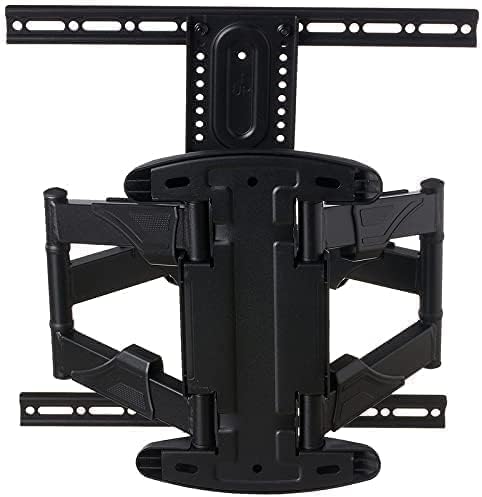
Image 3: The rear view of the NB North Bayou P5 mount in a folded configuration, highlighting the robust construction and VESA mounting points.
- Carefully place your TV face down on a soft, clean surface.
- Identify the VESA mounting holes on the back of your TV.
- Select the correct size screws and spacers (if needed) from the hardware kit that fit your TV's VESA pattern.
- Attach the VESA mounting arms/plate to the back of your TV. Do not overtighten.
4.4. Mounting TV to Wall Plate
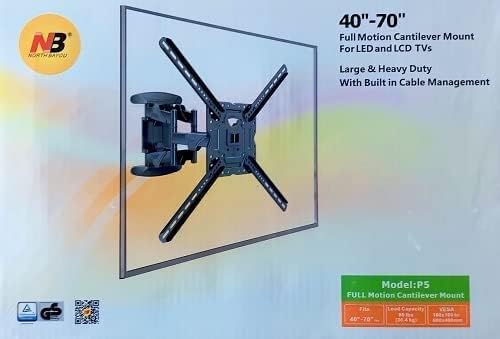
Image 4: The product packaging for the NB North Bayou P5 mount, clearly stating it is a 'Full Motion Cantilever Mount' for 40"-70" TVs, with a load capacity of 50 kg and VESA compatibility from 100x100 to 600x400.
- With assistance, carefully lift the TV with the attached VESA plate.
- Hook the VESA plate onto the wall plate. Ensure it is securely seated.
- Engage any safety locks or screws to prevent accidental dislodgement.
- Connect all necessary cables to your TV. The mount includes built-in cable management features to keep cables tidy.
5. Operating Instructions
The NB North Bayou P5 mount offers full motion capabilities for optimal viewing.
- Extension: Gently pull the TV away from the wall to extend the articulating arms.
- Swivel: Rotate the TV left or right to achieve your desired viewing angle.
- Tilt: Adjust the vertical angle of the TV (up or down) to reduce glare or improve viewing from different heights. Some mounts may require loosening and re-tightening tilt screws.
- Level Adjustment: Minor horizontal leveling adjustments can often be made after installation.
Always move the TV smoothly and avoid sudden, forceful movements. Ensure cables are not pinched or strained during adjustments.
6. Maintenance
Regular maintenance ensures the longevity and safe operation of your TV wall mount.
- Cleaning: Wipe the mount with a soft, dry cloth. Avoid abrasive cleaners or solvents.
- Periodic Checks: Periodically check all screws and bolts to ensure they remain tight. Re-tighten if necessary.
- Movement: If the mount becomes stiff, a small amount of silicone-based lubricant can be applied to moving joints, avoiding contact with electrical components.
7. Troubleshooting
If you encounter issues with your NB North Bayou P5 mount, refer to the following common solutions:
- Mount feels loose: Ensure all wall plate bolts and VESA plate screws are securely tightened. Do not overtighten.
- TV is not level: Check the wall plate's levelness. Some mounts allow for minor post-installation leveling adjustments on the VESA plate.
- Difficulty moving the TV: Ensure no cables are snagged. If the joints are stiff, apply a small amount of silicone lubricant.
- TV is too heavy: Verify your TV's weight does not exceed the 50 kg maximum load capacity. If it does, remove the TV immediately and seek a higher capacity mount.
If problems persist, contact customer support.
8. Warranty and Support
For warranty information or technical support, please refer to the documentation included with your purchase or contact NB North Bayou customer service through their official channels. Keep your proof of purchase for warranty claims.


