1. Introduction
This manual provides comprehensive instructions for the installation, operation, and maintenance of your Brick Loot Deluxe LED Lighting Kit, designed specifically for the LEGO Elf Club House Set 10275. This lighting kit enhances your LEGO model with custom-designed LED lights, bringing it to life with illumination. Please read this manual thoroughly before beginning installation to ensure proper setup and safe use.
Important Note: The LEGO Elf Club House Set 10275 is NOT included with this lighting kit.

Image 1.1: Visual disclaimer indicating that the LEGO model is not included with the light kit.
2. Safety Information
- This product contains small parts and is recommended for ages 12 years and up. Keep out of reach of younger children to prevent choking hazards.
- Ensure the power source is appropriate for the USB-powered lights (5 Volts DC). Do not use power sources with higher voltage.
- Avoid excessive force when handling wires and LED components to prevent damage.
- Do not immerse the lighting kit or any components in water. This product is not waterproof.
- If any component is damaged, discontinue use immediately and contact customer support.
3. Package Contents
Your Brick Loot Deluxe LED Lighting Kit for LEGO Elf Club House Set 10275 includes the following components:
- Assorted LED light strings and individual LEDs
- Connection cables and expansion boards
- USB power cable
- Installation Tip Sheet

Image 3.1: Overview of the components included in the Brick Loot Deluxe LED Lighting Kit.
4. Setup and Installation
Detailed installation instructions, including step-by-step guides and visual aids, are available on the official Brick Loot website. Refer to the included Installation Tip Sheet for guidance on accessing these resources.
General installation steps involve carefully integrating the LED components into your pre-assembled LEGO Elf Club House Set 10275. This typically includes:
- Identifying key areas for illumination within the LEGO model.
- Attaching LED strips and individual lights to specific bricks or sections.
- Routing connection cables discreetly to maintain the aesthetic integrity of the model.
- Connecting all LED components to the expansion boards.
- Connecting the expansion boards to the USB power cable.

Image 4.1: The LEGO Elf Club House Set 10275 with the installed Brick Loot LED Lighting Kit, demonstrating the illuminated exterior.
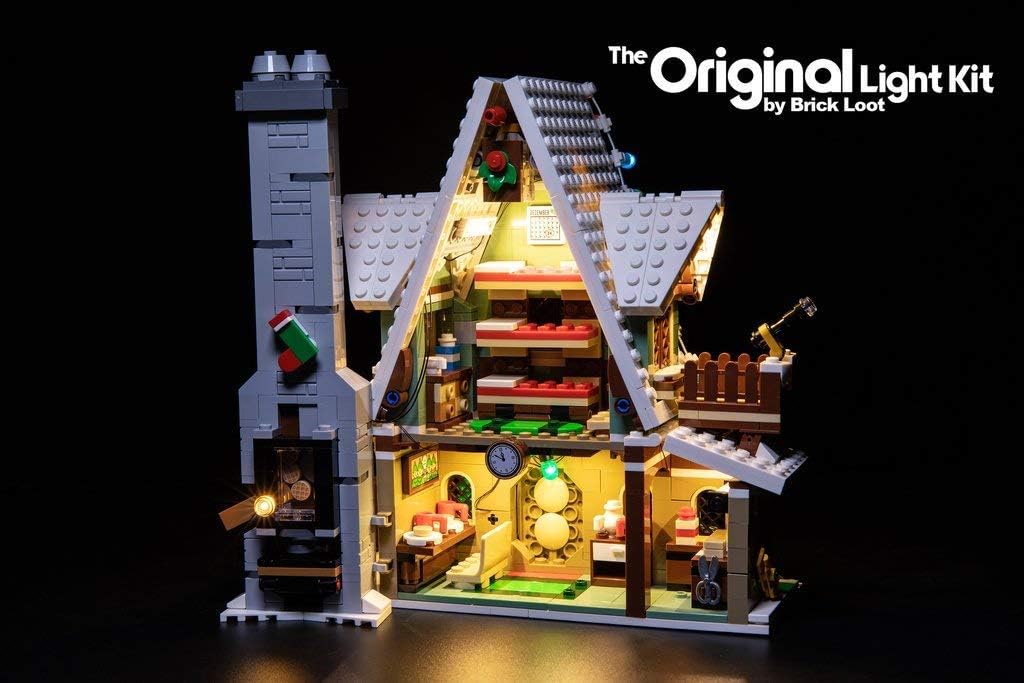
Image 4.2: An interior perspective of the LEGO Elf Club House Set 10275, highlighting the internal lighting effects.
For a visual guide on installation, please refer to the official product video:
Video 4.1: Official demonstration of the LED Light Kit for LEGO Elf Club House set 10275 by Brick Loot, showing installation and effects.
5. Operating Instructions
Once the LED lighting kit is fully installed and connected to a compatible USB power source, the lights will illuminate. This kit features remote control functionality for convenient operation.
To operate the lights:
- Connect the USB power cable to a 5V DC USB power adapter (not included) or a USB port.
- Use the provided remote control to turn the lights on or off, adjust brightness, and select various lighting modes or colors, if applicable.
For a general demonstration of remote control functionality with a similar lighting kit for the Elf Club House, please view the following video:
Video 5.1: Demonstration of a remote-controlled light kit for the LEGO Elf Club House 10275, illustrating various lighting effects and control options.
6. Maintenance
To ensure the longevity and optimal performance of your Brick Loot LED Lighting Kit, follow these maintenance guidelines:
- Cleaning: Gently dust the LED components and wires with a soft, dry cloth. Avoid using liquid cleaners or abrasive materials.
- Storage: When not in use, store the lighting kit in a cool, dry place away from direct sunlight and extreme temperatures. Ensure wires are not tangled or pinched.
- Handling: Always handle the delicate LED components and wires with care to prevent damage.
7. Troubleshooting
If you encounter any issues with your lighting kit, please refer to the following common troubleshooting steps:
| Problem | Possible Cause | Solution |
|---|---|---|
| Lights do not turn on. | Loose connection, faulty power source, damaged component. | Check all cable connections. Ensure the USB power source is functional and providing 5V DC. Inspect LEDs and wires for visible damage. |
| Some lights are dim or flickering. | Insufficient power, loose connection, faulty LED. | Verify power source stability. Re-check connections to the affected LEDs. If an individual LED is faulty, it may need replacement (contact support). |
| Remote control not working. | Battery depleted, remote not paired, obstruction. | Replace remote control battery. Ensure no obstructions between remote and receiver. Refer to remote control instructions for pairing if necessary. |
If these steps do not resolve the issue, please contact Brick Loot customer support for further assistance.
8. Specifications
| Feature | Detail |
|---|---|
| Brand | Brick Loot |
| Model Name | Deluxe LED Light Kit for LEGO ELF Club House Set 10275 |
| Light Source Type | LED |
| Power Source | AC adapter (USB powered) |
| Voltage | 5 Volts (DC) |
| Wattage | 2.5 watts |
| Control Method | Remote |
| Material | Plastic |
| Product Dimensions | 6 x 3 x 2 inches |
| Item Weight | 3.52 ounces |
| Recommended Age | 12 years and up |
9. Warranty and Support
Brick Loot is committed to the quality of its products and customer satisfaction. For any warranty claims, technical support, or inquiries, please visit the official Brick Loot website or contact their customer service directly. Contact information can typically be found on the product packaging or the company's website.
For additional information and support, you may visit the Brick Loot Store on Amazon.


