
1. Introduction
Thank you for choosing the Lifetime Air 3-in-1 Mobile Air Conditioner. This appliance is designed to provide cooling, ventilation, and dehumidification, offering a comfortable indoor climate. Please read this manual carefully before operating the unit to ensure proper use, maintenance, and safety.
This mobile air conditioner is equipped with wheels for easy movement and features a clear LED display and a remote control for convenient operation. It is suitable for rooms ranging from 42 to 60 cubic meters with a cooling capacity of 9000 BTU.
2. Safety Information
Always observe the following basic safety precautions when using electrical appliances:
- Read all instructions before using the appliance.
- Ensure the power supply matches the voltage specified on the rating label.
- Do not operate the appliance with a damaged cord or plug.
- Keep the appliance on a flat, stable surface with at least 50 cm of free space around it for proper airflow.
- Do not block the air outlet.
- Do not insert objects into the air inlet or outlet.
- Unplug the appliance before cleaning or maintenance.
- This appliance is for indoor use only.
- Do not use in bathrooms or other excessively humid environments.
- Keep out of reach of children.
3. Product Components
The package includes the following items:
- 1 x Mobile Air Conditioner Unit
- 1 x Remote Control
- 1 x Exhaust Hose
- 1 x Window Seal Kit
- 2 x Fittings (for hose connection)
- 1 x User Manual (this document)

Figure 3.1: Main Air Conditioner Unit. This image shows the front and top view of the white mobile air conditioner unit with its control panel and air vents.

Figure 3.2: Included Accessories. This image displays all components: the exhaust hose, window sealing kit, various fittings, and the remote control.
4. Setup and Installation
Follow these steps to set up your mobile air conditioner:
- Unpacking: Carefully remove the air conditioner and all accessories from the packaging. Retain the packaging for future storage or transport.
- Positioning: Place the unit on a flat, stable surface. Ensure there is at least 50 cm of unobstructed space around the unit for proper air circulation.

Figure 4.1: Unit Wheels. This image shows the durable wheels located at the base of the air conditioner, facilitating easy movement.
- Exhaust Hose Installation (for Cooling Mode):
- Attach one end of the exhaust hose to the air outlet on the back of the unit using the provided fittings.
- Extend the window seal kit to fit your window opening.
- Connect the other end of the exhaust hose to the window seal kit, ensuring a secure fit to expel hot air outside.

Figure 4.2: Exhaust Hose and Window Kit. This image illustrates the flexible exhaust hose connected to the adjustable window sealing plate, ready for installation.
- Drainage (for Dehumidification Mode): In dehumidification mode, ensure the condensation water can drain. You may need to connect a drainage hose (not included) to the designated drainage port if continuous drainage is desired, or periodically empty the internal water tank.
- Power Connection: Plug the power cord into a grounded electrical outlet (220-240V ~ 50Hz).
5. Operating Instructions
Your Lifetime Air mobile air conditioner can be operated using the control panel on the unit or the remote control.
5.1 Control Panel

Figure 5.1: Control Panel. This image shows the top-mounted LED display and touch buttons for operating the unit directly.
The control panel features an LED display and touch-sensitive buttons for various functions:
- Power Button (⑂): Turns the unit ON or OFF.
- Mode Button (↻): Cycles through Cooling, Dehumidification, and Ventilation modes.
- Temperature/Timer Adjustment Buttons (▲ / ▼): Adjusts the desired temperature in Cooling mode or sets the timer.
- Fan Speed Button (☯): Selects between High and Low fan speeds in Ventilation mode.
- Sleep Mode Button (🌛): Activates quiet, energy-saving operation for comfortable sleep.
- Timer Button (⏱): Sets the auto-on or auto-off timer (up to 24 hours).
- LED Display: Shows current temperature, timer settings, and mode indicators.
- Indicators: Lights for Fan, Dehum, Cool, Water Full, High/Low fan speed, and Power.
5.2 Remote Control
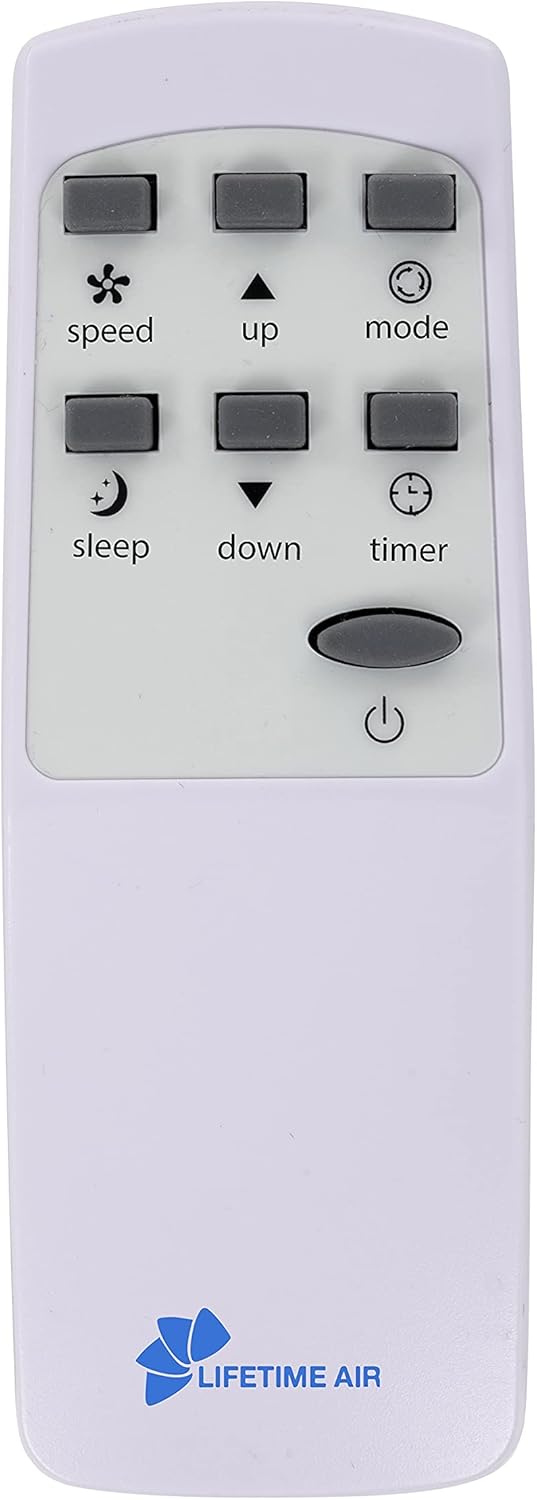
Figure 5.2: Remote Control. This image shows the compact white remote control with clearly labeled buttons for all functions.
The remote control allows you to operate the unit from a distance of up to 4 meters. It requires 2 x AAA batteries (not included).
- Power Button: Turns the unit ON or OFF.
- Speed Button: Adjusts fan speed.
- Up/Down Buttons: Adjusts temperature or timer settings.
- Mode Button: Selects operating mode.
- Sleep Button: Activates Sleep mode.
- Timer Button: Sets the timer.
6. Functions
The Lifetime Air mobile air conditioner offers three primary functions:
- Cooling Mode:
In this mode, the unit provides powerful cooling. Ensure the exhaust hose is properly installed and vented outside. Set your desired temperature between 16°C and 31°C using the temperature adjustment buttons. The unit will cool the room to the set temperature.
- Dehumidification Mode:
This mode removes excess moisture from the air, creating a more comfortable indoor environment and helping to prevent mold and mildew. In this mode, the unit also acts as an air purifier by trapping dirt and dust particles in its filter. Ensure proper drainage for condensed water.
- Ventilation (Fan) Mode:
The unit circulates air without cooling or heating. You can select between two fan speeds (High or Low) to create a refreshing breeze. This mode is ideal for improving air circulation on milder days.
7. Maintenance
Regular maintenance ensures optimal performance and extends the lifespan of your air conditioner.
- Cleaning the Air Filter:
The air filter should be cleaned regularly (every two weeks or more often depending on usage) to maintain efficiency. A dirty filter can reduce airflow and cooling capacity.
- Turn off the unit and unplug it from the power outlet.
- Locate and remove the air filter (refer to the unit diagram for exact location).
- Clean the filter with a vacuum cleaner or wash it gently with lukewarm water and mild detergent.
- Allow the filter to dry completely before reinserting it into the unit.
- Cleaning the Unit Exterior:
Wipe the exterior of the unit with a soft, damp cloth. Do not use harsh chemicals, abrasives, or solvents.
- Water Drainage:
In dehumidification mode, or if the internal water tank becomes full in cooling mode, the "Water Full" indicator will light up. Drain the water by connecting a hose to the drainage port or by carefully moving the unit to a drain and removing the plug.
- Storage:
If storing the unit for an extended period, ensure it is completely dry. Clean the filter, drain all water, and store it in a cool, dry place, preferably in its original packaging.
8. Troubleshooting
Before contacting customer support, please refer to the following troubleshooting guide for common issues:
| Problem | Possible Cause | Solution |
|---|---|---|
| Unit does not turn on. | No power supply; power cord not plugged in; power outage. | Check power connection; ensure outlet is functional; check circuit breaker. |
| Unit does not cool effectively. | Air filter is dirty; exhaust hose not properly installed; room too large; windows/doors open. | Clean air filter; ensure exhaust hose is sealed; close windows/doors; check room size suitability. |
| "Water Full" indicator is on. | Internal water tank is full. | Drain the water from the unit. |
| Unit is noisy. | Unit not on a flat surface; fan obstruction. | Place unit on a flat surface; check for obstructions in fan area. |
| Remote control not working. | Batteries are dead or incorrectly inserted; remote out of range. | Replace batteries (2 x AAA); ensure line of sight to unit; stay within 4 meters range. |
9. Specifications
Detailed technical specifications for the Lifetime Air 3-in-1 Mobile Air Conditioner:
| Model Number | 8711252194547 |
| Power Consumption | 1010 Watts |
| Cooling Capacity | 9000 BTU |
| Voltage | 220 - 240 V ~ 50 Hz |
| Energy Class | A |
| Operating Modes | Cooling, Dehumidification, Ventilation |
| Fan Speeds | 2 (High, Low) |
| Timer | 24 Hour Programmable |
| Temperature Range (Cooling) | 16°C to 31°C |
| Noise Level | ≤65 dB |
| Room Capacity | 42 - 60 m3 |
| Product Dimensions (L x W x H) | 34 x 35 x 69 cm |
| Weight | 23 kg |
| Material | Plastic |

Figure 9.1: Product Dimensions. This image provides a visual representation of the unit's height (69cm), depth (34cm), and width (35cm).
10. Warranty and Support
For warranty information and customer support, please refer to the specific warranty card included with your purchase or contact the retailer where the product was purchased. Lifetime Air is committed to providing quality products and support.