1. Product Overview
The RODEX WS-Y92B is a portable wireless speaker designed for audio playback from various sources. It features Bluetooth connectivity, a built-in FM radio function, and supports audio input via AUX cable, USB flash drive, and Micro SD card. The speaker includes a rechargeable battery and integrated disco lights for visual effects. It also functions as an extended speakerphone when connected to a mobile device via Bluetooth.
Key Features:
- Wireless Bluetooth connectivity for smartphones, laptops, and tablets.
- Integrated FM radio function.
- Multiple audio input options: AUX, USB, and Micro SD card.
- Built-in rechargeable battery for portability.
- Integrated disco light effects.
- Built-in microphone for speakerphone functionality.

Figure 1: Front view of the RODEX WS-Y92B speaker, showing the speaker grille and control buttons on the top panel.

Figure 2: Side view of the RODEX WS-Y92B speaker, illustrating its compact design.
2. Setup Instructions
2.1 Charging the Speaker
Before initial use, fully charge the speaker. Connect the provided USB charging cable to the speaker's charging port and to a standard USB power adapter (not included) or a computer's USB port. The charging indicator light will illuminate during charging and turn off or change color when fully charged.
Note: Ensure the charging cable is correctly inserted to avoid damage.
2.2 Powering On/Off
To power on the speaker, press and hold the power button (usually labeled with a power icon) for a few seconds until you hear an audible prompt or see the indicator lights activate. To power off, repeat the process.
3. Operating Instructions
3.1 Bluetooth Mode
- Power on the speaker. It will typically enter Bluetooth pairing mode automatically, indicated by a flashing LED light and an audible prompt.
- On your mobile device (smartphone, tablet, laptop), enable Bluetooth and search for available devices.
- Select "WS-Y92B" or a similar name from the list of devices.
- Once paired, the speaker will confirm with an audible sound, and the LED light will stop flashing.
- You can now play audio from your device through the speaker.
- To disconnect, disable Bluetooth on your device or power off the speaker.
3.2 FM Radio Mode
- Power on the speaker.
- Press the "Mode" button repeatedly until you hear the FM radio function activate.
- To auto-scan for stations, press and hold the Play/Pause button. The speaker will scan and save available FM stations.
- Use the "Previous" and "Next" buttons (often labeled with volume controls) to navigate between saved stations.
3.3 USB/Micro SD Card Playback
- Insert a USB flash drive or a Micro SD card (with audio files in supported formats) into the respective port on the speaker.
- The speaker should automatically detect the storage device and begin playing audio. If not, press the "Mode" button to switch to USB or TF card mode.
- Use the Play/Pause, Previous, and Next buttons to control playback.
3.4 AUX Input Mode
- Connect one end of a 3.5mm audio cable (not included) to the AUX port on the speaker.
- Connect the other end to the audio output jack of your external device (e.g., MP3 player, laptop).
- Press the "Mode" button to switch to AUX input mode.
- Control playback and volume from your connected device.
3.5 Disco Light Function
The speaker features integrated disco lights. These lights typically activate automatically when the speaker is powered on and playing audio. Some models may have a dedicated button (often labeled "LED" or similar) to toggle the lights on/off or change patterns.
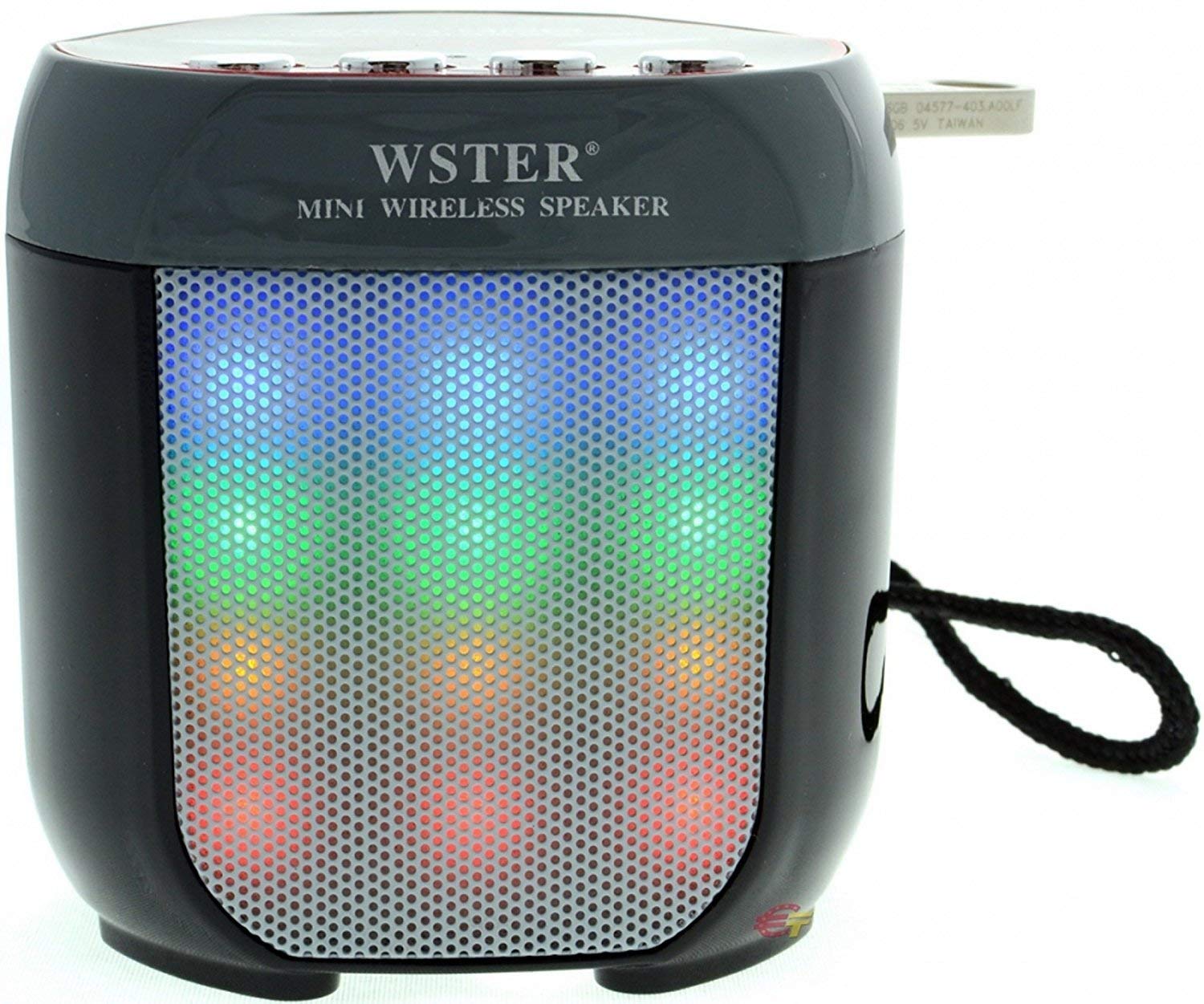
Figure 3: The RODEX WS-Y92B speaker with its multi-color disco lights illuminated, showcasing the visual effects.
4. Maintenance
- Cleaning: Use a soft, dry cloth to clean the speaker's exterior. Do not use abrasive cleaners, waxes, or solvents.
- Storage: Store the speaker in a cool, dry place away from direct sunlight and extreme temperatures.
- Battery Care: To prolong battery life, avoid fully discharging the battery frequently. Charge the speaker regularly, even if not in use for extended periods.
- Water Exposure: This speaker is not waterproof. Avoid exposing it to water or high humidity.
5. Troubleshooting
| Problem | Possible Solution |
|---|---|
| Speaker does not power on. | Ensure the battery is charged. Connect the speaker to a power source using the USB cable and try again. |
| No sound from the speaker. |
|
| Bluetooth pairing fails. |
|
| Charging cable does not work. |
|
| FM radio reception is poor. |
|
6. Specifications
| Feature | Detail |
|---|---|
| Brand | RODEX |
| Model | WS-Y92B |
| Connectivity Technology | Bluetooth, Auxiliary, USB, Wireless |
| Speaker Type | Bookshelf (Portable) |
| Product Dimensions (L x W x H) | 20 x 10 x 20 cm |
| Item Weight | 350 g |
| Included Components | USB Charging Cable |
| Color | Multi |
7. Warranty and Support
This product is covered by a 7-day warranty from the date of purchase. This warranty covers manufacturing defects. For warranty claims or technical support, please contact your retailer or the manufacturer directly.
Please retain your proof of purchase for warranty validation.


