Introduction
This manual provides essential information for setting up, operating, maintaining, and troubleshooting your Dell Precision 7920 Tower Workstation. This high-performance system is designed for demanding tasks such as VR, CG, AI, 4K editing, and rendering, featuring powerful Intel Xeon Gold processors, ample DDR4 memory, and robust storage solutions.
Please read this manual thoroughly before using the workstation to ensure optimal performance and longevity.
Setup Guide
Unpacking and Initial Inspection
Carefully remove the workstation from its packaging. Inspect the unit for any signs of physical damage that may have occurred during transit. Retain all packaging materials for future use or if the unit needs to be returned.

Figure 1: Front view of the Dell Precision 7920 Tower Workstation, showcasing its black chassis with a mesh front panel and front I/O ports.
Connecting Peripherals
Before powering on, connect all necessary peripherals. Refer to the port diagram for proper connection points.
- Monitor: Connect your display to the Nvidia Quadro P1000 graphics card using one of the four Mini Display Ports. Adapters may be required.
- Keyboard and Mouse: Connect your USB keyboard and mouse to any available USB 3.1 Gen 1 Type A ports on the front or rear. PS/2 ports are also available on the rear.
- Network: Connect an Ethernet cable to one of the two RJ45 Network ports on the rear.
- Power: Connect the power cable to the power supply unit (PSU) inlet on the rear of the workstation and then to a grounded electrical outlet.

Figure 2: Rear view of the Dell Precision 7920 Tower Workstation, displaying various I/O ports including USB, network, audio, and power connections.

Figure 3: Detailed diagram illustrating the front and rear ports and slots of the Dell Precision 7920 Tower Workstation, with numbered labels for identification.
Key to Ports & Slots:
- Power button/Power light
- Drive activity light
- SD card slot
- USB 3.0 ports
- USB 3.0 Type-C port with PowerShare
- USB 3.0 Type-C port
- Headset port
- Drive access release latch
- Expansion card slots
- 5.25 inch bay (optional)
- Optical drive
- Power cable connector
- USB 3.0 ports
- Drive carriers
- Discrete graphics card slot (optional)
- Security cable slot
- Padlock ring
- Line-out port
- Microphone/Line-in port
- Serial port
- PS/2 Mouse port
- PS/2 Keyboard port
- Network port (managed optionally)
- Network port
- USB 3.0 port (supports smart Power-On)
- Expansion card slots
Operating Instructions
Powering On and Initial Boot
Once all peripherals are connected, press the power button on the front of the workstation. The system will begin its boot sequence. The Dell Precision 7920 comes pre-installed with Windows 11 Professional 64-bit.
System Configuration
Upon first boot, you may be prompted to complete the Windows setup process, including user account creation and network configuration. Follow the on-screen instructions.
Storage Management
The workstation is equipped with 2x 1TB SSDs and 2x 4TB HDDs, providing a total of 10TB of storage. These drives are hot-swappable, allowing for easy expansion or replacement without powering down the system. For optimal performance, install operating systems and frequently used applications on the SSDs.
Graphics Performance
The Nvidia Quadro P1000 4GB graphics card is optimized for professional applications requiring high graphical fidelity and computational power, such as CAD, video editing, and 3D rendering. Ensure your graphics drivers are up to date for the best performance.
Maintenance
Cleaning
Regularly clean the exterior of the workstation with a soft, lint-free cloth. For dust accumulation on vents and internal components, use compressed air. Ensure the system is powered off and unplugged before cleaning internal parts.
Software Updates
Keep your operating system (Windows 11 Pro) and all drivers, especially graphics drivers, updated to ensure system stability, security, and optimal performance. Windows Update can manage most system updates automatically.
Internal Component Access
The Dell Precision 7920 Tower is designed for easy access to internal components for upgrades or maintenance. The side panel can be removed to access memory slots, expansion cards, and drive bays.

Figure 5: Exploded view of the Dell Precision 7920 Tower Workstation, illustrating the modular design and accessibility of internal components such as fans, drives, and expansion cards.
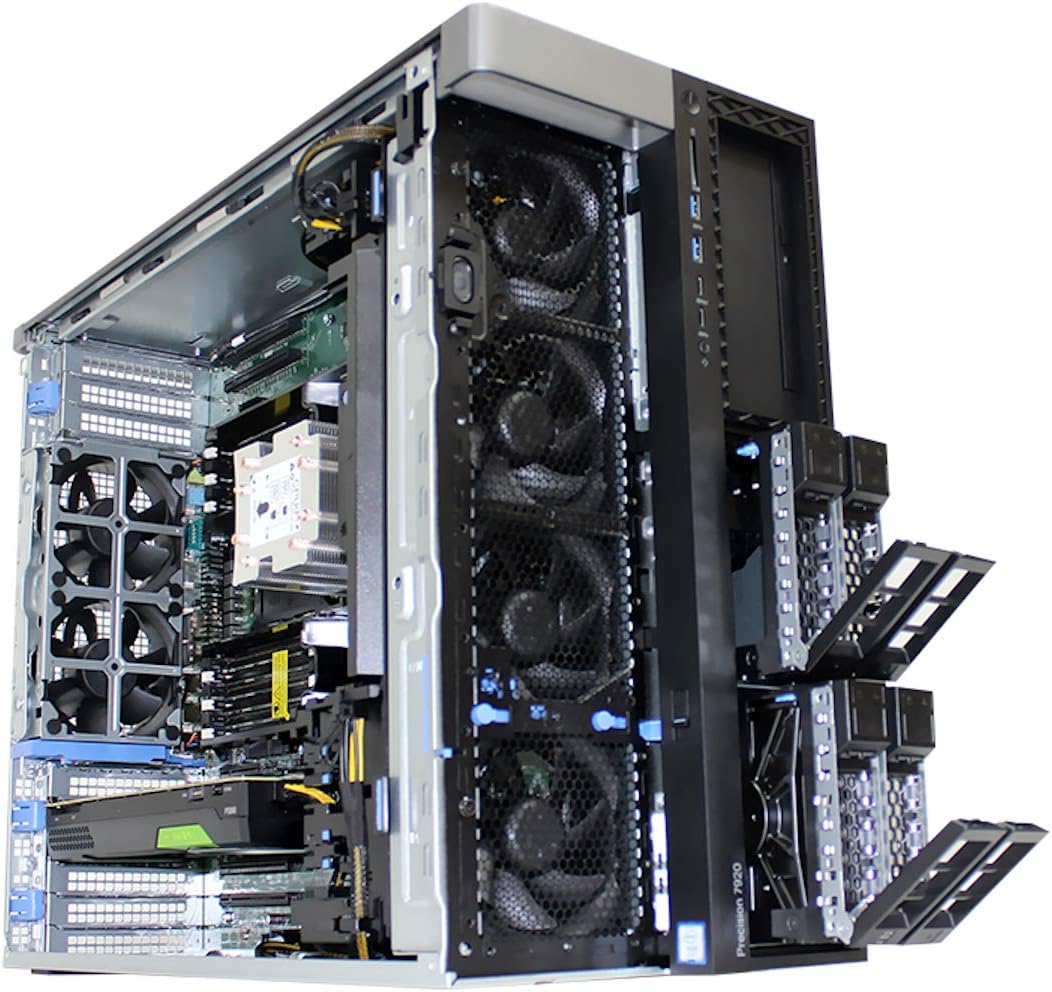
Figure 6: Internal view of the Dell Precision 7920 Tower Workstation with the side panel removed, showing the accessible drive bays and cooling system.
Troubleshooting
Common Issues and Solutions
- No Power:
Ensure the power cable is securely connected to both the workstation and a working electrical outlet. Verify the power supply unit (PSU) switch is in the 'On' position. Test the outlet with another device.
- No Display:
Check that the monitor is powered on and the video cable is securely connected to both the graphics card and the monitor. Ensure the correct input source is selected on your monitor. Try connecting to a different display port on the graphics card.
- System Slowdown:
Check Task Manager for high CPU or RAM usage by specific applications. Ensure sufficient free space on your SSD. Run a disk cleanup and defragmentation (for HDDs). Update drivers and operating system.
- Peripheral Not Detected:
Try connecting the peripheral to a different USB port. Restart the workstation. Check Device Manager in Windows for any unrecognized devices and install necessary drivers.
- Optical Drive Issues:
If the optical drive is not powering up or detecting discs, ensure its power and SATA data cables are securely connected internally. Refer to the internal component access section for guidance.
Technical Specifications
| Component | Specification |
|---|---|
| System | Dell Precision 7920 Tower Workstation |
| Processor | 2x Intel Xeon Gold 6130 16-Core 2.1GHz (3.7GHz Turbo) |
| Memory | 192GB DDR4 Memory (upgradable to 1.5TB) |
| Storage | 2x 1TB SSD + 2x 4TB HDD (Removable Hot Swap) |
| Graphics Card | Nvidia Quadro P1000 4GB (4x Mini Display Ports) |
| Optical Drive | DVD |
| Front I/O Ports | 2x USB 3.1 Gen 1 Type A, 2x USB 3.1 Type C, 1x Universal Audio Jack |
| Rear I/O Ports | 6x USB 3.1 Gen 1 Type A, 1x Serial, 2x RJ45 Network, 2x PS2, 1x Audio Line out, 1x Audio Line in/Microphone |
| Power Supply | 1450W PSU |
| Operating System | Windows 11 Professional 64-bit |
| Dimensions (LxWxH) | 22.29 x 8.58 x 17.05 inches |
Warranty and Support
This Dell Precision 7920 Tower Workstation is a renewed product. It is tested and certified to look and work like new. The refurbishing process includes functionality testing, basic cleaning, inspection, and repackaging. The product ships with a minimum 90-day warranty.
For technical support or warranty claims, please refer to the documentation provided by the seller or contact the seller directly. Dell may require a support contract for direct assistance with renewed products.
For additional information or to purchase extended protection plans, please visit the product page on Amazon.com or contact your reseller.
- Seller: Tech Supply Direct
- Warranty: Minimum 90-day warranty
- Return Policy: 90-day refund/replacement


